Freedom251 › Disk Diagnostic Software
DiskMaster
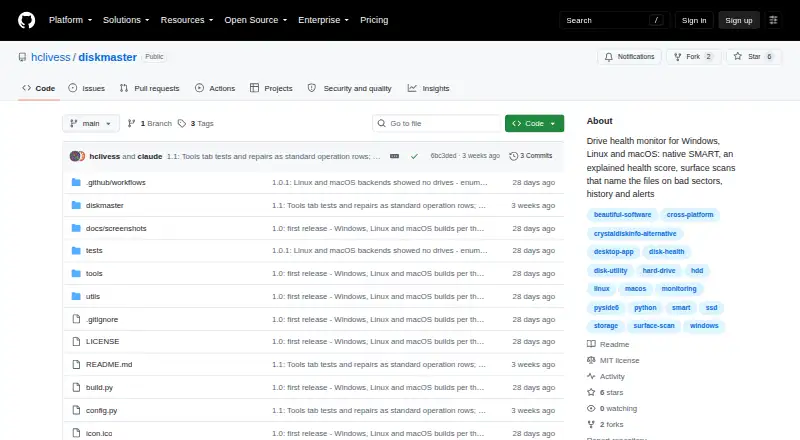
What DiskMaster is
DiskMaster is a free desktop tool for monitoring drive health on Windows, Linux and macOS. It reads SMART attributes, self-tests and test logs, then calculates a health score from 100 with deductions tied to their source attributes; performance is scored separately. Readings are stored in SQLite and shown in charts, with alerts for changes such as rising drive counters. Its read-only surface scan times blocks, checks unreadable sectors again and maps them to sectors. DiskMaster can identify related files and attempt to copy them while skipping unreadable bytes. Optional tools cover sector and filesystem repair, zero-fill and sanitizing bad sectors shown as free by the filesystem. Alerts can go to Slack, Discord, ntfy, email, desktop notifications, commands or JSON endpoints. The CLI exports text, HTML, JSON and CSV reports. SATA and USB monitoring needs no third-party tools, while NVMe logs and macOS use optional smartmontools. Raw SMART access requires administrator or sudo privileges.
Who it suits
DiskMaster suits someone who wants detailed drive-health monitoring on one machine. Its JSON output is also intended to feed a fleet tool.
What it does well
- Available for Windows, Linux and macOS.
- Scores health with attribute-linked deductions.
- Stores readings and charts them over time.
- Exports text, HTML, JSON and CSV reports.
- Offers alerts through several services and channels.
What to know first
- Remote monitoring is not supported.
- Raw SMART access requires administrator or sudo privileges.
- NVMe logs and macOS use optional smartmontools.
- Windows builds are unsigned.
Plans
| Plan | Billed and limits | Price |
|---|---|---|
| DiskMaster | Free / open-source; local desktop drive health monitoring | Free |
As github.com lists them, read 29 Sept 2026. The maker's own page has the final word.
Getting started
- Open the DiskMaster GitHub project page.
- Download the release archive for Windows x64, Linux x64, or macOS arm64.
- Run DiskMaster on the machine whose drives you want to monitor.
- Grant administrator or sudo privileges for raw SMART access.
- Configure alerts or export reports through the CLI as needed.
Overview
DiskMaster is a free desktop utility for monitoring and diagnosing drives on Windows, Linux and macOS. It suits people who want detailed visibility into one machine’s storage, especially those comfortable with administrator-level access. Its breadth—from historical monitoring to scans and optional repair—is useful, but it is not a remote-management console.
Key features
DiskMaster reads SMART attributes, self-tests and self-test logs, using native ATA pass-through for SATA and USB drives. It turns readings into a health score out of 100, identifies the attributes behind deductions, and scores performance separately. That separation helps distinguish a health concern from a performance measure rather than hiding both in one number. SSD wear tracking, temperature alerts and failure warnings add practical monitoring signals.
Readings are saved in SQLite and displayed in charts, with alerts for changes such as rising drive counters. Notifications can go to Slack, Discord, ntfy, email, the desktop, or a user-specified command; webhooks can target JSON endpoints. This makes the local monitor adaptable to existing notification workflows, though it does not itself monitor machines remotely.
The read-only surface scan times blocks, confirms unreadable sectors with a second read and maps them to sectors. DiskMaster can identify files associated with those sectors and attempt to rescue copies while skipping unreadable bytes. Optional tools include sector repair, filesystem repair, zero-fill and sanitizing bad sectors that the filesystem proves free. These operations are a meaningful extension beyond monitoring, but they can affect data or disk state; confirmations and safeguards do not remove the need for care.
The CLI exports text, HTML, JSON and CSV reports, and returns distinct exit codes for healthy, warning and critical states. JSON output is designed to feed a separate fleet tool, a useful bridge for administrators, not a substitute for built-in remote monitoring. SATA and USB monitoring needs no third-party tools; NVMe health logs and macOS use optional smartmontools. Raw SMART access requires administrator or sudo privileges. Windows builds are unsigned, while release archives include SHA-256 checksums.
Pricing
DiskMaster costs nothing. Its free/open-source plan provides local desktop drive-health monitoring, with no separate trial. That makes it a straightforward choice for an individual machine without a recurring software cost. There is no remote-monitoring plan to upgrade to; teams needing centralized oversight should look elsewhere or use the JSON output with another fleet tool.
Platforms
DiskMaster supports Windows, Linux and macOS. The latest release provides Windows x64 ZIP, Linux x64 tar.gz and macOS arm64 tar.gz builds that do not require Python. Optional smartmontools is needed for NVMe health logs and macOS, and raw SMART access requires administrator or sudo privileges.
Who it's for
Choose DiskMaster if you want to track drive health on a personal or work machine, investigate changes over time, scan for unreadable sectors, or feed its JSON output into a separate fleet system. It is less suitable if you need remote monitoring built into the product, or if you cannot grant the privileges required for raw SMART access.
Pros and cons
- Pros: Free/open-source coverage across three desktop platforms combines SMART readings, explainable health scoring, history, alerts and diagnostic scans.
- Pros: Multiple notification routes, report formats and CLI exit codes make its monitoring usable in existing workflows.
- Pros: File mapping and optional rescue or repair tools reach beyond basic drive-status reporting.
- Cons: Monitoring is local rather than remote, so fleet use requires a separate tool.
- Cons: Raw SMART access needs administrator or sudo privileges; NVMe logs and macOS require optional smartmontools.
- Cons: Windows builds are unsigned, which may matter to users who prefer signed installers.
Alternatives
Disk Diagnostic Software and Disk Health Monitoring Software are useful starting points for comparing tools by purpose.
smartmontools is the alternative to consider if you want free, cross-platform smartctl and smartd utilities rather than DiskMaster’s integrated scoring, history and scanning. For another option with a free Linux version and a limited trial, consider Hard Disk Sentinel.
nvm, Active@ Hard Disk Monitor, Ariolic Disk Scanner, DRevitalize, HDAT2 and MHDD are other listed alternatives.
Verdict
DiskMaster is a strong fit for a technically comfortable user who wants free, detailed drive monitoring and diagnostic tools on one desktop machine. Its most persuasive advantage is the combination of explainable health scoring, local history, alerts and sector-level investigation. Look elsewhere if remote monitoring is essential or if you need raw SMART access without elevated privileges.
Verdict
DiskMaster offers drive-health readings, history, alerts and optional recovery or repair tools at no cost. It is oriented toward deep monitoring of an individual machine rather than remote monitoring.
Questions
Is DiskMaster free?
Yes. DiskMaster is free and open-source.
Which platforms does it support?
It supports Windows, Linux, and macOS. The latest release provides Windows x64, Linux x64, and macOS arm64 archives.
Does DiskMaster monitor drives remotely?
No. Remote monitoring is not supported.
Does DiskMaster need other tools to monitor drives?
SATA and USB monitoring needs no third-party tools. NVMe health logs and macOS use optional smartmontools.
What reports can the CLI export?
The CLI exports text, HTML, JSON, and CSV reports.
Who makes DiskMaster?
The maker profile identifies Jan Kučera, based in Ostrava, Czechia.
Facts from DiskMaster's own pages
- CLI and exports
- The CLI exports text, HTML, JSON and CSV reports and returns exit codes 0 for healthy, 1 for warning, and 2 for critical. · github.com, 29 Sept 2026
- Dependencies and access
- SATA and USB monitoring needs no third-party tools, while NVMe health logs and macOS use optional smartmontools; raw SMART access requires administrator or sudo privileges. · github.com, 29 Sept 2026
- Download formats
- The latest release provides Windows x64 ZIP, Linux x64 tar.gz, and macOS arm64 tar.gz builds that do not require Python. · github.com, 29 Sept 2026
- File mapping and rescue
- It can identify files associated with unreadable sectors and rescue a copy while skipping unreadable bytes. · github.com, 29 Sept 2026
- Health score
- It calculates a health score from 100 and lists each deduction and its source attribute; performance is scored separately. · github.com, 29 Sept 2026
- History and alerts
- It stores readings in SQLite and provides charts and alerts for changes such as rising drive counters. · github.com, 29 Sept 2026
- Integrations
- Alerts can be sent through Slack, Discord, ntfy, email, desktop notifications, or a user-specified command; webhooks can also target JSON endpoints. · github.com, 29 Sept 2026
- Maker
- The maker profile identifies Jan Kučera, lists Ostrava, Czechia, and describes a family of single-purpose desktop tools. · github.com, 29 Sept 2026
- Purpose
- DiskMaster monitors drive health on Windows, Linux and macOS. · github.com, 29 Sept 2026
- Repair tools
- Optional repair tools include sector repair, sanitizing bad sectors proven free by the filesystem, filesystem repair, and zero-fill, each with confirmations and safeguards described in the README. · github.com, 29 Sept 2026
- Security and integrity
- The project says Windows builds are unsigned and each release archive includes a SHA-256 checksum. · github.com, 29 Sept 2026
- SMART monitoring
- It reads SMART attributes, self-tests and drive self-test logs, using native ATA pass-through for SATA and USB drives. · github.com, 29 Sept 2026
- Surface scans
- Its read-only surface scan times blocks, confirms unreadable sectors with a second read, and maps them to sectors. · github.com, 29 Sept 2026
- Who it is for
- The README describes DiskMaster as suited to monitoring one machine deeply and says its JSON output is designed to feed a fleet tool. · github.com, 29 Sept 2026
Where DiskMaster stands on Freedom251
- Disk Diagnostic Software#3 of 26
- Disk Health Monitoring Software#4 of 30