Snippets
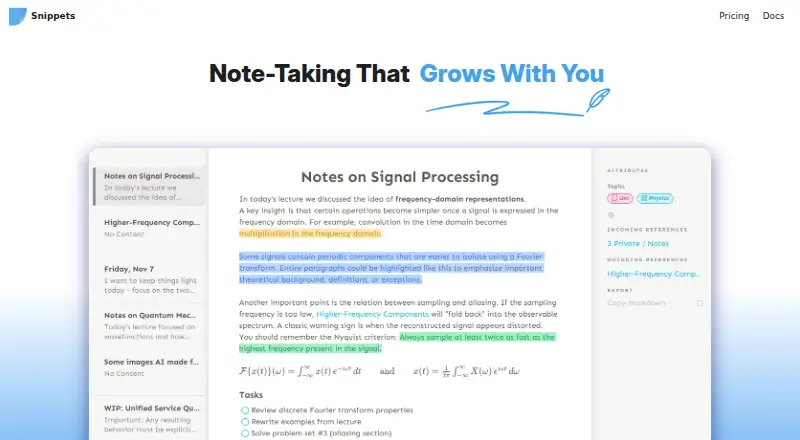
What Snippets is
Snippets is a note and code-snippet app for organizing material in workspaces. It runs on Android, iOS, Linux, macOS, and Windows, and supports offline access. GitHub is its listed integration. The Free plan costs nothing and includes unlimited workspaces and notes. Cloud costs $12 a year and lists unlimited cloud synchronization with end-to-end encryption, API access, a web clipper, mobile widgets, and note sharing. Pro is listed at $29 a month with unlimited branches; its billing is marked as coming soon. The pricing note says paid plans start at $12/yr. One detail to note is that the general note-sharing field says No, while the Cloud plan lists note sharing. The service’s website is snippets.ch.
Who it suits
Snippets may suit people who want to keep notes and code snippets organized across desktop and mobile platforms, including offline. Its free plan is for those who need unlimited workspaces and notes without a listed charge.
What it does well
- Works offline across five listed platforms
- Free plan includes unlimited workspaces and notes
- GitHub integration is listed
- Cloud plan includes encrypted synchronization and API access
What to know first
- General note-sharing field says No
- Pro billing is marked Coming Soon
Limits
The Free plan includes unlimited workspaces and notes, GitHub sync across devices, and folder sync. Cloud and Pro are marked as coming soon; Snippets Cloud is in beta and does not guarantee synced data will remain available or be preserved.
Plans
| Plan | Billed and limits | Price |
|---|---|---|
| Free | Free forever · Unlimited workspaces · Unlimited notes · GitHub sync across devices · Folder sync | Free |
| Cloud | $12 per year · Unlimited encrypted cloud sync · Apple Reminders sync on Mac · API access · Web clipper · Mobile widgets · Note sharing · Coming Soon | $12 a year |
| Pro | $29 one time · Full icon set · End-to-end encrypted GitHub sync · Unlimited GitHub branches | $29, paid once |
As snippets.ch lists them, read 15 Oct 2026. The maker's own page has the final word.
Getting started
- Visit https://snippets.ch/.
- Download the macOS or Windows app, or try the beta iOS or Android app.
- Start with the Free plan for unlimited workspaces and notes.
- Choose local storage, folder sync, or GitHub sync for notes.
Snippets is a note-taking and productivity app for people who want notes, tasks, and flashcards in one workspace. It is best suited to users who value flexible organization and control over sync; its free plan is substantial, while some paid features remain forthcoming.
Overview
Snippets brings several kinds of work into one system: notes, tasks, and flashcards. Collections, dashboards, references, and structured attributes offer different ways to arrange material, which can suit varied workflows better than a simple list of notes. That breadth may be unnecessary for someone who only needs a place to jot down text.
The rich-text editor supports formatting through a toolbar and keyboard shortcuts, and Markdown export gives users a way to take formatted content elsewhere. Notes can be stored locally or synced through a folder or GitHub repository. Snippets Cloud is another planned option, but its beta disclaimer says synced data is not guaranteed to remain available or preserved, so it should not be treated as the only copy of important notes.
Key features
- Flexible note organization: Collections, dashboards, references, and structured attributes can accommodate different kinds of material without forcing everything into one flat list. Markdown export is useful when portability matters.
- Tasks tied to notes: Due dates, priorities, and plain-language quick entry make Snippets more suitable for lightweight planning than a notes-only tool.
- Flashcards with practice tracking: A learning dashboard tracks progress, while practice mode reprioritizes cards based on ratings. This is a meaningful addition for users who want study materials alongside their notes.
- Multiple sync paths: Notes stay on the device by default, with optional local-folder, GitHub, or Snippets Cloud sync. Cloud content uses client-side end-to-end encryption, but the beta durability caveat matters for users who need dependable preservation.
- GitHub integration: GitHub sync across devices is part of the free plan, making it a practical choice for people comfortable using a repository to keep notes in sync.
Pricing
Snippets uses a freemium model. The Free plan costs nothing and is billed free forever. It includes unlimited workspaces, unlimited notes, GitHub sync across devices, and folder sync. That is a generous foundation for personal use, though it does not include the Cloud plan's note sharing or encrypted cloud sync.
Cloud costs $12 a year, billed at $12 per year, and is marked Coming Soon. Its listed features are unlimited encrypted cloud sync, Apple Reminders sync on Mac only, API access, a web clipper, mobile widgets, and note sharing. It may suit users who want those cloud-oriented features, but the forthcoming status and beta storage warning make it a poor fit for anyone who needs a dependable cloud archive today.
Pro is priced at $29 a month and is also marked Coming Soon. Its listed inclusion is unlimited branches. With no other included features stated, this plan is difficult to assess as a general upgrade; it is relevant only to readers who specifically need unlimited branches once the plan is available.
Platforms
Snippets is available on macOS and Windows. iOS and Android apps are in beta, while Linux is marked coming soon. Offline access is supported, which helps users who need to work without an internet connection; however, mobile users should account for the beta status, and Linux users will need to wait.
Who it's for
Snippets is a strong fit for people who want one place for organized notes, lightweight tasks, and study cards, especially if they prefer local storage or GitHub and folder sync. Its free plan can cover substantial personal note-taking without a note or workspace cap. It is less suitable for users who require launched cloud syncing, assured cloud durability, or note sharing today, or who need a Linux app now.
Pros and cons
Pros
- Unlimited free workspaces and notes: The free plan leaves room to build a sizable personal system without hitting a stated content cap.
- Useful organization and workflow range: Notes, task details, and adaptive flashcard practice cover more than basic text capture.
- Choice of local and sync options: Default local storage, folder sync, and GitHub sync let users avoid relying on Snippets Cloud.
- Markdown export: Offers a portable format for users who want to move notes beyond the app.
Cons
- Cloud is not yet a dependable everyday option: It is marked Coming Soon, is in beta, and carries a warning that synced data may not be preserved or remain available.
- Platform readiness varies: iOS and Android are beta apps, and Linux is coming soon, limiting the appeal for users who need those platforms immediately.
- Free plan lacks note sharing: Sharing appears among Cloud's planned features, so users who need to share notes must look elsewhere for now.
- Pro's value is narrow: At $29 a month, its only stated inclusion is unlimited branches, making it hard to justify for users who do not specifically need that capability.
Alternatives
For code-focused workflows, Code Snippet Managers is a relevant category to explore; for broader note-taking comparisons, see Note-taking apps.
- Bitbucket may suit teams that need repository hosting and pipelines: its free plan supports up to 5 users, unlimited public and private repositories, 1 GB of LFS storage, and 50 Pipelines.
- Cacher is worth considering for managing code snippets, with a free plan capped at 15 private snippets and 3 private labels, plus unlimited public snippets.
- Gisto is a free option for users who want local mode, provided they do not need that mode to sync across devices or cloud providers.
- SnipIT may fit users looking for separate code, AI, links, and tools vaults, along with web clipping and local browser storage on its free plan.
- Lepton is a free alternative for users who want unlimited public or secret snippets and unlimited tags.
- massCode is a free, open-source option that requires no account.
- Snibox is a free, MIT-licensed self-hosted option with one registered user out of the box.
- Snipora is another free, open-source option.
Verdict
Choose Snippets if you want a broad, no-cost personal system for notes, tasks, and flashcards, and are comfortable syncing through GitHub or a folder rather than depending on its forthcoming Cloud plan. Its principal advantage is combining flexible organization and learning tools with unlimited free notes and workspaces. Look elsewhere if you need ready-to-use cloud sharing, a guaranteed cloud archive, or a finished Linux or mobile app today.
Verdict
Snippets offers a no-cost plan with unlimited workspaces and notes, plus a Cloud option with synchronization and sharing features. Check the discrepancy in note-sharing details and the coming-soon billing note before choosing a plan.
Questions
Is Snippets free?
Yes. The Free plan is listed as free and includes unlimited workspaces and notes.
What do the paid plans cost?
Cloud is listed at $12 per year and Pro at $29 per month. Both are marked as coming soon.
Which platforms does Snippets support?
The site provides macOS and Windows downloads, lists iOS and Android apps as beta, and labels Linux as coming soon.
Can I use Snippets offline?
Yes. Offline access is listed.
How can I sync notes?
Notes can be stored locally, synced through a local folder, or synced through GitHub. Snippets Cloud is marked as coming soon.
Does Snippets support note sharing?
The general note-sharing field says no. The Cloud plan lists note sharing as a feature, and that plan is marked as coming soon.
Facts from Snippets's own pages
- API
- API access is listed for the Cloud plan, which is marked Coming Soon. · snippets.ch, 15 Oct 2026
- Attributes
- Attributes combine tag-like insertion with typed properties and support date, string, rich-text, number and task types. · snippets.ch, 15 Oct 2026
- Availability
- The site provides macOS and Windows downloads and lists iOS and Android apps as beta; it labels Linux as coming soon. · snippets.ch, 7 Oct 2026
- Beta distribution
- The iOS version is distributed through a public TestFlight beta invitation rather than a normal App Store listing. · testflight.apple.com, 15 Oct 2026
- Cloud beta limitation
- The privacy policy says Snippets Cloud is in beta and Snippets does not guarantee synced data will be safely stored, remain available, or be preserved with 100% durability. · snippets.ch, 7 Oct 2026
- Cloud limitation
- Snippets Cloud is beta software hosted on AWS and the privacy policy says availability and durability are not guaranteed during beta. · snippets.ch, 15 Oct 2026
- Collections
- Collections can be static or dynamically filtered and can appear as tables, lists or timelines. · snippets.ch, 15 Oct 2026
- Company funding
- The creator said on Reddit that Snippets is entirely bootstrapped and will rely on one-time purchases and subscriptions. · reddit.com, 15 Oct 2026
- Company location
- The website footer identifies Snippets as made in Switzerland. · snippets.ch, 15 Oct 2026
- Company team
- The creator described Snippets on Reddit as having a tiny team. · reddit.com, 15 Oct 2026
- Dashboards
- Dashboards place related notes and tables together for visual navigation. · snippets.ch, 15 Oct 2026
- Developer extensibility
- The app uses a plugin system in which JSON-defined snippet types are connected to the interface. · snippets.ch, 15 Oct 2026
- Documentation
- The documentation covers introduction, synchronization, collections, task management, attributes, visualizations and GitHub setup. · snippets.ch, 15 Oct 2026
- Editor
- Its rich-text editor supports formatting through keyboard shortcuts and a toolbar, and the product offers export to Markdown. · snippets.ch, 7 Oct 2026
- Encryption
- The privacy policy says Snippets Cloud uses client-side end-to-end encryption for encrypted content. · snippets.ch, 7 Oct 2026
- Export
- The product supports exporting notes to Markdown to reduce vendor lock-in. · snippets.ch, 15 Oct 2026
- Flashcards
- Flashcard snippets have question and answer sides and use a relevance algorithm to prioritize practice. · snippets.ch, 15 Oct 2026
- Free plan
- Yes · snippets.ch, 22 Sept 2026
- GitHub sync
- Changes are uploaded automatically through GitHub's HTTP API and can be used on desktop and mobile. · snippets.ch, 15 Oct 2026
- Integrations
- GitHub repositories are supported for automatic synchronization, and Google Calendar is an optional integration described in the privacy policy. · snippets.ch, 15 Oct 2026
- Journaling and habits
- Journaling, habit tracking and goals are listed as supported use cases. · snippets.ch, 15 Oct 2026
- Learning
- Flashcards include a dashboard that tracks learning progress and a practice mode that reprioritizes cards based on ratings. · snippets.ch, 7 Oct 2026
- Licence
- The public repository states that Snippets is not open source and gives no concrete open-sourcing plans. · github.com, 15 Oct 2026
- Limit: folder sync
- Folder synchronization cannot sync data to mobile devices and does not provide built-in sharing. · snippets.ch, 15 Oct 2026
Where Snippets stands on Freedom251
- Note-taking apps#61 of 216
- Code Snippet Managers#18 of 33