OV
What OV is
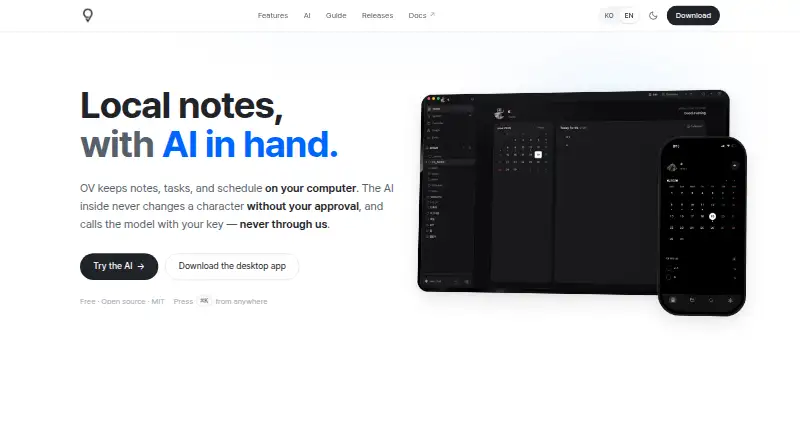
OV is a free, open-source app for notes, tasks, and scheduling. It stores notes as plain Markdown files on your computer, so they remain available offline. The editor offers slash-menu blocks, wikilinks, backlinks, tables, callouts, and embeds. Notes can be shown as tables, boards, or calendars, with Month and Day calendar views. Calendar events can also appear as task checkboxes. An optional AI assistant can read and search notes and propose changes, but you approve each change before it is applied. AI calls use your own provider key and go directly to that provider; OV does not operate its own AI service. Vaults can sync between desktop and mobile through iCloud Drive without passing through OV servers. OV says it sends no telemetry, while identifying AI calls and an optional GitHub Releases check as external network activity. Optional protections include per-note AES-256 encryption, OS-keychain key storage, and path validation. It supports macOS, Windows, Linux, web, and iOS; Android is coming soon.
Who it suits
OV suits people who want local Markdown notes, offline access, and open-source software across desktop, web, and iPhone. It also fits users who prefer bringing their own AI provider key and syncing through iCloud Drive.
What it does well
- Free and MIT-licensed
- Plain Markdown storage works offline
- Multiple note views and calendar modes
- Optional per-note AES-256 encryption
- No telemetry stated
What to know first
- Android is listed as coming soon
- AI usage requires your own provider key
- iCloud Drive is used for cross-device sync
Plans
| Plan | Billed and limits | Price |
|---|---|---|
| Free | Local-first storage · Open-source MIT license · Offline use | Free |
As ovapp.io lists them, read 20 Sept 2026. The maker's own page has the final word.
Verdict
OV combines local files, task and calendar views, and optional AI assistance without charging for the app. Its platform coverage and privacy controls are useful, while Android availability is not yet listed as current.
Facts from OV's own pages
- AI assistant
- The AI assistant can read, search, and propose changes, which require user approval before applying. · ovapp.io, 12 Oct 2026
- AI billing
- OV uses bring-your-own-key AI calls made directly to the provider, and does not run its own AI service. · ovapp.io, 12 Oct 2026
- Calendar
- The calendar provides Month and Day views, and calendar events also appear as task checkboxes. · ovapp.io, 12 Oct 2026
- Editor
- The editor supports slash-menu blocks, wikilinks, backlinks, tables, callouts, and embeds. · ovapp.io, 12 Oct 2026
- Free plan
- Yes · ovapp.io, 20 Sept 2026
- Integrations
- OV states that its Markdown files are compatible with Obsidian, iA Writer, and VS Code, and it supports Apple Calendar and Reminders on macOS. · ovapp.io, 12 Oct 2026
- Local storage
- Notes are plain Markdown files stored on the user's computer and work offline. · ovapp.io, 12 Oct 2026
- Mobile status
- The download page lists the iPhone app and says Android is coming soon. · ovapp.io, 12 Oct 2026
- Offline access
- Yes · ovapp.io, 20 Sept 2026
- Supported platforms
- macos,windows,linux · ovapp.io, 20 Sept 2026
- Pricing
- OV is described as completely free, open source, and MIT-licensed. · ovapp.io, 12 Oct 2026
- Privacy
- OV says it sends no telemetry; its FAQ lists AI calls using the user's key and an optional GitHub Releases update check as external network activity. · ovapp.io, 12 Oct 2026
- Product
- OV is a local-first app for notes, tasks, and scheduling. · ovapp.io, 12 Oct 2026
- Requirements
- The download page lists macOS 11+, Windows 10+ 64-bit, Linux distributions, and iOS 16+ as system requirements. · ovapp.io, 12 Oct 2026
- Security
- The features page lists optional per-note AES-256 encryption, OS-keychain API-key storage, and path validation for file writes. · ovapp.io, 12 Oct 2026
- Sync
- The vault can sync between desktop and mobile through the user's iCloud Drive, without passing through OV servers. · ovapp.io, 12 Oct 2026
- Views
- Notes can be viewed as tables, boards, or calendars. · ovapp.io, 12 Oct 2026
Where OV stands on Freedom251
- Note-taking apps#58 of 216