Freedom251 › Personal Knowledge Management Software
Foam
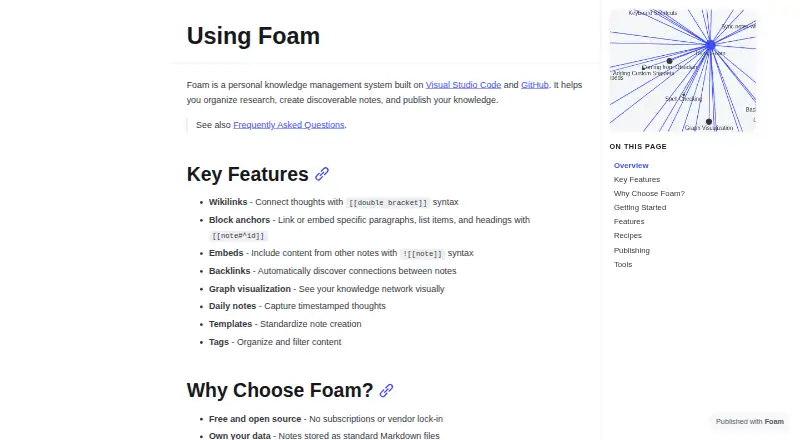
What Foam is
Foam is a personal knowledge management system built around Visual Studio Code and GitHub. It organizes research in standard Markdown files, giving users ownership of their notes, and connects them with double-bracket wikilinks. Link completion and navigation help move between notes, while backlinks and a graph visualization make connections easier to explore. Notes can include block anchors, embeds, tags, daily notes, templates, and note properties. The Foam extension adds wikilink tools, backlinks, graph visualization, templates, and daily notes to VS Code. A command-line interface can search and manage notes; the `foam mcp` command can expose a workspace to AI agents through MCP. Foam supports offline access, note sharing, and real-time collaboration. Workspaces can be published through options such as GitHub Pages, GitLab Pages, Azure DevOps Wiki, and Vercel. Other listed integrations include GitHub, Netlify, Azure DevOps Wiki, Gatsby, GitJournal, and VS Code Live Share. Foam is free and open source, with a listed plan price of $0 and no subscriptions or vendor lock-in. It collects anonymous usage data, but says it does not collect note content, file names, or personal information; users can opt out through VS Code telemetry settings.
Who it suits
Foam suits people who want to organize research as linked Markdown notes in a VS Code-centered workflow. It can also suit users who need offline access, collaboration, or options to publish a workspace.
What it does well
- Stores notes as standard Markdown files users own.
- Connects notes with wikilinks, backlinks, and a graph view.
- Includes templates, daily notes, tags, and note embeds.
- Supports offline access, sharing, and real-time collaboration.
- Offers CLI search and workspace access for AI agents via MCP.
- Free and open source, with no subscriptions or vendor lock-in.
What to know first
- Obsidian community plugins, Canvas, and Tasks syntax are unsupported.
- JavaScript templates can escape the in-process sandbox.
- Collects anonymous usage data, though users can opt out.
Limits
Foam's Obsidian migration guide identifies community plugins, Canvas, and Tasks plugin syntax as unsupported. Its free plan is listed as free.
Plans
| Plan | Billed and limits | Price |
|---|---|---|
| Free | Free and open source · no subscriptions or vendor lock-in | Free |
As docs.foam.md lists them, read 8 Oct 2026. The maker's own page has the final word.
Getting started
- Visit https://docs.foam.md/.
- Choose the Foam extension for Visual Studio Code or use a supported Windows, macOS, or Linux setup.
- Create or open a Foam workspace of Markdown notes.
- Use wikilinks, templates, or daily notes to organize the workspace.
- Publish the workspace through an available option such as GitHub Pages, GitLab Pages, Azure DevOps Wiki, or Vercel, if needed.
Verdict
Choose Foam if you want a free, open-source system for linked Markdown research notes, especially within Visual Studio Code. Its publishing, collaboration, and CLI options add flexibility around a workspace. Look elsewhere if you depend on Obsidian community plugins, Canvas, or Tasks syntax.
Questions
How much does Foam cost?
The listed Free plan costs nothing. It is free and open source, with no subscriptions or vendor lock-in.
Which platforms does Foam support?
The listed platforms are Windows, macOS, Linux, API, extension, and self-hosted. Supported desktop platforms are Windows, macOS, and Linux.
Can Foam work offline and support collaboration?
Yes. Foam lists offline access, note sharing, and real-time collaboration.
Can I publish notes made in Foam?
Foam workspaces can be published using options including GitHub Pages, GitLab Pages, Azure DevOps Wiki, and Vercel.
Is Foam open source, and what format does it use?
Yes, Foam is free and open source. It stores notes as standard Markdown files.
What should Obsidian users know about compatibility?
Foam's migration guide says Obsidian community plugins, Canvas, and Tasks plugin syntax are unsupported.
Facts from Foam's own pages
- CLI and MCP
- The Foam CLI can search and manage notes from a terminal, and its `foam mcp` command exposes a workspace to AI agents via MCP. · docs.foam.md, 8 Oct 2026
- Data destination
- Foam says telemetry events go to an Azure Application Insights resource owned by the Foam project, and raw event data is not shared. · docs.foam.md, 8 Oct 2026
- Free plan
- Yes · docs.foam.md, 20 Sept 2026
- Integrations
- Foam documents compatibility with Obsidian vaults and says users can open the same Markdown folder in VS Code with Foam installed. · docs.foam.md, 8 Oct 2026
- Knowledge graph
- Foam provides backlinks and a graph visualization to explore connections between notes. · docs.foam.md, 8 Oct 2026
- Limitations
- Foam's Obsidian migration guide says Obsidian community plugins, Canvas, and Tasks plugin syntax are unsupported. · docs.foam.md, 8 Oct 2026
- Note sharing
- Yes · docs.foam.md, 20 Sept 2026
- Note tools
- Features include block anchors, note embeds, tags, daily notes, templates, and note properties. · docs.foam.md, 8 Oct 2026
- Offline access
- Yes · docs.foam.md, 20 Sept 2026
- Open format
- Foam stores notes as standard Markdown files, so users own their data. · docs.foam.md, 8 Oct 2026
- Platforms
- Foam runs as a VS Code extension, and its installation guide says VS Code supports cross-platform use. · docs.foam.md, 8 Oct 2026
- Publishing
- Foam workspaces can be published using options including GitHub Pages, GitLab Pages, Azure DevOps Wiki, and Vercel. · docs.foam.md, 8 Oct 2026
- Purpose
- Foam is a personal knowledge management system built on Visual Studio Code and GitHub for organizing research, creating discoverable notes, and publishing knowledge. · docs.foam.md, 8 Oct 2026
- Real-time collaboration
- Yes · docs.foam.md, 20 Sept 2026
- Support
- The installation guide directs users to the FAQ, Foam Community Discord, GitHub Issues, and GitHub Discussions for help. · docs.foam.md, 8 Oct 2026
- Telemetry
- Foam collects anonymous usage data; its FAQ says it does not collect note content, file names, or personal information, and users can opt out through VS Code telemetry settings. · docs.foam.md, 8 Oct 2026
- Template security
- Foam warns that JavaScript templates can escape its in-process sandbox and advises running them only in trusted workspaces. · docs.foam.md, 8 Oct 2026
- VS Code extension
- The Foam extension adds wikilink completion and navigation, backlinks, graph visualization, templates, and daily notes to VS Code. · docs.foam.md, 8 Oct 2026
- Wikilinks
- Foam uses double-bracket wikilinks to connect notes and provides link completion and navigation. · docs.foam.md, 8 Oct 2026
Where Foam stands on Freedom251
- Personal Knowledge Management Software#4 of 32
- Note-taking apps#57 of 216