Freedom251 › AI Note-Taking Apps

Capacities
by Capacities
What Capacities is
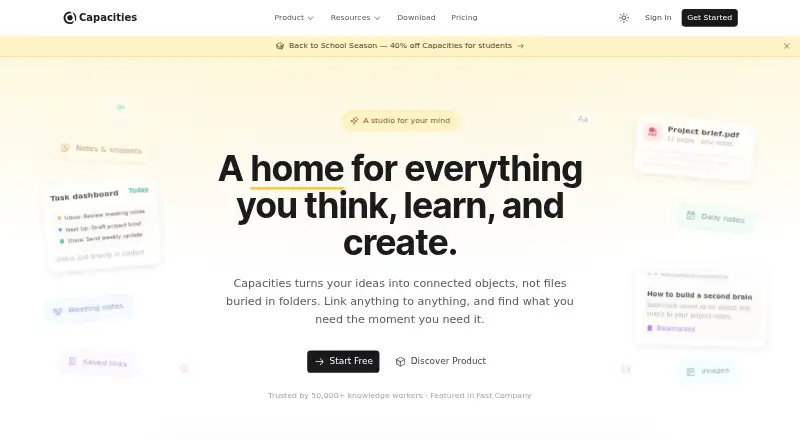
Capacities is a note-taking and knowledge-management app with offline access and note sharing. It runs on the web, Windows, macOS, Linux, iOS, and Android. The free Basic plan includes 5 GB of media uploads total, followed by 100 MB of uploads per month. Pro costs $9.99 a month and adds task management, an AI assistant, calendar integrations, smart queries, task actions, and unlimited media uploads subject to fair use. Believer costs $12.49 a month and includes Pro plus beta access to major new features. A separate Plus AI Power-Up is $8.33 a month when billed annually, with a larger monthly AI budget and AI top-ups. Listed integrations include Google and Microsoft calendars, Readwise, WhatsApp, Telegram, email, several task managers, Kindle, Raycast, and Web Highlights. Real-time collaboration is not available. Capacities is based in Freiburg im Breisgau, Germany.
Who it suits
Capacities suits people who want notes accessible across desktop and mobile platforms, including offline, and who value note sharing. Its Pro features may appeal to users seeking task management, calendar integrations, or an AI assistant.
What it does well
- Works offline.
- Available on web, desktop, and mobile.
- Free plan includes 5 GB of media uploads.
- Note sharing is available.
- Pro includes task management and an AI assistant.
What to know first
- Free uploads drop to 100 MB monthly after 5 GB.
- Real-time collaboration is not available.
- Unlimited media uploads are subject to fair use.
Limits
Basic includes 5 GB of media uploads total, then 100 MB of uploads per month. Pro includes unlimited media uploads subject to fair use.
Plans
| Plan | Billed and limits | Price |
|---|---|---|
| Capacities Basic | 5 GB media uploads total · 100 MB media uploads per month afterwards | Free |
| Capacities Pro | billed monthly · Task management · AI assistant · Calendar integrations · Smart queries · Task actions · Unlimited media uploads subject to fair use | $9.99 a month |
| Capacities Believer | from · Beta access to major new features · Everything in Pro | $12.49 a month |
| Plus AI Power-Up | billed annually · Larger monthly AI budget · AI top-ups | $8.33 a month |
As capacities.io lists them, read 20 Sept 2026. The maker's own page has the final word.
Getting started
- Open the Capacities website.
- Choose the free Basic plan or a paid plan.
- Use Capacities on the web or download it for Windows, macOS, Linux, iOS, or Android.
- Add notes and share them as needed.
- Connect any listed calendar, reading, messaging, or task services you use.
Overview
Capacities is a note-taking app with offline access, sharing and integrations across web, desktop and mobile. It suits people who want their notes connected to calendars, tasks and reading tools; the main trade-off is that collaboration is not real-time.
Key features
Offline access and note sharing make Capacities useful for keeping personal notes available across different situations and sharing them with others. It does not support real-time collaboration, so teams that need to work together in a shared note as changes happen should look elsewhere.
Its integrations span calendars, task managers, messaging services, reading tools and utilities: Google Calendar, Microsoft Calendar, Readwise, WhatsApp, Telegram, Email, Todoist, TickTick, Google Tasks, Microsoft To-Do, Things, Apple Reminders, Kindle, Raycast and Web Highlights. That breadth makes it a plausible hub for people who already use these services, though Pro is required for calendar integrations, task management and related tools such as smart queries and task actions.
Pricing
Capacities uses a freemium model. Capacities Basic is free and includes 5 GB of media uploads total, followed by 100 MB of uploads per month. That is a meaningful starting allowance, but the continuing monthly cap matters if you regularly add media after reaching the initial allotment.
Capacities Pro costs $9.99 a month, billed monthly. It adds task management, an AI assistant, calendar integrations, smart queries and task actions, as well as unlimited media uploads subject to fair use. It is the clearest fit for people who need those connected-work features or expect to outgrow Basic’s upload allowance; the fair-use condition still applies.
Capacities Believer costs from $12.49 a month and includes everything in Pro plus beta access to major new features. Its premium is for users who specifically want early access, rather than a broader set of core features.
Plus AI Power-Up costs $8.33 a month, billed annually. It adds a larger monthly AI budget and AI top-ups, making it relevant to users who need more AI capacity without changing the rest of their plan. The annual billing term is important when comparing it with Pro’s monthly billing.
Platforms
Capacities supports Android, iOS, Linux, macOS, web and Windows. That range covers major desktop and mobile systems, while offline access helps when a connection is unavailable.
Who it's for
Choose Capacities if you want a personal note-taking setup that can connect with the calendars, task apps and reading services you already use, and if offline access matters. Basic is a sensible way to start; Pro makes more sense once you need task management, calendar integrations, or a higher media allowance. It is less suited to groups whose notes need live, real-time collaboration.
Pros and cons
- Pros: Offline access and support across six desktop, mobile and web platforms make it adaptable to different devices and connectivity.
- Pros: Integrations cover calendars, tasks, messaging and reading services, reducing the need to keep those workflows entirely separate.
- Pros: Basic includes 5 GB of media uploads total, with an ongoing 100 MB monthly allowance afterward.
- Cons: Real-time collaboration is not supported, limiting its fit for teams editing notes together.
- Cons: Calendar integrations and task-management features are part of Pro, not the free Basic plan.
- Cons: Pro’s unlimited media uploads are subject to fair use, so the wording is not an unconditional upload guarantee.
Alternatives
For a broader look at options, browse AI Note-Taking Apps, Personal Knowledge Management Software and Note-taking apps.
- Notability offers a free Starter plan with five free notes, editing tools and content, PDFs and docs, 20,000+ templates and seven-day version history; pick it if that bounded note allowance and template collection better match your needs.
- Craft gives free users 1,500 blocks, 1 GB storage, a 25 MB media-upload limit, seven days of version history and 15 AI assistant credits; consider it if those explicit free-plan limits suit your use better than Capacities’ media allowance.
- Goodnotes has a free plan capped at three notebooks, three text documents, three whiteboards, three folders and 100 MB storage; choose it if those notebook and document caps fit your workflow.
- Notion positions its free plan for individuals organizing personal projects and life, with pages, blocks, databases and basic collaboration; consider it if basic collaboration is more important than Capacities’ offline access.
- Supernotes offers a Starter plan with 100 cards and an Unlimited plan at £6 a month, billed £72 annually; it may suit readers who prefer a card-based limit and a stated annual price.
- Zoho Notebook includes 500 MB cloud storage, 20 note versions, a 3 MB maximum notecard size and 10 MB file uploads on its free Essential plan; compare it if those specific storage and file limits meet your needs.
- Audionotes offers unlimited one-minute voice notes, unlimited text notes, transcripts and summaries, and 99+ languages on its free plan; choose it if voice capture and transcription are the priority.
- Evernote caps its free plan at 50 notes, one notebook, five spaces, 20 tags, 200 attachments and 1 GB storage; it may be a better fit if those limits align with how you organize notes.
Verdict
Capacities is a strong choice for people who want offline notes across devices and a wide set of connections to calendars, tasks and reading tools. Its free media allowance gives newcomers room to begin, while Pro adds the connected task and calendar features that make the app more capable. Look elsewhere if you need real-time collaboration, or if you would rather keep those Pro features off a paid plan.
Verdict
Capacities combines note-taking with offline access, sharing, and integrations across multiple platforms. The free plan has a defined media allowance, while Pro costs $9.99 a month.
Questions
Is Capacities free?
Yes. Capacities Basic is listed as free.
What does the Basic plan include for uploads?
Basic includes 5 GB of media uploads total, followed by 100 MB of uploads per month.
How much do the paid plans cost?
Pro costs $9.99 a month. Believer is listed at $12.49 a month, and the Plus AI Power-Up is $8.33 a month when billed annually.
Which platforms does Capacities support?
It is available on the web, Windows, macOS, Linux, iOS, and Android.
Does Capacities support real-time collaboration?
No. Real-time collaboration is not available.
What integrations are listed?
They include Google Calendar, Microsoft Calendar, Readwise, WhatsApp, Telegram, email, Todoist, TickTick, Google Tasks, Microsoft To-Do, Things, Apple Reminders, Kindle, Raycast, and Web Highlights.
Facts from Capacities's own pages
- Free plan
- Yes · capacities.io, 20 Sept 2026
- Headquarters
- Augustinerplatz 2, 79098 Freiburg im Breisgau, Germany · capacities.io, 28 Sept 2026
- Integrations
- Google Calendar,Microsoft Calendar,Readwise,WhatsApp,Telegram,Email,Todoist,TickTick,Google Tasks,Microsoft To-Do,Things,Apple Reminders,Kindle,Raycast,Web Highlights · capacities.io, 20 Sept 2026
- Note sharing
- Yes · capacities.io, 20 Sept 2026
- Offline access
- Yes · capacities.io, 20 Sept 2026
- Supported platforms
- web,windows,macos,linux,ios,android · capacities.io, 20 Sept 2026
- Real-time collaboration
- No · capacities.io, 20 Sept 2026
- Storage limit
- 5 · capacities.io, 20 Sept 2026
Where Capacities stands on Freedom251
- AI Note-Taking Apps#2 of 42
- Personal Knowledge Management Software#3 of 32
- Note-taking apps#21 of 216
- Note And Writing Apps#4 of 32