
Notability
by Notability
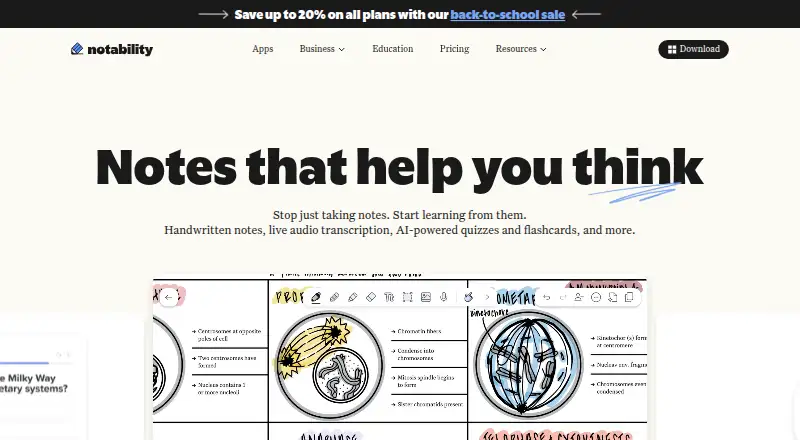
What Notability is
Notability combines handwritten notes, typed text, recordings, images, and imported documents in one workspace. It supports offline access, note sharing, and real-time collaboration across web, Windows, macOS, iOS, and Android. Notability Learn offers audio transcription, note summaries, Smart Notes, quizzes, flashcards, and chat with notes. Users can also turn YouTube videos into notes with transcripts and summaries. Integrations include iCloud, Dropbox, Google Drive, OneDrive, Box, and WebDAV. The free Starter plan costs nothing and includes 5 notes, editing tools and content, PDFs and documents, 20,000+ templates, and 7-day version history. Pro costs $19.99 a month, billed monthly, with unlimited YouTube conversions, quizzes, and flashcards, plus 90-day version history. Business Pro costs $180 a year per user and includes unlimited transcription and real-time AI summaries, chat with notes, an audit log, Intune MAM integration, and 90-day version history. The iOS and iPadOS apps require version 17 or later; Android requires version 12 or later.
Who it suits
Notability describes its users as students and professionals, and says it is used in classrooms and businesses. Notability for Education is free for schools and supports administrator configuration and MDMs such as Jamf and Mosyle.
What it does well
- Works offline across five listed platforms.
- Supports note sharing and real-time collaboration.
- Learn includes quizzes, flashcards, and chat with notes.
- Integrates with six listed cloud services.
- Free Starter plan includes 5 notes and 20,000+ templates.
What to know first
- iOS and iPadOS require version 17 or later.
- Android app requires Android 12 or later.
- Pro costs $19.99 a month, billed monthly.
- Some plans do not list prices.
Limits
Starter includes five notes and seven-day version history. The listed free plan also includes editing tools and content, PDFs and documents, and 20,000+ templates.
Plans
| Plan | Billed and limits | Price |
|---|---|---|
| Starter | 5 free notes · all editing tools and content · PDFs and docs · 20,000+ templates · 7-day version history | Free |
| Classic | 7-day version history | $49.99 a month |
| Lite | $11.99/yr; $14.99 also shown · unlimited notes · third-party backups (iOS only) · 7-day version history | $11.99 a year |
| Plus | $15.99/yr; $19.99 also shown · up to 100 YouTube link-to-note conversions/month (web only) · up to 400 AI quizzes and flashcards/month · audio recording and transcription · handwriting search · 30-day version history | $15.99 a year |
| Business Pro | $180/yr, per user · unlimited transcription and real-time AI summaries · chat with notes · 90-day version history · audit log · Intune MAM integration | $180 a year |
| Business | $60/yr, per user · unlimited note-taking and PDF annotation · centralized user admin and billing · shared libraries · AI summaries · audio recording and transcription · 30-day version history | $60 a year |
| Pro | $79.99/yr; $99.99 also shown · unlimited transcription and real-time AI summaries · unlimited YouTube link-to-note conversions (web only) · unlimited quizzes and flashcards · chat with notes · 90-day version history | $79.99 a year |
| Custom Contract | Talk to sales · custom payment terms · dedicated support · control and flexibility | On request |
As notability.com lists them, read 4 Oct 2026. The maker's own page has the final word.
Getting started
- Go to https://notability.com/.
- Choose a supported platform: web, Windows, macOS, iOS, or Android.
- For iOS or iPadOS, use version 17 or later; for Android, use Android 12 or later.
- Start with the free Starter plan, which costs nothing and includes five notes.
- For school use, Notability for Education is free for schools.
Notability is a cross-platform note workspace that brings handwritten and typed material, recordings, images, and documents together. It is best for students and professionals who want to capture varied material and turn it into study aids. Its broad toolkit is appealing, but the free plan’s five-note ceiling makes plan choice important.
Overview
Notability combines mixed-format notes with sharing, real-time collaboration, and offline access. That makes it suited to lectures and meetings where a single stream of text may not capture everything. Its study tools can turn notes and recordings into review materials, while integrations with iCloud, Dropbox, Google Drive, OneDrive, Box, and WebDAV give users several ways to work with cloud services. The main drawback is a free tier limited to five notes, with several paid plan prices not published.
Key features
A note can bring together handwriting, typed text, audio recordings, images, and imported documents. That flexibility suits classes and meetings with varied source material; anyone who only needs a basic text notebook may have little use for the broader format. Sharing and real-time collaboration support working together, and offline access is useful when a connection is unavailable.
Notability Learn offers audio transcription, note summaries, Smart Notes, quizzes, flashcards, and chat with notes. For students, these tools can turn captured material into revision prompts and summaries. Notability can also convert a YouTube video into a note with a transcript and summary, a useful route from video lessons to review material. These AI and transcription features matter most to users who will actively revisit and transform their notes.
Device requirements may rule out older phones and tablets: the iOS and iPadOS apps require version 17 or later, and Android requires version 12 or later. The product also supports web, Windows, and macOS.
Pricing
Notability uses a freemium model and offers a 30-day trial. Starter costs nothing and includes all editing tools and content, PDFs and documents, more than 20,000 templates, and seven-day version history, but its five-note limit is restrictive for anyone building a lasting archive. Lite offers unlimited notes and seven-day version history, though its price is custom pricing.
Plus includes 100 YouTube conversions per month, 400 AI questions per month, and 30-day version history; its price is custom pricing. It suits users who want more room for study features than Starter provides, but need to check whether those monthly quotas fit their use. Pro costs $19.99 a month, billed monthly, and adds unlimited YouTube conversions, unlimited quizzes and flashcards, and 90-day version history. That is the clearest fit for heavy study-tool use, though the monthly price is a significant commitment for a personal note app.
Classic costs $49.99 a month and includes seven-day version history; it offers less version history than Pro at a higher listed monthly price, so its appeal is unclear from these inclusions alone. Business has unlimited notes and 30-day version history at custom pricing. Business Pro costs $180 a year, billed per user, and includes unlimited transcription, real-time AI summaries, chat with notes, 90-day version history, an audit log, and Intune MAM integration. Those controls and team-oriented features make it more relevant to organizations than individual users. Custom Contract uses custom pricing and offers custom payment terms, dedicated support, and control and flexibility for teams that need an arrangement tailored to them.
Platforms
Notability supports web, Windows, macOS, iOS, and Android, covering desktop and mobile use. Offline access helps when working away from a network, though synced notes are replicated on servers maintained in the United States. Notes stored locally and not synced are accessible only to the user.
Who it's for
Students are the strongest fit if they want to combine lecture notes, recordings, documents, and study aids. Professionals may value the same mixed-format capture and real-time collaboration for meetings. Schools can use Notability for Education at no cost; it supports administrator configuration and works with MDMs including Jamf and Mosyle. Businesses considering sensitive material should note that the privacy policy prohibits submitting health data, non-public government ID numbers, personal financial data, and certain other sensitive information, except for local-only storage. The business page says Notability is SOC 2 certified and GDPR compliant and that customer data is not used to train LLMs. Audio and study-material input is processed for the requested feature, then deleted after study-material generation completes.
Pros and cons
- Pros: One note can hold handwriting, text, recordings, images, and documents, which suits lectures and meetings that span formats.
- Pros: Sharing, real-time collaboration, offline access, and six integrations support both individual and group workflows.
- Pros: Learn tools and YouTube-to-note conversion offer practical ways to turn source material into revision aids.
- Cons: Starter stops at five notes, a tight limit for ongoing use.
- Cons: Lite, Plus, and Business use custom pricing, making direct cost comparisons difficult before contacting the provider.
- Cons: iOS/iPadOS 17 and Android 12 minimums exclude older devices.
- Cons: Sensitive data is restricted from submission to the service, and synced notes are stored on U.S.-maintained servers.
Alternatives
Choose Capacities if you want a free-plan alternative available on Linux as well as mobile, desktop, and web; its Basic plan includes 5 GB of media uploads total, then 100 MB per month afterward, while Pro costs 9.99 USD. Craft is another freemium option across mobile, desktop, and web; its free plan limits users to 1,500 blocks, 1 GB storage, 25 MB media uploads, seven days of version history, and 15 AI assistant credits.
Goodnotes is worth comparing if you want another freemium note-taking app with a free plan and trial. Pick Notion if your priority is organizing personal projects and life with pages, blocks, databases, and basic collaboration on its free plan. Supernotes is an option if you prefer card-based notes: its Starter plan has 100 cards, while Unlimited costs £6 a month, billed £72 billed annually.
Zoho Notebook may suit users seeking a free plan with 500 MB cloud storage, 20 note versions, a 3 MB maximum notecard size, and 10 MB file uploads. Audionotes is a more focused alternative for voice notes, with unlimited one-minute voice notes, unlimited text notes, transcripts and summaries, and 99+ languages on its free plan. Evernote is another freemium choice; its free plan allows 50 notes, one notebook, five spaces, 20 tags, 200 attachments, and 1 GB storage. For broader comparisons, browse AI Note-Taking Apps or Note-taking apps.
Verdict
Notability is a strong choice for students and professionals who want a single workspace for mixed-format notes, collaboration, and study aids. Its most persuasive advantage is how it connects capture with review tools, including transcription and YouTube conversion. Look elsewhere if five free notes are not enough and the paid plan costs or quotas do not fit: several tiers have custom pricing, and Pro is $19.99 a month, billed monthly.
Verdict
Notability brings multiple note formats together with collaboration, offline access, and study tools. Check device requirements and plan details: Starter allows 5 notes, while Pro costs $19.99 a month, billed monthly.
Questions
Is Notability free?
Yes. Its Starter plan costs nothing and includes five notes. The pricing note also lists a 30-day trial.
What platforms does Notability support?
It is available on web, Windows, macOS, iOS, and Android. The iOS and iPadOS apps require version 17 or later, and Android requires version 12 or later.
What does Notability Pro cost?
Pro costs $19.99 a month, billed monthly. It includes unlimited YouTube conversions, quizzes, and flashcards, plus 90-day version history.
Is there a school plan?
Notability for Education is free for schools. It supports configuration by school administrators and works with MDMs such as Jamf and Mosyle.
Which services integrate with Notability?
Integrations include iCloud, Dropbox, Google Drive, OneDrive, Box, and WebDAV.
Who makes Notability?
The maker is Notability, founded in 2008 and headquartered in San Francisco, California, United States.
Facts from Notability's own pages
- AI and transcription data
- The privacy policy says submitted audio and study-material input are processed for the requested features, and that input content is deleted after study-material generation completes. · notability.com, 4 Oct 2026
- AI study tools
- Notability Learn includes audio transcription, note summaries, Smart Notes, quizzes, flashcards, and chat with notes. · papaya.notability.com, 4 Oct 2026
- Business security
- The business page states that Notability is SOC 2 certified and GDPR compliant, and says customer data is not used to train LLMs. · notability.com, 4 Oct 2026
- Data storage
- Notes stored locally and not synced are accessible only to the user; synced data is replicated on servers maintained in the United States. · notability.com, 4 Oct 2026
- Device requirements
- The iOS and iPadOS apps require version 17 or later, and the Android app requires Android 12 or later. · notability.com, 4 Oct 2026
- Education
- Notability for Education is free for schools, supports configuration by school administrators, and works with MDMs such as Jamf and Mosyle. · notability.com, 4 Oct 2026
- Free plan
- Yes · notability.com, 20 Sept 2026
- Headquarters
- San Francisco, California, United States · notability.com, 28 Sept 2026
- Integrations
- The privacy policy identifies Dropbox, Google Drive, Box, and OneDrive as optional third-party backup services, and Apple iCloud as a notes sync service. · notability.com, 4 Oct 2026
- Note sharing
- Yes · notability.com, 20 Sept 2026
- Offline access
- Yes · notability.com, 20 Sept 2026
- Supported platforms
- web,windows,macos,ios,android · notability.com, 20 Sept 2026
- Privacy limits
- The privacy policy prohibits submitting health data, non-public government ID numbers, personal financial data, and certain sensitive data to the service, except for local-only storage. · notability.com, 4 Oct 2026
- Product
- Notability combines handwritten notes, text, recordings, images, and imported documents in one workspace. · papaya.notability.com, 4 Oct 2026
- Real-time collaboration
- Yes · notability.com, 20 Sept 2026
- Real-time collaboration
- Notability Cloud syncs notes across devices and enables real-time collaboration. · papaya.notability.com, 4 Oct 2026
- Support
- The business page directs users to the Help Center and says custom-contract teams can receive dedicated support. · notability.com, 4 Oct 2026
- Supported platforms
- Notability is available on Mac, Windows, iPad, iPhone, Android, and the web. · notability.com, 4 Oct 2026
- Who it serves
- Notability describes itself as serving students and professionals, and says it is used in classrooms and businesses worldwide. · papaya.notability.com, 4 Oct 2026
- YouTube notes
- Notability can turn a YouTube video into a note with a transcript and summary. · notability.com, 4 Oct 2026
Where Notability stands on Freedom251
- Note-taking apps#9 of 216
- Handwritten Notes Software#3 of 18
- AI Note-Taking Apps#15 of 42