Freedom251 › Code Snippet Managers
Snipora
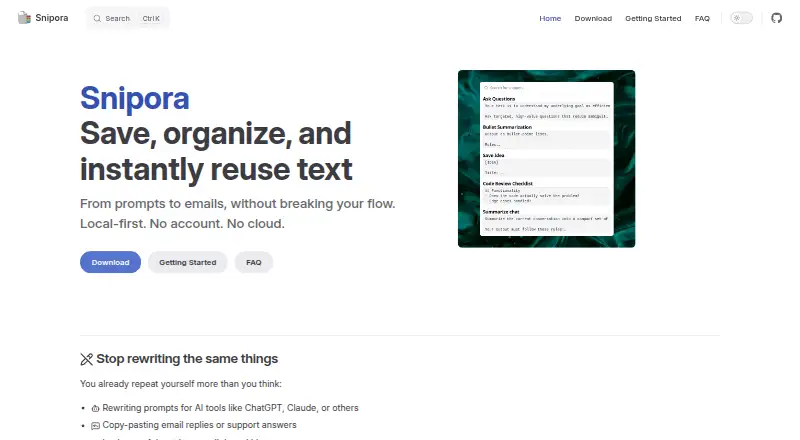
What Snipora is
Snipora is a snippet manager for capturing, organizing, finding, and reusing text on Linux, macOS, and Windows. It can hold items such as email replies, signatures, code blocks, command-line commands, and prompts for AI tools including ChatGPT and Claude; it does not describe a direct connection to those tools. A global shortcut opens a popup for searching and inserting a snippet into the active application. Depending on settings and the application, insertion may instead copy the text to the clipboard. Snippets are grouped with tags rather than folders, and a snippet can have several tags. Snipora says it preserves formatting, including code indentation. It works offline and stores snippets on the device, with no account required, server data transmission, or tracking. The Free plan costs nothing. Device sync is unavailable, and import/export is planned for a future version. Automatic update checks are enabled by default when online and can be disabled in settings. Official binaries are unsigned, so Windows or macOS security warnings may appear.
Who it suits
Snipora suits people who reuse text across applications and want local, offline access to snippets on Linux, macOS, or Windows. It may fit users comfortable managing snippets on one device, since device sync is unavailable.
What it does well
- Free plan costs nothing.
- Works offline and stores snippets locally.
- Tags allow multiple labels per snippet.
- Preserves formatting, including code indentation.
- Available on Linux, macOS, and Windows.
What to know first
- Device sync is not currently available.
- Import/export is planned, not available yet.
- Official binaries are not code-signed.
- Insertion may copy to clipboard instead of typing.
Limits
The free and open-source plan costs nothing. Device sync is unavailable, and import and export are planned for a future version.
Plans
| Plan | Billed and limits | Price |
|---|---|---|
| Free | Free and open-source | Free |
As snipora.github.io lists them, read 4 Oct 2026. The maker's own page has the final word.
Getting started
- Visit https://snipora.github.io/.
- Choose the build for Linux, macOS, or Windows.
- Download and install the appropriate package for your system.
- Use the global shortcut to open the snippet search popup.
- Create snippets and organize them with tags.
Verdict
Snipora offers free, offline snippet storage and quick search across three desktop platforms. Consider the lack of device sync and unsigned downloads before choosing it.
Questions
How much does Snipora cost?
Its Free plan costs nothing. The pricing model is free.
Is there a free trial?
No. Snipora lists no free trial.
Which platforms does Snipora support?
Builds are listed for Linux, macOS, and Windows. Available downloads include Linux AppImage, Debian and RPM packages, Windows installers, and macOS disk images and archives for Intel/AMD and Apple Silicon.
Does Snipora sync snippets between devices?
No. Cross-device sync is unavailable.
Does Snipora integrate directly with ChatGPT or Claude?
It lets users save prompts for tools such as ChatGPT and Claude, but does not describe a direct integration.
Does Snipora require an account?
No. Snipora says it requires no account, sends no data to a server, and has no tracking.
Facts from Snipora's own pages
- Available builds
- The download page lists Windows installers, Linux AppImage, Debian and RPM packages, and macOS disk images and archives for Intel/AMD and Apple Silicon. · snipora.github.io, 4 Oct 2026
- Binary signing
- The download page says official binaries are not code-signed, and warns that Windows SmartScreen or macOS Gatekeeper may show warnings. · snipora.github.io, 4 Oct 2026
- Code formatting
- Snipora says it preserves formatting, including code indentation. · snipora.github.io, 4 Oct 2026
- Insertion behavior
- The FAQ says Snipora may not auto-type into every application and may instead copy the snippet to the clipboard, depending on settings. · snipora.github.io, 4 Oct 2026
- Integrations
- The home page describes saving prompts for AI tools such as ChatGPT and Claude; it does not describe a direct integration. · snipora.github.io, 4 Oct 2026
- Notable limits
- Device sync is not currently available, and import/export is planned for a future version. · snipora.github.io, 4 Oct 2026
- Offline and storage
- Snipora works offline and stores snippets locally on the device. · snipora.github.io, 4 Oct 2026
- Organization
- Snippets use tags instead of folders, and one snippet can have multiple tags. · snipora.github.io, 4 Oct 2026
- Privacy
- The home page says Snipora requires no account, sends no data to a server, and has no tracking. · snipora.github.io, 4 Oct 2026
- Product
- Snipora is a local-first snippet manager for capturing, organizing, searching, and reusing text. · snipora.github.io, 4 Oct 2026
- Search and insertion
- A global shortcut opens a popup where users can search snippets and insert one into the active application. · snipora.github.io, 4 Oct 2026
- Support
- Users are directed to open a GitHub issue to report a bug or ask for help. · snipora.github.io, 4 Oct 2026
- Updates
- The FAQ says the app periodically checks for updates when connected to the internet by default, and that this can be disabled in settings. · snipora.github.io, 4 Oct 2026
- Use cases
- The guide lists AI prompts, email replies, signatures, code blocks, and command-line commands as examples of snippets. · snipora.github.io, 4 Oct 2026
Where Snipora stands on Freedom251
- Code Snippet Managers#17 of 33