Freedom251 › Code Snippet Managers
Gisto
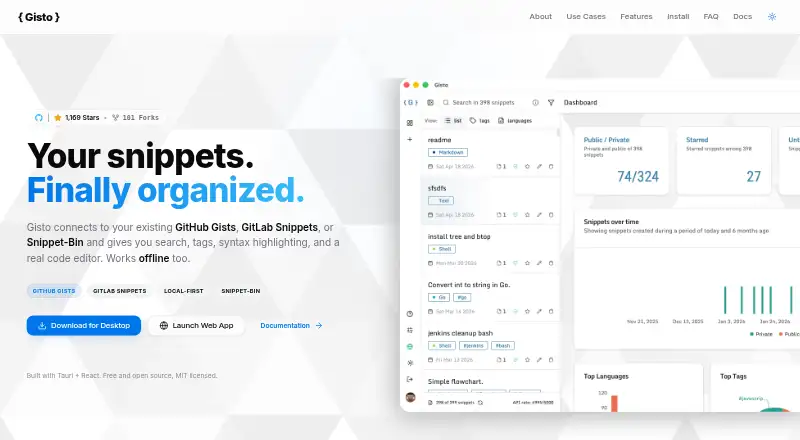
What Gisto is
Gisto is a free, open-source application for managing and sharing code snippets across Linux, macOS, Windows, web and self-hosted setups. It supports GitHub Gists, GitLab Snippets, Snippet-Bin and local browser storage. Search and organization tools include full-text search, tags, language grouping and filters for content, filenames, tags or descriptions. Its Monaco editor offers syntax highlighting, autocomplete, Emmet and configurable settings. Snippets can bundle multiple files, and supported formats include Markdown, HTML, JSON, CSV and PDF, with a live preview for GitHub Flavored Markdown. Users can connect an AI API key to generate descriptions and tags. Local-only mode stores snippets in IndexedDB and supports working with them offline, including JSON export and import. GitHub and GitLab sync connects directly to their official APIs, while access tokens are stored in local storage. Snippet-Bin can be self-hosted on the user’s infrastructure. The Tauri desktop app is described as using under 40 MB of RAM and having an under 10 MB download.
Who it suits
Gisto suits developers who want to organize and share snippets across supported providers or keep them in local browser storage. Its self-hosted option may appeal to users who want Snippet-Bin on their own infrastructure.
What it does well
- Full-text search, tags and language grouping
- Monaco editor includes syntax highlighting and autocomplete
- Snippets can contain multiple files
- Local-only mode supports offline use and JSON import/export
- Open source and MIT licensed
What to know first
- Local mode does not sync across devices or cloud providers
- GitHub and GitLab access tokens are stored in local storage
- AI descriptions and tags require a connected API key
Limits
The free plan costs nothing. Local mode does not sync across devices or cloud providers.
Plans
| Plan | Billed and limits | Price |
|---|---|---|
| Free | Local mode does not sync across devices or cloud providers | Free |
As gisto.org lists them, read 1 Oct 2026. The maker's own page has the final word.
Getting started
- Visit the Gisto website.
- Choose a supported route: Linux, macOS, Windows, web, or self-hosted.
- Use local IndexedDB mode for account-free offline storage, or connect GitHub or GitLab for synchronization.
- For self-hosted storage, deploy Snippet-Bin with Docker behind a private domain or VPN.
- Connect an AI API key if you want Gisto to generate snippet descriptions and tags.
Overview
Gisto is a code-snippet manager for developers who want to collect, search, and share reusable code across desktop and web workflows. It suits people who need more than a plain text stash, especially those who want provider choice or a self-hosted backend. Its main trade-off is that sync and token storage depend on the approach you choose.
Key features
Gisto works with GitHub Gists, GitLab Snippets, Snippet-Bin, and browser-local storage. Full-text search, custom tags, language grouping, and filters for content, filename, tags, or description give larger collections useful ways to stay navigable. Snippets can bundle several files, including code, documentation, configurations, and README files, which helps preserve context around a reusable fragment.
The Monaco editor includes syntax highlighting, autocomplete, Emmet, and configurable settings. Gisto also handles Markdown, HTML, JSON, CSV, and PDF, with live GitHub Flavored Markdown preview. That breadth is useful for developers who keep examples and supporting material together; it may be more editor capability than someone seeking only a small, quick-access clipboard needs.
Quick actions copy or download snippets and open them in Plunker, Carbon, JSFiddle, and other tools. An optional AI API key can generate descriptions and tags, potentially reducing manual cataloguing, though it requires connecting an external service key.
Local mode stores data in IndexedDB and works offline: users can create, edit, tag, query, export, and import JSON without an internet connection. It is a useful account-free option, but local mode does not sync across devices or cloud providers. For GitHub and GitLab synchronization, the client connects to the official APIs directly rather than routing snippets or tokens through intermediary servers. Gisto stores those provider access tokens in local storage, so users should weigh that handling against their own security preferences. Snippet-Bin offers another route: a Docker-deployable backend on a private domain or VPN keeps snippets on the user's infrastructure.
The Tauri desktop app is described as using under 40 MB of RAM and downloading in under 10 MB, appealing to users who want a comparatively small desktop client. Gisto is MIT-licensed and accepts issue reports, feature requests, and pull requests through GitHub.
Pricing
Gisto is free and open source. The Free plan costs nothing. It includes cross-device sync and Markdown notes, but local-only mode itself does not sync between devices or cloud providers. The choice of storage mode therefore matters more than a paid tier: local IndexedDB prioritizes offline and account-free use, while provider-backed sync and self-hosting have different token or infrastructure considerations.
Platforms
Gisto is available for Linux, macOS, Windows, web, and self-hosted deployments. That range makes it suitable for mixed desktop environments or teams that prefer to run their own Snippet-Bin backend, while browser-local storage remains confined to its local mode.
Who it's for
Gisto is best for developers who want searchable, tagged snippets with a capable editor, multi-file organization, and a choice between GitHub, GitLab, local storage, or self-hosting. It is less suitable when local-only storage must sync automatically across devices, or when keeping provider tokens in local storage is unacceptable.
Pros and cons
- Pro: Search, tags, language grouping, and multiple filters make it easier to retrieve items from a growing snippet library.
- Pro: Offline IndexedDB mode supports editing and JSON import/export without an account or internet connection.
- Pro: GitHub, GitLab, and self-hosted Snippet-Bin provide distinct storage choices, including an option to keep snippets on personal infrastructure.
- Con: Local mode does not sync across devices or cloud providers, limiting it as a shared or multi-device workflow.
- Con: GitHub and GitLab access tokens are stored in local storage, a consideration for users with stricter credential-handling requirements.
Alternatives
Bitbucket is a better fit when snippet work belongs alongside repositories and pipelines: its free plan supports up to 5 users, unlimited public and private repositories, 1 GB of LFS storage, and 50 Pipelines.
Cacher may suit readers who prefer a hosted snippet service with explicit private-snippet and attachment allowances; its free plan includes 15 private snippets, 3 private labels, unlimited public snippets, 10 MB of attachments, and 50 MB per month of uploads.
Lepton is a simpler free alternative for Linux, macOS, and Windows users who need unlimited public or secret snippets and unlimited tags.
Snibox is another free, MIT-licensed self-hosted option for users who want an out-of-the-box setup for one registered user.
massCode is worth considering for users who want a free, open-source snippet manager with no account required.
SafeScript may be relevant for Linux users seeking a free, MIT-licensed Flatpak, or Mac users considering its 7.99 USD plan.
ZCode Snippets is another free option for Linux, macOS, and Windows.
ByteStash fits readers who prefer a web-based workspace with defined membership and API limits: its free plan allows 100 snippets per workspace, one member, and 120 API requests per minute.
Browse more options in Code Snippet Management Software and Code Snippet Managers.
Verdict
Choose Gisto if you want a free, open-source snippet manager that combines detailed organization with offline use and the choice of cloud-provider or self-hosted storage. Its strongest reason to choose is that flexibility; look elsewhere if you need local-mode sync or do not want GitHub or GitLab tokens stored in local storage.
Verdict
Gisto offers several ways to store and organize snippets, including offline local mode and self-hosted Snippet-Bin. Choose a storage approach with its sync limits and token handling in mind.
Questions
How much does Gisto cost?
Gisto is free, with a listed plan price of $0. It is open source and MIT licensed.
Can I use Gisto offline?
Yes. Local mode stores snippets in IndexedDB and supports creating, editing, tagging, searching, importing, and exporting JSON without an internet connection.
Does local mode sync across devices?
No. Local mode does not sync across devices or cloud providers. Gisto also supports synchronization with GitHub and GitLab.
Which platforms does Gisto support?
Gisto supports Linux, macOS, Windows, web, and self-hosted setups.
Which services can store Gisto snippets?
Gisto supports GitHub Gists, GitLab Snippets, Snippet-Bin, and local browser storage.
Who makes Gisto, and how can I get support?
Gisto accepts issue reports, feature requests, and pull requests through GitHub.
Facts from Gisto's own pages
- AI features
- Users can connect an AI API key to generate snippet descriptions and tags automatically. · gisto.org, 1 Oct 2026
- Authentication
- Gisto stores GitHub or GitLab access tokens in local storage and also offers account-free IndexedDB local mode. · github.com, 1 Oct 2026
- Editor
- Gisto uses the Monaco editor with syntax highlighting, autocomplete, Emmet, and configurable settings. · gisto.org, 1 Oct 2026
- External tools
- Quick actions can copy or download snippets and open them in Plunker, Carbon, JSFiddle, and other tools. · gisto.org, 1 Oct 2026
- File support
- It supports Markdown, HTML, JSON, CSV, and PDF files with GitHub Flavored Markdown live preview. · gisto.org, 1 Oct 2026
- Licensing and support
- Gisto is free, open source, MIT licensed, and accepts issue reports, feature requests, and pull requests through GitHub. · github.com, 1 Oct 2026
- Multi-file snippets
- A snippet can bundle multiple files, including code, documentation, configurations, and README files. · gisto.org, 1 Oct 2026
- Offline use
- Local-only mode stores snippets in IndexedDB and supports creating, editing, tagging, querying, exporting, and importing JSON without an internet connection. · gisto.org, 1 Oct 2026
- Performance
- The Tauri desktop app is described as using under 40 MB of RAM and having an under 10 MB download. · gisto.org, 1 Oct 2026
- Providers
- It supports GitHub Gists, GitLab Snippets, Snippet-Bin, and local browser storage. · github.com, 1 Oct 2026
- Purpose
- Gisto is a cross-platform application for managing and sharing code snippets. · gisto.org, 1 Oct 2026
- Search and organization
- Features include advanced full-text search, custom tags, language grouping, and filtering by content, filename, tags, or description. · gisto.org, 1 Oct 2026
- Security model
- For GitHub and GitLab synchronization, the client connects directly to official APIs without intermediary servers processing or backing up snippets or tokens. · gisto.org, 1 Oct 2026
- Self-hosting
- Snippet-Bin is a self-hosted backend deployable with Docker behind a private domain or VPN, keeping snippets on the user's infrastructure. · github.com, 1 Oct 2026
Where Gisto stands on Freedom251
- Code Snippet Managers#6 of 33
- Code Snippet Management Software#4 of 22