Freedom251 › Code Snippet Managers
Snibox
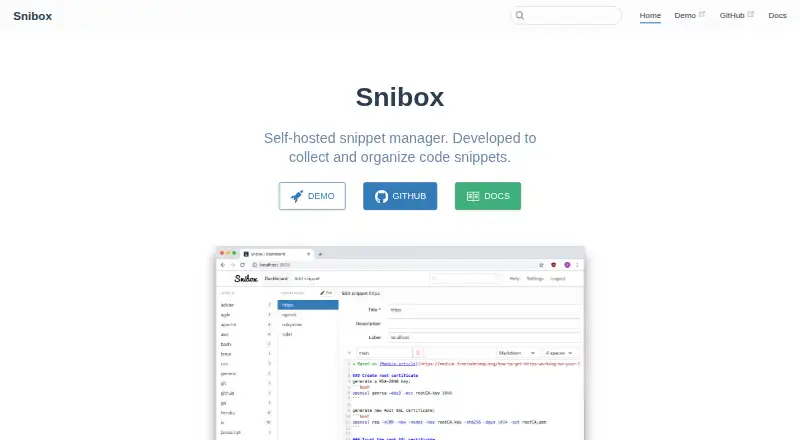
What Snibox is
Snibox is a self-hosted manager for collecting and organizing code snippets, including material in programming languages, Markdown and plain text. Its label-oriented interface includes search. It is free and released under the MIT License. Deployment guides cover Docker, Heroku, macOS, Ubuntu and Windows, and the listed platforms include Linux, macOS, web, Windows and self-hosted use. There is an important account restriction out of the box: only the first registered user can access the personal private snippets repository, and additional user registration is disabled. For production password resets, Snibox sends email through Mailgun; the maker says this is needed only for password resets. Deployment instructions describe setting Mailgun account variables in the .env file or adding Mailgun Starter on Heroku. The Ubuntu guide says users may need to configure database credentials and set up the database before launching the server. The project README links to a demo and notes that its free Heroku server may take up to 30 seconds to wake. The listed plan is self-hosted and configured for one registered user out of the box.
Who it suits
Snibox suits individuals who want to keep code snippets, Markdown or plain text in a self-hosted collection. Its default account setup is oriented around one registered user rather than team sharing.
What it does well
- Organizes code, Markdown and plain-text snippets.
- Labels and search help organize and find saved snippets.
- Free and MIT-licensed.
- Deployment guides cover Docker, Heroku, macOS, Ubuntu and Windows.
What to know first
- Additional user registration is disabled out of the box.
- Only the first registered user can access the private repository.
- Production password resets require Mailgun email setup.
Limits
The free plan is self-hosted and set up for one registered user out of the box. Additional user registration is disabled by default, and team sharing is unavailable.
Plans
| Plan | Billed and limits | Price |
|---|---|---|
| Snibox | MIT-licensed · self-hosted · out of the box, one registered user | Free |
As snibox.github.io lists them, read 3 Oct 2026. The maker's own page has the final word.
Getting started
- Open the Snibox website or the linked demo.
- Choose a deployment route covered by the maker's guides: Docker, Heroku, macOS, Ubuntu, or Windows.
- Follow the selected guide to configure and launch Snibox.
- For Ubuntu, configure database credentials if needed and set up the database before launching the server.
- For production password resets, configure Mailgun variables in the .env file or install Mailgun Starter on Heroku.
Snibox is a self-hosted manager for code, Markdown, and plain-text snippets. It is best suited to an individual who wants a searchable, label-organized collection on infrastructure they control. Its MIT-licensed software is free, but deployment work and a one-user default are meaningful trade-offs.
Overview
Snibox brings several kinds of reusable text into one personal library, with labels and search for finding items again. That makes it a practical fit for people who want code and reference notes together rather than a code-only stash. It is less suitable for anyone who wants a hosted service without operating it, or a shared workspace for multiple accounts.
The project uses Vue.js and Vuex on the frontend and Ruby on Rails on the backend. Deployment guides cover Docker, Heroku, macOS, Ubuntu, and Windows, but users remain responsible for configuring and launching the service. The Ubuntu guide, for example, calls for database setup and credentials where needed. A demo is linked from the README; its free Heroku server may take up to 30 seconds to wake.
Key features
Labels, search, and varied content
Snibox supports snippets in various programming languages, Markdown, and plain text. Labels provide a way to group a collection, while search helps retrieve saved material without relying on memory of where it was filed. Together, these suit a personal reference library that mixes code with notes. There is no team-sharing capability in the plan.
Private collection, single-user default
Private snippets are supported, but the default authentication setup gives access to the personal private repository only to the first registered user and disables additional registration. That is a clear boundary for teams: Snibox can hold private material for one account out of the box, not serve as a multi-user shared repository without changing its setup.
Self-hosting and email setup
The software is released under the MIT License, and the maker provides guides for several deployment environments. Password-reset email in production is sent through Mailgun; the deployment instructions call for Mailgun account variables in the .env file, or the Mailgun Starter add-on on Heroku. Mailgun is needed only for password resets, but operators should account for that configuration if they want the reset flow to work.
Pricing
Snibox costs nothing. Its single plan is MIT-licensed and self-hosted, with one registered user out of the box. Private snippets and API access are included, while team sharing is not. There are no paid tiers or per-seat choices in this offering, so the central cost is not a subscription: it is the work of deploying and operating the service.
This free plan fits an individual comfortable managing a deployment who values private snippets and API access without a software charge. It is a weaker choice for a group that needs accounts to collaborate, or for someone who would rather pay for a hosted product than handle setup.
Platforms
Snibox supports Linux, macOS, Windows, web, and self-hosted use. The deployment guides span Docker, Heroku, macOS, Ubuntu, and Windows, giving operators several routes to run it. Sync coverage is web-only, so this is not a promise of synchronized native apps across devices.
Who it's for
Choose Snibox if you want a free, open-source personal snippet library, can take responsibility for deployment, and want code, Markdown, and plain text organized through labels and search. Look elsewhere if multiple people need access to a shared private collection, if you need broader sync coverage, or if self-hosting is an unwanted operational task.
Pros and cons
Pros
- Free and MIT-licensed: there is no software subscription, and the license permits use under its terms.
- More than code: Markdown and plain text can sit alongside programming-language snippets in the same searchable, label-oriented collection.
- Private snippets and API access: both are included for the personal use case.
- Multiple deployment guides: Docker, Heroku, macOS, Ubuntu, and Windows are covered.
Cons
- One-user default: additional registration is disabled, and only the first registered user can access the personal private repository.
- Operators handle setup: deployment, and potentially database configuration, are part of using a self-hosted service.
- Password resets need Mailgun in production: email reset functionality requires Mailgun configuration.
- Web-only sync coverage: the platform mix does not amount to synchronization across native clients.
Alternatives
For a broader comparison, see Code Snippet Management Software and Code Snippet Managers.
- Bitbucket is worth considering if you want a free plan for up to five users with unlimited public and private repositories, 1 GB of LFS storage, and 50 Pipelines.
- Cacher may suit someone who wants a snippet-focused free tier with 15 private snippets, three private labels, unlimited public snippets, 10 MB of attachments, and 50 MB/month uploads.
- Gisto is another free option across Linux, macOS, self-hosted, web, and Windows; its local mode does not sync across devices or cloud providers.
- Lepton is a free desktop alternative for Linux, macOS, and Windows with unlimited public or secret snippets and unlimited tags.
- massCode is free and open source, requires no account, and supports Linux, macOS, and Windows.
- SafeScript offers a free, MIT-licensed Linux version; its Mac version costs 7.99 USD.
- ZCode Snippets is a free alternative for Linux, macOS, and Windows.
- ByteStash may be a fit for a web-based workspace: its free plan allows 100 snippets per workspace, one member, and 120 API requests per minute.
Verdict
Snibox is a sensible choice for an individual who wants private, searchable snippets across code and text formats and is willing to self-host. Its strongest case is a free MIT-licensed library with API access and no snippet quota stated in its plan. The reason to look elsewhere is equally clear: the default setup is for one user, with no team sharing, and operating the service is part of the bargain.
Verdict
Snibox offers a free, self-hosted way to collect and search snippets across several content types. Its default account configuration is for one user, and production password-reset email requires Mailgun setup.
Questions
How much does Snibox cost?
The listed plan is free. Snibox is open source under the MIT License.
Can I use Snibox privately?
Yes. Private snippets are supported. Out of the box, only the first registered user can access the personal private snippets repository.
Does Snibox support teams?
No. Team sharing is listed as unavailable, and registration of additional users is disabled by default.
Which platforms does Snibox support?
The listed platforms are Linux, macOS, self-hosted, web, and Windows. Deployment guides cover Docker, Heroku, macOS, Ubuntu, and Windows.
Does Snibox offer API access?
Yes, API access is listed as supported.
How does password reset email work?
Production password-reset email is sent through Mailgun. Deployment instructions describe setting Mailgun variables in the .env file or installing Mailgun Starter on Heroku.
Facts from Snibox's own pages
- Account limit
- The authentication documentation says only the first registered user can access the personal private snippets repository, and registration of additional users is disabled out of the box. · snibox.github.io, 3 Oct 2026
- Content types
- It supports various programming languages, Markdown, and plain text. · snibox.github.io, 3 Oct 2026
- Database setup
- The Ubuntu deployment guide instructs users to configure database credentials if needed and set up the database before launching the server. · snibox.github.io, 3 Oct 2026
- Demo
- The project README links to a demo and notes that its free Heroku server may take up to 30 seconds to wake. · github.com, 3 Oct 2026
- Deployment
- The maker provides deployment guides for Docker, Heroku, macOS, Ubuntu, and Windows. · snibox.github.io, 3 Oct 2026
- Email setup
- Deployment instructions say to configure Mailgun account variables in the .env file, or install the Mailgun Starter add-on on Heroku. · snibox.github.io, 3 Oct 2026
- License
- Snibox is released under the MIT License. · snibox.github.io, 3 Oct 2026
- Organization
- Its interface is label-oriented and includes search. · snibox.github.io, 3 Oct 2026
- Password reset
- Production email is sent through Mailgun, which the maker says is needed only for password resets. · snibox.github.io, 3 Oct 2026
- Purpose
- Snibox is a self-hosted snippet manager for collecting and organizing code snippets. · snibox.github.io, 3 Oct 2026
- Technology
- The README identifies Vue.js and Vuex as the frontend and Ruby on Rails as the backend. · github.com, 3 Oct 2026
Where Snibox stands on Freedom251
- Code Snippet Managers#11 of 33
- Code Snippet Management Software#9 of 22