Freedom251 › Property Maintenance Management Software
SiteOps
What SiteOps is
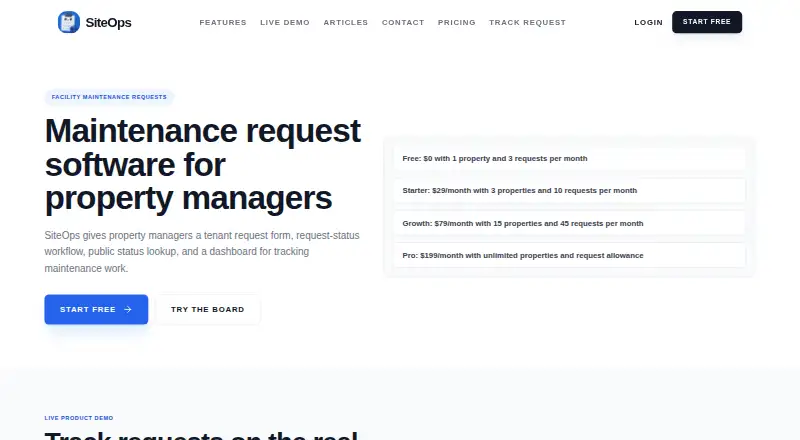
SiteOps is browser-based maintenance request software for property managers. Tenants can submit property-specific requests with a category, unit or room number, description, name, email, and optional photo. Managers track work on a dashboard and Kanban board, moving requests through new, in progress, and done. Requesters can check status using a confirmation code and unit number. When an email recipient is set in the app, new requests and status changes can trigger email notifications to the owner and requester. The free plan covers one property and three requests per month. Monthly plans are Starter at $29 a month for three properties and 10 requests per month, Growth at $79 a month for 15 properties and 45 requests per month, and Pro at $199 a month with unlimited properties and request allowance. Paid-plan checkout includes a 30-day trial only if the user has not already used one. Plan limits for team access, categories, and branding vary by tier. The product runs in a browser and offers mobile access; support is listed at [email protected].
Who it suits
SiteOps suits property managers who want tenants to report maintenance issues and track request status through a browser-based system. The plan limits are relevant for managers comparing property and request volumes.
What it does well
- Tenant forms can accept optional photos.
- Kanban board tracks requests through three statuses.
- Requesters can look up status by code and unit.
- New requests and status changes can trigger email notifications.
- Mobile access is available.
What to know first
- Free plan allows one property and three monthly requests.
- Starter is limited to three properties and 10 monthly requests.
- Email notifications require an email recipient in the app.
- Trial applies only to users who have not already used one.
Limits
The free plan covers one property and three requests per month. Starter allows three properties and 10 requests monthly; Growth allows 15 properties and 45 requests monthly. Pro lists unlimited properties and an unlimited request allowance.
Plans
| Plan | Billed and limits | Price |
|---|---|---|
| Free | 1 property · 3 maintenance requests/month · email notifications · tenant status tracking · mobile-friendly forms · Powered by SiteOps branding | Free |
| Pro | $2028/year · unlimited properties · unlimited maintenance requests · email notifications · tenant status tracking · custom categories · response badge · remove branding · unlimited staff team management | $169 a month |
| Starter | $300/year · 3 properties · 10 maintenance requests/month · email notifications · tenant status tracking · custom categories · response badge · remove branding · 1 manager account | $25 a month |
| Growth | $804/year · 15 properties · 45 maintenance requests/month · email notifications · tenant status tracking · custom categories · response badge · remove branding · team management up to 5 staff | $67 a month |
As siteops.org lists them, read 15 Oct 2026. The maker's own page has the final word.
Getting started
- Visit the SiteOps website.
- Choose the free plan or a paid plan.
- Use a browser to access the web-based product.
- At paid-plan checkout, use the 30-day trial if eligible.
SiteOps is a browser-based maintenance request system for property managers, combining tenant intake, status updates and a manager work board. It fits small portfolios that need a focused request-to-resolution process without installing local software. The central trade-off is clear: the workflow is practical, but the lower plans impose tight monthly request limits.
Overview
Tenants use property-specific forms to report maintenance issues, while managers organize and update those requests in one place. A public lookup lets a requester check progress with a confirmation code and unit number, reducing the need for repeated status calls or emails. SiteOps is most convincing for managers whose work volume stays within the selected tier; busy portfolios will reach the quotas quickly.
Key features
Tenant intake and updates
Forms capture a category, unit or room number, description, name and email, with an optional photo. Those fields provide the identifying information a manager needs to route a job and contact the requester. Requests move through new, in progress and done on a Kanban board, giving a straightforward operational view rather than a complex asset-management system.
Notifications and lookup
Email notifications for new requests and status changes can be sent to the owner and requester when the app has an email recipient. Requesters can retrieve a request through its confirmation code and unit number, so progress remains visible between updates.
Access and administration
Team access, categories, properties, requests and branding are controlled by tier-specific limits. Mobile access is supported, and the web-native design works in a browser without specialized local software. Google sign-in, Stripe billing, S3 photo uploads, SES transactional email and GA4 analytics are named services when enabled. SiteOps says it uses reasonable technical and organizational safeguards while acknowledging that no internet service can guarantee perfect security.
Pricing
SiteOps has a free plan and paid subscriptions, with paid pricing advertised from $25/mo when billed annually. A 30-day trial is included at paid checkout only for users who have not already used a trial.
| Plan | Price | Limits and inclusions |
|---|---|---|
| Free | free | 1 property and 3 requests per month |
| Starter | $29 a month, billed monthly | 3 properties and 10 requests per month |
| Growth | $79 a month, billed monthly | 15 properties and 45 requests per month |
| Pro | $199 a month, billed monthly | Unlimited properties and unlimited request allowance |
The Free tier is suitable for a single property with very occasional issues, but three requests monthly leaves little room for seasonal spikes. Starter adds two properties yet allows only ten monthly requests, making it a reasonable test tier for a small manager rather than a high-turnover building. Growth is aimed at a broader portfolio, although 45 requests per month can still constrain active maintenance operations. Pro removes both stated property and request ceilings and is the practical choice for larger or unpredictable volumes. Compare the monthly tiers with the lower annual starting price before committing, since the published plan prices above are monthly terms.
Platforms
SiteOps runs on the web and supports mobile access. Its browser-based architecture avoids a requirement for specialized local software, which suits distributed property teams and tenants using ordinary devices.
Who it's for
SiteOps is for property managers who need structured tenant maintenance intake, a simple status board and self-service status checking. Free and Starter make sense for one to three properties with light request traffic. Growth fits managers adding properties while keeping requests moderate. Pro is the better match when request volume is central to operations or when an unlimited property allowance is necessary. It is less suitable for teams seeking a broader maintenance suite beyond the submission, notification and status workflow described here.
Pros and cons
Pros
- Clear tenant-to-manager workflow: Forms, confirmation-code lookup and a three-stage Kanban board cover the essential path from report to completion.
- Useful intake fields: Unit details, contact information, category, description and optional photos give managers actionable context at submission.
- Accessible deployment: Web and mobile access avoid specialized local installations.
- Free entry point: A no-cost tier allows a single property to start with the system.
Cons
- Low lower-tier quotas: Three requests monthly on Free and ten on Starter can be exhausted by routine maintenance.
- Sharp Pro price jump: Unlimited properties and requests require $199 a month, a substantial step above Growth.
- Workflow scope is focused: The published feature set centers on requests and status handling, so managers needing broader operational tooling should compare alternatives.
Alternatives
Property Maintenance Management Software is the broader category to explore when you want to compare multiple maintenance products.
Choose FlowServIQ instead if unlimited work orders and preventive maintenance on a free plan matter more than SiteOps's property-specific request caps; its free tier also includes a tenant portal, asset tracking, certification tracking and one team member across Android, iOS and web.
Platuni Maintenance is a better fit for a very small operation seeking a free single-unit starter plan or a low-cost growth tier priced per month.
Pick SRVO when an installable mobile app, asset counts, preventive maintenance, reports and CSV export are priorities; its free Maintain plan covers one site, 15 assets and two users.
EstateApp is an alternative for property businesses focused on receiving and managing tender requests through a web profile.
Hili Billing suits teams looking for a web billing product with a free starter tier rather than a dedicated maintenance-request workflow.
Consider Made Tech Repairs when a housing association or local authority wants an integration-free repairs product priced after a needs discussion.
TaskEstate is worth comparing for a free web plan with resident requests, work orders and a dashboard for one user, one property and one building.
HCOMS Property Management System is a paid, multi-platform property-management option from Hayes Computing Solutions Ltd.
Verdict
Choose SiteOps if you manage a small-to-growing property portfolio and want a focused browser workflow for tenant requests, status visibility and basic team handling. Its main reason to choose it is the coherent intake-to-completion loop with a free starting tier. Look elsewhere if your properties generate more requests than the Free, Starter or Growth quotas allow, or if you need maintenance capabilities beyond this focused workflow; Pro removes the stated caps but costs $199 a month.
Verdict
SiteOps combines tenant intake, status lookup, and a manager work board. Compare the tier limits with your property and request volume before choosing a plan.
Questions
Does SiteOps have a free plan?
Yes. It costs nothing and includes one property and three requests per month.
What do the paid plans cost?
Starter is $29 a month, Growth is $79 a month, and Pro is $199 a month. The pricing note says paid plans start at $25 per month when billed annually.
Is there a free trial?
Paid-plan checkout includes a 30-day trial for users who have not already used a trial.
Can tenants use SiteOps on mobile?
Mobile access is listed. The product runs in a browser.
How can requesters check progress?
They can look up a request using its confirmation code and unit number.
How can I contact SiteOps support?
The site lists [email protected] as its support contact.
Facts from SiteOps's own pages
- API authentication
- The request API requires an authenticated owner context and checks that the property belongs to that owner. · siteops.org, 15 Oct 2026
- Billing integration
- Paid subscriptions use Stripe Checkout and billing records include checkout, subscription, customer, invoice and webhook data. · siteops.org, 15 Oct 2026
- Company name
- A SiteOps buyer guide identifies the company name as SiteOps Technologies Inc. · siteops.org, 15 Oct 2026
- Company operator
- The terms identify Alexander Landaverde / GrowSoft as the operator. · siteops.org, 15 Oct 2026
- Custom categories
- Managers can define categories such as HVAC, plumbing, pest control and landscaping. · siteops.org, 15 Oct 2026
- Data handling
- The privacy policy says customer records and uploaded files are not sold. · siteops.org, 15 Oct 2026
- Data isolation
- The terms prohibit accessing another customer workspace and say access may be limited to protect customers and payment integrity. · siteops.org, 15 Oct 2026
- Documentation
- Public documentation consists mainly of product articles describing request workflows, statuses, API behavior and buyer guidance. · siteops.org, 15 Oct 2026
- Email notifications
- The service can email owners about new requests and email requesters about confirmations and status changes. · siteops.org, 15 Oct 2026
- Founder
- SiteOps articles identify Alexander Landaverde as founder and builder. · siteops.org, 15 Oct 2026
- Independent mention: intake fields
- A Reddit post about SiteOps describes tenant requests containing category, unit, description, contact information and optional photos. · reddit.com, 15 Oct 2026
- Independent mention: tracking workflow
- A separate Reddit post describes SiteOps as tracking request status, history, email updates and public lookup. · reddit.com, 15 Oct 2026
- Integrations
- The privacy policy names Google sign-in, Stripe billing, AWS services, S3 photo storage, SES email and GA4 analytics. · siteops.org, 15 Oct 2026
- Integrations and service providers
- The privacy policy names Google sign-in, Stripe billing, S3 photo uploads, SES transactional email, and GA4 analytics when enabled. · siteops.org, 7 Oct 2026
- Intended users
- SiteOps describes itself as maintenance request software for property managers. · siteops.org, 7 Oct 2026
- Kanban board
- Requests move through new, in-progress and done columns on an owner dashboard. · siteops.org, 15 Oct 2026
- Licence
- The reviewed pages do not state an open-source licence or provide source-code licensing terms. · siteops.org, 15 Oct 2026
- Limit: availability warranty
- The terms provide the service as-is and disclaim guarantees of uninterrupted operation or error-free output. · siteops.org, 15 Oct 2026
- Limit: legal and professional scope
- The terms say the service does not replace code compliance checks, tax advice, safety review, legal review or professional judgment. · siteops.org, 15 Oct 2026
- Limit: request quotas
- Free, Starter and Growth plans cap monthly requests at 3, 10 and 45 respectively; Pro is unlimited. · siteops.org, 15 Oct 2026
- Limit: workflow scope
- SiteOps articles caution that it does not guarantee repair speed, emergency dispatch, tenant satisfaction or automatic completion. · siteops.org, 15 Oct 2026
- Multi-property dashboard
- The dashboard supports switching between properties and filtering requests by property, category or status. · siteops.org, 15 Oct 2026
- Photo upload API
- Photo attachments use a signed upload URL from /api/upload-url and are stored in an S3-backed location. · siteops.org, 15 Oct 2026
- Platform
- The product describes a web-native architecture accessible from a browser without installing specialized local software. · siteops.org, 7 Oct 2026