Freedom251 › Invoicing software

PayPal Invoicing
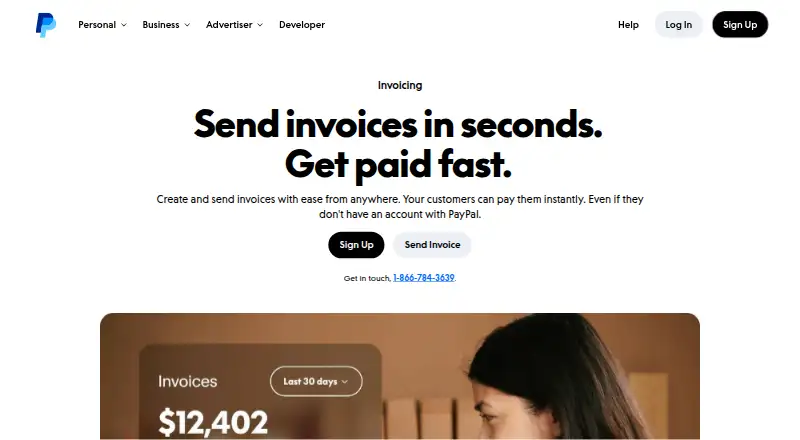
What PayPal Invoicing is
PayPal Invoicing lets freelancers, service professionals, consultants, and small businesses create and send client invoices. You can customize them with a company name, brand colors, logo, taxes, discounts, shipping details, and notes, then share them by email, SMS, messaging apps, social media, or QR code. A dashboard shows when an invoice is sent, opened, and paid. Templates support recurring invoices, while automatic reminders and QuickBooks and Xero sync can reduce manual work. Customers can pay without a PayPal account, but senders need one to create and send invoices. The service is available on the web, iOS, and Android, including through the PayPal app. Creating and sending invoices has no setup or subscription fee; transaction fees apply when customers pay. Listed rates are 3.49% + $0.49 per transaction for PayPal and Venmo, and 4.99% + $0.49 per transaction for Pay Later. Fixed fees vary by currency received, and international transactions may add a percentage-based fee.
Who it suits
It suits independent professionals and small businesses that bill clients directly and want recurring invoices, payment reminders, and invoice tracking. Businesses serving customers in different markets may also use its multi-currency invoicing.
What it does well
- Customizes invoices with branding, taxes, discounts, and notes
- Tracks when invoices are sent, opened, and paid
- Supports recurring invoices and automatic reminders
- Customers can pay without a PayPal account
- Available on web, iOS, and Android
What to know first
- A PayPal account is required to send invoices
- Transaction fees apply when customers pay
- International transactions may add a percentage-based fee
Limits
Creating and sending invoices has no setup or subscription fee, but transaction fees apply when customers pay. The listed PayPal and Venmo rate is 3.49% + $0.49 per transaction; Pay Later is 4.99% + $0.49 per transaction. Fixed fees vary by currency received, and international transactions may add a percentage-based fee.
Plans
| Plan | Billed and limits | Price |
|---|---|---|
| Free | Create and send invoices without setup or subscription fees · Transaction fees apply when customers pay | Free |
| PayPal and Venmo | 3.49% + $0.49 per transaction | $3.49, paid once |
| Pay Later | 4.99% + $0.49 per transaction | $4.99, paid once |
| Free invoicing | — | On request |
As paypal.com lists them, read 19 Sept 2026. The maker's own page has the final word.
Getting started
- Visit the PayPal Invoicing page.
- Create or sign in to a PayPal account.
- Create an invoice and add the business details, branding, and charges.
- Send the invoice by email, SMS, a messaging app, social media, or QR code.
- Use the dashboard to follow its sent, opened, and paid status.
PayPal Invoicing is a client-billing tool built into PayPal for freelancers, service professionals, consultants, and small businesses. It suits senders who want to invoice and collect payments through several channels without a subscription; the trade-off is transaction fees and a required PayPal account for the sender.
Overview
Customers can pay invoices without opening a PayPal account, which reduces a barrier for clients while letting the business use PayPal to collect payment. Invoicing is available on the web and through the PayPal app on iOS and Android. PayPal reports more than 755 million invoices sent globally and $144 billion paid through them, giving this service substantial reach. Its availability in more than 200 markets is useful for businesses billing across borders, though invoicing supports 24 currencies and international transactions may carry an additional percentage-based fee.
Key features
Businesses can add their name, logo, brand colors, taxes, discounts, shipping details, and notes to an invoice. That gives clients a clearer, more recognizable bill, while the range of fields accommodates service charges as well as shipping-related costs. Invoices can go by email, SMS, messaging apps, social media, or QR code, so senders can choose a channel that suits the client.
A dashboard tracks when an invoice is sent, opened, and paid, making it easier to spot bills that still need attention. Recurring-invoice templates speed up repeat billing, and automatic reminders can reduce manual follow-up. QuickBooks and Xero sync can cut down on bookkeeping re-entry. These tools make the service more useful for recurring client work, although they do not remove the underlying payment fees.
The PayPal app lets users create and manage invoices away from a desk. PayPal says email payment links are encrypted and cites fraud protection, transaction encryption, Seller Protection on eligible transactions, and 24/7 fraud analysis. Those protections are relevant to online collection, but Seller Protection applies only to eligible transactions.
Pricing
PayPal uses a freemium model: creating and sending invoices carries no setup or subscription fee, but customers' payments incur transaction fees. The Free plan costs nothing. It is the natural starting point for a business that wants to invoice without a recurring software charge, but it is not a way to avoid payment-processing costs.
The PayPal and Venmo option is $3.49, paid once, billed at 3.49% + $0.49 per transaction. Pay Later is $4.99, paid once, billed at 4.99% + $0.49 per transaction. The fixed fee varies by currency received, and international transactions may add a percentage-based fee. These are payment costs rather than subscription tiers, so the choice matters when deciding which payment methods to offer; businesses should account for the percentage and fixed charge on every applicable transaction.
Free invoicing is also described as included with a PayPal account. No user-seat or invoice-volume cap is given for these options.
Platforms
Use PayPal Invoicing on the web, iOS, or Android. The mobile app supports creating and managing invoices, which suits businesses that bill while away from a computer. PayPal Invoicing is available in over 200 markets and 24 currencies; supported payment currencies are stated as 130, a broader count than the invoicing-currency coverage.
Who it's for
Freelancers, consultants, service professionals, and small businesses billing clients directly are the clearest fit. It is especially practical when customers need several ways to receive or pay an invoice and the sender values recurring templates, payment tracking, reminders, and accounting sync. Businesses that need invoicing without a PayPal sender account should look elsewhere, as should cost-sensitive sellers whose transaction mix makes percentage and fixed fees a poor fit.
Pros and cons
- Pros: No subscription fee to create and send invoices, with multiple delivery channels and no PayPal account requirement for customers to pay.
- Pros: Sent, opened, and paid tracking, recurring templates, automatic reminders, and QuickBooks and Xero sync can reduce routine billing follow-up.
- Pros: Web and mobile access plus availability in more than 200 markets support businesses billing clients in different places.
- Cons: Senders must have a PayPal account, and payment processing still incurs transaction fees.
- Cons: International transactions may add a percentage-based fee, and the fixed fee varies by received currency.
Alternatives
Zoho Invoice is worth considering for Indian businesses seeking a free-forever option, with up to two users, three projects, and 500 invoices per year; it also supports Android, iOS, macOS, and Windows.
SumUp Invoices is a free alternative for businesses wanting unlimited invoices and quotes, recurring invoices, and customer management across web and mobile.
InvoiceOcean may suit a small operation that can stay within three invoices per month and one user on its free plan, or consider its $9 a month Basic plan.
Hiveage offers a free plan with five clients and unlimited invoices, estimates, and time tracking, making it a candidate for a business prioritizing those workflows.
SolidInvoice is an alternative for web, Linux, or macOS users; its $9 a month Solo plan includes 10 active clients, unlimited invoices, one seat, online payments, recurring invoices, and multi-currency support.
Inkvoice may appeal to businesses seeking a self-hosted or cloud option; its Cloud Free plan allows one user, five customers, and unlimited invoices.
Online Invoices is a web-based alternative with a free plan.
Invoice Home is another freemium option; its free plan permits invoicing up to $1,000 for the past 30 days.
Compare more options in Invoicing software, or browse Cross-Border Payment Platforms, Payment Facilitation Platforms, Mobile Payment Processing Software, Virtual Terminal Software, and Hosted Checkout Software.
Verdict
Choose PayPal Invoicing if you bill clients directly and want flexible invoice delivery, payment tracking, and repeat-billing tools without a subscription. Its broad reach and customer account-free payments are meaningful advantages; the main reason to look elsewhere is the per-transaction cost, especially for international payments, or the requirement that senders use PayPal.
Verdict
PayPal Invoicing combines customizable invoices with tracking, recurring templates, reminders, and several sharing options. Sending invoices has no subscription fee, but payment fees apply and senders need a PayPal account.
Questions
Does PayPal charge to create and send invoices?
There is no setup or subscription fee for creating and sending invoices. Transaction fees apply when customers pay.
What are the listed transaction rates?
PayPal and Venmo are listed at 3.49% + $0.49 per transaction, and Pay Later at 4.99% + $0.49 per transaction. Fixed fees vary by currency received, and international transactions may add a percentage-based fee.
Do customers need a PayPal account to pay?
No. A PayPal account is required for the sender to create and send invoices, but customers do not need one to pay.
Which platforms can I use?
The listed platforms are web, iOS, and Android. The PayPal app can also be used to create and manage invoices.
Can invoices recur or be sent in multiple currencies?
Recurring invoices and multi-currency invoicing are listed as supported. The invoice page lists availability in 24 currencies.
How can I send an invoice to a client?
Invoices can be sent by email, SMS, messaging apps, social media, or QR code.
Facts from PayPal Invoicing's own pages
- Payment reminders
- Yes · paypal.com, 19 Sept 2026
- Automation tools
- QuickBooks and Xero sync, recurring invoices, and automatic reminders help reduce manual work. · paypal.com, 27 Sept 2026
- Business platform
- PayPal offers fraud protection, transaction encryption, Seller Protection on eligible transactions, and 24/7 fraud analysis. · paypal.com, 27 Sept 2026
- Business scale
- PayPal reports over 430 million active accounts worldwide and availability in 200+ markets. · paypal.com, 27 Sept 2026
- Customer account need
- Customers do not need a PayPal account to pay an invoice. · paypal.com, 27 Sept 2026
- Free plan
- Yes · paypal.com, 19 Sept 2026
- Global invoice value
- PayPal invoices have facilitated $144 billion paid globally. · paypal.com, 27 Sept 2026
- Global invoice volume
- PayPal invoices sent globally exceeded 755 million. · paypal.com, 27 Sept 2026
- Headquarters
- San Jose, California, United States · paypal.com, 28 Sept 2026
- International availability
- PayPal Invoicing is available in over 200 markets and 24 currencies. · paypal.com, 27 Sept 2026
- Sender account need
- A PayPal account is required to create and send invoices. · paypal.com, 27 Sept 2026
- Invoice customization
- Invoices can include company name, brand colors, logo, taxes, discounts, shipping details, and notes. · paypal.com, 27 Sept 2026
- Sharing methods
- Invoices can be sent by email, SMS, messaging apps, social media, or QR code. · paypal.com, 27 Sept 2026
- Invoice tracking
- The dashboard tracks when invoices are sent, opened, and paid. · paypal.com, 27 Sept 2026
- Mobile access
- The PayPal app lets users create and manage invoices from anywhere they do business. · paypal.com, 27 Sept 2026
- Multi-currency invoicing
- Yes · paypal.com, 19 Sept 2026
- Online payments
- Yes · paypal.com, 19 Sept 2026
- Payment security
- Invoice payment links sent by email are encrypted. · paypal.com, 27 Sept 2026
- Recurring billing
- Templates can be used to quickly send recurring invoices. · paypal.com, 27 Sept 2026
- Recurring invoices
- Yes · paypal.com, 19 Sept 2026
- Phone support
- The invoice page lists 1-866-784-3639 for getting in touch. · paypal.com, 27 Sept 2026
- Target businesses
- Built for freelancers, service professionals, consultants, and small businesses billing clients directly. · paypal.com, 27 Sept 2026
Where PayPal Invoicing stands on Freedom251
- Invoicing software#8 of 84
- Payment Software#5 of 29
- Digital Wallet Apps#22 of 44
- Money Transfer Apps#58 of 81