Freedom251 › Coworking Space Management Software

KoopDesk
What KoopDesk is
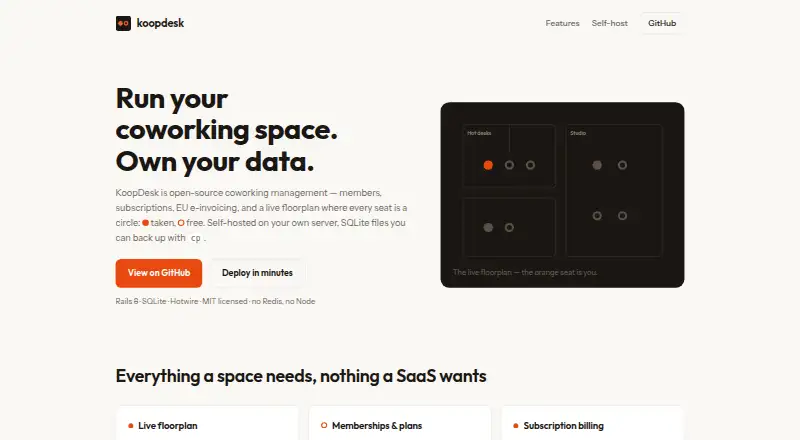
KoopDesk is free, open-source software for running coworking memberships, desk reservations, and billing. Operators can draw a floorplan that members use as a live map to check seat availability and reserve desks. Memberships can cover hot desks, dedicated desks, or private offices, on monthly or yearly cycles. Invoices can be prepared as drafts for review or issued automatically when each member’s cycle comes due. Invoice exports include PDF and EN 16931 UBL XML formats for RO e-Factura (CIUS-RO), XRechnung, or Peppol BIS 3.0. Stripe can charge saved member cards for issued invoices, but payments stay off unless Stripe keys are configured. HMAC-signed webhooks report member, invoice, and reservation events, with retries and a delivery log. KoopDesk is MIT-licensed and single-tenant, with each installation independently controlled. The maker describes deployment as one container with SQLite on a volume; TLS can run through a proxy or Kamal, and SQLite backups can be copied or managed with Litestream. Its listed stack is Rails 8, SQLite, and Hotwire.
Who it suits
KoopDesk suits operators running a coworking space who want to manage memberships, desk bookings, and invoicing in a self-hosted installation. It also fits operators who need EU e-invoice exports or a live desk map.
What it does well
- Free, MIT-licensed open-source software
- Live floorplan displays seat availability
- Supports monthly and yearly membership cycles
- Exports several EU e-invoice formats
- SQLite backups can be copied or managed with Litestream
What to know first
- Single-tenant, with separate installations independently controlled
- Stripe payments require configured keys
- Self-hosted deployment requires an SQLite volume
Plans
| Plan | Billed and limits | Price |
|---|---|---|
| MIT-licensed open-source software | self-hosted · single-tenant · coworking memberships · desk reservations · invoicing · webhooks | Free |
As koopdesk.github.io lists them, read 15 Oct 2026. The maker's own page has the final word.
Getting started
- Open the KoopDesk website.
- Deploy the app in a container with SQLite on a volume.
- Set up TLS through a proxy or Kamal.
- Draw a floorplan and configure membership types.
- Configure Stripe keys if you want to charge saved member cards.
Overview
KoopDesk is open-source software for coworking operators who need desk reservations, member billing, and EU e-invoicing in a self-hosted web app. It is best suited to teams comfortable running their own installation; its booking and invoice workflows are practical strengths, while single-tenant deployment and payment setup narrow its appeal.
Key features
Operators can draw floorplans, and members can reserve desks from a live map showing seat availability. This is useful when members need to choose a specific spot, rather than simply request access to a space. Membership types cover hot desks, dedicated desks, and private offices, with monthly or yearly cycles.
Invoices can be created as drafts for review on each member’s cycle or issued automatically. Drafts preserve an approval step; automatic issuance cuts recurring billing work once configured. Exports include PDF and EN 16931 UBL XML for RO e-Factura (CIUS-RO), XRechnung, or Peppol BIS 3.0, making the invoicing workflow relevant to operators who use those formats.
Stripe can charge saved member cards for issued invoices, but payments remain off until Stripe keys are configured. HMAC-signed webhooks cover member, invoice, and reservation events, with retries and a delivery log—useful for connecting those workflows to other services. KoopDesk is described as one container with SQLite on a volume and TLS through a proxy or Kamal. Backups can be copied as SQLite files or managed with Litestream. Its Rails 8, SQLite, and Hotwire stack needs no Redis, Postgres, or Node build step, but hosting and operational responsibility remain with the operator.
Pricing
KoopDesk’s MIT-licensed open-source plan costs nothing and is self-hosted and single-tenant. There is no recurring software fee, but the operator must run the installation. The plan has no stated seat or quota cap; each installation is independently controlled rather than shared across tenants. The maker presents it as free software, not a hosted service.
Platforms
KoopDesk is available as a self-hosted web application. Its single-tenant design means each installation is controlled independently, so it suits operators who want to manage their own deployment rather than use a shared multi-tenant service.
Who it's for
KoopDesk makes sense for coworking operators who want interactive desk reservations, recurring membership cycles, and EU e-invoice exports, and who can manage self-hosting and configure Stripe if they want card payments. It is a weaker fit for operators seeking a managed service, multiple tenants in one installation, or payments that work without configuration.
Pros and cons
- Pros: Live floorplans show seat availability and let members book specific desks, supporting spaces where desk choice matters.
- Pros: Draft or automatic cycle-based invoicing and exports to several named EU formats combine recurring billing with regional e-invoicing needs.
- Pros: The open-source plan costs nothing, and the maker describes a compact deployment using SQLite without Redis, Postgres, or a Node build step.
- Cons: Self-hosting leaves deployment and backups to the operator rather than providing a hosted workspace service.
- Cons: Single-tenant installations do not provide a shared multi-tenant setup.
- Cons: Stripe payments require configured keys and remain off otherwise.
Alternatives
For a coworking software comparison, see Coworking Space Management Software; for booking-focused options, see Room Booking Software.
Choose Deskie instead if you want a paid product with a free trial and a stated entry plan for spaces with 15 members or less: Starter costs $49 a month. Cobot is another paid option with a free trial; its Cobot External Bookings plan costs $19 a month and includes unlimited bookings and resources, while KoopDesk is free but self-hosted.
Digicuro offers paid enterprise pricing with flexible contracts. Pickspace uses custom pricing and invites businesses to book a demo. Coworks, DeskOS, Engage Apps, and essensys Operate are other alternatives.
Verdict
KoopDesk is a strong fit for a coworking operator who wants live desk booking, membership-cycle billing, and EU e-invoice exports without a software charge, and is prepared to run a self-hosted installation. Look elsewhere if you need managed hosting, multi-tenant operation, or card payments without configuring Stripe.
Verdict
KoopDesk combines coworking reservations, membership cycles, and invoice handling in a self-hosted package. Its single-tenant setup and Stripe configuration requirement are worth considering before choosing it.
Questions
How much does KoopDesk cost?
The listed MIT-licensed open-source plan is free.
Is KoopDesk open source?
Yes. It is MIT-licensed.
Which platforms does KoopDesk support?
It is listed for self-hosted and web use.
Can KoopDesk issue EU e-invoices?
Invoices export as PDF and EN 16931 UBL XML for RO e-Factura (CIUS-RO), XRechnung, or Peppol BIS 3.0.
Does KoopDesk support card payments?
Stripe can charge saved member cards for issued invoices when Stripe keys are configured.
Can multiple tenants share an installation?
KoopDesk is single-tenant; each installation is independently controlled.
Facts from KoopDesk's own pages
- Automatic invoices
- Invoices are generated on each member billing cycle. · koopdesk.github.io, 15 Oct 2026
- Backups
- SQLite data can be backed up by copying files or using Litestream. · koopdesk.github.io, 15 Oct 2026
- Billing
- Invoices can be generated on each member's cycle as drafts for review or issued automatically. · koopdesk.github.io, 4 Oct 2026
- Billing behavior
- The billing process is described as idempotent and able to catch up missed cycles. · koopdesk.github.io, 15 Oct 2026
- Data and backups
- The maker says SQLite backups are files that can be copied or managed with Litestream. · koopdesk.github.io, 4 Oct 2026
- Deployment
- The maker describes deployment as one container with SQLite on a volume and TLS through a proxy or Kamal. · koopdesk.github.io, 4 Oct 2026
- Deployment model
- KoopDesk is designed to run self-hosted in one container with SQLite on a persistent volume. · koopdesk.github.io, 15 Oct 2026
- Documentation depth
- The opened official product page provides deployment commands and feature descriptions but no separate API, SDK, help-centre or changelog pages. · koopdesk.github.io, 15 Oct 2026
- E-invoice XML
- Invoices can be exported as EN 16931 UBL XML. · koopdesk.github.io, 15 Oct 2026
- E-invoicing
- Invoices export as PDF and EN 16931 UBL XML for RO e-Factura (CIUS-RO), XRechnung, or Peppol BIS 3.0. · koopdesk.github.io, 4 Oct 2026
- GitHub organization
- The KoopDesk GitHub organization lists two public repositories named landing and cowork. · github.com, 15 Oct 2026
- Hosting cost claim
- The maker says a €4 VPS can run a complete space. · koopdesk.github.io, 15 Oct 2026
- Hot-desk capacity
- Hot-desk zones display seat-by-seat capacity. · koopdesk.github.io, 15 Oct 2026
- Infrastructure requirements
- The stated stack does not require Redis, PostgreSQL or a Node build step. · koopdesk.github.io, 15 Oct 2026
- Integrations
- The page specifically mentions Stripe and says webhooks can connect door-access or accounting systems. · koopdesk.github.io, 15 Oct 2026
- Invoice workflow
- Generated invoices may remain drafts for review or be issued automatically. · koopdesk.github.io, 15 Oct 2026
- Landing repository documentation
- The landing repository README describes a Jekyll site, editing index.html, running jekyll serve locally and automatic GitHub Pages deployment. · github.com, 15 Oct 2026
- Landing repository status
- The public landing repository shows zero stars, zero forks and two commits on the opened page. · github.com, 15 Oct 2026
- Licence
- KoopDesk is released under the MIT licence. · koopdesk.github.io, 15 Oct 2026
- License and tenancy
- KoopDesk is MIT-licensed and single-tenant, with each installation described as independently controlled. · koopdesk.github.io, 4 Oct 2026
- Limit: linked source repository
- The product page's documented clone target https://github.com/koopdesk/koopdesk returned a 404 when opened. · github.com, 15 Oct 2026
- Limit: payment setup
- Card payments do not operate until Stripe keys are configured. · koopdesk.github.io, 15 Oct 2026
- Limit: self-hosting
- Operators must provide and maintain the server, container, storage, TLS and backups themselves. · koopdesk.github.io, 15 Oct 2026
- Limit: single tenant
- The product is described as single-tenant, so one installation is not presented as a shared multi-space SaaS tenant. · koopdesk.github.io, 15 Oct 2026
Where KoopDesk stands on Freedom251
- Coworking Space Management Software#1 of 30
- Room Booking Software#2 of 34