Freedom251 › Facilities Management Software

Fiix
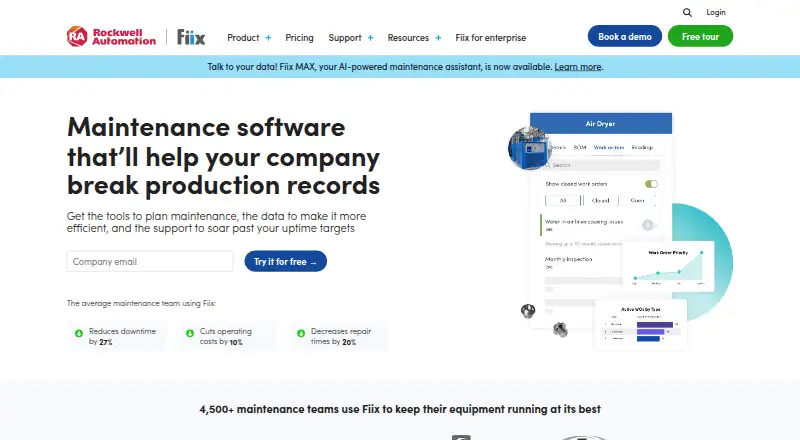
What Fiix is
Fiix is a computerized maintenance management system for organizing maintenance work and asset information. It keeps machine availability, asset costs, preventive-maintenance schedules, and history together, with QR-code access to asset records. Teams can submit and update work orders, complete tasks, and prioritize planned or unplanned maintenance. Scheduled work can be triggered by dates, meter readings, events, or alarms, with task lists and notifications generated automatically. Technicians can use the mobile app offline to view work orders and instructions and update completed tasks. Fiix also offers configurable dashboards and scheduled reports covering work orders, inventory, and KPIs. Integration options include an app exchange, two-way connectors, an open API, and an SDK. The Free plan costs nothing and includes limited users, 25 active PMs, work orders, asset management, inventory, and mobile access. Basic is $45 a month per user, and Professional is $75 a month per user. Mobile apps require Android 11 or later or iOS/iPadOS 17 or later; rooted or modded devices are unsupported.
Who it suits
Fiix suits maintenance teams that need to manage assets, work orders, and scheduled maintenance. Its offline mobile app may suit technicians who need task information when they are not connected.
What it does well
- Free plan includes 25 active PMs
- Preventive maintenance can use dates, meters, events, or alarms
- Mobile app supports offline task updates
- Dashboards and scheduled reports cover work orders and KPIs
- Fiix offers an open API and SDK
What to know first
- Free plan is limited to a specified number of users
- Mobile app requires Android 11 or later or iOS/iPadOS 17 or later
- Rooted or modded devices are unsupported
- Fiix does not natively support multifactor authentication
Limits
The Free plan is for limited users and includes 25 active PMs. Basic, at $45 a month per user, includes unlimited PMs; Professional costs $75 a month per user.
Plans
| Plan | Billed and limits | Price |
|---|---|---|
| Free | 25 active PMs · unlimited service requests · work orders · downtime tracking · asset management · mobile app · inventory · calendar | Free |
| Basic | per user, per month · unlimited PMs · reports · resource-based scheduling · certification tracking · email and phone support · pass/fail inspection | $45 a month |
| Professional | per user, per month · multi-site management · Fiix Foresight · purchasing and RFQs · nested PMs · multi-asset work orders · cycle counts · advanced notifications · custom analytics | $75 a month |
| Enterprise | custom pricing · failure codes · customizable interface · custom workflows · Integration Hub · custom API integrations · e-signatures · audit trail · SSO | On request |
| Fiix MAX | contact for pricing · AI maintenance assistant · questions about assets, history, work orders, and parts · requires Professional or Enterprise | On request |
| Lite License (Operator Access) | contact for pricing · limited operator and frontline access · requires Basic, Professional, or Enterprise | On request |
As fiixsoftware.com lists them, read 15 Oct 2026. The maker's own page has the final word.
Getting started
- Open the Fiix website.
- Choose the Free plan, which does not require a credit card, or review the paid plans.
- Access Fiix through web or its Android and iOS mobile app.
- Add and manage assets, work orders, and preventive maintenance tasks.
- Use the app exchange, smart connectors, or developer tools if integration is needed.
Overview
Fiix is a computerized maintenance management system for teams coordinating equipment upkeep, technicians and maintenance records. It is most compelling for organizations that need scheduled and reactive work managed together, including technicians who may have to work without a connection. Its breadth is useful, but the free plan has limited users and paid per-user pricing can raise costs as teams grow.
Fiix was founded in 2008 and is headquartered in Toronto, Ontario, Canada. It is available on the web, Android and iOS, with API access. Fiix says processed data is protected with 256-bit TLS encryption over HTTPS and that it undergoes independent third-party SOC 2 Type 2 audits. Daily backups are kept across geographically diverse locations on a rolling 30-day basis; CMMS data export is also available. Fiix reports average uptime of 99.5%.
Key features
- Asset records and QR access: Asset information, availability, costs, maintenance schedules and history sit together. QR-code access can help staff get to the relevant record at the equipment, rather than relying on disconnected records.
- Work orders: Staff can submit, update and complete work orders, while teams prioritize planned and unplanned maintenance. This makes Fiix relevant to operations that need routine servicing and unexpected repairs in a shared process.
- Preventive maintenance: Schedules can be triggered by dates, meter readings, events or alarms, with automated task lists and notifications. The range of triggers suits equipment whose maintenance depends on usage or operating conditions as well as calendar intervals.
- Offline mobile work: Technicians can access work orders and instructions, then update completed tasks while offline. That is a practical advantage where connectivity is unreliable. The mobile app requires Android 11 or later or iOS/iPadOS 17 or later; rooted or modified devices are unsupported.
- Reporting and analytics: Customizable interactive dashboards and scheduled reports cover work orders, inventory and KPIs. This gives managers a way to monitor maintenance and stock activity without relying only on individual work-order updates.
- Integrations and access controls: An app exchange, two-way smart connectors, developer tools and an open API offer options for connecting Fiix with other systems. Enterprise supports SAML 2.0 and OpenID Connect single sign-on. Fiix does not natively support multifactor authentication, though MFA can be used indirectly through supported single sign-on identity providers; organizations requiring native MFA should weigh that limitation.
Pricing
Fiix uses a freemium model. The Free plan costs nothing, requires no credit card, and has limited users. It includes 25 active PMs, unlimited service requests and work orders, downtime tracking, asset management, mobile app access, inventory, parts and supplies, and a calendar. It is a useful entry point for a small operation, but its user and active-PM limits make it less suitable for a larger maintenance team or a broad preventive-maintenance program.
Basic costs $45 a month, billed per user, per month. It removes the Free plan's 25-active-PM ceiling with unlimited PMs and adds reports, resource-based scheduling, user certification tracking, success team access, email and phone support, and pass/fail inspections. It fits teams that need more scheduling and oversight, though per-user billing means the cost scales with staff.
Professional costs $75 a month, billed per user, per month. It adds multi-site management, Fiix Foresight, purchasing and RFQs, nested PMs, multi-asset work orders, inventory cycle counts, advanced notifications, and custom analytics and reports. This is the more suitable tier for organizations managing multiple locations or more complex purchasing and maintenance workflows, at a higher per-user price.
Enterprise has custom pricing and adds failure codes, a customizable interface, customized workflows, Integration Hub, custom API integrations, e-signatures, an audit trail and single sign-on. It is aimed at organizations needing tailored processes or integration and access-control options beyond Professional.
Fiix MAX has contact-for-pricing terms and provides an AI maintenance assistant. It must be combined with Professional or Enterprise and is unavailable to Lite License users. Lite License (Operator Access) also has contact-for-pricing terms; it provides limited CMMS access and must be combined with Basic, Professional or Enterprise. Neither is a standalone plan.
Platforms
Fiix supports Android, iOS, web and API access. Its native mobile app is designed for offline work, with the operating-system minimums and device restrictions noted above. Technician time tracking and spare-parts inventory are also supported.
Who it's for
Fiix is a strong fit for maintenance teams that want asset records, preventive schedules, work orders and inventory handled in one CMMS, particularly when technicians need mobile access away from a reliable connection. Basic suits teams needing unlimited PMs and operational reporting; Professional is more appropriate for multi-site work and deeper purchasing and analytics needs. Smaller teams can start free, while organizations needing custom workflows, integrations or single sign-on can consider Enterprise.
It is a weaker fit for teams that require native multifactor authentication, or for buyers who need a clearly fixed Enterprise, MAX or Lite License price before engaging with sales. Per-user charges also merit scrutiny when many staff need paid access.
Pros and cons
- Pro: Preventive schedules can respond to dates, meters, events or alarms, accommodating more than calendar-based maintenance.
- Pro: Offline mobile access lets technicians consult instructions and update completed work without a connection.
- Pro: Free includes unlimited work orders and service requests, with asset management and inventory, providing a meaningful starting set of functions.
- Con: Free is capped at 25 active PMs and limited users, which can constrain a growing team or maintenance program.
- Con: Basic and Professional are priced per user per month, so costs rise with the number of paid users.
- Con: Native MFA is absent; indirect MFA depends on using a supported SSO identity provider.
Alternatives
Fracttal One is another freemium option across Android, iOS, web and API. Its plan is quote-based, so consider it if you want to compare another platform with a free plan and are prepared to request pricing.
MaintainX also offers a free plan and trial across Android, iOS, web and API. Its Basic plan is $0 per user/month and includes unlimited work orders, procedures and requester users, but limits work orders with attached procedures to two. It may suit teams prioritizing a free work-order and procedure workflow with that attachment cap in mind.
EMS Academic Scheduling is a paid option with web, desktop and mobile platform support; its page directs buyers to request a demo or contact sales rather than showing a price.
MPACT CMMS is another paid maintenance option; its Professional plan is $29 a month per user, billed annually.
MRI Property Management X has no public price and directs buyers to request a demo.
openMAINT is a free alternative available on web, Windows, macOS, Linux, iOS and Android.
ServiceNow Workplace Service Delivery is a paid option with custom-quote pricing for its Workplace Service Delivery Foundation plan.
eFACiLiTY is a paid alternative available on web, iOS and Android.
For broader browsing, see Facilities Management Software, Work Order Management Software, Church Facility Management Software and CMMS Software.
Verdict
Choose Fiix if your maintenance operation needs a shared system for assets, recurring and reactive work, inventory and offline technician access. The free plan offers a useful starting point, while Professional and Enterprise address multi-site or tailored workflows. Look elsewhere if native MFA is essential or per-user pricing and custom-priced upper tiers do not suit your buying requirements.
Verdict
Fiix brings asset records, maintenance scheduling, work orders, and reporting together, with offline mobile access. Its free plan provides a starting option, while paid plans are priced per user per month.
Questions
Does Fiix have a free plan?
Yes. Free costs nothing, is for limited users, and requires no credit card. It includes 25 active PMs, service requests, work orders, downtime tracking, asset management, mobile access, inventory, parts, supplies, and a calendar.
What do the listed paid plans cost?
Basic is $45 a month per user. Professional is $75 a month per user. Enterprise and Fiix MAX use custom or contact-for-pricing terms, and Lite License also says contact for pricing.
Which platforms does Fiix support?
Fiix lists Android, iOS, web, and API. The mobile app supports Android 11 or later and iOS/iPadOS 17 or later; rooted or modded devices are unsupported.
Does Fiix support offline mobile use?
Yes. Technicians can access work orders, update completed tasks, and view instructions while offline.
Does Fiix support multifactor authentication?
Fiix does not natively support multifactor authentication. MFA can be used indirectly through supported single sign-on identity providers.
What integration options does Fiix provide?
Fiix offers an app exchange, two-way smart connectors, and developer tools including an open API, API guide, reference, and SDK.
Facts from Fiix's own pages
- Analytics
- Dashboards and reports visualize maintenance data, while higher tiers add advanced analytics, work-order insights, asset insights, and parts forecasting. · fiixsoftware.com, 15 Oct 2026
- API
- The public API uses HTTPS POST requests with JSON payloads, HMAC-SHA256 signatures, API keys, CRUD operations, RPC calls, and multipart file uploads. · fiixlabs.github.io, 15 Oct 2026
- API documentation depth
- The reference identifies API version 2.48.1 and is linked under Apache License 2.0; the no-SDK guide documents authentication, requests, responses, errors, CRUD, RPC, and uploads. · fiixlabs.github.io, 15 Oct 2026
- Asset management
- Asset tools track equipment performance, hierarchy, history, costs, and maintenance activity. · fiixsoftware.com, 15 Oct 2026
- Availability
- Fiix states that it averages 99.5% uptime using automation across availability zones and replication technology. · fiixsoftware.com, 1 Oct 2026
- Backups
- Fiix backs up data daily in geographically diverse locations on a rolling 30-day basis and allows CMMS data export. · fiixsoftware.com, 1 Oct 2026
- Company founding and headquarters
- LinkedIn states that Fiix was incorporated in 2008 and is headquartered in Toronto, Ontario. · linkedin.com, 15 Oct 2026
- Company legal identity
- Fiix is a trademark of Rockwell Automation, Inc., and the Google Play developer is Rockwell Automation Canada Ltd. · fiixsoftware.com, 15 Oct 2026
- Company size
- LinkedIn lists Fiix by Rockwell Automation in the 201–500 employee size range. · linkedin.com, 15 Oct 2026
- Compliance
- Fiix is subject to independent third-party audits for SOC 2 Type 2 compliance. · fiixsoftware.com, 1 Oct 2026
- Documentation and support
- The Help Center includes getting-started, assets, maintenance, mobile, parts, purchasing, reporting, analytics, administration, and release-note categories, plus community and learning resources. · helpdesk.fiixsoftware.com, 15 Oct 2026
- Encryption
- Fiix states that all processed data is protected with 256-bit TLS encryption over HTTPS. · fiixsoftware.com, 1 Oct 2026
- Founded
- 2008 · fiixsoftware.com, 28 Sept 2026
- Headquarters
- Toronto, Ontario, Canada · fiixsoftware.com, 28 Sept 2026
- Integrations
- Fiix connects with ERP, BI, productivity, OT, MES, SCADA, PLC, HMI, sensor, and other systems through its Integration Hub and partner connectors. · fiixsoftware.com, 15 Oct 2026
- Inventory
- Inventory features manage parts and supplies, stock levels, purchasing, RFQs, and cycle counts by plan. · fiixsoftware.com, 15 Oct 2026
- Limit: mobile functionality
- Some reviewers say the mobile app lacks field features, has restricted access to past work orders, or does not fully match desktop behavior. · play.google.com, 15 Oct 2026
- Limit: pricing and cancellation
- Independent complaints describe Fiix as expensive at scale and cite dissatisfaction with annual contracts and advance cancellation requirements. · trustpilot.com, 15 Oct 2026
- Limit: reporting and customization
- Reviewers commonly report that custom reports are difficult to build, inaccurate in some cases, and less flexible than desired. · softwareadvice.com, 15 Oct 2026
- MFA limitation
- Fiix does not natively support multifactor authentication; MFA can be used indirectly through supported single sign-on identity providers. · helpdesk.fiixsoftware.com, 1 Oct 2026
- Mobile and offline
- The mobile app lets technicians manage work, assets, parts, photos, barcodes, signatures, and requests offline. · apps.apple.com, 15 Oct 2026
- Mobile offline use
- The Fiix mobile app lets technicians access work orders, update completed tasks, and view instructions while offline. · fiixsoftware.com, 1 Oct 2026
- Mobile platforms
- The mobile app supports Android 11 or later and iOS/iPadOS 17 or later; rooted or modded devices are unsupported. · helpdesk.fiixsoftware.com, 1 Oct 2026
- Named integrations
- Official integration pages name SAP, Oracle NetSuite, Sage, Microsoft Dynamics, Infor, Epicor, QuickBooks, Power BI, Tableau, Workday, Teams, Slack, and Outlook. · fiixsoftware.com, 15 Oct 2026
Where Fiix stands on Freedom251
- Facilities Management Software#2 of 34
- Church Facility Management Software#2 of 26
- Work Order Management Software#3 of 38
- CMMS Software#5 of 37