
Decisions
What Decisions is
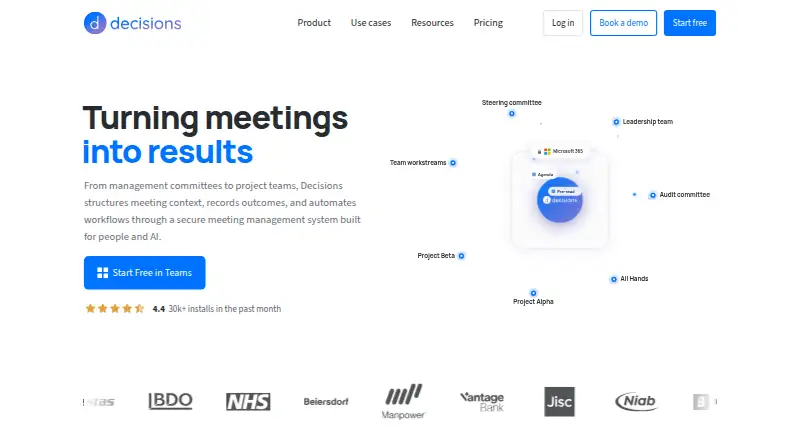
Decisions is meeting management software for recording and transcribing meetings, creating AI summaries, tracking action items and keeping a searchable archive. Teams can co-author agendas and collaborate on structured meetings stored in Teams. Tasks sync to Microsoft Planner with assignees and due dates. The service connects with Microsoft 365 apps including OneNote, Planner and SharePoint, and optional AI connectors include Microsoft Copilot, Claude and ChatGPT. Meeting content stays in the organization’s Microsoft 365 tenant; AI processing uses Azure OpenAI with no data retention. Decisions is available in Teams, web, desktop, iOS, Android, Outlook and Word. It holds SOC 2 Type II and ISO 27001:2022 certifications, is GDPR compliant and aligned with the EU AI Act. The Free plan is for organizations with up to 30 users on their Microsoft 365 tenant and requires no credit card. Paid plans start at $8/user/mo (annual); Basic includes 200 AI credits monthly. Monthly billing can be canceled anytime, while annual billing runs 12 months and saves up to 20%.
Who it suits
It suits organizations that run meetings through Microsoft 365 and want agendas, notes, action items and meeting content tied to that environment. The free option is limited to organizations with up to 30 users on their Microsoft 365 tenant.
What it does well
- Records and transcribes meetings, with AI summaries.
- Tasks sync to Planner with assignees and due dates.
- Meeting content stays in the organization’s Microsoft 365 tenant.
- Available across Teams, web, desktop, mobile, Outlook and Word.
What to know first
- Free plan is limited to Microsoft 365 tenants with up to 30 users.
- Basic provides 200 AI credits per month.
- Paid plans start at $8/user/mo (annual).
Limits
The Free plan is available to organizations with up to 30 users on their Microsoft 365 tenant and includes 100 AI credits per month. Basic includes 200 monthly AI credits; Business+ includes 500, and Executive includes unlimited AI credits.
Plans
| Plan | Billed and limits | Price |
|---|---|---|
| Free | billed monthly · 100 AI credits per month | Free |
| Basic | Billed annually · 200 AI credits per month | $8 a month |
| Business+ | Billed annually · 500 AI credits per month | $15 a month |
| Executive | Billed annually · Unlimited AI credits | $29 a month |
As meetingdecisions.com lists them, read 28 Sept 2026. The maker's own page has the final word.
Getting started
- Open the Decisions app in the Microsoft Teams app store.
- Start with the Free option; it does not require a credit card.
- Ask an admin to deploy through the Microsoft 365 Admin Center.
- Choose a paid plan if you need more than 100 AI credits per month.
Overview
Decisions is meeting-management software for organizations that run on Microsoft 365. It suits teams that want to connect meeting preparation, records and follow-up to Microsoft tools; its strongest case is that those materials stay in the organization’s tenant and tasks flow into Planner.
It covers the meeting cycle from co-authored agendas and structured meetings in Teams to recordings, transcripts with speaker labels, AI summaries and searchable records. That breadth is useful, but the free tier’s organization-size ceiling and monthly AI quotas matter when deciding whether it will stretch across a team.
Key features
- Capture and review: Recording, transcription with speaker labels, AI summaries and a searchable archive make Decisions useful beyond the live meeting, particularly for teams that need to revisit discussions.
- Agendas and collaboration: Note templates and co-authored agendas support structured meetings stored in Teams. This is a better fit for teams already using that environment than for those seeking a separate, platform-neutral workspace.
- Accountable follow-up: Action-item tracking syncs tasks to Microsoft Planner with assignees and due dates, giving follow-up a clearer owner and deadline.
- Microsoft workflow: Connections include OneNote, Planner and SharePoint, with optional AI connectors for Microsoft Copilot, Claude and ChatGPT. AI processing uses Azure OpenAI with no data retention.
- Deployment and data: Meeting content remains in the organization’s Microsoft 365 tenant. Admins can deploy through Microsoft 365 Admin Center without end-user software installation; individual installation from the Teams app store is stated to take 30 seconds.
Decisions is SOC 2 Type II and ISO 27001:2022 certified, GDPR compliant and EU AI Act aligned. Those credentials and tenant-based storage will matter to organizations assessing governance alongside meeting features.
Pricing
Decisions uses a freemium model. The free plan costs nothing per month and includes 100 AI credits monthly. It is available to organizations with up to 30 users on their Microsoft 365 tenant, so it can serve smaller teams but not larger tenants. Starting free requires no credit card.
- Basic: $8 per user per month, billed annually, with 200 AI credits per month. It is the entry paid tier for teams that outgrow the free cap or need more monthly AI usage.
- Business+: $15 per user per month, billed annually, with 500 AI credits per month. It fits teams whose AI workload exceeds Basic’s allowance.
- Executive: $29 per user per month, billed annually, with unlimited AI credits. It is the clearest choice for organizations that cannot work within a monthly credit quota, at a substantial per-user premium.
Annual billing runs for 12 months and saves up to 20%. Monthly billing has no lock-in and can be canceled anytime, which offers more flexibility than committing annually. The published prices are per user, so organization-wide costs rise with seats; the free tier also has its separate 30-user tenant limit.
Platforms
Decisions is available in Teams, web, desktop, iOS, Android, Outlook and Word. That spread makes it accessible across Microsoft work surfaces as well as mobile devices. Customer support is available by email at [email protected].
Who it's for
Choose Decisions if your organization uses Microsoft 365 and wants meeting materials kept in its tenant, with Planner handling assigned, dated follow-up. Its structured-meeting tools, deployment path and security credentials make it particularly relevant to organizations that prioritize integration and governance.
Look elsewhere if your organization is outside Microsoft 365, if a 30-user free-plan ceiling is too restrictive, or if your likely AI use does not fit the paid plans’ monthly credit allowances. The free option is a practical way to start, but it is not a no-limit substitute for a paid plan.
Pros and cons
- Pro: Planner sync includes assignees and due dates, so meeting actions can move into a task workflow with clear ownership.
- Pro: Meeting content stays in the organization’s Microsoft 365 tenant, supported by SOC 2 Type II and ISO 27001:2022 certification, GDPR compliance and EU AI Act alignment.
- Pro: Admin deployment through Microsoft 365 Admin Center avoids requiring end users to install software.
- Con: The free plan is limited to Microsoft 365 tenants with up to 30 users, which rules it out for larger organizations.
- Con: Free, Basic and Business+ include 100, 200 and 500 monthly AI credits respectively; teams with heavier usage must move to Executive for unlimited credits.
- Con: The quoted paid prices are annual-billing rates for each user, so larger teams face a higher total commitment; monthly billing is more flexible but is not the quoted rate.
Alternatives
For broader category browsing, compare meeting management software or meeting notes software.
- Fellow is worth considering if you want a freemium alternative with a free trial and broad platform support; its free plan provides five AI notes per user over a lifetime.
- AgreeDo is another freemium option with a free trial; AgreeDo Basic allows four meetings monthly, three participants per meeting and one attachment per meeting.
- Geekbot may suit a team seeking a web-based, API-connected freemium alternative; its Starter plan covers 10 users, while Basic — Standups is $2.50 a month on annual billing.
- Parabol is a web or self-hosted alternative for teams that prioritize open-source software; its maker says its code is scrutinized by a developer community.
- 4Minitz is a free, open-source, MIT-licensed option for teams willing to self-host.
- Magic Minutes offers a web-based free plan for meeting attendees, including access to view and download minutes and meeting packs, upload reports, comment and close off actions.
- BoardPAC is an alternative with mobile, desktop, web and self-hosted platform options.
- Decisions is a separate listing for a paid product with free-plan availability and Foundation and Growth plans.
Verdict
Decisions is a strong choice for Microsoft 365 organizations that want meeting capture, structured collaboration and accountable Planner follow-up to remain within their existing environment. Its tenant-based storage and broad meeting workflow are the reasons to choose it; the 30-user free cap, AI credit limits and annual paid commitments are the reasons to compare alternatives before rolling it out widely.
Verdict
Decisions brings meeting capture, collaboration and Planner task sync into a Microsoft 365-centered workflow. Check the free-plan user limit and monthly AI credit allowances against your organization’s needs.
Questions
Does Decisions have a free plan?
Yes. The Free plan includes 100 AI credits per month and is available to organizations with up to 30 users on their Microsoft 365 tenant.
Does starting for free require a credit card?
No. The free start option does not require a credit card.
How much do paid plans cost?
Basic is $8.00 per user per month, Business+ is $15.00, and Executive is $29.00. Each is billed annually.
Which platforms support Decisions?
Decisions is available in Teams, web, desktop, iOS, Android, Outlook, and Word.
What Microsoft 365 services does it connect with?
It connects with OneNote, Planner, and SharePoint. Tasks can sync to Microsoft Planner with assignees and due dates.
Where is meeting content stored and how is AI processed?
Meeting content stays in the organization’s Microsoft 365 tenant. AI processing uses Azure OpenAI with no data retention.
Facts from Decisions's own pages
- Action-item tracking
- Yes · meetingdecisions.com, 23 Sept 2026
- Admin deployment
- Admins can deploy through Microsoft 365 Admin Center without end-user software installation. · meetingdecisions.com, 28 Sept 2026
- AI credit limits
- Monthly AI credits are 100 Free, 200 Basic, 500 Business+, and unlimited Executive. · meetingdecisions.com, 28 Sept 2026
- AI summaries
- Yes · meetingdecisions.com, 23 Sept 2026
- Annual billing savings
- Annual billing runs for 12 months and saves up to 20%. · meetingdecisions.com, 28 Sept 2026
- Customer base
- Decisions is trusted by more than 5,000 organizations worldwide. · meetingdecisions.com, 28 Sept 2026
- AI data processing
- AI processing uses Azure OpenAI with no data retention. · meetingdecisions.com, 28 Sept 2026
- Free plan
- Yes · meetingdecisions.com, 23 Sept 2026
- Free plan limit
- Available to organizations with up to 30 users on their Microsoft 365 tenant. · meetingdecisions.com, 28 Sept 2026
- Trial payment requirement
- The free start option does not require a credit card. · meetingdecisions.com, 28 Sept 2026
- Installation time
- Decisions installs from the Microsoft Teams app store in 30 seconds. · meetingdecisions.com, 28 Sept 2026
- Meeting recording
- The mobile app can record in-person meetings for AI capture. · meetingdecisions.com, 28 Sept 2026
- Microsoft integrations
- Connects with Microsoft 365 apps and services including OneNote, Planner, and SharePoint. · meetingdecisions.com, 28 Sept 2026
- Monthly billing
- Monthly billing has no lock-in and can be canceled anytime. · meetingdecisions.com, 28 Sept 2026
- Note templates
- Yes · meetingdecisions.com, 23 Sept 2026
- Optional AI connectors
- Optional connectors include Microsoft Copilot, Claude, and ChatGPT. · meetingdecisions.com, 28 Sept 2026
- Planner task sync
- Tasks sync to Microsoft Planner with assignees and due dates attached. · meetingdecisions.com, 28 Sept 2026
- Supported platforms
- Available in Teams, web, desktop, iOS, Android, Outlook, and Word. · meetingdecisions.com, 28 Sept 2026
- Meeting recording
- Yes · meetingdecisions.com, 23 Sept 2026
- Searchable archive
- Yes · meetingdecisions.com, 23 Sept 2026
- Security certifications
- SOC 2 Type II and ISO 27001:2022 certified; GDPR compliant and EU AI Act aligned. · meetingdecisions.com, 28 Sept 2026
- Paid from
- 8 · meetingdecisions.com, 23 Sept 2026
- Support channel
- Customer support is available by email at [email protected]. · meetingdecisions.com, 28 Sept 2026
- Team collaboration
- Users can co-author agendas and collaborate on structured meetings stored in Teams. · meetingdecisions.com, 28 Sept 2026
Where Decisions stands on Freedom251
- Agenda Tools#1 of 20
- Meeting Management Software#5 of 36
- Meeting Notes Software#19 of 112