Freedom251 › Flexible Workspace Management Software

Workplacify
What Workplacify is
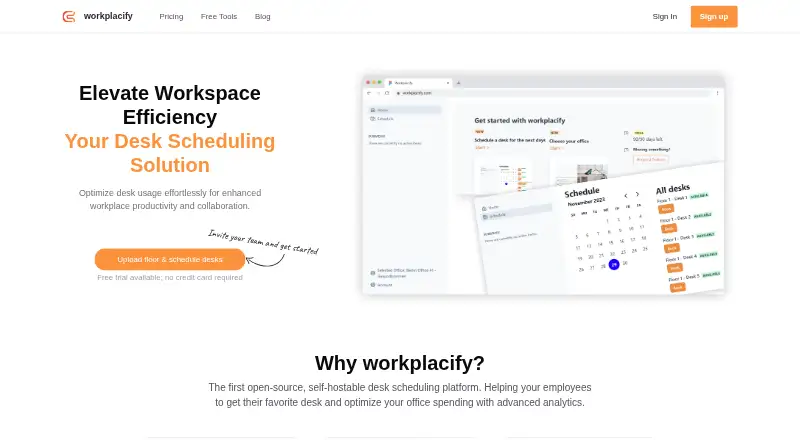
Workplacify is an open-source desk scheduling platform for hybrid workplaces. Employees can reserve desks, while organizations manage offices, floors, assigned desks, and floor maps. Managers can set how far ahead employees may book, restrict bookings to selected days, and allow past bookings. These settings apply to an entire office; more granular controls for departments or zones are being explored. The Community Edition is free, can be modified and self-hosted, and includes unlimited users and desks. Community Edition support is through forums and GitHub. The site offers a three-month free trial without a credit card. Paid plans listed are Large companies at $5 a month, billed per 10 users, and Starter at $10 a month, also billed per 10 users. Enterprise pricing is tailored and not listed; that plan includes SSO and self-hosting support. The company says Enterprise support includes dedicated assistance and guaranteed SLAs. Workplacify is headquartered in Berlin, Germany. Its privacy policy says data is stored in a DigitalOcean database in Frankfurt and users may request deletion.
Who it suits
The free self-hosted edition is described as suitable for smaller businesses and technically capable organizations. Enterprise is intended for larger organizations.
What it does well
- Community Edition supports unlimited users and desks
- Create floor maps and assign desks to floors
- Three-month trial requires no credit card
- Enterprise lists SSO and self-hosting support
What to know first
- Office booking rules apply to the whole office
- Community support is through forums and GitHub
- Enterprise pricing is tailored and not listed
- Slack integration is listed as coming soon
Limits
Community Edition provides core desk booking, user management, and basic analytics. Starter is limited to 10 offices, 50 floors, and 200 colleagues; its basic workplace analytics are marked as coming soon. Office booking settings apply to the whole office.
Plans
| Plan | Billed and limits | Price |
|---|---|---|
| Community Edition | Self-hosted · Core desk booking, user management, and basic analytics · Unlimited users and desks | Free |
| Starter | per 10 users/month · Up to 10 offices · Up to 50 floors · Up to 200 colleagues · Desk scheduling · Invitation templates · Basic Workplace Analytics coming soon | $10 a month |
| Large companies | per 10 users/month · For organizations with > 200 employees · Unlimited offices, floors, and colleagues · Desk scheduling · Advanced workplace analytics, Slack integration, and monthly email reports coming soon | $5 a month |
| Enterprise | Tailored to your needs · Unlimited offices and floors · SSO · Self-hosting support · Workplacify creates floor plans · 25+ communication templates and custom SSO providers coming soon | On request |
As workplacify.com lists them, read 11 Oct 2026. The maker's own page has the final word.
Getting started
- Open workplacify.com.
- Choose the Community Edition for self-hosting, or review the paid plans.
- Use the three-month free trial without entering a credit card.
- Set up offices and floors, then assign desks and create floor maps.
- Configure booking rules for each office.
Workplacify is an open-source desk-reservation and office-management platform for hybrid workplaces. It suits technically capable smaller teams that can self-host, as well as larger organizations coordinating many locations. Its strongest case is structured multi-office booking; organizations needing different rules for individual departments or zones should be cautious.
Overview
Employees reserve desks while managers organize multiple offices, floors, and desk locations. Desks can be assigned to floors and shown on floor maps, giving a distributed workplace a comprehensible physical layout instead of a flat list of seats.
Office Settings let managers set booking lead times, restrict reservations to selected days, and permit past bookings. These controls support a consistent company policy, but they apply to an entire office. If one department or zone needs different limits, the current model is too broad; more granular controls are still being explored.
The Community Edition's publicly available code can be downloaded, changed, and self-hosted. That gives capable organizations control over deployment and customization, while support is limited to community forums and GitHub rather than a staffed service desk.
Key features
- Multi-office and floor management: Unlimited office and floor structures on the relevant paid tiers make Workplacify suitable for organizations with several sites. Floor assignment and maps help employees choose a specific physical desk.
- Desk scheduling: Reservations form the core workflow across plans, with office-level controls for advance booking, permitted days, and past bookings.
- Analytics: Basic analytics are planned for Starter, while advanced workplace analytics and monthly email reports are planned for Large companies. These additions may help utilization reviews, but they are not the reason to choose the entry tier today.
- Open-source deployment: Community Edition is self-hosted and includes core booking, user management, and basic analytics. It favors teams able to run and maintain their own installation.
- Identity and support options: Enterprise includes SSO and self-hosting support, with integrations described for identity providers such as Okta and Azure AD. Dedicated assistance and guaranteed SLAs are part of paid Enterprise support.
- Privacy controls: User data is stored in a DigitalOcean database in Frankfurt, Germany, and users may request deletion. Workplacify collects personal identification information, text entered into tracking functionality, and Google Analytics data, so buyers should assess that data practice against their policy requirements.
Pricing
The free Community Edition is self-hosted and costs nothing. It includes core desk booking, user management, basic analytics, and unlimited users and desks. It is the logical fit for smaller businesses and technically capable organizations; the trade-off is community-only support and responsibility for hosting.
Large companies costs $5 a month, billed per 10 users/month, for organizations with more than 200 employees. It provides unlimited offices, floors, and colleagues plus desk scheduling. Advanced analytics, Slack integration, and monthly email reports are marked as coming soon, so this tier is mainly about scale rather than currently delivered extras.
Starter costs $10 a month, billed per 10 users/month. It allows up to 10 offices, 50 floors, and 200 colleagues, with desk scheduling and invitation templates; basic workplace analytics are coming soon. It fits a growing, bounded portfolio, but the published caps matter for larger deployments.
Enterprise uses custom pricing tailored to your needs. It adds unlimited offices and floors, SSO, self-hosting support, floor-plan creation by Workplacify, and 25-plus communication templates; custom SSO providers are coming soon. Paid customers receive dedicated support and guaranteed SLAs. Every paid plan has a three-month free trial with no credit card required, and customers can cancel at any time.
Platforms
Workplacify runs on the web and is available as self-hosted software. The self-hosted route is confined to Community Edition unless Enterprise support is purchased, making deployment capability an important buying consideration.
Who it's for
Choose Workplacify if you need desk booking tied to a model of multiple offices, floors, and maps, and either want open-source control or require enterprise-scale structure. Community Edition is especially appropriate for smaller organizations with technical ownership. Starter suits teams within its office, floor, and colleague limits, while Large companies targets organizations above 200 employees. Enterprise is the better fit when SSO, vendor-created floor plans, self-hosting assistance, and contractual support matter.
Look elsewhere if booking policies must vary by department or zone, if you require a native mobile app, or if your team cannot maintain self-hosted infrastructure and does not need the paid support tiers.
Pros and cons
Pros
- Unlimited free seats and desks: Community Edition avoids per-user growth costs.
- Useful physical structure: Floor assignment and maps make multi-site desk selection clearer.
- Deployment control: Public code and self-hosting support customization and organizational control.
- Enterprise identity support: SSO and provider integrations address larger-company access requirements.
- Low-risk evaluation: The three-month trial needs no credit card and can be cancelled at any time.
Cons
- Office-wide rules only: Departments and zones cannot currently receive separate booking policies.
- Community support is informal: Free users rely on forums and GitHub rather than guaranteed assistance.
- Several paid features are pending: Slack, reports, and some analytics are labelled coming soon.
- Starter has hard ceilings: Ten offices, 50 floors, and 200 colleagues may force an upgrade.
- No published Enterprise price: Budgeting requires a tailored quote.
Alternatives
Officely is a better match for teams wanting Android and iOS apps and a freemium entry plan capped at five users, with paid per-user booking beyond that.
Roomzilla suits resource-focused booking, offering a free tier for up to three resources and paid unlimited resources.
desk.ly is worth considering when a free plan for up to 15 users and Android, iOS, web, and API access are priorities.
Deska fits a very small single office: its free plan covers one office, two desks, and two users with an interactive map.
Flexopus is an alternative for buyers seeking mobile and API support with a 30-day all-function demo rather than a free ongoing plan.
Hot Desk is a web-only option with a free five-seat starter tier and per-seat scaling.
DeskGrid is the closest open-source comparison for teams wanting MIT-licensed, self-hosted software at no license cost.
deskbird is suited to organizations that want native mobile apps plus desk, room, and parking booking in a paid business plan.
For a broader shortlist, see Desk Booking Software.
Verdict
Workplacify is a strong choice for technically capable organizations that need desk reservations organized across offices and floors, especially when self-hosting or SSO matters. Choose it for its free unlimited-seat Community Edition or its scalable paid structures; look elsewhere if your booking policies must differ by department or zone, or if you need mature mobile and communication integrations immediately.
Verdict
Workplacify combines desk reservations with office and floor management, with a free self-hosted edition and paid options. Check whether office-wide booking rules fit your needs; more granular department or zone rules are still being explored.
Questions
Is there a free plan?
Yes. The Community Edition is free and includes core desk booking, user management, basic analytics, and unlimited users and desks.
How much do the paid plans cost?
Starter is $10 a month, billed per 10 users. Large companies is $5 a month, also billed per 10 users. Enterprise pricing is tailored to the organization.
Can I try Workplacify before paying?
The site offers a three-month free trial with no credit card required, and says customers can cancel at any time.
Can Workplacify be self-hosted?
Yes. The Community Edition can be downloaded, modified, and self-hosted. Enterprise also lists self-hosting support.
Does Workplacify support SSO?
SSO is listed for Enterprise, which also describes support for identity providers such as Okta or Azure AD.
Where is user data stored?
Workplacify's privacy policy says user data is stored in a DigitalOcean database in Frankfurt, Germany. Users may request data deletion.
Facts from Workplacify's own pages
- Booking rules
- Office Settings let managers limit how far ahead employees can book, restrict bookings to selected days, and allow past bookings. · workplacify.com, 11 Oct 2026
- Data collected
- The privacy policy says Workplacify collects personal identification information, text entered into its tracking functionality, and Google Analytics data. · workplacify.com, 11 Oct 2026
- Floor planning
- Users can assign desks to floors and create floor maps. · workplacify.com, 11 Oct 2026
- Headquarters
- Berlin, Germany · workplacify.com, 28 Sept 2026
- Notable booking limit
- Office Settings currently apply to an entire office; the company says more granular rules for departments or zones are being explored. · workplacify.com, 11 Oct 2026
- Office management
- The product supports managing multiple offices with multiple floors. · workplacify.com, 11 Oct 2026
- Open source
- The company says its source code is publicly available for review, and its Community Edition can be downloaded, modified, and self-hosted. · workplacify.com, 11 Oct 2026
- Privacy and storage
- The privacy policy says user data is stored in a DigitalOcean database in Frankfurt, Germany, and users may request data deletion. · workplacify.com, 11 Oct 2026
- Purpose
- Workplacify is an open-source desk scheduling platform for hybrid workplaces that helps employees reserve desks and organizations manage office use. · workplacify.com, 11 Oct 2026
- Slack
- Slack integration is listed as coming soon for the Large companies plan. · workplacify.com, 11 Oct 2026
- SSO
- The Enterprise plan lists SSO, and the company describes integrations with identity providers such as Okta or Azure AD. · workplacify.com, 11 Oct 2026
- Support
- The company says Community Edition support is through community forums and GitHub, while paid Enterprise support includes dedicated assistance and guaranteed SLAs. · workplacify.com, 11 Oct 2026
- Target users
- The company describes the free self-hosted edition as suitable for smaller businesses and technically capable organizations, and its Enterprise offering as intended for larger organizations. · workplacify.com, 11 Oct 2026
- Trial
- The site offers a three-month free trial with no credit card required and says customers can cancel at any time. · workplacify.com, 11 Oct 2026
Where Workplacify stands on Freedom251
- Flexible Workspace Management Software#6 of 25
- Desk Booking Software#9 of 30