Freedom251 › Desk Booking Software

Hot Desk
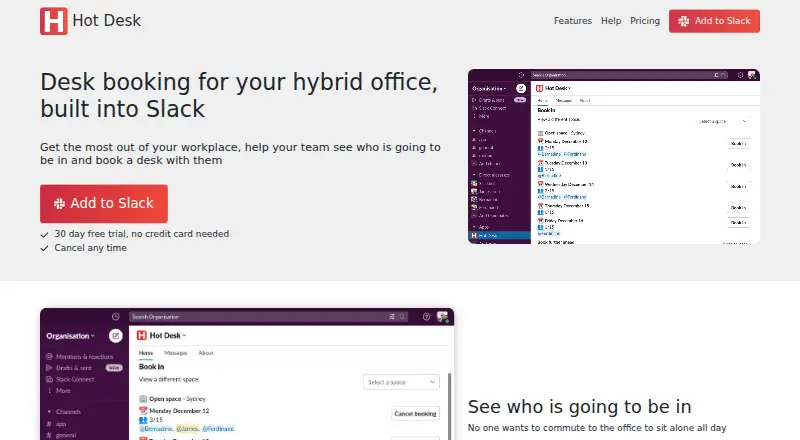
What Hot Desk is
Hot Desk helps hybrid office teams coordinate attendance and reserve desks and meeting rooms through Slack. Teams can set up spaces by name and location, book preferred desks and see who is sitting nearby. In Slack, users can check meeting-room availability, equipment and capacity before making a reservation. Admins can restrict a space to selected users and send weekly reminders to book a workplace space. Parking can be handled through reservations for numbered spots or a booking limit for a car park. Google Calendar sync updates working locations and meeting-room bookings from Hot Desk to Google Calendar; the listed sync runs in that direction only. The web service has a free Starter plan for up to five seats, with unlimited admins and no per-user charge. Scale costs $2.35 a month per seat and includes unlimited seats and admins. Pricing is based on bookable workplace capacity, and a 30-day trial is listed. Hot Desk is headquartered in Corby, England, UK, and provides setup and usage guides plus a support contact form.
Who it suits
It suits hybrid teams that use Slack to coordinate office attendance and book desks, rooms or parking. Its free Starter plan is limited to five seats.
What it does well
- Manage workplace bookings within Slack.
- Book desks and see nearby colleagues.
- Check meeting-room equipment and capacity.
- Free Starter plan covers up to five seats.
- Scale costs $2.35 a month per seat.
What to know first
- Google Calendar sync runs one way.
- Starter plan is limited to five seats.
- Slack permissions include reading channel membership and direct messages sent to Hot Desk.
Limits
The free Starter plan is capped at five seats.
Plans
| Plan | Billed and limits | Price |
|---|---|---|
| Starter | Up to 5 seats · unlimited admins · no cost per user | Free |
| Scale | Per seat per month · Unlimited seats · unlimited admins · no cost per user | $2.35 a month |
| Enterprise | For organisations with over 500 seats · unlimited admins · no cost per user | On request |
As gethotdesk.com lists them, read 9 Oct 2026. The maker's own page has the final word.
Getting started
- Open https://gethotdesk.com/.
- Use the web service and connect workplace activity through Slack.
- Configure named spaces and locations for the office.
- Choose the free Starter plan for up to five seats or the Scale plan at $2.35 per seat per month.
- Use the listed 30-day trial if evaluating a paid plan.
Hot Desk is a Slack-centred workplace booking service for hybrid offices. It is best suited to teams that want desks, rooms and parking coordinated inside Slack, especially where colleagues need visibility of office attendance. Its capacity-based pricing is attractive for larger teams, but the one-way calendar connection and broad Slack permissions deserve attention.
Overview
Hot Desk lets teams configure workplaces as named spaces and locations, then manage bookings through Slack rather than a separate workflow. Staff can see who is coming in, reserve a desk or room, and arrange parking. That Slack focus makes it a natural fit for organisations already using Slack as their daily communication hub; teams centred on another collaboration platform will have less reason to choose it.
The service is web-based and headquartered in Corby, England. It includes desk check-in, setup and usage guides, and a contact form for support. Its privacy policy says data is deleted within seven days after uninstalling Hot Desk or requesting deletion. It describes administrative and electronic safeguards, while acknowledging that no information can be guaranteed secure.
Key features
Workspaces can be divided into named areas and locations, useful for offices with multiple floors, rooms or sites. Teams can reserve a preferred desk and see nearby colleagues, which supports coordinated seating rather than isolated reservations. Administrators can restrict a space to specified users, giving offices a way to apply access rules.
Meeting-room booking in Slack shows availability, equipment and capacity before a reservation is made. Parking is covered too: teams can book numbered spots or impose a booking limit for a car park. Weekly reminders can prompt staff to reserve a workplace space, helping administrators encourage regular booking without manually chasing individuals.
Google Calendar receives working locations and meeting-room bookings from Hot Desk. The integration is one way, so edits made in Google Calendar do not return to Hot Desk; calendar-led workflows should therefore consider another product. Slack permissions include reading channel membership and direct messages sent to Hot Desk, plus uploading requested reports, so administrators should review that access before connecting it.
Pricing
Hot Desk uses a freemium model and prices by bookable workplace capacity rather than charging per user. A 30-day trial is available.
- Starter: free, for up to five seats, with unlimited administrators and no cost per user. It suits very small teams validating a Slack booking workflow, but the five-seat ceiling makes it unsuitable for a growing office.
- Scale: $2.35 per seat per month, with unlimited seats, unlimited administrators and no cost per user. This is the practical choice for larger teams that want predictable capacity-based access; the published term is per seat per month.
- Enterprise: custom pricing for organisations with more than 500 seats, with unlimited administrators and no cost per user. It is aimed at very large deployments that exceed Scale's stated positioning.
The free tier's limit is seats, not administrator accounts. Moving to Scale removes the seat ceiling while retaining unlimited administrators, but introduces the monthly per-seat charge.
Platforms
Hot Desk is available on the web and is designed to be operated through Slack.
Who it's for
Choose Hot Desk if your hybrid office already relies on Slack and needs one workflow for desks, meeting rooms and parking. Named spaces, access restrictions and nearby-seat visibility are particularly useful for multi-area offices. The free Starter plan fits teams of five or fewer; Scale is the more credible option once the workplace exceeds that limit. Look elsewhere if two-way calendar editing, native mobile apps or a platform other than Slack is central to your process.
Pros and cons
- Pros: Slack-based booking keeps workplace reservations in an existing communication tool; desk, room and parking coverage handles more than seating alone; preferred desks, nearby-colleague visibility and check-in support coordinated attendance; capacity-based pricing avoids a charge for every user.
- Cons: Google Calendar sync is one way, so calendar edits cannot update Hot Desk; Starter is capped at five seats; Slack access includes channel-membership and direct-message permissions that organisations should assess; the web-only platform may not suit teams seeking dedicated mobile applications.
Alternatives
For a broader directory of options, see Desk Booking Software.
- Officely is a freemium alternative with Android, iOS and web apps; pick it when mobile access matters, or when a free plan for up to five users and simple desk booking meet your needs.
- Roomzilla suits teams focused on resource and room reservations, with a free tier for up to three resources and Android, iOS and web support.
- desk.ly offers a free plan for up to 15 users and supports Android, iOS, web and API access, making it worth considering for a larger free deployment.
- Deska is a fit for a very small office needing a free plan limited to one office, two desks and two users.
- Flexopus is a paid service with a 30-day demo and Android, iOS, web and API support; choose it when a non-free, multi-platform option is preferable.
- Workplacify is a self-hosted, open-source option for organisations that want publicly reviewable code and a downloadable Community Edition.
- DeskGrid is a free, MIT-licensed, self-hosted choice with API and web support.
- deskbird is a paid alternative covering desk, room and parking booking with native mobile apps and Microsoft Teams integration.
Verdict
Hot Desk is a strong choice for Slack-first hybrid teams that want desk, room and parking reservations managed together, with a free entry point for up to five seats and capacity-based Scale pricing beyond that. Choose another service if you need two-way Google Calendar control, native mobile apps or less extensive Slack permissions.
Verdict
Hot Desk combines Slack-based desk, room and parking bookings with a free plan for smaller teams. Its Google Calendar sync is one way, and the free plan covers no more than five seats.
Questions
Is Hot Desk free?
Yes. Starter costs nothing and supports up to five seats, with unlimited admins.
How much does the paid plan cost?
Scale costs $2.35 per seat per month. Pricing is based on bookable workplace capacity, with no charge per user.
Is there a free trial?
Yes. A 30-day trial is listed.
What platforms does Hot Desk support?
Hot Desk is listed as web-based and supports workplace management through Slack.
Does Hot Desk sync with Google Calendar?
Yes. It sends working locations and meeting room bookings from Hot Desk to Google Calendar; the sync is one way.
When is data deleted?
The privacy policy says data is deleted within seven days after uninstalling Hot Desk or requesting deletion.
Facts from Hot Desk's own pages
- Booking controls
- A space can be restricted so only specified users can book it. · gethotdesk.com, 9 Oct 2026
- Calendar integration
- Google Calendar sync updates working locations and meeting room bookings from Hot Desk, and the page says the sync is one way from Hot Desk to Google Calendar. · gethotdesk.com, 9 Oct 2026
- Data handling
- The privacy policy says data is deleted within seven days after uninstalling Hot Desk or requesting deletion. · gethotdesk.com, 9 Oct 2026
- Headquarters
- Corby, England, UK · gethotdesk.com, 28 Sept 2026
- Meeting rooms
- Users can check room availability, view equipment and capacity, and book rooms in Slack. · gethotdesk.com, 9 Oct 2026
- Parking
- Teams can book numbered parking spots or use a booking limit for a car park. · gethotdesk.com, 9 Oct 2026
- Permissions
- The Slack permissions listed include reading channel membership and direct messages sent to Hot Desk, and uploading requested reports. · gethotdesk.com, 9 Oct 2026
- Preferred desks
- Teams can book a specific preferred desk and see who is sitting nearby. · gethotdesk.com, 9 Oct 2026
- Pricing basis
- Pricing is based on bookable workplace capacity, and the pricing page says there is no charge per user. · gethotdesk.com, 9 Oct 2026
- Product
- Hot Desk helps hybrid office teams see who will be in and book desks with colleagues through Slack. · gethotdesk.com, 9 Oct 2026
- Reminders
- Admins can send a weekly reminder to the team to book a workplace space. · gethotdesk.com, 9 Oct 2026
- Security
- The privacy policy describes administrative and electronic safeguards, while stating that it cannot guarantee information will never be compromised. · gethotdesk.com, 9 Oct 2026
- Slack
- The service says teams can set up and manage their workplace without leaving Slack. · gethotdesk.com, 9 Oct 2026
- Support
- Hot Desk provides setup and usage guides and a contact form for support inquiries. · gethotdesk.com, 9 Oct 2026
- Workspace setup
- Spaces can be configured with a name and location to subdivide an office. · gethotdesk.com, 9 Oct 2026
Where Hot Desk stands on Freedom251
- Desk Booking Software#7 of 30