Freedom251 › Employee Time Tracking Software

Timesheets.com
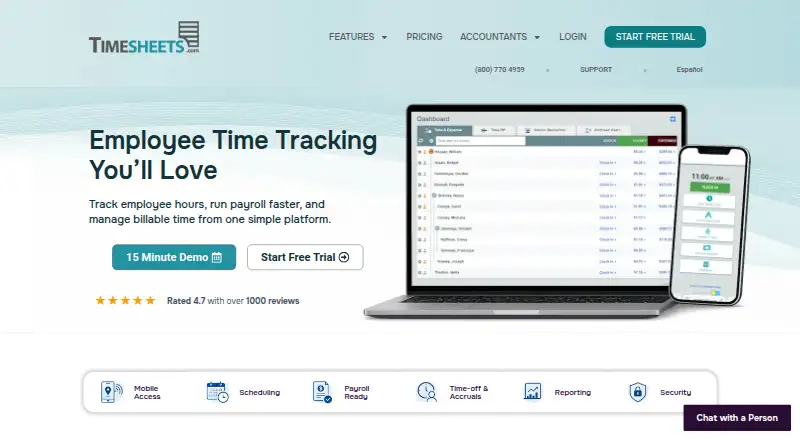
What Timesheets.com is
Timesheets.com combines employee hour tracking, payroll support, and billable-time management. Employees can clock in through the web, iOS, Android, kiosk mode, or manual entry, with time organized by location, department, and job. Timesheets can be signed and approved; payroll tools include overtime calculations, deductions, accruals, and exports. Project timesheets can record customer, project, account-code, bill-rate, and cost-rate information for client billing and job costing. Security controls include punch-time photos, GPS punch locations, IP restrictions, notifications, audit trails, and configurable user restrictions. The company says data is encrypted at rest, backed up and replicated, and not sold or shared with third parties. Integrations include QuickBooks, ADP, Gusto, Paychex, CSV, spreadsheets, PDFs, and a REST API that returns JSON. QuickBooks support covers all Desktop versions and most Online versions, except Online editions without weekly timesheets. The Freelancer plan is free for one user; Professional costs $5.50 per user per month, with Photo Timestamp sold separately for an additional $1 per user.
Who it suits
It suits payroll and attendance teams, billing and job-costing users, and organizations in professional services, healthcare, accounting, education, or nonprofits. Independent workers can use the single-user Freelancer plan to track their own time and expenses.
What it does well
- Clock-in options include web, mobile, kiosk, and manual entry
- Timesheets support signatures and approvals
- Project records include billing and cost rates
- Integrates with QuickBooks, ADP, Gusto, and Paychex
What to know first
- Freelancer cannot track other workers
- Professional excludes Photo Timestamp, sold separately for $1 per user
- API keys are limited to five requests per rolling 60 seconds
- Some QuickBooks Online versions are unsupported
Limits
The free Freelancer plan is for one user and cannot track other workers. Professional costs $5.50/user/mo and excludes Photo Timestamp, available separately for an additional $1 per user.
Plans
| Plan | Billed and limits | Price |
|---|---|---|
| Freelancer free | single user · time and expense management | Free |
| Nonprofit | per user; monthly or annually · Professional features · 20% discount | $4.40 a month |
| Professional | per user; monthly or annually · all features except Photo Timestamp · Photo Timestamp costs $1 per user | $5.50 a month |
| Freelancer | monthly or annually · single user · time and expense management | $7.50 a month |
As timesheets.com lists them, read 15 Oct 2026. The maker's own page has the final word.
Getting started
- Open the Timesheets.com website.
- Choose the free Freelancer plan for one user, or a paid plan for team use.
- Start the free trial if you want to try the product before paying.
- Have employees clock in through the web, iOS, Android, kiosk mode or manual entry.
- Connect a listed integration such as QuickBooks, ADP, Gusto or Paychex, if needed.
Overview
Timesheets.com combines employee timekeeping, payroll preparation, and project billing for organizations that need hours to serve several workflows. It suits small payroll and attendance teams, service businesses, and other organizations billing by job; the free option is aimed at one independent worker. The main trade-off is that team features start at a per-user charge, while Photo Timestamp is not included in the standard paid plan.
Key features
Workers can record time through the web, iOS, Android, kiosk mode, or manual entry. Location, department, and job fields give managers more useful context than a bare clock-in record. GPS punch locations, IP restrictions, notifications, audit trails, configurable user restrictions, and punch-time photo capture provide progressively stronger attendance controls. That combination is valuable where managers must verify when and where hours were entered, although the photo feature has a separate price on the Professional plan.
Timesheet signatures and approvals, overtime calculations, deductions, and accruals support payroll preparation. Payroll exports and connections to ADP, Gusto, Paychex, QuickBooks, CSV files, spreadsheets, and PDFs let teams move approved hours into their existing process. QuickBooks support covers every Desktop version and most Online versions, but not Online editions that lack weekly timesheets. Timesheets.com organizes and exports payroll data rather than replacing a payroll processor.
Project timesheets record client and project time with customer, account-code, bill-rate, and cost-rate fields. Those fields make the product more suitable for billing and job costing than a basic attendance clock, particularly for professional services and other organizations that need to connect labor to revenue.
The REST API returns JSON for custom integrations, but each API key is limited to five requests in a rolling 60-second period. That is workable for modest synchronization and a meaningful constraint for high-frequency or data-heavy integrations. Data is encrypted at rest, backed up and replicated, and the company says it does not sell or share it with third parties. Live support runs from 5:00 am to 5:00 pm PT for trial users and paying customers.
Pricing
Timesheets.com uses a freemium model, with paid plans from $5.50/user/mo and a free trial.
Freelancer
The Freelancer plan costs $0.00 per month, billed at $0.00 per month. It is for an independent worker managing personal time and expenses. It is explicitly single-user and cannot track other workers, so it is not a free team tier.
Nonprofit
Nonprofit costs $4.40 per user per month, with monthly and annual options at the same per-user price. It is a standard account with a 20% price reduction, making it the natural choice for qualifying nonprofit organizations that need team tracking at the lowest listed paid rate.
Professional
Professional costs $5.50 per user per month, also with monthly and annual options at that same per-user price. It includes all features except Photo Timestamp; adding that feature costs $1 per user. Teams that need photo evidence should budget for the add-on rather than treating the headline price as complete.
Platforms
The product is offered across web, Android, iOS, and an API. Kiosk and manual-entry modes broaden clock-in choices for workplaces that cannot rely on one device type. The API's five-request rolling-minute limit should be checked before building frequent automated syncs.
Who it's for
Timesheets.com is aimed at payroll and attendance teams, billing and job-costing operations, and professional services, medical, accounting, education, and nonprofit organizations. It is particularly well matched to employers that want approvals, overtime handling, attendance controls, and payroll exports in one system. A solo freelancer can use the free plan, but a growing team must move to a paid per-user plan.
Pros and cons
Pros
- One workflow covers attendance, payroll preparation, and billable project time.
- GPS, IP rules, photos, approvals, and audit trails support accountable time records.
- QuickBooks, major payroll services, file exports, and an API offer several routes into existing systems.
- Nonprofits receive a 20% reduction at $4.40 per user per month.
Cons
- The free Freelancer plan cannot track additional workers.
- Professional excludes Photo Timestamp and charges another $1 per user for it.
- The API limit of five requests per rolling 60 seconds can restrict intensive integrations.
- QuickBooks Online editions without weekly timesheets are unsupported.
Alternatives
For a broader directory of options, see Time and Expense Software and Employee Time Tracking Software.
Clockify is worth choosing when a free plan for up to five users and wider desktop platform coverage matter more than Timesheets.com's payroll and attendance controls.
Choose Avaza when you need project collaboration alongside time and expense management, with a free tier that includes one timesheet/expense user.
Harvest fits an individual freelancer who needs a free account with one seat and two projects.
Invoice Ninja is the alternative for users prioritizing invoicing, with a free tier for five clients and unlimited invoicing.
Paymo suits a small project operation comfortable with a free tier limited to one user, one client, and two projects.
Teamwork.com is an option when project management and collaboration are the primary requirement.
SAVIOM is a paid, self-hosted or web alternative for organizations seeking resource scheduling and authority assignment.
Bill4Time is another choice for time and billing, with its Time & Billing plan priced at $49.00 per month.
Verdict
Choose Timesheets.com if your organization needs attendance controls, approved payroll-ready hours, and project billing in the same system, especially at a nonprofit or service business. Look elsewhere if you need a genuinely free multi-user plan, frequent API synchronization, or Photo Timestamp included in the base paid price.
Verdict
Timesheets.com supports attendance, payroll preparation, and project billing in one platform, with clock-in options across web, mobile, and kiosk use. Buyers should note the Freelancer plan is single-user and the API has a request limit.
Questions
How much does Timesheets.com cost?
The Freelancer plan is free for one user. Paid pricing starts at $5.50/user/mo; Professional is $5.50 per user per month.
Is there a free trial?
Yes. A free trial is available, and live support is included during the trial.
Which platforms can employees use to clock in?
They can use web, iOS, Android, kiosk mode or manual entry.
Does it support timesheet approvals?
Yes. Timesheets can be signed and approved.
Which integrations are available?
Listed options include QuickBooks, ADP, Gusto, Paychex, CSV, spreadsheets, PDFs and an API for custom integrations.
Does it work with QuickBooks Online?
It supports most QuickBooks Online versions, but not versions without weekly timesheets. All QuickBooks Desktop versions are supported.
Facts from Timesheets.com's own pages
- API
- A public customer-side REST API returns JSON and covers users, assignments, customers, projects, codes, time, expenses and reports. · timesheets.com, 15 Oct 2026
- API authentication and limits
- API access uses an API key and authorization token, with a default limit of five requests per rolling 60 seconds per key. · support.timesheets.com, 15 Oct 2026
- API documentation
- Documentation includes authentication, an endpoint catalog, resource guides, reports, errors and reusable Bash, Node.js and Python examples. · support.timesheets.com, 15 Oct 2026
- Billable time
- The service supports project time, customers, tasks, bill and cost rates, job costing and profitability reporting. · timesheets.com, 15 Oct 2026
- Company founding
- Timesheets.com says it launched in 2004 from a small team of Silicon Valley web developers. · timesheets.com, 15 Oct 2026
- Company headquarters and size
- LinkedIn lists San Jose, California headquarters and a company size of 11–50 employees. · linkedin.com, 15 Oct 2026
- Company history
- Timesheets.com says it launched in 2004, founded by a small team of Silicon Valley web developers. · timesheets.com, 7 Oct 2026
- Company identity
- The legal terms identify TimeClockOnline.com, Inc., a California corporation, as the owner and operator of Timesheets.com. · timesheets.com, 15 Oct 2026
- Compliance limitation
- The terms state that Timesheets.com does not support HIPAA compliance and must not be used for protected health information. · timesheets.com, 15 Oct 2026
- Data protection
- The company says data is encrypted at rest, backed up and replicated, and never sold or shared with third parties. · timesheets.com, 7 Oct 2026
- Founded
- 2004 · timesheets.com, 28 Sept 2026
- Headquarters
- The site lists a mailing address of PO Box 1392, Discovery Bay, CA 94505. · timesheets.com, 7 Oct 2026
- Integrations
- The product supports QuickBooks, ADP, Gusto, Paychex, CSV, spreadsheets, PDFs, and an API for custom integrations. · timesheets.com, 7 Oct 2026
- Intended users
- The company presents the product for payroll and attendance teams, billing and job-costing users, and professional services, medical, accounting, education, and nonprofit organizations. · timesheets.com, 7 Oct 2026
- Licence
- The terms identify the software and content as owned by TimeClockOnline.com, Inc., prohibit reverse engineering and provide no source-code rights, indicating proprietary software. · timesheets.com, 15 Oct 2026
- Limit: bugs and speed
- Reviews mention occasional glitches, slow loading and responsiveness problems, especially in reports, mobile timers and editing. · softwareadvice.com, 15 Oct 2026
- Limit: customization and integrations
- Some G2 reviewers report limited customization, reporting options and integrations with other platforms. · g2.com, 15 Oct 2026
- Limit: interface
- Reviewers on G2, Capterra and Software Advice frequently describe the interface as dated or in need of modernization. · g2.com, 15 Oct 2026
- Limit: scale and pricing
- GetApp reviewers say costs can become high for larger teams and that the freelancer plan feels limited for its price. · getapp.com, 15 Oct 2026
- Mileage and expenses
- Users can record mileage and expenses, attach receipts and route information into reports or accounting workflows. · timesheets.com, 15 Oct 2026
- Mobile access
- The mobile site is designed for any device and provides basic time and expense recording; users can switch to the desktop site for full features. · support.timesheets.com, 15 Oct 2026
- Payroll
- The software provides timesheet signatures and approvals, overtime calculations, deductions, accruals, and payroll exports. · timesheets.com, 7 Oct 2026
- Payroll exports
- Exports are available for QuickBooks, ADP, Gusto, Paychex, CSV, spreadsheets and PDFs. · timesheets.com, 15 Oct 2026
- Payroll time tracking
- Employees can clock in through web, iOS, Android, kiosk mode or manual entry, while managers review attendance and approve time. · timesheets.com, 15 Oct 2026
Where Timesheets.com stands on Freedom251
- Employee Time Tracking Software#16 of 52
- Timesheet Management Software#10 of 29
- Time and Expense Software#10 of 27