Freedom251 › Employee Time Tracking Software
time cockpit
by time cockpit
What time cockpit is
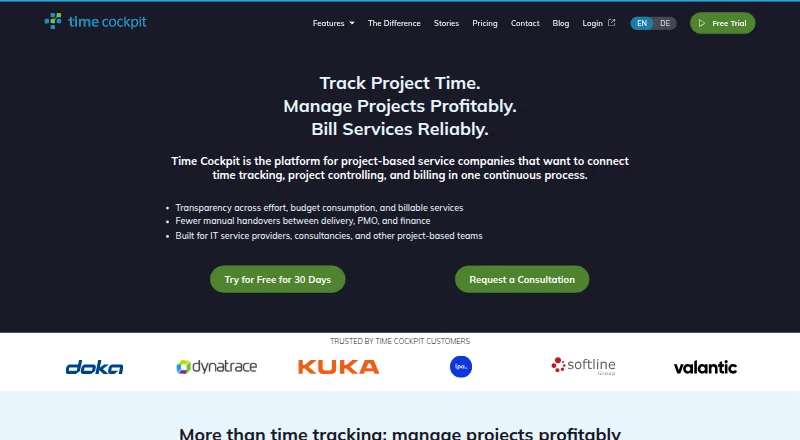
time cockpit combines project time tracking, project controlling and billing for project-based service companies. Users can log time against projects and tasks, monitor budgets, and compare planned effort with actual time. Billable hours can create invoice items, and invoices can be made from tracked services. The product also records working hours, overtime, vacation and sick leave. An optional Activity Tracker logs applications, edited files and breaks, but requires the Full Client. Listed integrations include Jira, Azure DevOps, MS Project and SAP; custom interfaces can also be developed. Its Web API offers REST and OData endpoints, with Power BI and Excel able to connect to OData. An MCP server gives Claude, ChatGPT, Copilot and Cursor access to functions within each user's permissions. Hosting is in Microsoft Azure data centers in Amsterdam and Dublin, and the maker says production databases use three-node clusters with 35-day point-in-time recovery. Plans list €10.85 per user per month, and a 30-day trial is offered.
Who it suits
It is aimed at IT service providers, consultancies and other project-based teams that need to track project time and billing. Different user limits span a one-user Freelancer plan, a Starter plan for up to 10 users and an unlimited-user Business plan.
What it does well
- Tracks time, budgets and planned versus actual effort.
- Tracked billable hours can feed invoice items.
- Records work hours, overtime, vacation and sick leave.
- Offers REST and OData API endpoints.
- Lists a 30-day trial.
What to know first
- Timesheet approvals are not available.
- Activity Tracker requires installing the Full Client.
- Freelancer is limited to one user.
- No GPS tracking or screenshot capture.
Limits
The free plan details are not sufficient to describe its limits.
Plans
| Plan | Billed and limits | Price |
|---|---|---|
| Business | Per user & month; prorated at the beginning of the following month · Unlimited users · personal onboarding · enterprise features with extended support | €10.85 a month |
| Freelancer | Free for the first year; €10.85 per month after the first year · 1 user · unlimited customers, projects, tasks and invoices | Free |
| Starter | €29.90 for the first year; €10.85 per user/month after the first year · Up to 10 users · unlimited customers, projects, tasks and invoices | €29.90 |
As timecockpit.com lists them, read 29 Sept 2026. The maker's own page has the final word.
Getting started
- Open the time cockpit website.
- Choose a plan: Freelancer for one user, Starter for up to 10, or Business for unlimited users.
- Start the 30 day trial.
- Use the web or a listed platform: Android, iOS, macOS or Windows.
- Install the Full Client if you want to use the optional Activity Tracker.
Time cockpit is a combined project-time, work-time and billing system for consultancies, IT service providers and other project-led teams. It suits organizations that need budgets, billable services and staff attendance in one record; teams requiring formal timesheet approval should look elsewhere. Its strongest case is connecting operational time data directly to project control and invoicing.
Overview
Time cockpit links hours recorded against projects and tasks with planned effort, budgets and actual performance. Billable services can become invoice items, and invoices can be created from tracked work. That makes it more than an attendance clock: it is aimed at service businesses whose time entries must support both delivery management and client billing.
The same system records working hours, overtime, vacation and sick leave. However, timesheet approvals are not supported, so it is unsuitable where supervisors must formally sign off entries before billing or payroll.
Key features
Project control and billing
Teams can compare planned and actual effort, watch project budgets and assign time to detailed tasks. Billable hours flow into invoice items, keeping project monitoring and invoicing based on the same records. This is valuable for client-service organizations; companies wanting only a basic clock-in tool may find the project and billing scope unnecessary.
Work-time and activity tracking
Overtime, leave and sickness sit alongside project time. The optional Activity Tracker records applications used, files edited and breaks, but it requires installation of the Full Client. That can provide a fuller activity picture for organizations willing to deploy desktop software, while teams seeking approval workflows or lightweight monitoring should note the constraint.
Integrations, API and AI access
Listed integrations cover Jira, Azure DevOps, MS Project and SAP, with custom interfaces available. REST and OData endpoints support the Web API, and Power BI and Excel can connect directly to OData for reporting. An MCP server allows Claude, ChatGPT, Copilot and Cursor to use time cockpit functions within each user's permissions, extending the product into AI-assisted workflows without broadening those permissions.
Hosting and access controls
Data runs in Microsoft Azure data centers in Amsterdam and Dublin, with production databases using three-node clusters. The database service includes 35-day point-in-time recovery. Single sign-on works with Azure Active Directory or Okta, giving larger organizations established identity controls.
Pricing
A 30-day trial and a free plan are offered. The pricing page shows the following paid plans, all at the stated monthly amount:
| Plan | Price and allowance | Best fit |
|---|---|---|
| Freelancer | €10.85 a month; 1 user. After the first year, billing uses the Standard price and actual daily usage up to the monthly maximum. | One-person operators needing project time, budgets and billing. |
| Starter | €10.85 a month; up to 10 users, with the same first-year daily-usage and post-year Standard-price terms. Email support and personalized onboarding. | Small teams that need shared project records without unlimited seats. |
| Business | €10.85 per user per month, prorated at the beginning of the following month; unlimited users, personal onboarding, enterprise features and extended support. Priority support. | Growing or larger organizations requiring unlimited users and enterprise service. |
All three plans include unlimited customers, projects, tasks and invoices. The meaningful differences are user capacity and service level: Freelancer is strictly single-user, Starter stops at 10 users, while Business charges per user but removes that ceiling.
Platforms
Time cockpit is available across web, Windows, macOS, Android, iOS and API environments. It also supports payroll integrations. GPS tracking and screenshot capture are not provided, and mobile apps are not offered as a separate product capability.
Who it's for
Choose it for an IT service provider, consultancy or similar project business that bills by time and wants budget variance, attendance records and invoices connected. Its integrations and reporting endpoints suit teams already using Jira, Azure DevOps, MS Project, SAP, Power BI or Excel. Avoid it when manager approvals, GPS, screenshots or a simple attendance-only workflow are mandatory.
Pros and cons
- Pros: Project budgets, planned-versus-actual tracking and invoice creation share one time record.
- Pros: Work hours, overtime, leave and sickness cover broader workforce administration.
- Pros: OData, REST, named integrations, SSO and Azure hosting support established business systems.
- Cons: No timesheet approvals, limiting control-heavy billing processes.
- Cons: Activity logging requires the Full Client, adding deployment overhead.
- Cons: Freelancer and Starter impose one- and 10-user ceilings respectively.
Alternatives
Pick Jibble instead if you want a freemium service with a forever-free plan for unlimited users, two geofences and one work schedule, plus broad platform coverage.
TimeCamp is the better starting point when an unlimited-users, unlimited-projects free plan is the priority.
Choose Clockify for a free plan capped at five users and a low-cost Basic tier billed annually.
Harvest fits an individual freelancer wanting a forever-free account with one seat and two projects.
Consider Paymo when a free plan with one user, one client, two projects and 1 GB of storage matches your scale.
solidtime is an alternative with a self-hosted option and a Professional plan priced at €8 a month when billed annually, excluding VAT.
Pick TMetric for a free allowance of up to two seats and plans mentioning billable rates, expenses and project budgets.
todo.vu is another freemium option, with a Solo Free plan for one staff user, 1 GB storage and unlimited tasks, clients and projects.
See the Time Tracking Software and Employee Time Tracking Software directories for broader category choices.
Verdict
Time cockpit is a strong choice for project-based service companies that want time capture, budget control and invoicing joined to attendance records and business integrations. Choose it for that connected workflow and its reporting, identity and recovery capabilities. Look elsewhere if approval-driven timesheets, GPS or screenshots are central requirements, or if a very small team needs a genuinely free multi-user plan.
Verdict
time cockpit links project time records with budget monitoring and billing, with additional work-time tracking and integrations. Its listed entry price is €10.85 per user per month, and users needing approvals or activity logging without the Full Client should account for those limits.
Questions
How much does time cockpit cost?
Pricing starts at €10.85/user/mo, and a 30 day trial is available.
Is there a free plan?
Yes, a free plan is listed. Freelancer is priced at €10.85 a month and is limited to one user.
Which platforms does it support?
Listed platforms are Android, API, iOS, macOS, web and Windows.
Which integrations are available?
Listed integrations include Jira, Azure DevOps, MS Project and SAP. Custom interfaces can also be developed.
Does it support timesheet approvals?
No. Timesheet approvals are not supported.
Where is time cockpit hosted?
It runs in Microsoft Azure data centers in Amsterdam and Dublin. Production databases use three node clusters, and its database service includes 35 day point in time recovery.
Facts from time cockpit's own pages
- Activity tracking
- The optional Activity Tracker logs used applications, edited files and breaks; using it requires installing the Full Client. · timecockpit.com, 29 Sept 2026
- AI assistant access
- The MCP server lets Claude, ChatGPT, Copilot and Cursor access time cockpit functions within the user's permissions. · timecockpit.com, 29 Sept 2026
- API and reporting
- The Web API exposes REST and OData endpoints, and Power BI and Excel can connect directly to the OData endpoint. · timecockpit.com, 29 Sept 2026
- Audience
- The maker describes the product as designed for IT service providers, consultancies and other project-based teams. · timecockpit.com, 29 Sept 2026
- Billing
- Billable hours can generate invoice items, and users can create invoices from tracked services. · timecockpit.com, 29 Sept 2026
- Free plan
- No · timecockpit.com, 20 Sept 2026
- Headquarters
- Leonding, Austria · timecockpit.com, 28 Sept 2026
- Integrations
- The maker lists integrations with Jira, Azure DevOps, MS Project and SAP, and says custom interfaces can be developed. · timecockpit.com, 29 Sept 2026
- Limits
- The pricing page lists unlimited customers, projects, tasks and invoices across all three plans; user limits are one for Freelancer, up to 10 for Starter, and unlimited for Business. · timecockpit.com, 29 Sept 2026
- Product
- Time cockpit combines project time tracking, project controlling and billing for project-based service companies. · timecockpit.com, 29 Sept 2026
- Project tracking
- Users can track time against projects and tasks, monitor budgets and compare planned with actual effort. · timecockpit.com, 29 Sept 2026
- Recovery
- The maker says its database service includes 35-day point-in-time recovery. · timecockpit.com, 29 Sept 2026
- Security and hosting
- Time cockpit runs in Microsoft Azure data centers in Amsterdam and Dublin, and production databases use three-node clusters. · timecockpit.com, 29 Sept 2026
- SSO
- Single sign-on supports Azure Active Directory or Okta identity providers. · timecockpit.com, 29 Sept 2026
- Support
- The pricing page lists email support for Freelancer and Starter, priority support for Business, and personalized onboarding for Starter and Business. · timecockpit.com, 29 Sept 2026
- Timesheet approvals
- No · timecockpit.com, 20 Sept 2026
- Work time
- The product records working hours, overtime, vacation and sick leave alongside project time. · timecockpit.com, 29 Sept 2026
Where time cockpit stands on Freedom251
- Employee Time Tracking Software#14 of 52
- Time tracking apps#24 of 78
- Time Tracking Software#28 of 77