Freedom251 › Time tracking apps
todo.vu
by todo.vu
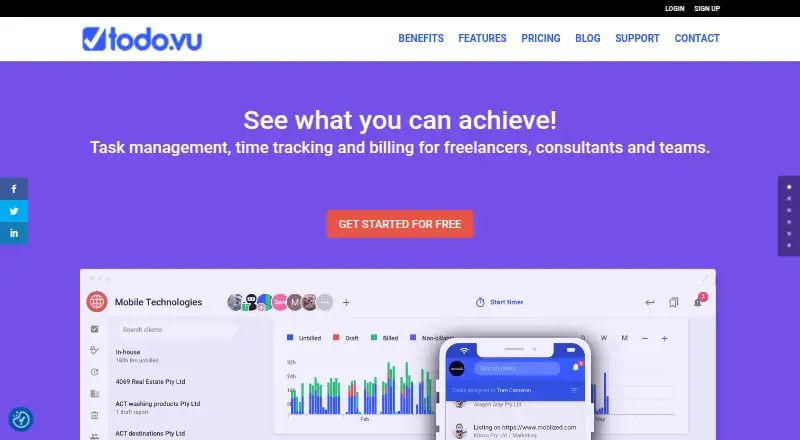
What todo.vu is
todo.vu combines task management, time tracking, and billing for freelancers, consultants, and teams. Tasks are organized on a visual Kanban-style board with comments, notifications, client access, dependencies, and recurring tasks. Users can track time directly on tasks at custom hourly billing rates or enter it manually; todo.vu calculates totals and prepares itemized billing reports tied to tasks, projects, and clients. Due dates can synchronize with iCal-compatible calendars, including Google and Office365. Emails can be converted into tasks or comments, and clients can take part by email without logging in. The free Solo Free plan includes one staff user, 1Gb of storage, and unlimited tasks, clients, and projects. Business Time costs $9/month, supports unlimited users with a $99 monthly cap, and includes priority support and complimentary onboarding. A 14-day trial is listed. Native Android and iOS apps provide task access and time tracking, with desktop access options also available. API connectors work fully only on Business Time and are limited to one task every 30 hours on non-paid plans. The company is based in New Farm, Queensland, Australia.
Who it suits
It suits freelancers, consultants, and teams managing client tasks alongside time and billing. The maker also identifies architects, virtual assistants, engineers, accountants, developers, designers, and other teams as potential users.
What it does well
- Combines tasks, time tracking, and billing reports.
- Track time at custom hourly rates or enter it manually.
- Clients can interact by email without logging in.
- Free plan includes unlimited tasks, clients, and projects.
- Native Android and iOS apps support tasks and time tracking.
What to know first
- Free plan is limited to one staff user.
- Free-plan API connectors are limited to one task every 30 hours.
- Full API connector functionality requires Business Time.
- Business Time costs $9/month.
Limits
Solo Free covers one staff user and 1Gb of storage. On non-paid plans, API connectors are rate-limited to one task every 30 hours; full API connector functionality is on Business Time.
Plans
| Plan | Billed and limits | Price |
|---|---|---|
| Solo Free | $0/month · One staff user · 1Gb Storage · Unlimited Tasks, Clients & Projects · No credit card required | Free |
| Business Time | $9/month · Unlimited users capped at $99/month · 2 GB Storage · Priority Support · Every user after the 11th is free | $9 a month |
As todo.vu lists them, read 1 Oct 2026. The maker's own page has the final word.
Getting started
- Visit todo.vu and choose the Solo Free plan or Business Time plan.
- Start the listed 14-day trial if you want to try a paid plan.
- Use the web app or native Android and iOS apps to access tasks and track time.
- Add tasks, clients and projects, then track time at custom rates or enter it manually.
- Sync due dates with an iCal-compatible calendar if needed.
- Use WebCatalog for Windows, macOS or Linux desktop access, or create a Chrome extension with Applicationize.
todo.vu is a client-work platform that combines task boards with billable time and client reporting. It suits freelancers, consultants and service teams whose projects must be tracked and charged accurately, rather than people seeking a personal to-do list. The strongest reason to choose it is the direct path from task activity to itemized billing; the main compromise is that its free tier and automation features are tightly constrained.
Overview
Founded in 2013 in New Farm, Queensland, todo.vu was created by IT-consulting professionals for agencies, contractors and other teams handling client work. A Kanban-style board organizes projects, while task dependencies and recurring tasks support structured, ongoing workflows. Real-time comments, notifications and guest access keep clients involved without forcing every participant into the same internal process.
The product is more than a project board because time records and billing reports stay connected to the tasks, projects and clients that generated them. That focus makes it a better fit for accountable service work than for simple household or personal planning.
Key features
- Task-linked time tracking: Start a timer on a task using a custom hourly billing rate, or add time manually. This suits work billed by effort and reduces the need to reconcile a separate timer with project records.
- Billing reports: todo.vu calculates totals and creates itemized reports tied to tasks, projects and clients. Freelancers and firms can move from recorded activity to a client-facing charge with less manual assembly.
- Client communication: Emails can become tasks or comments, and clients can reply by email without logging in. That lowers participation friction, although teams wanting every conversation inside a dedicated portal may prefer a different workflow.
- Calendar synchronization: Due dates sync with any iCal-compatible calendar, including Google and Office365 calendars. It keeps deadlines visible in an existing calendar without replacing that calendar.
- Automation: The Add-Task Zapier integration can create tasks from hundreds of applications through API connectors. On non-paid plans, however, connectors are rate-limited to one task every 30 hours; full functionality requires Business Time, making serious automation a paid-plan feature.
- Mobile and desktop access: Native iOS and Android apps support task access and time tracking. For Windows, macOS and Linux, todo.vu recommends WebCatalog and describes creating a Chrome extension with Applicationize rather than offering a dedicated native desktop application.
- Security: The service uses encrypted connections and passwords, private database networks, email validation, isolated workspace schemas, SQL-injection prevention and monitoring. These safeguards address common operational risks for client data.
Pricing
Solo Free
Solo Free costs nothing, billed at $0/month, with one staff user, 1 GB of storage and unlimited tasks, clients and projects. No credit card is required. It is a sensible starting point for an individual freelancer with modest files, but the single-staff cap rules it out for a working team, and API connectors are limited to one task every 30 hours.
Business Time
Business Time costs $9 a month, billed at $9/month. It allows unlimited users with charges capped at $99/month; every user after the 11th is free. The plan includes 2 GB of storage, priority support, complimentary onboarding and fully functional API connectors. It is the practical choice for agencies and growing teams that need automation and shared access, though the storage increase remains relatively small for file-heavy projects.
A 14-day trial lets prospective customers assess the paid workflow before committing. The published pricing does not provide a separate annual term or additional plan tiers.
Platforms
todo.vu supports web, iOS, Android, Windows, macOS and Linux access, alongside an API and browser-extension options. Native mobile apps are the clearest dedicated clients; desktop users rely on WebCatalog or a Chrome-based Applicationize extension.
Who it's for
Architects, virtual assistants, engineers, accountants, web developers, creative designers, freelancers, consultants and most client-focused teams can benefit when hours and charges must follow project activity. Solo Free fits one-person practices that need unlimited work items more than storage or integrations. Business Time is better for multi-user operations, priority assistance and automated intake from other applications.
It is a weaker choice for people who only need personal reminders, or for organizations that require generous storage on the entry paid tier. Teams dependent on API-driven intake should also budget for Business Time rather than relying on the free allowance.
Pros and cons
Pros
- Task-to-invoice continuity: Time entries and itemized billing reports remain tied to clients and projects.
- Low-friction client access: Guests and email interaction let clients participate without logging in.
- Broad access: Mobile apps, web access, API support and cross-platform desktop workarounds cover varied setups.
- Predictable team ceiling: Business Time caps charges at $99/month and makes users after the 11th free.
Cons
- Free tier is solo-only: One staff user prevents shared team use.
- Automation is paywalled in practice: Non-paid connectors allow only one task every 30 hours.
- Limited free storage: Solo Free includes 1 GB, which may constrain document-heavy client work.
- No dedicated native desktop apps: Windows, macOS and Linux users depend on WebCatalog or a browser extension.
Alternatives
For a wider comparison, see Task Management Software and Time Tracking Software.
- Routine is a freemium option with a free tier offering three integrations, three custom databases and 250 AI credits.
- Any.do suits personal planning, with unlimited personal tasks and lists on its free plan.
- MeisterTask is worth considering for a free Kanban-oriented setup with unlimited tasks and up to three projects.
- PLANKA is the alternative when a self-hosted community edition is preferred.
- Taskade AI Agents targets teams wanting AI-agent features alongside task management.
- TickTick is a general task and reminder choice with a free tier.
- Vikunja offers a freemium task manager with self-hosted availability.
- Wekan is a free, self-hosted Kanban alternative.
Verdict
Choose todo.vu if you run client projects and want task progress, tracked hours and billing reports in one workflow, with email-based client participation. Look elsewhere if you need a multi-user free plan, generous entry-level storage, or unrestricted automation without paying for Business Time.
Verdict
todo.vu connects client work, recorded time, and billing reports, with email and calendar workflows for keeping tasks moving. Its free plan is limited to one staff user, and API connector functionality is restricted outside Business Time.
Questions
Does todo.vu have a free plan?
Yes. Solo Free costs nothing and includes one staff user, 1Gb of storage, and unlimited tasks, clients and projects.
How much does Business Time cost?
Business Time costs $9 a month. It supports unlimited users with a $99 monthly cap, and every user after the 11th is free.
Is there a free trial?
A 14-day trial is listed.
Which platforms are available?
The listing includes Android, iOS, web, API, extension, Linux, macOS and Windows. Native apps are available for Android and iOS.
Can clients use todo.vu without logging in?
Clients can interact by email without logging in, and the task workflow also includes client access.
When do API connectors work fully?
Full API connector functionality is available on the paid Business Time plan. Non-paid plans are limited to one task every 30 hours.
Facts from todo.vu's own pages
- API limitation
- API connectors are fully functional only on the paid Business Time plan and are rate-limited to one task every 30 hours on non-paid plans. · todo.vu, 1 Oct 2026
- Billing reports
- todo.vu automatically calculates totals and creates itemized billing reports linked to tasks, projects and clients. · todo.vu, 1 Oct 2026
- Calendar integration
- Task due dates can synchronize with any iCal-compatible calendar, including Google and Office365 calendars. · todo.vu, 1 Oct 2026
- Company history
- The product was created by founders with experience in the IT consulting industry to serve agencies, consultants, contractors and freelancers managing client work. · todo.vu, 1 Oct 2026
- Core product
- todo.vu combines task management, time tracking and billing for freelancers, consultants and teams. · todo.vu, 1 Oct 2026
- Desktop options
- todo.vu recommends WebCatalog, which is available for Windows, macOS and Linux, and also describes creating a Chrome extension with Applicationize. · todo.vu, 1 Oct 2026
- Email integration
- Emails can be converted into tasks or comments, and clients can interact by email without logging in. · todo.vu, 1 Oct 2026
- Free plan
- Yes · todo.vu, 21 Sept 2026
- Headquarters
- New Farm, Queensland, Australia · todo.vu, 28 Sept 2026
- Mobile apps
- Native todo.vu apps are available for iOS and Android for accessing tasks and tracking time. · todo.vu, 1 Oct 2026
- Security safeguards
- todo.vu states that it uses encrypted connections, private database networks, encrypted passwords, email validation, isolated workspace schemas, SQL-injection prevention and monitoring. · todo.vu, 1 Oct 2026
- Paid from
- 9 · todo.vu, 21 Sept 2026
- Support
- The Business Time plan includes priority support and complimentary onboarding. · todo.vu, 1 Oct 2026
- Target users
- todo.vu says it is ideal for architects, virtual assistants, engineers, accountants, web developers, creative designers, freelancers, consultants and most teams. · todo.vu, 1 Oct 2026
- Task workflow
- Tasks are organized on a visual Kanban-style board with real-time comments, notifications and client access. · todo.vu, 1 Oct 2026
- Time tracking
- Users can track time directly on tasks at custom hourly billing rates or log time manually. · todo.vu, 1 Oct 2026
- Zapier integration
- The todo.vu Add-Task Zapier integration can create tasks from hundreds of other applications through API connectors. · todo.vu, 1 Oct 2026
Where todo.vu stands on Freedom251
- Time tracking apps#30 of 78
- Time Tracking Software#35 of 77
- Task Management Software#36 of 59