
TickTick
by TickTick
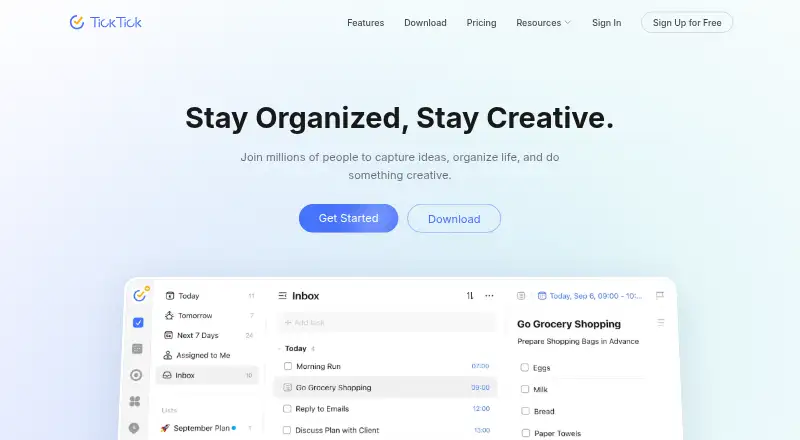
What TickTick is
TickTick is a task and reminder app with recurring tasks, subtasks, and calendar sync. Calendar views range from yearly to daily, with an agenda view, and reminders can repeat weekly, monthly, yearly, or on custom schedules. Lists can be shared, tasks assigned, and members can collaborate. Planning tools include Pomodoro, habit tracking, countdowns, Kanban, timeline, and the Eisenhower Matrix; the app also offers more than 40 themes. TickTick integrates with Notion and supports MCP, CLI, and OpenClaw workflows. It is available on the web, Windows, macOS, Linux, Android, and iOS, with a Chrome extension also listed. The free plan costs nothing and allows 9 lists, 99 tasks per list, 1 attachment per day, and 2 shared members. Premium costs $49.99 per year and raises the limits to 299 lists and 999 tasks per list. Data remains after Premium expires, but Premium features then become unavailable.
Who it suits
TickTick suits individuals and small groups who want task reminders, recurring schedules, shared lists, or calendar views across several platforms. Its free plan supports up to two shared members.
What it does well
- Recurring tasks and customizable reminder schedules
- Yearly, monthly, weekly, daily, and agenda views
- Sharing, task assignment, and collaboration
- Available across six platforms plus a Chrome extension
What to know first
- Free plan allows 9 lists
- Free plan allows 99 tasks per list
- Free plan includes 1 attachment per day
- Premium features become unavailable after expiry
Limits
The free plan allows nine lists, 99 tasks per list, one attachment per day, and two shared members. Premium raises those limits to 299 lists, 999 tasks per list, 199 attachments per day, and 29 shared members; Premium features become unavailable when the subscription expires, while data is retained.
Plans
| Plan | Billed and limits | Price |
|---|---|---|
| Free | billed monthly · 9 lists · 99 tasks per list · 1 attachment per day · 19 checklist items per task · 2 task reminders · 2 shared members | Free |
| Premium | Annual plan · 299 lists · 999 tasks per list · 199 attachments per day · 199 checklist items per task · 5 task reminders · 29 shared members | $49.99 a year |
As ticktick.com lists them, read 27 Sept 2026. The maker's own page has the final word.
Getting started
- Visit https://ticktick.com/.
- Choose the free plan or Premium at $49.99 per year.
- Use TickTick on Android, iOS, Linux, macOS, Windows, or the web.
- Create lists and tasks, then add reminders or recurring rules as needed.
- Share lists or assign tasks if you are collaborating with others.
Overview
TickTick is a task manager for people who want recurring reminders, calendar planning, and focus tools alongside their lists. Its range of views and routines makes it a flexible choice, though the free plan’s per-list and collaboration caps may push heavier users to Premium.
Key features
Task planning and reminders
TickTick supports subtasks, recurring tasks, and reminders, with repeat rules for weekly, monthly, yearly, or custom schedules. Calendar sync and yearly, monthly, weekly, daily, and agenda views help users plan at different time scales. Kanban, timeline, and Eisenhower Matrix views provide alternatives to a plain list; these are useful for people who organize by workflow or priority, but may be unnecessary for users who only need a basic checklist.
Lists can be shared, tasks assigned, and friends or colleagues included in collaborative work. Notion integration and support for MCP, CLI, and OpenClaw workflows broaden its usefulness for people who already use those tools. Pomodoro, habit tracking, countdowns, and more than 40 themes add personal organization and customization options.
Platforms
TickTick is available on web, Windows, macOS, Linux, iOS, and Android, as well as through a Chrome extension. That broad coverage suits users who move between desktop and mobile devices.
Pricing
The Free plan costs nothing and covers basic tasks, reminders, sync, and lists. It allows 9 lists, 99 tasks per list, 1 attachment per day, 19 checklist items per task, 2 task reminders, and 2 shared members. These limits suit personal use or small, light workflows, but the task cap applies to each list and the two-member ceiling restricts collaboration.
Premium costs $49.99 a year. It raises the limits to 299 lists, 999 tasks per list, 199 attachments per day, 199 checklist items per task, 5 task reminders, and 29 shared members, while unlocking premium features. It is the more practical choice for users whose lists, attachments, reminders, or shared work exceed the free allowances; users who stay within those caps can keep the basic plan.
Premium data remains retained after the subscription expires, but Premium features then become unavailable. Refunds can be requested within 14 days for purchases through Google Play, PayPal, or Stripe. Apple App Store refunds must be requested through Apple Support.
Who it's for
TickTick fits people who want one app for task lists, recurring reminders, calendar views, and personal focus or habit tools. It also suits small groups that need shared lists and task assignments, provided their member count fits the plan. People seeking only a simple task list may find its wider set of planning options unnecessary, while teams larger than the included member limit should consider their collaboration needs before choosing a plan.
Pros and cons
- Pros: Calendar views span five time scales, and recurring reminders can use custom rules, making it suitable for both routine tasks and date-based planning.
- Pros: Kanban, timeline, Eisenhower Matrix, Pomodoro, habit tracking, and countdowns offer several approaches to planning and focus in one app.
- Cons: Free users are limited to 9 lists, 99 tasks per list, and 2 shared members, which can constrain growing workflows.
- Cons: Premium is an annual commitment at $49.99 a year for users who need higher limits or paid features.
Alternatives
Any.do is worth considering for personal task management if unlimited personal tasks and lists on its free plan matter more than TickTick’s broader set of planning tools.
Super Productivity suits users who want all features on a free plan across Android, iOS, Linux, macOS, web, and Windows, without a premium tier.
Nozbe may fit small groups looking for a free plan capped at three users and three active projects.
Routine is another freemium option, with a free plan that includes three integrations, three custom databases, and 250 AI credits.
SingularityApp offers a free Basic plan capped at 10 projects, five sections per project, three habits, and one reminder per task.
Superlist is an option for users who prefer a free plan with up to five private and shared lists and unlimited tasks and notes.
Tasks.org may appeal to Android, Linux, macOS, and Windows users seeking a free plan with unlimited tasks, lists, tags, and reminders.
Lunatask is another freemium choice, with free-plan allowances for two Areas of Life, seven Daily Habits, and 30 Relationships.
For broader comparisons, see To-do list apps, Time Management Apps, and Task Management Software.
Verdict
Choose TickTick if you want task lists supported by recurring reminders, varied calendar views, and additional tools for focus and habits. Its main advantage is the breadth of planning options; its main drawback is that free-plan limits and the annual Premium price matter once your lists, collaboration, or reminder needs grow.
Verdict
TickTick combines task organization, reminders, calendar views, and collaboration in one app. The free plan has defined list, task, attachment, and member limits; Premium costs $49.99 per year.
Questions
Is TickTick free?
Yes. The free plan includes basic task, reminder, sync, and list features, with limits of nine lists and 99 tasks per list.
How much does Premium cost?
Premium costs $49.99 per year.
Which platforms support TickTick?
TickTick is available on Android, iOS, Linux, macOS, Windows, and the web. It also lists a Chrome extension.
Can I share tasks with other people?
Yes. Users can share lists, assign tasks, and collaborate with friends and colleagues. The free plan supports two shared members; Premium supports 29.
Does TickTick integrate with other tools?
TickTick integrates with Notion and supports MCP, CLI, and OpenClaw workflows.
What happens to my data if Premium expires?
TickTick retains data after Premium expires, but Premium features become unavailable.
Facts from TickTick's own pages
- Active task limit
- 99 · ticktick.com, 21 Sept 2026
- Apple Refunds
- Apple App Store refunds must be requested through Apple Support. · ticktick.com, 27 Sept 2026
- Calendar sync
- Yes · ticktick.com, 21 Sept 2026
- Calendar Views
- Calendar views include yearly, monthly, weekly, daily, and agenda views. · ticktick.com, 27 Sept 2026
- Team Collaboration
- Users can share lists, assign tasks, and collaborate with friends and colleagues. · ticktick.com, 27 Sept 2026
- Company Identity
- The site identifies the company as TickTick Team. · ticktick.com, 27 Sept 2026
- Data Retention
- Data is retained after Premium expires, while Premium features become unavailable. · ticktick.com, 27 Sept 2026
- Founded
- 2013 · ticktick.com, 23 Sept 2026
- Free Attachments
- The free plan includes 1 attachment per day. · ticktick.com, 27 Sept 2026
- Free Lists Limit
- The free plan includes 9 lists. · ticktick.com, 27 Sept 2026
- Free Member Limit
- The free plan supports 2 members. · ticktick.com, 27 Sept 2026
- Free plan
- Yes · ticktick.com, 21 Sept 2026
- Free Tasks Limit
- The free plan allows 99 tasks per list. · ticktick.com, 27 Sept 2026
- Headquarters
- Hong Kong · ticktick.com, 23 Sept 2026
- App Integrations
- TickTick integrates with Notion and supports MCP, CLI, and OpenClaw workflows. · ticktick.com, 27 Sept 2026
- Notable Features
- Features include Pomodoro, habit tracking, countdowns, Kanban, timeline, and Eisenhower Matrix. · ticktick.com, 27 Sept 2026
- Premium Lists Limit
- Premium includes 299 lists. · ticktick.com, 27 Sept 2026
- Premium Tasks Limit
- Premium allows 999 tasks per list. · ticktick.com, 27 Sept 2026
- Recurring Reminders
- Repeat Reminder supports weekly, monthly, yearly, or custom recurring rules. · ticktick.com, 27 Sept 2026
- Recurring tasks
- Yes · ticktick.com, 21 Sept 2026
- Refund Window
- Refunds can be requested within 14 days for Google Play, PayPal, or Stripe purchases. · ticktick.com, 27 Sept 2026
- Subtasks
- Yes · ticktick.com, 21 Sept 2026
- Support Channels
- Support is available through the Help Center and [email protected]. · ticktick.com, 27 Sept 2026
- Supported platforms
- web,windows,macos,linux,ios,android,chrome_extension · ticktick.com, 21 Sept 2026
Where TickTick stands on Freedom251
- To-do list apps#3 of 150
- Time Management Apps#11 of 35
- Task Management Software#34 of 59