SingularityApp
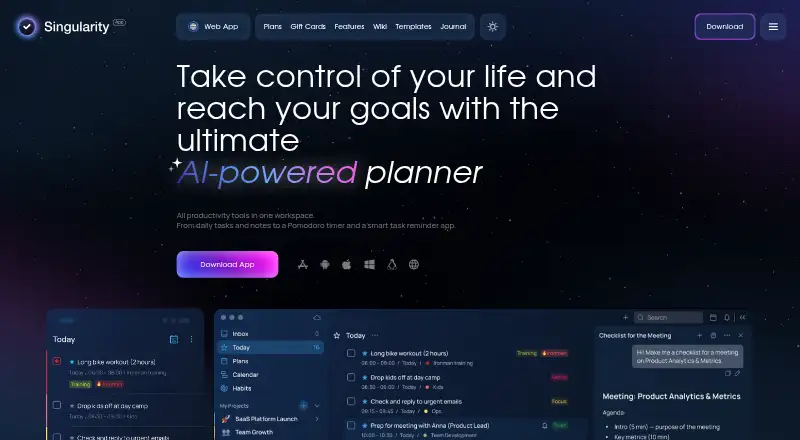
What SingularityApp is
SingularityApp is an AI-powered planner that brings tasks, notes, reminders, and a Pomodoro timer together. It includes calendar planning, priorities, recurring tasks, reminders, and nested projects and tasks. A habit tracker, stopwatch, and time-tracking statistics by task, project, and tag support focus and activity review. Projects can be shared, with up to five members on Pro and ten on Elite. Integrations include Google Calendar sync, web calendars, Telegram and email task capture, API, and MCP. Google Calendar sync can be one-way or two-way; in two-way sync, changes to synced tasks are reflected in the calendar. The app is available on web, Windows, macOS, Linux, iOS, and Android. Basic is free and allows up to 10 projects, five sections per project, three habits, and one reminder per task, on one device. Pro costs $3.33 per month billed annually, and Elite costs $4.17 per month billed annually. A 14-day Elite trial is offered without requiring a credit card. Minimum requirements include macOS Sierra or later, Android 10 or later, iOS 13 or later, and Windows 10 64-bit or later.
Who it suits
SingularityApp suits people organizing tasks, habits, reminders, and calendar activity across desktop, mobile, and web. Its paid tiers may suit shared projects needing more members, reminders, or cloud storage.
What it does well
- Available on web, Windows, macOS, Linux, iOS, and Android.
- Supports recurring tasks, reminders, subtasks, and calendar sync.
- Google Calendar sync can be one-way or two-way.
- 14-day Elite trial does not require a credit card.
- Pro and Elite support shared projects.
What to know first
- Basic is limited to one device.
- Basic allows one reminder per task.
- Windows requires Windows 10 64-bit or later.
- AI use may send account data and content to external AI providers.
Limits
Basic is limited to 10 projects, five sections per project, three habits, one reminder per task, and one device. Pro and Elite are billed annually; Pro includes 50MB of cloud storage and up to five members per project, while Elite includes 2GB and up to ten members.
Plans
| Plan | Billed and limits | Price |
|---|---|---|
| Basic | up to 10 projects · up to 5 sections per project · up to 3 habits · one reminder per task · one device | Free |
| Pro | per month, billed annually; or $3.99 per month, billed monthly · unlimited projects, sections, and habits · sync across devices · up to 5 project members · 50MB cloud storage | $3.33 |
| Elite | per month, billed annually; or $4.99 per month, billed monthly · up to 10 project members · 2GB cloud storage · notes with images · Kanban boards · AI assistant with own models | $4.17 |
As singularity-app.com lists them, read 5 Oct 2026. The maker's own page has the final word.
Getting started
- Open the SingularityApp website and choose a platform: web, Windows, macOS, Linux, iOS, or Android.
- Start with Basic, choose a paid plan, or begin the 14-day Elite trial without a credit card.
- Create projects and tasks, then add reminders, priorities, or recurring schedules.
- Connect Google Calendar or use a listed web calendar, Telegram, email, API, or MCP integration.
SingularityApp is a planner that combines tasks, notes, reminders, habits, and focus timers in one workspace. It suits individuals and small teams who want planning and time awareness across desktop, mobile, and web. The broad feature set is useful, but the free tier is tightly capped and the paid tiers are the practical choice for regular multi-device or collaborative use.
Overview
SingularityApp goes beyond a basic checklist with priorities, recurring schedules, nested projects, and calendar planning. Notes and reminders sit alongside tasks, while a habit tracker and time tools support routines as well as deadlines. That makes it a sensible fit for people who prefer one system for personal organization and focused work. If you only need simple lists, its extra layers may be unnecessary.
Project sharing brings the app into small-team territory, although membership limits depend on the paid tier. The Basic plan is restricted to one device, so users moving between phone, computer, and browser will quickly encounter a reason to upgrade.
Key features
Planning and capture
Tasks can be prioritized, reminded, repeated, and nested inside projects and subtasks. Google Calendar synchronization supports either one-way or two-way operation; with two-way sync, changes to synced tasks flow back into the calendar. Web calendars, Telegram and email capture, an API, and MCP integrations provide several routes for adding or connecting work.
Focus, habits, and reporting
A habit tracker, Pomodoro timer, and stopwatch cover routine building and timed sessions. Statistics can be viewed by task, project, or tag, giving users a way to assess where time is going rather than merely checking items off.
Sharing and data controls
Pro projects allow up to five members, while Elite projects allow up to ten. Data transmitted through the service is protected with SSL/TLS, and access to personal information is limited to employees who need it. The maker says it does not sell personal information and does not retain payment-card details on its servers. Using the AI Assistant can send account data and content to external AI providers; MCP integration data is not used to train AI models.
Pricing
| Plan | Price | Limits and inclusions |
|---|---|---|
| Basic | free | Up to 10 projects, five sections per project, three habits, one reminder per task, and one device. |
| Pro | $3.33 a month, billed annually | Up to five members per project, 50MB cloud storage, and five reminders per task. |
| Elite | $4.17 a month, billed annually | Up to ten members per project, 2GB cloud storage, and five reminders per task. |
Basic is suitable for a single-device user with a modest number of projects and habits. Its one-reminder limit and three-habit ceiling make it a poor match for elaborate routines. Pro is the sensible step for cross-device use and small shared projects, though 50MB is limited for attachment-heavy work. Elite doubles the project membership allowance and expands storage to 2GB, making it the better choice for larger collaborations. Both paid prices require annual billing. A 14-day trial provides all Elite features without a credit card, which is enough time to judge whether the broader toolkit justifies a subscription.
Platforms
SingularityApp runs on web, Windows, macOS, Linux, iOS, and Android. Minimum requirements are macOS Sierra or later, Windows 10 64-bit or later, Android 10 or later, and iOS 13 or later. The wide coverage is valuable for households or teams using mixed devices, but Basic's one-device rule undermines that advantage unless you pay.
Who it's for
Choose SingularityApp if you want habits, Pomodoro sessions, time statistics, calendar synchronization, and structured projects alongside ordinary tasks. Pro fits small groups sharing projects; Elite is aimed at larger groups or users who need materially more storage. It is less compelling for anyone seeking only free, uncomplicated lists or who does not want AI-assisted features that may transmit account content to external providers.
Pros and cons
- Pros: One system combines nested planning, recurring tasks, habits, timers, and time reports.
- Pros: Two-way Google Calendar sync can keep task changes reflected in the calendar.
- Pros: Six platform types and multiple capture integrations support varied workflows.
- Pros: SSL/TLS transmission, restricted internal access, no sale of personal information, and no stored card details are clear privacy safeguards.
- Cons: Basic permits only one device, 10 projects, three habits, and one reminder per task.
- Cons: Pro storage is only 50MB, while collaboration and storage improvements require annual billing.
- Cons: AI Assistant use may send account data and content to external AI providers.
Alternatives
TickTick is a better fit when you want a freemium task app with basic reminders, synchronization, and lists on the same six platform types. Any.do suits users wanting unlimited personal tasks and lists on its free plan. Microsoft To Do is the straightforward free option for task lists synced across web, iOS, Android, and Windows. Super Productivity is preferable if you want every feature free across desktop, mobile, web, API, and self-hosted setups. Vikunja is an alternative freemium project manager with a paid Personal plan at €4 a month. Nozbe is worth considering for a free plan supporting up to three users and three active projects. Routine offers a free tier with three integrations, three custom databases, and 250 AI credits. Google Tasks is the minimal free choice for lists, subtasks, due dates, and notifications on Android, iOS, and web. Browse more options in to-do list apps.
Verdict
SingularityApp is a strong choice for people who want task planning, habits, focus sessions, time reporting, and calendar connections in one cross-platform app. Pro is the practical tier for small collaborative projects, while Elite makes sense when member and storage limits matter. Look elsewhere if a simple free list is enough, if you need generous free multi-device use, or if sending AI-assisted content to external providers is unacceptable.
Verdict
SingularityApp combines planning, habit tracking, focus tools, and calendar integrations across six platform types. Its free plan has limits, while the annual-billed paid tiers add project collaboration and storage; review the listed device requirements before choosing.
Questions
Is there a free plan?
Yes. Basic is free and includes up to 10 projects, five sections per project, three habits, one reminder per task, and one device.
What does the 14-day trial include?
The trial offers all Elite features free for 14 days and does not require a credit card.
How much do the paid plans cost?
Pro is $3.33 a month when billed annually. Elite is $4.17 a month when billed annually.
Which platforms does SingularityApp support?
It supports web, Windows, macOS, Linux, iOS, and Android. The maker lists Windows 10 64-bit or later, macOS Sierra or later, iOS 13 or later, and Android 10 or later as minimum requirements.
Does it sync with Google Calendar?
Yes. Sync can be one-way or two-way; with two-way sync, changes to synced tasks are reflected in the calendar.
What happens to data when I use the AI Assistant?
Account data and content may be sent to external AI providers. The maker says MCP integration data is not used to train AI models.
Facts from SingularityApp's own pages
- AI data handling
- When the AI Assistant is used, account data and content may be sent to external AI providers, and MCP integration data is not used to train AI models. · singularity-app.com, 5 Oct 2026
- Calendar sync
- Yes · singularity-app.com, 22 Sept 2026
- Collaboration
- Projects can be shared, with up to five members on Pro and up to ten on Elite. · singularity-app.com, 5 Oct 2026
- Focus and habits
- It includes a habit tracker, Pomodoro timer, stopwatch, and time-tracking statistics by task, project, and tag. · singularity-app.com, 5 Oct 2026
- Free plan
- Yes · singularity-app.com, 22 Sept 2026
- Google Calendar
- Google Calendar synchronization can be one-way or two-way, with changes to synced tasks reflected in the calendar for two-way sync. · singularity-app.com, 5 Oct 2026
- Integrations
- The maker lists Google Calendar sync, web calendars, Telegram and email task capture, API, and MCP integrations. · singularity-app.com, 5 Oct 2026
- Planning features
- The app includes calendar planning, task priorities, reminders, recurring tasks, and nested projects and tasks. · singularity-app.com, 5 Oct 2026
- Platform limits
- The maker lists macOS Sierra or later, Android 10 or later, iOS 13 or later, and Windows 10 64-bit or later as minimum requirements. · singularity-app.com, 5 Oct 2026
- Privacy
- The maker says it does not sell personal information and does not store payment card details on its servers. · singularity-app.com, 5 Oct 2026
- Product
- SingularityApp describes itself as an AI-powered planner that combines tasks, notes, reminders, and a Pomodoro timer. · singularity-app.com, 5 Oct 2026
- Recurring tasks
- Yes · singularity-app.com, 22 Sept 2026
- Security
- The privacy policy says data transmitted through SingularityApp is encrypted using SSL/TLS and access to personal information is restricted to employees who need it. · singularity-app.com, 5 Oct 2026
- Subtasks
- Yes · singularity-app.com, 22 Sept 2026
- Support
- The pricing page directs users with payment problems to the SingularityApp support team. · singularity-app.com, 5 Oct 2026
- Supported platforms
- web,windows,macos,linux,ios,android · singularity-app.com, 22 Sept 2026
- Task reminders
- Yes · singularity-app.com, 22 Sept 2026
- Trial
- The download page offers all Elite features free for 14 days without requiring a credit card. · singularity-app.com, 5 Oct 2026
Where SingularityApp stands on Freedom251
- To-do list apps#10 of 150