Google Tasks
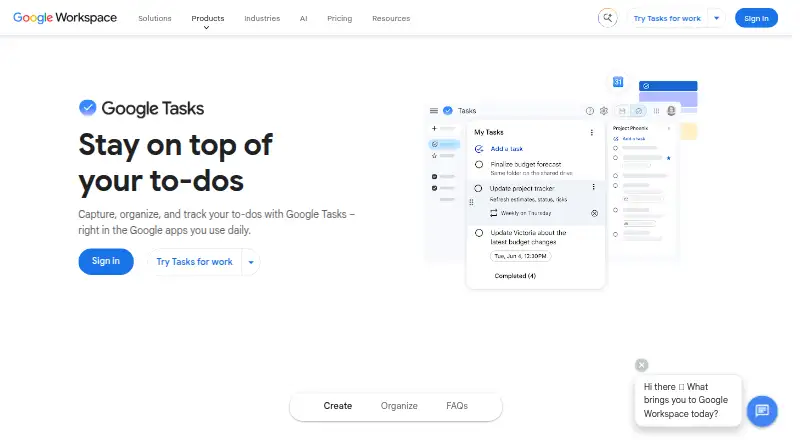
What Google Tasks is
Google Tasks is a free tool for capturing, organizing, and tracking to-dos across Google apps. Users can turn a Gmail message into a task and return to the original email from that task. Tasks with a date and time appear in Google Calendar, where reminders are available, and repeating tasks can be set for daily, weekly, monthly, or annual schedules. Separate lists, starred tasks, subtasks, due dates, and notifications help structure work. Tasks and lists sync across computers, phones, and tablets when users are signed in to the same Google Account. Access is available at tasks.google.com and in the side panels of Gmail, Calendar, Chat, and Drive. In Google Chat spaces, users can assign tasks to teammates, set deadlines, and follow progress. Tasks assigned in shared Google documents appear in the assignee's task list, though that feature is limited to some Business and Enterprise plans. Google lists mobile apps for iPhone, iPad, and Android. The Google Play listing says app data is encrypted in transit and users can request deletion. Google Tasks costs nothing and is available on web, iOS, and Android.
Who it suits
Google Tasks suits people who want to manage to-dos alongside Gmail, Calendar, Chat, and Drive. It also supports task assignment in Chat spaces, with shared-document task assignment available on some Business and Enterprise plans.
What it does well
- Turns Gmail messages into tasks linked to the original email.
- Tasks can repeat daily, weekly, monthly, or annually.
- Syncs across computers, phones, and tablets.
- Chat spaces support teammate assignment and progress tracking.
- Free on web, iOS, and Android.
What to know first
- Offline access is not available.
- Shared-document task assignment is limited to some Business and Enterprise plans.
Limits
Offline access is listed as none. Tasks assigned in a shared Google document populate the assignee’s task list only on some Business and Enterprise plans.
Plans
| Plan | Billed and limits | Price |
|---|---|---|
| Google Tasks | Google Tasks access; task lists; subtasks; due dates and notifications | Free |
As workspace.google.com lists them, read 11 Oct 2026. The maker's own page has the final word.
Getting started
- Open Tasks at tasks.google.com or find it in the side panel of Gmail, Calendar, Chat, or Drive.
- Sign in to the same Google Account you use on your other devices to sync tasks and lists.
- Create task lists and add tasks, subtasks, due dates, or notifications.
- Turn a Gmail email into a task when you want to keep a link to the original message.
- Install the iPhone or iPad app, or get the Android app from Google Play.
Overview
Google Tasks is a no-cost to-do app for collecting and tracking work alongside Google apps. It is a strong fit for people who already use Gmail or Calendar and want personal reminders tied to those routines. Its focused feature set keeps everyday task tracking simple, but it is not a substitute for offline access or a broader project-management system.
Key features
Turning a Gmail message into a task preserves a route back to the original email, making it useful for follow-ups that depend on a particular conversation. Add a date and time and the task appears in Google Calendar, where reminders can sit beside scheduled commitments. Daily, weekly, monthly, and annual repeats cover common recurring work; subtasks help divide a larger to-do into smaller steps.
Separate lists and starred tasks offer a straightforward way to group work and flag priorities. Tasks and lists sync across computer, phone, and tablet when signed in to the same Google Account. Users can open Tasks at tasks.google.com or in the side panel of Gmail, Calendar, Chat, and Drive, which reduces the need to leave those workflows to capture a task.
Collaboration works in specific Google contexts rather than as a general team-planning feature. In a Google Chat space, users can assign work to teammates, set deadlines, and track progress. Tasks assigned in a shared Google document populate the assignee’s task list, but this feature is available only on some Business and Enterprise plans. Offline access is unavailable, so Tasks is a poor fit for people who need to review or update their list without internet access.
Pricing
Google Tasks is free. The Google Tasks plan costs nothing and includes access to Tasks, task lists, subtasks, due dates, and notifications. For a personal to-do list, that covers the core planning features without a paid tier to weigh against them.
The plan does not include offline access, and shared-document task assignment is limited to some Business and Enterprise plans. Readers who need those document workflows should check whether their Google plan includes them; the free Tasks plan alone does not provide that capability. The Chat-space assignment features are useful for teams already working in Chat, but do not make Tasks a broad project-management tool.
Platforms
Tasks is available on the web, iOS, and Android. The web version can be opened at tasks.google.com or from the side panel in Gmail, Calendar, Chat, and Drive. Mobile apps are available for iPhone, iPad, and Android. Cross-device synchronization depends on signing in to the same Google Account, and the lack of offline access means all platforms require an internet connection for use.
Who it's for
Choose Google Tasks if you want a free, lightweight list that connects email follow-ups, calendar reminders, recurring tasks, and subtasks across devices. It particularly suits people whose daily work already runs through Google apps. Look elsewhere if offline use is essential, or if your team needs collaboration beyond Chat-space assignments and the limited shared-document feature.
Pros and cons
- Pro: Gmail-to-task capture keeps the source email accessible, which helps with conversation-based follow-ups.
- Pro: Calendar integration, reminders, and repeat schedules support routine tasks without a separate paid plan.
- Pro: Lists, stars, and subtasks provide basic organization while syncing across computer, phone, and tablet.
- Con: No offline access rules it out for users who need their tasks when disconnected.
- Con: Shared-document task assignment is limited to some Business and Enterprise plans, so it is not a universal collaboration option.
- Con: Its collaboration features are tied to Google Chat spaces and shared documents rather than a wider task-management workflow.
Alternatives
For a personal to-do workflow, start with To-do list apps to compare other options. If you are choosing software for a work queue or a broader team workflow, browse Task Queue Software or Task Management Software.
The alternatives below are task-queue and worker products rather than direct personal-list replacements. Choose IronWorker if you want its free Basic plan with a public cluster, one concurrency, five hours per month, 512 MB RAM, a 30-minute runtime, and 50 scheduled tasks. Django Q2 is a free, MIT-licensed option for users seeking that software. Faktory offers a free, AGPL-licensed open-source plan with no dedicated support, plus a $99 a month Enterprise additional-packs plan.
Gearman is a free, BSD-licensed open-source option. Graphile Worker is free and open source under the MIT license, with a Worker Pro Launch Offer from $25+ /mo. Hangfire offers an always-free Open plan, with Hangfire Core under LGPL 3.0, commercial use, and SQL Server 2008 R2+ and in-memory storage.
Inngest may suit users who need a free plan with 5 seats, 50k executions, 500k events ingested, and 24-hour trace history; its Pro plan starts at $99 a month. pg-boss is a free, MIT-licensed open-source option that runs in your own database with no per-job charges.
Verdict
Google Tasks is the right choice for people who want a free personal task list woven into Gmail and Calendar, with recurring schedules, reminders, subtasks, and cross-device sync. Choose it for that focused Google workflow; look elsewhere if offline access or fuller team task management is central to your decision.
Verdict
Google Tasks covers recurring reminders, lists, subtasks, and selected collaboration features at no charge. Note that it requires internet access and shared-document task assignment is plan-limited.
Questions
How much does Google Tasks cost?
The listed plan is free and includes task lists, subtasks, due dates, and notifications.
Which platforms can I use?
Google Tasks is listed for web, iOS, and Android. Google lists its mobile app for iPhone and iPad.
Can tasks repeat or send reminders?
Yes. Tasks can repeat daily, weekly, monthly, or annually. A task with a date and time appears in Google Calendar, where reminders are available.
Can I turn an email into a task?
Yes. You can turn a Gmail email into a task and return to the original message from the task.
Can I use Google Tasks offline?
Offline access is listed as none.
Who makes the Android app?
The Google Play listing identifies Google LLC as the developer.
Facts from Google Tasks's own pages
- Android data safety
- The Google Play listing says the app’s data is encrypted in transit and that users can request deletion of their data. · play.google.com, 11 Oct 2026
- Calendar
- A task with a date and time appears in Google Calendar, where users can receive reminders. · workspace.google.com, 11 Oct 2026
- Calendar sync
- Yes · workspace.google.com, 23 Sept 2026
- Chat collaboration
- In a Google Chat space, users can assign tasks to teammates, set deadlines, and track progress. · workspace.google.com, 11 Oct 2026
- Cross-device sync
- Tasks and task lists sync across computer, phone, and tablet when signed in to the same Google Account. · workspace.google.com, 11 Oct 2026
- Docs delegation limit
- Tasks assigned in a shared Google document populate the assignee’s task list, and this feature is available on some Business and Enterprise plans. · workspace.google.com, 11 Oct 2026
- Free plan
- Yes · workspace.google.com, 23 Sept 2026
- Gmail
- Users can turn an email into a task and return to the original message from that task. · workspace.google.com, 11 Oct 2026
- Lists and priorities
- Users can create separate task lists and star important tasks. · workspace.google.com, 11 Oct 2026
- Mobile apps
- Google lists its Tasks mobile app for iPhone and iPad, and its Google Play listing identifies Google LLC as the developer. · apps.apple.com, 11 Oct 2026
- Offline access
- none · workspace.google.com, 23 Sept 2026
- Purpose
- Google Tasks lets users capture, organize, and track to-dos in Google apps they use daily. · workspace.google.com, 11 Oct 2026
- Recurring tasks
- Yes · workspace.google.com, 23 Sept 2026
- Repeating tasks
- Tasks can repeat daily, weekly, monthly, or annually. · workspace.google.com, 11 Oct 2026
- Subtasks
- Users can break larger tasks into smaller steps by adding subtasks under a main task. · workspace.google.com, 11 Oct 2026
- Support
- The Google Play listing provides [email protected] as the app support email. · play.google.com, 11 Oct 2026
- Supported platforms
- Web,iOS,Android · workspace.google.com, 23 Sept 2026
- Task reminders
- Yes · workspace.google.com, 23 Sept 2026
- Web and Workspace access
- Users can access Tasks at tasks.google.com or in the side panel of Workspace apps including Gmail, Calendar, Chat, and Drive. · workspace.google.com, 11 Oct 2026
Where Google Tasks stands on Freedom251
- To-do list apps#21 of 150
- Task Management Software#12 of 59
- Google Workspace Productivity Tools#5 of 22
- Task Queue Software#11 of 37