GQueues
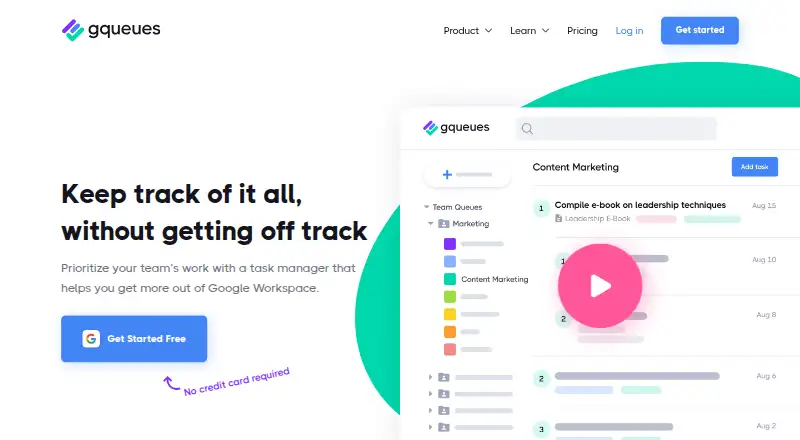
What GQueues is
GQueues is a task manager for people and teams who organize work with Google Workspace. Tasks can hold due dates, reminders, unlimited subtasks, tags, attachments, and notes, and can follow repeating schedules. Projects can be shown as lists or kanban boards, or as Google Calendars that sync changes in both directions in real time. Teams can share workspaces and lists, assign tasks, discuss them in comments, and review a record of changes.
The service connects with Google Calendar, Gmail, Drive, Contacts, and Google Workspace, and has a Chrome extension. Its listed platforms include web, Android, and iOS. GQueues Lite is a free option for core task management with Google login. GQueues for YOU costs $3 a month, billed annually, and is aimed at solo users; it adds Google integrations, reminders, search, and mobile apps. GQueues for BUSINESS costs $4 a month, billed annually per user, and adds team collaboration, unlimited shared calendars, bulk actions, Workspace integration, and central license management. A 14-day trial is also offered.
GQueues says task data is held in Google Cloud Datastore, while attachments remain in users’ Google Drive accounts. It says data is encrypted in transit and at rest. Help articles and live chat with its Customer Care team are available. GQueues says it was founded in 2009 by Cameron Henneke and acquired by Baydin in 2024.
Who it suits
GQueues suits solo users, small businesses, and teams that use Google services to plan and coordinate tasks. Its BUSINESS plan is positioned for teams and power users who need shared workspaces, collaboration, and centralized license management.
What it does well
- Tasks support due dates, reminders, unlimited subtasks, and repeating schedules.
- Projects can appear as lists, kanban boards, or synced Google Calendars.
- Teams can assign tasks, comment, and review change records.
- Integrates with Google Calendar, Gmail, Drive, Contacts, and Workspace.
- A free plan and a 14-day trial are available.
- Data is encrypted in transit and at rest, according to GQueues.
What to know first
- GQueues for YOU costs $3 a month, billed annually.
- GQueues for BUSINESS costs $4 a month, billed annually per user.
- GQueues says it does not currently have a bug bounty program.
Limits
GQueues Lite covers core task management and Google login. Google integrations, reminders, search, and mobile apps are listed with GQueues for YOU; team collaboration and other team features are listed with BUSINESS.
Plans
| Plan | Billed and limits | Price |
|---|---|---|
| GQueues for YOU | billed annually · Solo users · Lite features plus Google integrations, reminders, search, and mobile apps | $3 a month |
| GQueues for BUSINESS | billed annually · Per user · teams and power users · YOU features plus team collaboration, unlimited shared calendars, bulk actions, Workspace integration, and central license management | $4 a month |
| GQueues Lite | Core task management · intuitive interface · Google login | Free |
As gqueues.com lists them, read 5 Oct 2026. The maker's own page has the final word.
Getting started
- Visit the GQueues website.
- Choose GQueues Lite for free core task management with Google login, or review the paid plans.
- Use the 14-day trial if you want to try the service before choosing a plan.
- Choose GQueues for YOU as a solo user or BUSINESS for a team.
- Use GQueues on the web, or access the listed Android and iOS apps and Chrome extension.
Verdict
Solo users who want task management with Google integrations can start with GQueues for YOU, while teams may prefer BUSINESS for collaboration and shared calendars. People who need team features on a free plan or require a bug bounty program may want to look elsewhere.
Questions
Is GQueues free?
Yes. GQueues Lite is a free plan for core task management with Google login. A 14-day trial is also offered.
How much do the paid plans cost?
GQueues for YOU costs $3 a month, billed annually. GQueues for BUSINESS costs $4 a month, billed annually per user.
Which platforms does GQueues support?
GQueues lists web, Android, iOS, and a Chrome extension.
Which Google services does it integrate with?
GQueues lists Google Calendar, Gmail, Drive, Contacts, and Google Workspace.
Where is GQueues data stored?
GQueues says task data is stored in Google Cloud Datastore and attachments in users’ Google Drive accounts. It says data is encrypted in transit and at rest.
Who makes GQueues?
GQueues says it was founded in 2009 by Cameron Henneke and acquired by Baydin in 2024.
Facts from GQueues's own pages
- Collaboration
- Teams can share workspaces and lists, assign tasks, comment on tasks, and review a record of changes. · gqueues.com, 5 Oct 2026
- Company history
- GQueues says it was founded in 2009 by Cameron Henneke and acquired by Baydin in 2024. · gqueues.com, 5 Oct 2026
- Free plan
- Yes · gqueues.com, 20 Sept 2026
- Google integrations
- GQueues lists integrations with Google Calendar, Gmail, Drive, Contacts, and Google Workspace, plus a Chrome extension. · gqueues.com, 5 Oct 2026
- Intended users
- GQueues describes itself as built for small businesses and Google users, and its pricing page positions Business for teams and power users. · gqueues.com, 5 Oct 2026
- Mobile apps
- The pricing page lists mobile apps for Android and iOS. · gqueues.com, 5 Oct 2026
- Purpose
- GQueues is a task manager designed to help teams prioritize work with Google Workspace. · gqueues.com, 5 Oct 2026
- Recurring tasks
- Yes · gqueues.com, 20 Sept 2026
- Security
- GQueues says task data is stored in Google Cloud Datastore, attachments are stored in users’ Google Drive accounts, and data is encrypted in transit and at rest. · gqueues.com, 5 Oct 2026
- Security limits
- GQueues says it does not have a bug bounty program at this time. · gqueues.com, 5 Oct 2026
- Support
- GQueues offers help articles and live chat with its Customer Care team. · gqueues.com, 5 Oct 2026
- Task organization
- Tasks can include due dates, reminders, unlimited subtasks, tags, attachments, notes, and repeating schedules. · gqueues.com, 5 Oct 2026
- Views
- Projects can be viewed as lists, kanban boards, or Google Calendars synced in real time in both directions. · gqueues.com, 5 Oct 2026
Where GQueues stands on Freedom251
- To-do list apps#19 of 150
- Task Management Software#10 of 59
- Google Workspace Productivity Tools#4 of 22