
Nozbe
by Nozbe
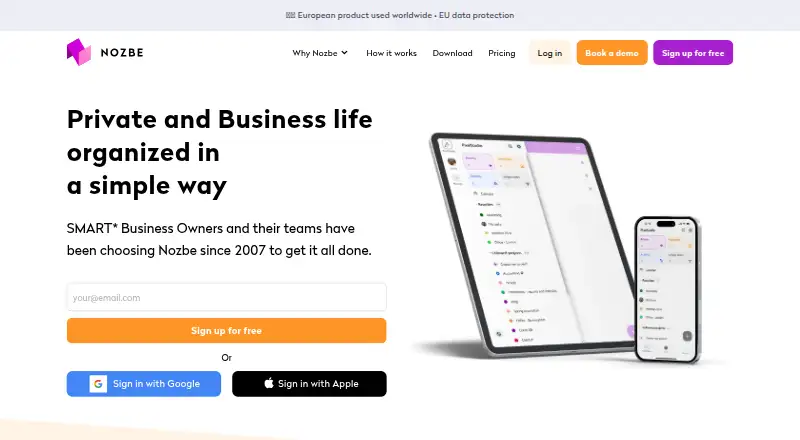
What Nozbe is
Nozbe is task and project management software for individuals and teams, available on the web and through apps for Android, iOS, macOS, and Windows. Tasks can have deadlines, reminders, and time tracking; recurring tasks, subtasks, and calendar sync support ongoing work. Dedicated apps work offline. Projects can be shared with teams, organizations, subcontractors, and other Nozbe spaces. Premium projects support unlimited tasks, comments, sections, tags, and templates. Premium also offers project and user groups, while Business supports unlimited admins. The free plan has no time limit or credit card requirement, and includes up to three users, three active projects, three sections, three tags, and one workspace. It provides 500 MB of storage per space, limits files to 10 MB, and keeps completed task history for seven days. Premium starts at $6/user/mo billed annually; a monthly option is $7.50 per member. Nozbe was founded in 2007 and is based in Gdynia, Poland.
Who it suits
Nozbe suits individuals and teams organizing tasks and projects across web and mobile or desktop apps. Its free plan can accommodate up to three users, with paid plans offering expanded project and team capabilities.
What it does well
- Tasks include deadlines, reminders, and time tracking.
- Recurring tasks, subtasks, and calendar sync are supported.
- Dedicated apps work offline.
- Projects can be shared with teams and other groups.
What to know first
- Free plan is limited to three active projects.
- Free storage is 500 MB per space.
- Free completed-task history lasts seven days.
- Files on the free plan are limited to 10 MB.
Limits
Free allows up to three users, three active projects, three sections, three tags, and one workspace. It includes 500 MB of storage per space with a 10 MB file limit, and completed task history is limited to seven days.
Plans
| Plan | Billed and limits | Price |
|---|---|---|
| Free | 3 users · 3 active projects · 3 project sections · 3 tags · 500 MB attachments per space · 7 days of task history | Free |
| Premium | Billed yearly; from $6/member/month · 1–200 people · 20 GB storage per user · 200 MB per file · Unlimited projects · Unlimited project sections | $6 a month |
| Business | Billed yearly; from $9/member/month · 1–200 people · Unlimited workspaces · Unlimited storage · 200 MB per file · Unlimited projects | $9 a month |
| Premium yearly | billed yearly from $6/member/month | $6 a month |
| Premium monthly | billed monthly from $7.5/member/month | $7.50 a month |
As nozbe.com lists them, read 28 Sept 2026. The maker's own page has the final word.
Getting started
- Open the Nozbe website.
- Choose the Free plan or review the paid plans.
- Create a free space; creating another free space starts a seven-day Premium trial.
- Use Nozbe on the web or its Android, iOS, macOS, or Windows apps.
- Share projects with your team or other Nozbe spaces.
Nozbe is a task and project-management service for people coordinating individual and shared work across desktop and mobile. It is best suited to users who need recurring work, structured projects, and offline-capable apps rather than a bare checklist. The free tier is useful for a small trial, while serious project work is aimed at Premium or Business.
Overview
Nozbe comes from a company founded in 2007 by Michael Sliwinski and based in Gdynia, Poland. The maker describes its product as European, with EU data protection, and operates with a 20-plus-person fully remote team. Its combination of task planning, project collaboration, and dedicated apps gives it a broader remit than a personal reminder list.
Key features
Tasks can carry deadlines, reminders, recurring schedules, subtasks, and time tracking. Calendar sync helps place planned work alongside other commitments. These tools fit routines and ongoing projects, although the listed active-task limit of three is a severe constraint if it applies to the account you are using.
Projects can be shared with teams, organizations, subcontractors, and other Nozbe spaces. Premium projects support unlimited tasks, comments, sections, tags, and templates, removing the structural ceilings that make the free plan mainly a lightweight workspace. CSV project import and email-to-task forwarding offer practical ways to bring existing work into Nozbe.
Premium includes project and user groups; Business adds unlimited administrators. That makes Business relevant when several people must manage users and projects, not merely when a team wants shared tasks. Dedicated apps work offline, covering Android, iOS, macOS, and Windows, while a web app is also supported. Apple and Google sign-in are available.
Pricing
The Free plan costs nothing, has no time limit, and requires no credit card. It supports up to three users, three active projects, three project sections, three tags, and one workspace. Storage is 500 MB per space with a 10 MB file limit, and completed-task history lasts seven days. Those caps suit a personal setup or a very small pilot, but quickly become restrictive for a growing project archive.
Premium costs $6 a month per member when billed yearly, or $7.50 a month per member when billed monthly, for one to 200 people. It provides unlimited projects and sections, 20 GB of storage per user, and a 200 MB file limit, along with the unlimited project capabilities described above. Creating another free space starts a seven-day Premium trial. Online payment orders have a 30-day money-back guarantee.
Business costs $9 per member per month when billed yearly, for one to 200 people. It adds unlimited workspaces, unlimited storage, a 200 MB file limit, unlimited projects, and unlimited administrators. Choose it for organization-wide administration and workspace capacity; otherwise Premium is the more proportionate paid tier. Payments can use major cards, PayPal, Apple Pay, selected bank methods, the App Store, or Google Play, with Stripe and Verifone handling payment and invoicing.
Platforms
Nozbe runs on the web and has dedicated Android, iOS, macOS, and Windows apps. The dedicated applications work offline, which is useful for maintaining task work when a connection is unavailable. Calendar sync and sign-in through Apple or Google complement the cross-device setup.
Who it's for
Nozbe is a good fit for individuals and teams that need shared projects, recurring responsibilities, reminders, and a consistent offline-capable app set. Premium is the sensible choice for teams that will exceed three projects or need substantial files and project structure. Business is aimed at organizations that require unlimited workspaces, storage, and administrative roles. Users wanting only a simple, unrestricted personal checklist may find the free caps and collaboration-oriented tiers unnecessary.
Pros and cons
Pros
- Recurring tasks, reminders, deadlines, subtasks, and time tracking cover ongoing operational work.
- Premium removes project, section, task, comment, tag, and template limits.
- Offline desktop and mobile apps support work without a connection.
- Sharing spans teams, organizations, subcontractors, and other Nozbe spaces.
- A seven-day Premium trial and 30-day money-back guarantee reduce the risk of upgrading.
Cons
- The free tier allows only three users, three active projects, three sections, three tags, and one workspace.
- Free storage is 500 MB per space with a 10 MB file cap, and history is limited to seven days.
- Monthly Premium costs $7.50 per member, higher than the yearly rate.
- The three-active-task limit can undermine use as a full daily task list.
Alternatives
For a broader starting point, compare the To-do list apps directory. Pick TickTick if you want Linux support and a free plan with basic tasks, reminders, sync, and lists. Any.do suits users seeking unlimited personal tasks and lists on its free-forever Personal plan. Choose Microsoft To Do for a free service with task-list sync across web, iOS, Android, and Windows.
Super Productivity is a free, all-features option spanning desktop, mobile, web, and self-hosting. Vikunja is an alternative freemium project manager with a 4.00 EUR monthly Personal plan. SingularityApp offers a free Basic tier with up to 10 projects. Routine provides a free plan with three integrations, three custom databases, and 250 AI credits. Google Tasks is a free choice for lists, subtasks, due dates, and notifications on Android, iOS, and the web.
Verdict
Choose Nozbe when shared, recurring project work and offline apps matter more than having a generous free tier. Premium is the practical destination for most active teams, while Business earns its price when unlimited workspaces, storage, and administrators are necessary. Look elsewhere if you need an unrestricted free task manager or a simpler personal checklist without project caps.
Verdict
Nozbe combines task reminders, recurring work, and project sharing across web and dedicated apps. The free plan has defined limits; Premium starts at $6/user/mo billed annually.
Questions
Is Nozbe free?
Yes. Its Free plan costs $0, has no time limit, and does not require a credit card.
What does Nozbe Premium cost?
Premium starts at $6 per member per month billed yearly. A monthly option is listed at $7.50 per member.
Which platforms does Nozbe support?
Nozbe supports Android, iOS, macOS, Windows, and the web. Dedicated apps work offline.
What are the Free plan limits?
Free supports up to three users, three active projects, three sections, three tags, and one workspace. Storage is 500 MB per space with a 10 MB file limit, and completed task history lasts seven days.
Does Nozbe offer a trial?
Creating another free space changes it to a seven-day Premium trial.
Where is Nozbe based?
Nozbe is headquartered in Gdynia, Poland. It was founded in 2007 by Michael Sliwinski.
Facts from Nozbe's own pages
- Admin controls
- Premium supports project and user groups; Business supports unlimited admins · nozbe.com, 28 Sept 2026
- Calendar sync
- Yes · nozbe.com, 22 Sept 2026
- Company history
- Founded in 2007 by Michael Sliwinski; the company has a 20+ person all-remote team · nozbe.com, 28 Sept 2026
- Data protection
- Nozbe describes itself as a European product with EU data protection · nozbe.com, 28 Sept 2026
- Founded
- 2007 · nozbe.com, 28 Sept 2026
- Free billing
- The free plan has no credit card requirement and no time limit · nozbe.com, 28 Sept 2026
- Free history
- Completed task history is limited to 7 days · nozbe.com, 28 Sept 2026
- Free plan
- Yes · nozbe.com, 22 Sept 2026
- Free storage
- 500 MB per space, with a 10 MB file limit · nozbe.com, 28 Sept 2026
- Free tier limits
- Free for up to 3 users, 3 active projects, 3 sections, 3 tags, and 1 workspace · nozbe.com, 28 Sept 2026
- Headquarters
- Gdynia, Poland · nozbe.com, 28 Sept 2026
- Integrations
- Features include CSV project import, email-to-task forwarding, Apple sign-in, and Google sign-in · nozbe.com, 28 Sept 2026
- Offline access
- web_and_mobile · nozbe.com, 22 Sept 2026
- Offline apps
- Dedicated apps work offline · nozbe.com, 28 Sept 2026
- Payment methods
- Accepts major cards, PayPal, Apple Pay, selected bank methods, App Store, and Google Play · nozbe.com, 28 Sept 2026
- Payment providers
- Stripe and Verifone handle payments and invoicing · nozbe.com, 28 Sept 2026
- Premium trial
- Creating another free space changes it to a 7-day free Premium trial · nozbe.com, 28 Sept 2026
- Project features
- Projects support unlimited tasks, comments, sections, tags, and templates on Premium · nozbe.com, 28 Sept 2026
- Recurring tasks
- Yes · nozbe.com, 22 Sept 2026
- Refund policy
- Online payment orders have a 30-day money-back guarantee · nozbe.com, 28 Sept 2026
- Team sharing
- Projects can be shared with teams, organizations, subcontractors, and other Nozbe spaces · nozbe.com, 28 Sept 2026
- Paid from
- 6 · nozbe.com, 22 Sept 2026
- Subtasks
- Yes · nozbe.com, 22 Sept 2026
- Supported platforms
- web,windows,macos,ios,android · nozbe.com, 22 Sept 2026
Where Nozbe stands on Freedom251
- To-do list apps#9 of 150