
Super Productivity
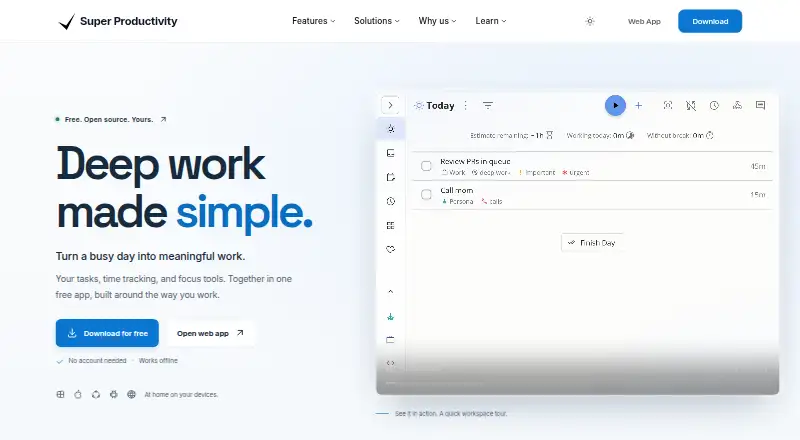
What Super Productivity is
Super Productivity is a task management app from Super Productivity, a maker founded in 2016. It supports recurring tasks and subtasks, giving users ways to schedule repeated work and divide tasks into smaller pieces. Calendar sync is also included. Offline access is available on web and mobile, and the app runs on web, Windows, macOS, Linux, iOS, and Android.
The Free plan costs nothing and includes all features on all platforms, with no premium tiers. The plan details say there are no trials, while the product listing also marks a free trial as available. The listed capabilities focus on tasks, calendars, and offline access. People can choose a web, desktop, or mobile platform while using the same free plan. Super Productivity is suited to people who want recurring work, task breakdowns, and calendar sync in a tool that spans computers and phones.
Who it suits
It suits people who want to manage recurring work, break tasks into subtasks, and sync tasks with a calendar. Its platform range works for users choosing among web, desktop, and mobile access.
What it does well
- Recurring tasks support repeated work.
- Subtasks let users break tasks into smaller parts.
- Calendar sync is included.
- Offline access is available on web and mobile.
- Free plan includes all features across all platforms.
What to know first
- No premium tiers are offered.
- Offline access is listed only for web and mobile.
Plans
| Plan | Billed and limits | Price |
|---|---|---|
| Free | Forever · All features · All platforms | Free |
As super-productivity.com lists them, read 11 Oct 2026. The maker's own page has the final word.
Getting started
- Visit https://super-productivity.com/.
- Choose web, Windows, macOS, Linux, iOS, or Android.
- Use the Free plan, which includes all features on all platforms.
Overview
Super Productivity brings task planning, time tracking and focus tools together in a free, open-source app. It is particularly well suited to developers, freelancers and privacy-conscious users who want to shape their own workflow. Its breadth is unusual for a no-cost tool, though connected services still depend on a network connection.
Key features
Tasks can be arranged as lists, Kanban boards or an Eisenhower Matrix, with subtasks for breaking work down and recurring tasks for routines. That flexibility helps users move between a simple task list and a more structured view without switching apps. Focus mode, a Pomodoro timer and breaks add support for working in deliberate sessions.
Time tracking is built around tasks, with timesheets and reports for reviewing how time was spent. Calendar events can be imported and tasks timeboxed, making the app useful for planning work against an existing schedule. Integrations include Jira, GitHub, GitLab, Gitea, Google Calendar and CalDAV calendars. A plugin system and REST API allow custom integrations, a practical strength for technical users but unnecessary complexity for someone who only needs a basic checklist.
Offline use is supported, but it has a clear boundary: remote issues cannot be fetched and updates cannot be sent to connected services without a network. Tasks stay on the device unless sync is enabled. Optional sync uses the user's Dropbox, Google Drive or WebDAV, and synced data can be encrypted. This gives privacy-minded users control over storage, though the setup is less turnkey than a service-managed sync.
The app has no analytics or telemetry, and integration API calls go directly from the device to the connected services. It is MIT-licensed; users can download, self-host and customize it without subscriptions or upsells.
Pricing
Free — free, billed Forever. The plan includes all features across all platforms, so recurring tasks, time tracking, focus tools and integrations do not sit behind a paid upgrade. There is no free trial and no premium tier; the trade-off is that community support is through GitHub, Reddit and other community platforms rather than a paid support offering. No seat limits or usage quotas are stated.
Platforms
Super Productivity supports web, Windows, macOS, Linux, iOS and Android. That range makes it a credible choice for people who switch between desktop and mobile. Offline access is supported on web and mobile; connected-service operations still need a network.
Who it's for
Developers can use the integrations and custom plugin options to connect task planning with issue trackers. Freelancers may value task-based time records and reports, while people with ADHD may appreciate the combination of breakdowns, focus sessions and breaks. Privacy advocates have a stronger case here than with a tool that relies on provider-managed accounts: tasks stay local by default, and optional sync can use their own storage provider. Users who want a simple task list without planning or tracking tools may find this more app than they need.
Pros and cons
- Pros: All features are included free across platforms, with no subscription or upsell.
- Pros: Lists, boards, matrix planning, subtasks, recurring tasks, time tracking and focus tools cover several work styles in one app.
- Pros: Local-first task storage, optional encrypted sync and no analytics or telemetry suit users who prioritize control over their data.
- Cons: Fetching remote issues and sending updates to connected services stops working offline.
- Cons: Custom integrations through plugins or the REST API are most useful to technical users, not people seeking a ready-made minimalist task list.
- Cons: Support is community-based.
Alternatives
For a broader shortlist, browse to-do list apps.
TickTick is worth comparing if its free plan's basic task, reminder, sync and list features are enough; that plan caps users at 9 lists, 99 tasks per list and 1 attachment.
Any.do offers a free Personal plan with unlimited personal tasks and lists, so it may suit users whose priority is managing personal lists rather than combining planning with time tracking and focus tools.
Microsoft To Do is a free alternative for task lists that sync across web, iOS, Android and Windows.
Vikunja is another option for users comparing a freemium task manager with web, desktop, mobile, API and self-hosted platforms; its Personal plan is €4 a month.
Nozbe may fit readers organizing work with others: its free plan allows up to 3 users, 3 active projects and 1 free workspace.
SingularityApp has a free Basic plan limited to 10 projects, 5 sections per project, 3 habits, one reminder per task and one device.
Routine is an alternative with a free plan that includes 3 integrations, 3 custom databases and 250 AI credits.
Google Tasks is a free option for task lists, subtasks, due dates and notifications on Android, iOS and web.
Verdict
Super Productivity is a strong choice for people who want task planning, time records and focus tools without a subscription, especially if local storage, custom integrations or developer-oriented connections matter. Its main limitation is the offline boundary for connected services, and its depth may be unnecessary for a basic personal checklist. Choose it for a configurable, privacy-conscious work system; look elsewhere if you need remote integrations to function offline or prefer a simpler task app.
Verdict
Choose Super Productivity if you want task features such as recurring tasks and subtasks across web, desktop, and mobile, with all features included in the free plan. Look elsewhere if you need an offering with premium tiers or offline access on desktop.
Questions
How much does Super Productivity cost?
The Free plan costs nothing.
Is there a free plan?
Yes. It includes all features across all platforms, with no premium tiers.
Which platforms does it support?
Web, Windows, macOS, Linux, iOS, and Android.
Can it work offline?
Offline access is available on web and mobile.
Does it include calendar sync and recurring tasks?
Yes. Calendar sync and recurring tasks are listed features.
Facts from Super Productivity's own pages
- Calendar sync
- Yes · super-productivity.com, 21 Sept 2026
- Custom integrations
- The plugin system and REST API can be used to build custom integrations. · super-productivity.com, 11 Oct 2026
- Data storage
- Tasks stay on the user's device unless sync is enabled; the download page says synced files live with the user's storage provider under their account. · super-productivity.com, 11 Oct 2026
- Focus
- The app includes focus mode, a Pomodoro timer, and breaks. · super-productivity.com, 11 Oct 2026
- Founded
- 2016 · super-productivity.com, 28 Sept 2026
- Free plan
- Yes · super-productivity.com, 21 Sept 2026
- Integrations
- Listed integrations include Jira, GitHub, GitLab, Gitea, Google Calendar, and CalDAV calendars. · super-productivity.com, 11 Oct 2026
- Intended users
- The site describes use cases for developers, freelancers, people with ADHD, and privacy advocates. · super-productivity.com, 11 Oct 2026
- License
- The download page describes the app as MIT-licensed and says users can download, self-host, and customize it without subscriptions or upsells. · super-productivity.com, 11 Oct 2026
- Offline access
- web_and_mobile · super-productivity.com, 21 Sept 2026
- Offline use
- The app can be used offline, while fetching remote issues and sending updates to connected services requires a network connection. · super-productivity.com, 11 Oct 2026
- Planning
- Tasks can be organized as lists, Kanban boards, or an Eisenhower Matrix. · super-productivity.com, 11 Oct 2026
- Privacy
- The privacy page says the app has no analytics or telemetry and that integration API calls go directly from the device to connected services. · super-productivity.com, 11 Oct 2026
- Purpose
- Super Productivity combines task planning, time tracking, and focus tools in a free, open-source app. · super-productivity.com, 11 Oct 2026
- Recurring tasks
- Yes · super-productivity.com, 21 Sept 2026
- Scheduling
- Users can bring in calendar events and timebox tasks. · super-productivity.com, 11 Oct 2026
- Subtasks
- Yes · super-productivity.com, 21 Sept 2026
- Support
- The pricing page points users to community support on GitHub, Reddit, and other platforms. · super-productivity.com, 11 Oct 2026
- Supported platforms
- web,windows,macos,linux,ios,android · super-productivity.com, 21 Sept 2026
- Sync
- Optional sync can use the user's Dropbox, Google Drive, or WebDAV, and the privacy page says synced data can be encrypted. · super-productivity.com, 11 Oct 2026
- Time tracking
- Users can track time on tasks and create timesheets and reports. · super-productivity.com, 11 Oct 2026
Where Super Productivity stands on Freedom251
- To-do list apps#7 of 150