Freedom251 › Employee Time Tracking Software

solidtime
by solidtime
What solidtime is
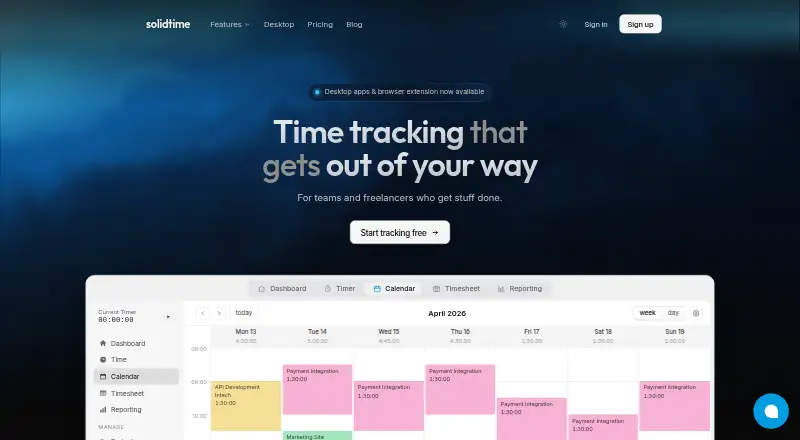
solidtime is open-source time-tracking software for teams and freelancers, available as cloud software or self-hosted deployment. A live timer, drag-and-drop calendar, and weekly timesheet cover time capture; entries can be organized by client, project, task, and tag, with project rates and budgets. Reports can be filtered and grouped by those categories and billable state, then shared or exported as PDF, CSV, or Excel. The software can turn billable time into invoices with PDF and structured e-invoice output, tax rates, discounts, and EU reverse-charge. Its desktop app detects the active app and document and pauses the timer when it detects idle time; activity stays on the device until made into a time entry. Desktop versions are offered for macOS, Windows 10/11, and Linux. The Open Source plan is free and includes self-hosting. Professional costs €8 a month when billed annually, excluding VAT, or €9 a month billed monthly, excluding VAT. The cloud service is hosted within the EEA, primarily in France.
Who it suits
solidtime suits freelancers tracking billable work and teams organizing time across clients, projects, and tasks. Its Professional cloud plan is aimed at teams billing clients who need access controls, estimates, and richer reporting; self-hosting is also available.
What it does well
- Track time with a live timer, calendar, and weekly timesheet.
- Reports export as PDF, CSV, or Excel.
- Create invoices from billable time.
- Offers self-hosted deployment and desktop apps.
What to know first
- Timesheet approvals are not available.
- Professional annual billing costs €8 a month, excluding VAT.
- Professional monthly billing costs €9 a month, excluding VAT.
Limits
The free Open Source plan provides core features and self-hosted deployment. Professional costs €8 a month per user with annual billing or €9 a month per user with monthly billing; both prices exclude VAT.
Plans
| Plan | Billed and limits | Price |
|---|---|---|
| Professional | Billed annually; excl. VAT · Team support · Project access management · Organization access management · Invoicing · Project and task estimates · PDF reports | €8 a month |
| Open Source | €0 forever · Self-hosted deployment · All core features · No invoicing · No private Docker Registry · No priority support | Free |
| Solo | Free · 1 user · Clients, Projects, Tags & Tasks · Calendar View · Timesheet View · Breaks · Automatic Activity Tracking · Reporting | Free |
| Business | €199 / year · excl. VAT · one organization · Self-hosted deployment · All core features · Invoicing · Private Docker Registry · Team size selector shown at 5 users | €199 a year |
| Business (comparison starting price) | from €49 / year · Self-hosted deployment · All core features · Invoicing · Private Docker Registry · Team size determines price | €49 a year |
| Professional (annual billing) | Billed annually · excl. VAT · Per user · Everything in Solo · Team support · Access management · Billable hours & rates · Invoicing · Estimates · Rounding · PDF and shareable reports · Priority support | €8 a month |
| Professional (monthly billing) | Billed monthly · excl. VAT · Per user · Everything in Solo · Team support · Access management · Billable hours & rates · Invoicing · Estimates · Rounding · PDF and shareable reports · Priority support | €9 a month |
| Enterprise | Custom · Self-hosted deployment · All core features · Invoicing · Private Docker Registry · Priority support | On request |
As solidtime.io lists them, read 20 Sept 2026. The maker's own page has the final word.
Getting started
- Visit the solidtime website.
- Choose the free Open Source option for self-hosted deployment, or select a cloud plan.
- Install the desktop app for macOS, Windows 10/11, or Linux if you want desktop tracking.
- Start recording time with the live timer, calendar, or weekly timesheet.
Solidtime is a capable time tracker for freelancers and client-service teams that need hours to flow into reports and invoices. Its combination of open-source self-hosting, desktop activity context, and detailed billing controls makes it more substantial than a basic stopwatch, but teams needing formal timesheet approvals should choose another system.
Overview
Time entries can come from a live timer, a drag-and-drop calendar, or a weekly timesheet. You can classify them by client, project, task, and tag, then attach project rates and budgets. That structure suits agencies, consultants, and other project businesses where recorded hours must remain attributable and billable. It is less compelling for organizations whose central requirement is managerial approval: timesheet approvals are not supported.
The desktop application recognizes the active app and document and pauses timing when it detects idle time. Activity remains on the device until you deliberately convert it into a time entry, preserving useful context without automatically polluting the timesheet. macOS (Apple Silicon and Intel), Windows 10/11, and Linux builds are offered.
Key features
Reporting and invoicing
Reports can be filtered and grouped by member, project, client, task, tag, or billable status. They can be shared or exported as PDF, CSV, or Excel, giving client-facing teams several practical delivery formats. Invoicing starts with billable time and supports PDF plus structured e-invoice output, tax rates, discounts, and EU reverse-charge. Those capabilities make solidtime a credible bridge from time capture to billing, rather than a tracker that ends with a timesheet.
Open source, hosting, and protection
The software is released under the GNU Affero General Public License v3.0. The free Open Source option supports self-hosted deployment, while paid on-premise licenses add commercial capabilities. Cloud hosting is within the EEA, primarily in France with Scaleway. Data protection includes TLS in transit, role-based access, logged data changes, logically separated customer data, and encrypted offsite backups. Paddle handles paid-plan card transactions as Merchant of Record, so solidtime says it does not receive or store card details.
Imports and integrations
The GitHub project README identifies import paths for time data from Toggl, Clockify, and Timeentry CSV. That can reduce migration friction when moving an existing time-tracking history.
Pricing
Solidtime uses a freemium model. The Open Source plan costs €0 forever and includes all core features with self-hosted deployment. It is the clearest fit for technically comfortable individuals or organizations that want control of hosting and can manage their own installation; it does not provide the convenience of the hosted service.
Professional is priced per user at €8 a month when billed annually, excluding VAT, or €9 a month when billed monthly, excluding VAT. Both versions include everything in Solo, team support, access management, billable hours and rates, invoicing, estimates, rounding, PDF and shareable reports, and priority support. Annual billing lowers the monthly rate but commits you to an annual term; monthly billing costs more while avoiding that longer commitment. Professional is the sensible cloud choice for teams billing clients and needing project or organization access controls and richer reporting.
For self-hosted organizations, Business starts at €49 a year and includes deployment plus core features and invoicing; the team size determines the price. A separate Business listing is €199 a year, excluding VAT, for one organization and five users. Enterprise has custom pricing and adds all core features, self-hosting, invoicing, a private Docker Registry, and priority support. Open Source and Business do not include the Enterprise support commitment.
Platforms
Solidtime is available on the web, through an API, and as desktop software for Linux, macOS, and Windows. Self-hosted deployment is also supported, giving organizations a choice between managed cloud use and operating the service themselves.
Who it's for
Choose solidtime if you are a freelancer or a project team that needs dependable categorization, billable rates, estimates, client-ready reports, and invoices in one workflow. The Open Source plan is especially suitable when self-hosting and AGPL-licensed code matter. Professional fits cloud teams that need access controls and priority support. Look elsewhere if approval workflows are mandatory or if you want a fully managed experience without paying for a hosted tier.
Pros and cons
- Pro: Multiple capture methods and client/project/task/tag organization support both spontaneous timing and structured timesheets.
- Pro: Billable rates, budgets, estimates, exports, and tax-aware invoicing connect tracking directly to client administration.
- Pro: A free AGPL self-hosted edition provides control over deployment and data location.
- Pro: Desktop activity detection supplies context while keeping unconverted activity on the device.
- Con: No timesheet approvals means teams cannot run a formal manager-review step inside solidtime.
- Con: Solo pricing is not published, and cloud Professional requires per-user payment, so the cost picture is less straightforward for growing teams.
- Con: Self-hosting shifts installation and operational responsibility to the customer.
Alternatives
For a broad directory of options, see Time Tracking Software, Employee Time Tracking Software, and Time Billing Software.
- Jibble is a better match when you need mobile coverage, geofences, and a free plan with unlimited users.
- TimeCamp suits teams wanting a free-forever plan with unlimited users and projects.
- Clockify is worth considering when a familiar free tier for up to five users is the priority.
- Harvest fits an individual freelancer who needs a free plan limited to one seat and two projects.
- Paymo is an alternative for users comparing task, client, project, and storage limits across free and paid tiers.
- time cockpit is another paid time-tracking option.
- TMetric is a fit if a free plan for two seats and billable rates are the key requirements.
- todo.vu is aimed at solo users wanting one staff seat with unlimited tasks, clients, and projects.
Verdict
Solidtime is a strong recommendation for freelancers and client-billing teams that want open-source flexibility or a focused path from tracked hours to invoices. Choose Professional for managed team controls and reporting, or Open Source when self-hosting is the priority. Look elsewhere when timesheet approvals are non-negotiable or when you prefer a simpler, fully managed tracker.
Verdict
solidtime brings time capture, reporting, and invoicing into one tool, with desktop and self-hosted options. Its free open-source plan supports self-hosting; Professional adds team-oriented features at a per-user price.
Questions
Is solidtime open source?
Yes. The source repository states that solidtime is available under the GNU Affero General Public License v3.0.
Does solidtime have a free plan?
Yes. Open Source costs nothing and includes core features and self-hosted deployment.
How much does Professional cost?
Professional costs €8 a month per user with annual billing, excluding VAT, or €9 a month per user with monthly billing, excluding VAT.
Which platforms does solidtime support?
The listed platforms are API, Linux, macOS, self-hosted, web, and Windows. Desktop apps are offered for macOS, Windows 10/11, and Linux.
Can solidtime create invoices?
Yes. It can create invoices from billable time, including PDF and structured e-invoice output, tax rates, discounts, and EU reverse-charge.
Who makes solidtime?
The maker is solidtime, headquartered in Vienna, Austria.
Facts from solidtime's own pages
- Billable time
- Yes · solidtime.io, 20 Sept 2026
- Cloud hosting
- The privacy policy says the cloud service is hosted within the EEA, primarily in France with Scaleway. · solidtime.io, 5 Oct 2026
- Data export
- Yes · solidtime.io, 20 Sept 2026
- Data protection
- The DPA describes TLS encryption in transit, role-based access, logged data changes, logically separated customer data, and encrypted offsite backups. · solidtime.io, 5 Oct 2026
- Desktop activity tracking
- The desktop app detects the active app and document and pauses the timer when it detects idle time; activity remains on the device until turned into a time entry. · solidtime.io, 5 Oct 2026
- Desktop app
- Yes · solidtime.io, 20 Sept 2026
- Desktop platforms
- The desktop app is offered for macOS, Windows 10/11, and Linux, with Apple Silicon and Intel macOS builds and x64 and ARM options listed. · solidtime.io, 5 Oct 2026
- Free plan
- Yes · solidtime.io, 20 Sept 2026
- Headquarters
- Vienna, Austria · solidtime.io, 28 Sept 2026
- Integrations and imports
- The GitHub project README lists time-data imports from Toggl, Clockify, and Timeentry CSV. · github.com, 5 Oct 2026
- Intended users
- The cloud pricing page describes Solo for freelancers and Professional for teams billing clients who need access controls, estimates, and richer reporting. · solidtime.io, 5 Oct 2026
- Invoicing
- The product offers invoices from billable time, including PDF and structured e-invoice output, tax rates, discounts, and EU reverse-charge. · solidtime.io, 5 Oct 2026
- Open-source license
- The source repository states that Solidtime is available under the GNU Affero General Public License v3.0. · github.com, 5 Oct 2026
- Payments
- Paid-plan card payments are handled by Paddle as Merchant of Record, and Solidtime says it does not receive or store card details. · solidtime.io, 5 Oct 2026
- Product
- Solidtime describes itself as open-source time-tracking software for teams and freelancers. · solidtime.io, 5 Oct 2026
- Project organization
- Users can organize time by client, project, task, and tag, and set project rates and budgets. · solidtime.io, 5 Oct 2026
- Project tracking
- Yes · solidtime.io, 20 Sept 2026
- Reporting
- Reports can be filtered and grouped by member, project, client, task, tag, or billable state, then shared or exported as PDF, CSV, or Excel. · solidtime.io, 5 Oct 2026
- Self-hosting
- Solidtime offers self-hosted deployment, with a free open-source option and paid on-premise licenses. · solidtime.io, 5 Oct 2026
- Support
- The Professional cloud plan includes priority support; the on-premise comparison lists priority support for Enterprise but not Open Source or Business. · solidtime.io, 5 Oct 2026
- Timesheet approvals
- No · solidtime.io, 20 Sept 2026
- Tracking
- The time-tracking feature includes a live timer, drag-and-drop calendar, and weekly timesheet. · solidtime.io, 5 Oct 2026
Where solidtime stands on Freedom251
- Employee Time Tracking Software#11 of 52
- Time tracking apps#22 of 78
- Time Tracking Software#23 of 77
- Time Billing Software#10 of 31