Freedom251 › Time Management Apps

Paymo
by Paymo
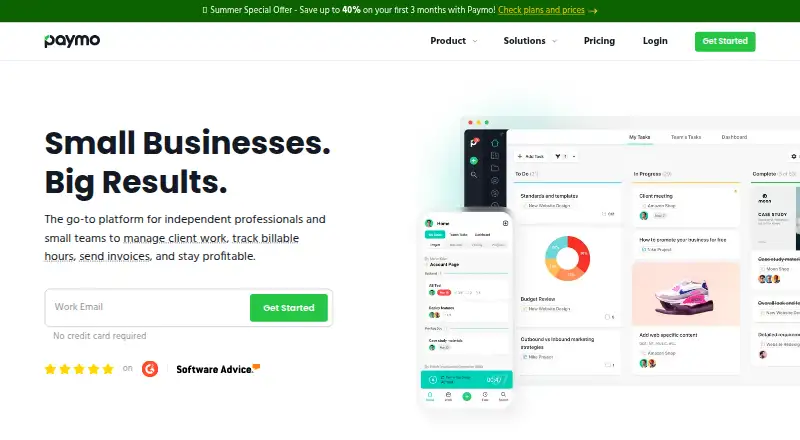
What Paymo is
Paymo is project and work management software with time tracking and guest access. It is available on the web, Windows, macOS, Linux, iOS, and Android. The free plan is limited to one user, one client, two projects, and 1 GB of storage. The Solo plan allows one user, three clients, five projects, and 5 GB of storage for $9.90 a month. Plus costs $15.90 a month and Pro costs $23.90 a month, both billed monthly; each allows unlimited users, clients, and projects. Plus includes 50 GB of storage, while Pro includes 500 GB. The pricing note lists paid access from $5.90 per user per month when billed annually, as well as a 15-day trial. Paymo has 14 native integrations. Its maker, Paymo, was founded in 2007 and is headquartered in Oradea, Bihor, Romania.
Who it suits
Paymo may suit individuals or teams who need project management with time tracking and guest access. Its platform list covers browser, desktop, and mobile use.
What it does well
- Includes time tracking and guest access.
- Available across web, desktop, and mobile platforms.
- Plus and Pro allow unlimited users and projects.
- Has 14 native integrations.
What to know first
- Free plan is limited to one user.
- Free plan includes two projects and 1 GB storage.
- Solo allows only five projects.
- Pro costs $23.90 a month.
Limits
The free plan is limited to one user, one client, two projects, and 1 GB of storage. Solo allows one user, three clients, five projects, and 5 GB; Plus and Pro have unlimited users, clients, and projects, with 50 GB and 500 GB of storage respectively.
Plans
| Plan | Billed and limits | Price |
|---|---|---|
| Free | 1 user · 1 client · 2 projects · unlimited tasks, time entries and invoices · 1GB storage | Free |
| Plus | per user, billed for 12 months; after 3 months $15.9/user/month · unlimited users, clients and projects · recurring tasks · reports · templates · proofing and versioning · integrations and API · 50GB storage | $10.90 |
| Pro | per user, billed for 12 months; after 3 months $23.9/user/month · unlimited users, clients and projects · Gantt charts · dependencies · portfolio Gantt · scheduling and workload · leave management · 500GB storage | $16.90 |
| Solo | billed for 12 months; after 3 months $9.9/month · 1 user · 3 clients · 5 projects · guest access · 5GB storage | $5.90 |
As paymoapp.com lists them, read 15 Oct 2026. The maker's own page has the final word.
Getting started
- Visit the Paymo website.
- Choose the free plan or review the paid plans.
- Use the 15-day trial if you want to try paid access.
- Access Paymo on the web or choose a listed desktop or mobile platform.
Overview
Paymo combines project management with time tracking, aimed at freelancers and teams that want to account for work in the same place they organize projects. Its broad platform support and guest access are useful strengths, but the free and Solo tiers keep tight ceilings on clients and projects.
It is most compelling for solo operators who can work within those caps or teams willing to move to a higher tier. If you need room to grow without stepping up from a single-user plan, Paymo is a less comfortable fit.
Key features
Time tracking alongside project management makes Paymo a sensible option for work where recording time is part of managing projects. Guest access can bring clients into the workflow, and 14 native integrations provide ways to connect other tools.
The limits have practical consequences: Free supports one user, one client, and two projects, while Solo remains limited to one user and allows three clients and five projects. A freelancer handling a growing client roster may outgrow either plan. Plus and Pro remove the user, client, and project caps, though storage still differs substantially between them.
Pricing
Paymo offers a free plan and a 15-day trial. The pricing note says paid plans start at $5.90/user/mo (annual); the plan prices below are billed monthly.
| Plan | Price and limits | Who it suits |
|---|---|---|
| Free | free; 1 user, 1 client, 2 projects, and 1 GB storage. | A solo user with a small workload who can stay within the client and project limits. |
| Solo | $9.90 a month; 1 user, 3 clients, 5 projects, and 5 GB storage. | A freelancer who needs more room than Free provides but does not need additional seats. |
| Plus | $15.90 a month; unlimited users, clients, and projects, with 50 GB storage. | A team that needs uncapped collaboration and project capacity, with moderate storage needs. |
| Pro | $23.90 a month; unlimited users, clients, and projects, with 500 GB storage. | A team that needs the same uncapped seats and project allowances as Plus, but substantially more storage. |
Free is the only zero-cost option and is strictly for one user; the single-client and two-project caps constrain even a modest portfolio. Solo adds only limited client and project capacity and no extra seats. Plus is the first listed tier with unlimited users, clients, and projects, while Pro’s distinction is its larger storage allowance. Compare those monthly prices with the annual-billing starting price before choosing a plan.
Platforms
Paymo supports web, Windows, macOS, Linux, iOS, and Android. That range suits people who switch between desktop and mobile devices, without limiting the choice to one operating system.
Who it's for
Paymo is best for freelancers and teams that need time tracking tied to project work and value client access. It is a stronger fit for a team on Plus or Pro if multiple people need accounts; Free and Solo are single-user plans. Freelancers with more than three clients or five projects will hit Solo’s stated caps, and teams that need substantial storage should weigh Pro’s larger allowance against Plus.
Pros and cons
Pros
- Time tracking and project management together: useful when recording work belongs alongside project organization.
- Guest access: gives clients a way to participate in the workflow.
- Wide platform coverage: web, desktop, and mobile operating systems are supported.
- Uncapped team and project allowances on Plus and Pro: both plans support unlimited users, clients, and projects.
Cons
- Free is narrowly capped: one user, one client, two projects, and 1 GB storage leave little room for a growing workload.
- Solo remains single-user: its higher client and project limits do not help a team that needs multiple seats.
- Storage varies sharply by tier: Plus includes 50 GB, compared with 500 GB on Pro.
Alternatives
For a different time-tracking option, Jibble has a free plan with unlimited users and supports mobile, desktop, web, API, extension, and self-hosted platforms. TimeCamp is another freemium alternative, with a free plan offering unlimited users and projects and support across desktop, mobile, web, and self-hosted platforms.
Clockify may suit a small group that wants a free tier for up to five users; its listed Basic plan is $3.99 a month, billed annually. Harvest is aimed at individual freelancers on its free plan, which includes one seat and two projects.
solidtime, time cockpit, TMetric, and todo.vu are also alternatives.
For category comparisons, see Time Tracking Software, Time Management Apps, Time and Expense Software, Project Management Software, and Time Billing Software.
Verdict
Choose Paymo if you want project management and time tracking together, with client access and support across web, desktop, and mobile platforms. Its main advantage is that combined workflow; its main drawback is that the free and Solo plans restrict both users and workload, making Plus or Pro the more relevant options for teams.
Verdict
Paymo offers a free plan with tight limits and paid tiers that expand user, project, and storage allowances. Compare the monthly plan details with the annual-billing starting price in the pricing note.
Questions
Does Paymo have a free plan?
Yes. The Free plan costs nothing and includes one user, one client, two projects, and 1 GB of storage.
How much do the paid plans cost?
Solo costs $9.90 a month, Plus costs $15.90 a month, and Pro costs $23.90 a month, all billed monthly. Paymo also lists paid access from $5.90 per user per month with annual billing.
Is there a trial?
Paymo lists a 15-day trial.
Which platforms does Paymo support?
Paymo is available on the web, Windows, macOS, Linux, iOS, and Android.
Does Paymo include time tracking and guest access?
Yes. Both time tracking and guest access are listed.
Who makes Paymo?
Paymo is made by Paymo, founded in 2007 and headquartered in Oradea, Bihor, Romania.
Facts from Paymo's own pages
- API
- Paymo exposes a REST API using XML or JSON and GET, POST, PUT and DELETE requests; API keys are generated inside the account. · help.paymoapp.com, 15 Oct 2026
- API purpose
- The API is intended for third-party integrations, backups and extracting account data. · help.paymoapp.com, 15 Oct 2026
- Automatic desktop tracking
- Paymo Track can run in the background on Windows, macOS and Linux and record activity across desktop applications. · paymoapp.com, 15 Oct 2026
- Collaboration
- Paymo provides activity streams, real-time discussions, notifications, guest access, sharing controls and permissions. · paymoapp.com, 15 Oct 2026
- Company facts
- LinkedIn lists Paymo as a privately held software-development company founded in 2008, headquartered in Oradea, Romania, with 11–50 employees. · linkedin.com, 15 Oct 2026
- Company origin
- Paymo says it began in 2007 inside a web-development agency to track hours and generate client invoices. · paymoapp.com, 15 Oct 2026
- Customer footprint
- The company states that more than 50,000 agencies, law firms, consultants, architecture firms, universities and freelancers in over 100 countries use Paymo. · paymoapp.com, 15 Oct 2026
- Documentation
- The Help Center contains dedicated sections for projects, users, timesheets, scheduling, Gantt charts, invoices, estimates, expenses, desktop apps, mobile apps, integrations and troubleshooting. · help.paymoapp.com, 15 Oct 2026
- Financial management
- The product supports project budgets, expense tracking, estimate-versus-actual indicators, fixed rates, hourly rates and billing priorities. · paymoapp.com, 15 Oct 2026
- Founded
- 2007 · paymoapp.com, 28 Sept 2026
- Free plan
- Yes · help.paymoapp.com, 20 Sept 2026
- GDPR
- Paymo says customers can access data through its API, delete an account to wipe data, and receive breach notification within 72 hours of discovery. · help.paymoapp.com, 15 Oct 2026
- Guest access
- Yes · help.paymoapp.com, 20 Sept 2026
- Headquarters
- Oradea, Bihor, Romania · paymoapp.com, 28 Sept 2026
- Integrations
- Official integrations include Google Calendar, Google Drive, Slack, QuickBooks Online, Xero, Typeform, Jotform, Zapier, Make, PomoDone, LambdaTest, Rethink and Shift. · paymoapp.com, 15 Oct 2026
- Invoicing
- Timesheets can be converted into invoices, with online payments, taxes and partial payments supported in the mobile workflow. · help.paymoapp.com, 15 Oct 2026
- Languages
- The interface is available in 23 languages. · paymoapp.com, 15 Oct 2026
- Licence
- Paymo is delivered as a hosted subscription service under Paymo S.R.L. terms rather than as self-hosted software with an open-source licence. · paymoapp.com, 15 Oct 2026
- Limit: Android login reliability
- A Google Play reviewer says the mobile app worked once and then repeatedly failed to move past login. · play.google.com, 15 Oct 2026
- Limit: export limitation
- A Capterra reviewer reports that Gantt charts cannot be exported directly to Excel, which complicates spreadsheet analysis. · capterra.com, 15 Oct 2026
- Limit: mobile feature gap
- GetApp reviewers report that the mobile app lacks some web capabilities, including invoicing unbilled project time and notifying guests about comments. · getapp.com, 15 Oct 2026
- Limit: pricing changes
- A Software Advice reviewer says charging separately for Gantt charts in older plans was disappointing after previously bundled functionality. · softwareadvice.com, 15 Oct 2026
- Free-plan user limit
- 1 · help.paymoapp.com, 20 Sept 2026
- Native integrations
- 14 · help.paymoapp.com, 20 Sept 2026
Where Paymo stands on Freedom251
- Time Management Apps#5 of 35
- Project management tools#37 of 196
- Time Tracking Software#17 of 77
- Project Management Software#43 of 188
- Time tracking apps#18 of 78
- Time Billing Software#8 of 31
- Time and Expense Software#8 of 27
- Google Workspace Project Management Software#11 of 30
- Nonprofit Project Management#15 of 34