Freedom251 › Employee Scheduling Software

ezClocker
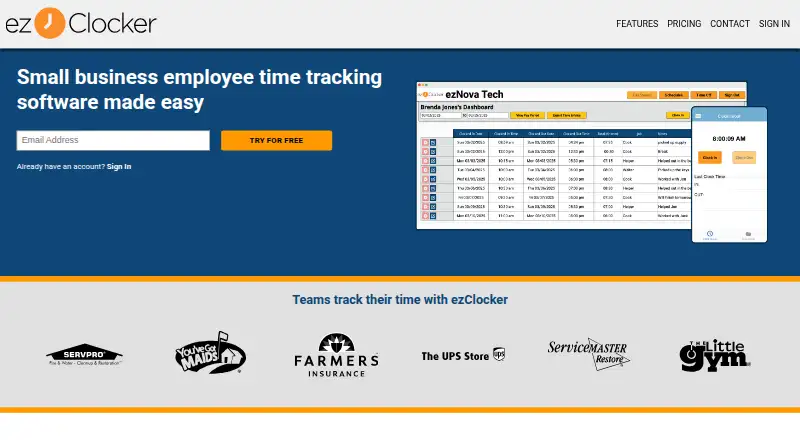
What ezClocker is
ezClocker is time tracking and scheduling software for small businesses, available through a website and mobile apps for Android and iOS. Employees can clock in and out from a website or mobile device, while employers can review and edit timesheets. The app captures an employee’s GPS location when they clock in or out; it does not track their location during work. Employers can create schedules, and employees can view shifts on their devices. The Basic plan costs $15 a month and covers up to 15 employees. Standard costs $30 a month for up to 30 employees, and Premium costs $60 a month for up to 60 employees. Each plan also shows an annual billed amount. All three include web and mobile access, scheduling, GPS verification, and CSV pay period export. Standard and Premium add job assignments, overtime reports, payroll integrations, and time off. Timesheets can be exported in formats accepted by Paychex, ADP Workforce Now, Gusto, and ACS Technologies; QuickBooks Payroll is listed as coming soon. Geofencing to limit clock-in and clock-out locations is available on Standard and Premium. Fees are waived when an employer has one employee or fewer. The maker describes the product as intended for small businesses, including those with remote staff at multiple job sites.
Who it suits
ezClocker suits small businesses that need employees to clock in remotely or at multiple job sites and employers to manage schedules and timesheets. Its mobile apps, GPS verification, payroll exports, and higher-plan geofencing may be useful for teams coordinating work across locations.
What it does well
- Employees can clock in and out on the web or mobile.
- Employers can review and edit timesheets.
- Scheduling lets employees view shifts on their devices.
- Exports are accepted by four named payroll services.
- Fees are waived for employers with one employee or fewer.
What to know first
- The listed Basic plan covers up to 15 employees.
- Geofencing is limited to Standard and Premium.
- QuickBooks Payroll is listed as coming soon.
Limits
Basic costs $15 a month and covers up to 15 employees. Geofencing, job assignments, overtime reports, payroll integrations, and time off are listed for Standard and Premium rather than Basic.
Plans
| Plan | Billed and limits | Price |
|---|---|---|
| Basic | $150 a year · Up to 15 employees · Web and mobile access · Employee scheduling · GPS verification · CSV pay period export | $15 a month |
| Standard | $300 a year · Up to 30 employees · Web and mobile access · Employee scheduling · GPS verification · CSV pay period export · Job assignments · Overtime reports · Payroll integrations · Time off | $30 a month |
| Premium | $600 a year · Up to 60 employees · Web and mobile access · Employee scheduling · GPS verification · CSV pay period export · Job assignments · Overtime reports · Payroll integrations · Time off | $60 a month |
As ezclocker.com lists them, read 11 Oct 2026. The maker's own page has the final word.
Getting started
- Visit the ezClocker website.
- Choose Basic, Standard, or Premium based on the employee limit and included tools you need.
- Use the website or mobile app for employees to clock in and out.
- Have employers create schedules and review or edit timesheets.
- Export timesheets as CSV or in formats accepted by supported payroll services.
Verdict
Choose ezClocker if your small business needs web and mobile time tracking, employee scheduling, and GPS verification. Consider Standard or Premium for geofencing, job assignments, overtime reports, payroll integrations, or time off; Basic covers up to 15 employees.
Questions
What does ezClocker cost?
Basic is $15 a month, billed $150 a year; Standard is $30 a month, billed $300 a year; Premium is $60 a month, billed $600 a year.
Is there a free plan or trial?
The listing says there is a free plan and a 30-day trial. Fees are waived when an employer has one employee or fewer.
Which platforms can I use?
ezClocker is available on the web and through Android and iOS mobile apps.
What payroll services accept its timesheet exports?
Timesheets can be exported in formats accepted by Paychex, ADP Workforce Now, Gusto, and ACS Technologies. QuickBooks Payroll is listed as coming soon.
Does it track employees throughout a shift?
It captures an employee’s GPS location when they clock in or out and does not track their location while they work.
Who makes ezClocker, and where is it based?
The contact page lists an address in Plano, Texas, United States.
Facts from ezClocker's own pages
- Company
- The contact page gives an address of 6010 W. Spring Creek Pkwy, Suite G, Plano, Texas 75024. · landing.ezclocker.com, 11 Oct 2026
- Free trial
- The 30-day free trial requires no credit card when subscribed through the website, and the pricing page says trial support is included. · landing.ezclocker.com, 11 Oct 2026
- Free use
- The terms say fees are waived when an employer has one employee or fewer. · ezclocker.com, 11 Oct 2026
- Geofence limit
- The maker says geofencing to restrict clock-in and clock-out locations is available on Standard and Premium plans. · blog.ezclocker.com, 11 Oct 2026
- GPS
- The app captures an employee’s GPS location when they clock in or out and does not track their location while they work. · landing.ezclocker.com, 11 Oct 2026
- Headquarters
- Plano, Texas, United States · ezclocker.com, 28 Sept 2026
- Intended users
- The maker describes ezClocker as intended for small businesses, including businesses with remote staff at multiple job sites. · e2e.ezclocker.com, 11 Oct 2026
- Payroll exports
- ezClocker exports timesheets in formats accepted by Paychex, ADP Workforce Now, Gusto, and ACS Technologies; its page lists QuickBooks Payroll as coming soon. · ezclocker.com, 11 Oct 2026
- Privacy and security
- The security page says users have unique usernames and passwords and that data travels over encrypted channels through U.S.-based networks and servers. · ezclocker.com, 11 Oct 2026
- Purpose
- ezClocker is time tracking and scheduling software for small businesses, available as a website or mobile application. · ezclocker.com, 11 Oct 2026
- Scheduling
- Employers can create employee schedules and employees can view their shifts from their devices. · landing.ezclocker.com, 11 Oct 2026
- Support
- Technical and billing support is available by email and phone, generally Monday through Friday from 9:00 a.m. to 5:00 p.m. CST. · landing.ezclocker.com, 11 Oct 2026
- Time tracking
- Employees can clock in and out from a website or mobile device, and employers can review and edit timesheets. · e2e.ezclocker.com, 11 Oct 2026
Where ezClocker stands on Freedom251
- Employee Scheduling Software#6 of 43
- Employee Time Tracking Software#9 of 52
- Time and Attendance Software#5 of 28