Freedom251 › Email Signature Management Software

SyncSignature
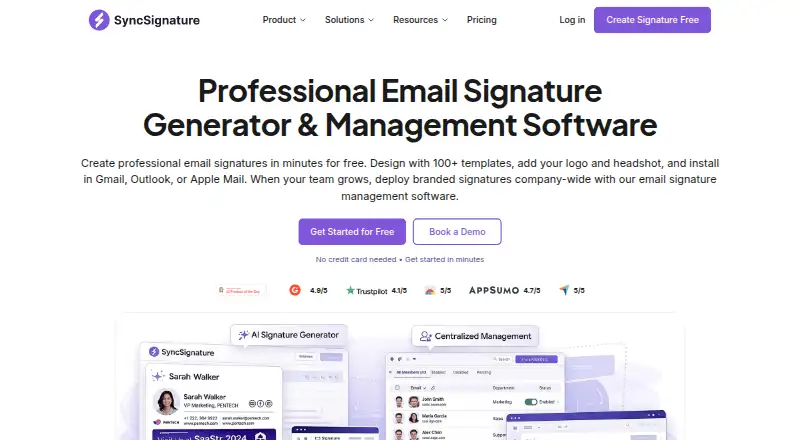
What SyncSignature is
SyncSignature creates individual email signatures and gives teams a way to manage and update them centrally. Users can choose from more than 100 templates and customize signatures with logos, headshots, social icons, contact details, and banner images, along with adjustable colors, fonts, and layouts. The maker lists rendering support for Gmail, Outlook, Apple Mail, Yahoo, Thunderbird, and more than 25 other email clients. Admins can deploy signatures through Google Workspace or Microsoft 365, and directory sync can keep employee details current. Team features include scheduled banners targeted by team and analytics for link clicks and banner performance. The service is web-based, with a free plan, a 7-day trial, and paid plans from $2/user/mo (annual). The maker says Google Workspace signatures are written through Google APIs without SMTP setup, DNS changes, rerouting email, or email content leaving Google's infrastructure. It also says the integration uses OAuth 2.0 and HTTPS, stores user data on AWS, and does not read or store email content.
Who it suits
It suits freelancers who need an individual signature as well as sales, marketing, HR, or IT teams managing signatures centrally. Teams using Google Workspace or Microsoft 365 can use directory sync and centralized deployment.
What it does well
- More than 100 signature templates are available.
- Customizable logos, contact details, colors, fonts, and layouts.
- Directory sync can update employee details in signatures.
- Scheduled banners and click analytics support team campaigns.
- Free plan and 7-day trial are available.
What to know first
- The free plan includes one professional signature template.
- Solo covers one signature for individual use.
- Enterprise pricing is by custom quote.
Limits
The free plan provides one professional signature template, unlimited edits, and copy/paste installation. The Solo plan is one signature for individual use; the Team plan covers five users and is displayed as $10/month and $2/user. Paid plans are billed annually, and the trial lasts 7 days.
Plans
| Plan | Billed and limits | Price |
|---|---|---|
| Free | 1 professional signature template · unlimited edits · copy/paste installation | Free |
| Team | Billed annually · 5 users · displayed as $10/month and $2/user | $10 a month |
| Solo | Billed annually · 1 signature · individual use | $6 a month |
| Enterprise | Custom quote · multiple workspaces/clients · signature limits per workspace | On request |
As syncsignature.com lists them, read 8 Oct 2026. The maker's own page has the final word.
Getting started
- Open the SyncSignature website.
- Choose the free plan, start the 7-day trial, or select a paid plan.
- Create or customize a signature using a template and the available design options.
- For team deployment, connect Google Workspace or Microsoft 365.
- Use the connected directory to sync employee details and deploy signatures.
SyncSignature is an email-signature builder with centralized controls for organizations. It suits Google Workspace and Microsoft 365 teams that need consistent branding and automatically maintained employee details, while freelancers can use its simpler copy-and-paste workflow. Its main advantage is combining deployment, directory synchronization and campaign measurement in one web service; buyers needing broader platform coverage or a fully itemized enterprise package should compare alternatives.
Overview
SyncSignature combines individual signature creation with team administration. More than 100 professional templates offer a substantial starting point, and each design can include logos, headshots, social icons, contact details and banner images. Colors, fonts and layouts are adjustable, giving brand teams room to match their identity without designing every signature from scratch.
The product is particularly well suited to organizations running Google Workspace or Microsoft 365. Administrators can deploy and change company signatures through those services, so employees do not have to install updates manually. Directory synchronization imports employee information and refreshes signatures when records change, reducing the recurring work of correcting names, roles or contact details.
Key features
Rendering support covers Gmail, Outlook, Apple Mail, Yahoo, Thunderbird and more than 25 other email clients. That breadth helps a company keep a consistent appearance across mixed mail environments, although the service itself is delivered on the web.
Team tools add scheduled banner campaigns that can target specific teams, plus reporting for link clicks and banner performance. This makes SyncSignature more useful to marketing and communications groups than a generator that only produces static HTML. Campaign analytics are a reason to consider it when signatures are part of a promotion plan, not merely a branding requirement.
For Google Workspace, signatures are written through Google APIs rather than SMTP. The stated setup avoids DNS changes, mail rerouting and email content leaving Google's infrastructure. The integration uses OAuth 2.0 and HTTPS, stores user data on AWS and does not read or store email content. SyncSignature describes its service as GDPR-aligned and can provide a data processing agreement on request.
Pricing
The Free plan costs nothing and includes one professional signature template, unlimited edits and copy/paste installation. It is a sensible choice for a freelancer or an individual who can manage installation personally, but it does not provide the centralized rollout that makes the service valuable to larger teams.
Solo costs $6 a month, billed annually, for one signature and individual use. It is aimed at a single professional who wants a paid signature workflow; the annual billing term matters if you want to avoid a recurring monthly commitment.
Team is displayed as $10 a month, billed annually, for five users, equivalent to $2 per user per month. This is the entry point for a small group needing shared administration rather than individual copy-and-paste management. Enterprise uses custom pricing and supports multiple workspaces or clients, with signature limits set per workspace; organizations with larger, segmented deployments must request a quote. A 7-day trial is available, alongside the free plan.
Platforms
SyncSignature is a web service. Its listed email-platform integration is Google Workspace, while team deployment also supports Microsoft 365. Signatures are designed to render in Gmail, Outlook, Apple Mail, Yahoo, Thunderbird and more than 25 additional clients.
Who it's for
Freelancers can use the free builder for a single signature. Sales teams, marketing agencies, startups, and HR or IT departments are better candidates for Team because directory sync and automatic updates reduce administrative maintenance. Enterprises with multiple workspaces or clients may fit Enterprise, provided custom pricing and workspace limits meet their requirements.
Pros and cons
- Pros: More than 100 templates and detailed branding controls cover common professional designs.
- Pros: Google Workspace and Microsoft 365 deployment removes manual employee installation.
- Pros: Directory synchronization keeps signatures aligned with changing employee records.
- Pros: Scheduled, targeted banners and click reporting connect signatures with campaigns.
- Cons: The free tier is limited to one template and copy/paste installation, so it is not a centralized team solution.
- Cons: Team pricing is billed annually, and Enterprise requires a custom quote with workspace-specific limits.
- Cons: The product is web-based, which may not suit buyers seeking broad native desktop or mobile apps.
Alternatives
Choose Signitic instead if you need Android, iOS, macOS, Windows or browser-extension access, or a free tier covering up to 19 employees; its free plan includes one template, one communication-banner campaign and a Signitic badge.
Scribe is worth considering for organizations wanting API access and a free allowance of up to two users, with Business priced at $68 a month for 30 users.
Pick Signite when a free plan for up to five deployed users and unlimited duration is more important than a free trial; its free tier includes basic fields and a logo but retains Signite branding and excludes premium features.
AdSigner is an alternative for teams that need API, extension or Windows access and user-based signature plans.
HiHello Email Signature Manager suits users who also want digital business cards, with a free personal tier for one user and four cards.
MySignature offers a free basic signature for each email address and is a simpler option for individual use.
gSignature is another freemium alternative with web, desktop and browser-extension platforms.
Newoldstamp may fit a five-signature team seeking a 109.00 USD annual plan.
For a broader starting point, compare the Email Signature Software and Email Signature Management Software lists.
Verdict
Choose SyncSignature if your organization uses Google Workspace or Microsoft 365 and wants centrally deployed signatures that stay synchronized with employee directories, with campaign analytics as an added benefit. Look elsewhere if you need native apps across many platforms, a free centralized tier, or predictable enterprise pricing without a custom quote.
Verdict
SyncSignature combines signature creation with centralized deployment, directory sync, and campaign analytics. Its free plan and $2/user/mo (annual) Team pricing provide listed starting options, while Enterprise buyers need a custom quote.
Questions
Is SyncSignature free?
Yes. The Free plan costs nothing and includes one professional signature template, unlimited edits, and copy/paste installation.
What do paid plans cost?
Paid plans start at $2/user/mo billed annually. Solo is listed at $6 a month billed annually for one signature; Team is listed at $10 a month billed annually for five users.
Which platforms and email clients does it support?
SyncSignature is web-based. The maker lists Gmail, Outlook, Apple Mail, Yahoo, Thunderbird, and more than 25 other email clients for signature rendering, and Google Workspace and Microsoft 365 for team deployment.
Can teams update signatures centrally?
Yes. Admins can deploy and update signatures through Google Workspace or Microsoft 365. Directory sync can update employee details in signatures when those details change.
What does the Enterprise plan cost?
The Enterprise plan requires a custom quote. It supports multiple workspaces or clients, with signature limits per workspace.
Who founded SyncSignature?
The maker identifies Neel Patel as founder and CEO. It says the company began in 2023 and is headquartered in Vesu, Surat, Gujarat, India.
Facts from SyncSignature's own pages
- Campaigns and analytics
- Team features include scheduled signature banners targeted by team and analytics for link clicks and banner performance. · syncsignature.com, 8 Oct 2026
- Company
- The maker says SyncSignature began in 2023 and identifies Neel Patel as founder and CEO. · syncsignature.com, 8 Oct 2026
- Compliance
- The maker describes SyncSignature as GDPR-aligned and says it can provide a data processing agreement on request. · syncsignature.com, 8 Oct 2026
- Customization
- Signatures can include logos, headshots, social icons, contact details, and banner images, with customizable colors, fonts, and layouts. · syncsignature.com, 8 Oct 2026
- Directory sync
- SyncSignature can pull employee details from Google Workspace or Microsoft 365 directories and update signatures as those details change. · syncsignature.com, 8 Oct 2026
- Email clients
- The maker lists Gmail, Outlook, Apple Mail, Yahoo, Thunderbird, and more than 25 other email clients as supported for rendering signatures. · syncsignature.com, 8 Oct 2026
- Headquarters
- Vesu, Surat, Gujarat, India · syncsignature.com, 28 Sept 2026
- Mail handling
- For Google Workspace, signatures are written through Google APIs without SMTP configuration, DNS changes, email rerouting, or email content leaving Google's infrastructure. · syncsignature.com, 8 Oct 2026
- Product
- SyncSignature creates individual email signatures and provides centralized signature management for teams. · syncsignature.com, 8 Oct 2026
- Security
- The maker says its Google Workspace integration uses OAuth 2.0 and HTTPS, stores user data on AWS, and does not read or store email content. · syncsignature.com, 8 Oct 2026
- Team deployment
- Admins can deploy and update company signatures through Google Workspace or Microsoft 365 without employees installing them manually. · syncsignature.com, 8 Oct 2026
- Templates
- The maker says users can choose from more than 100 professional signature templates. · syncsignature.com, 8 Oct 2026
- Who it serves
- The maker describes use cases for freelancers, sales teams, marketing agencies, HR and IT departments, startups, and enterprises. · syncsignature.com, 8 Oct 2026
Where SyncSignature stands on Freedom251
- Email Signature Management Software#14 of 41
- Email Signature Software#12 of 29