Freedom251 › Email Signature Software

HiHello Email Signature Manager
What HiHello Email Signature Manager is
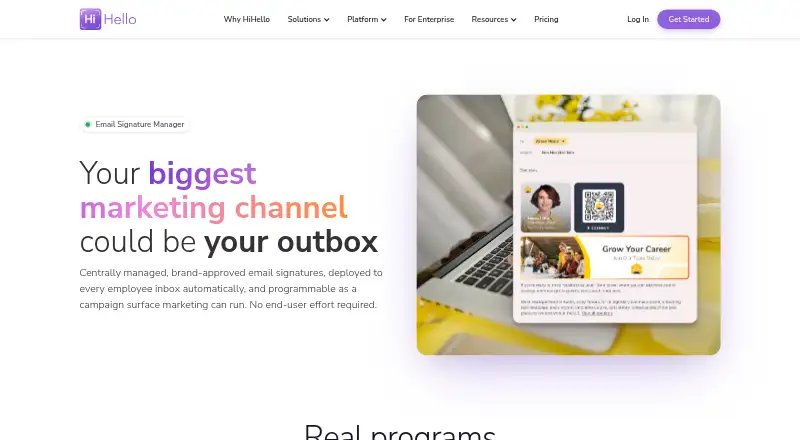
HiHello Email Signature Manager helps organizations centrally deploy and manage employee email signatures, promotional banners, and disclaimers. It delivers signatures to Gmail and Outlook through Google Workspace and Microsoft 365, with no end-user setup required. Administrators can assign templates by person, department, role, or region, and control signature layouts, banners, disclaimers, and fields from a central point. Marketing teams can schedule, rotate, and retire banners, then track impressions, clicks, and campaign performance with UTM support. Automated email signatures are included in Business and Enterprise plans. HiHello says the service syncs with Microsoft Entra ID, Google Workspace, Okta, and Workday, supports SCIM attribute mapping, and connects to thousands of apps through Zapier. Signatures are applied within employees’ Gmail or Outlook accounts before messages are sent. HiHello says email is not routed through external servers and private DKIM keys are not shared. The company states that customer data is encrypted in transit and at rest, is not sold, and that the product is SOC 2 Type II certified and GDPR-ready. The product is described as built for enterprise marketing and IT teams. HiHello was founded in 2018 and is headquartered in Palo Alto, California.
Who it suits
This product suits marketing and IT teams that need to manage employee signatures and promotional banners centrally across an organization. Business and Enterprise plans include automated signatures for Gmail and Outlook deployments.
What it does well
- Deploys signatures through Google Workspace and Microsoft 365.
- Admins can assign templates by department, role, region, or user.
- Marketing teams can schedule banners and track campaign clicks and impressions.
- Integrates with Microsoft Entra ID, Google Workspace, Okta, and Workday.
- Every plan includes email support and video onboarding.
- Customer data is encrypted in transit and at rest.
What to know first
- Automated email signatures are included only in Business and Enterprise plans.
- Business is listed at $5 per user/month, billed at $60 per user/year.
- Enterprise pricing is custom.
Limits
The free Personal plan is limited to one user, four digital business cards, a personal email signature, and five card and badge scans per month. Automated email signatures are included in Business and Enterprise plans.
Plans
| Plan | Billed and limits | Price |
|---|---|---|
| Personal | Forever · 1 user · 4 digital business cards · 5 card & badge scans/mo · personal email signature | Free |
| Business | $60 per user/year · 5–100 users · unlimited cards and scans · team email signatures · SSO & directory sync | $5 a month |
| Professional | $72 billed yearly · 1 user · 16 digital business cards · 20 card & badge scans/mo · professional email signature | $6 a month |
| Enterprise | 101+ users · organization email signatures · SAML SSO + SCIM · SOC 2 security · dedicated account manager | On request |
As hihello.com lists them, read 15 Oct 2026. The maker's own page has the final word.
Getting started
- Visit the HiHello Email Signature Manager website.
- Choose Personal, Business, Professional, or Enterprise based on the listed plan details.
- For team signatures, use Business or Enterprise.
- Connect deployment through Google Workspace for Gmail or Microsoft 365 for Outlook.
- Use the web app on PC or Mac, or HiHello's iOS and Android apps.
Overview
HiHello Email Signature Manager gives organizations a central way to control employee signatures in Gmail and Outlook. It is strongest for marketing and IT teams that need consistent templates and measurable banner campaigns, but its automated organization signatures require a Business or Enterprise plan.
Rather than asking employees to configure signatures individually, administrators deploy and maintain them through Google Workspace or Microsoft 365. That makes the product a better fit for organizations with governance needs than for people who simply want a personal sign-off.
Key features
Admins can assign templates by user, department, role, or region, and centrally manage layouts, fields, disclaimers, and banners. This is useful when different groups need tailored details without losing organizational consistency. Deployment requires no end-user setup, while automatic updates and directory sync help keep centrally managed signatures current.
Campaign controls let marketing teams schedule, rotate, and retire banners, then track impressions, clicks, and campaign performance with UTM support. That turns employee signatures into a trackable promotional channel; teams without recurring campaigns may not get much from this layer.
HiHello says it syncs with Microsoft Entra ID, Google Workspace, Okta, and Workday, supports SCIM attribute mapping, and connects to thousands of apps through Zapier. Signatures are applied inside employees’ Gmail or Outlook accounts before sending. HiHello says messages are not routed through external servers and private DKIM keys are not shared, a relevant distinction for organizations attentive to email security.
HiHello states that it is SOC 2 Type II certified, GDPR-ready, and registered under the EU-US, UK, and Swiss Data Privacy Frameworks. It also says customer data is encrypted at rest and in transit and is not sold. These commitments may matter to teams evaluating data handling, though they do not replace an organization’s own compliance review.
Every plan includes a self-service Help Center, video onboarding, and email support. Enterprise adds a dedicated account manager and implementation specialist, which is more useful for a larger rollout than for a single user.
Pricing
The free Personal plan is billed Free forever and covers one user, four digital business cards, a personal email signature, and five card and badge scans per month. It is a reasonable starting point for an individual, but it does not include automated organization signatures.
Business costs $5 per user/month, billed $60 per user/year, for 5–100 users and team email signatures. This is the entry plan for organizations that need centrally deployed signatures; the 5-user minimum makes it unsuitable for a smaller team seeking the managed setup.
Professional costs $6 per month, billed $72 billed yearly, and is for one user. It includes a professional email signature, 16 digital business cards, and 20 card and badge scans per month. It offers a more generous individual card-and-scan allowance than Personal, but does not provide the team signatures that make the manager useful for organizations.
Enterprise has custom pricing and is for 101+ users. It includes organization email signatures and a dedicated account manager. Larger organizations get the management and support tier, but need to request pricing rather than select a published rate.
Platforms
The product supports Android, iOS, and web. HiHello also offers a web app for PC and Mac. Signature deployment itself is through Google Workspace and Microsoft 365, so the platform-app list should not be mistaken for a list of supported email deployment services.
Who it's for
HiHello is best suited to marketing and IT teams in enterprise organizations that need governance across roles or departments, centralized deployment, and campaign measurement. Business is the practical starting point for a 5–100-user team; Enterprise is aimed at organizations with 101 or more users. Solo users can use Personal or Professional, but should not expect automated organization-wide signature management at those tiers.
Pros and cons
- Central control across groups: Templates can vary by user, department, role, or region while admins retain control of layouts, disclaimers, fields, and banners.
- Campaign measurement: Scheduling and banner analytics with UTM support make it possible to assess signature promotions rather than merely display them.
- Low-friction deployment: Gmail and Outlook signatures deploy through Google Workspace and Microsoft 365 without employee setup.
- Business starts at a 5-user minimum: A smaller organization cannot buy the team-signature tier for only one to four users.
- Individual plans are not substitutes for team management: Personal and Professional provide individual signatures, while automated organization signatures are reserved for Business and Enterprise.
- Enterprise price is custom: Larger buyers must obtain a quote instead of comparing against a fixed published price.
Alternatives
For a broader shortlist, browse Email Signature Software, Email Signature Management Software, Digital Business Card Software, or Contact Management Software.
Choose Signitic instead if a free option for up to 19 employees, one signature template, and one banner campaign is a better fit, and its displayed Signitic badge is acceptable. Consider Scribe if its free tier for up to two users and one template fits a smaller setup. Signite offers a free tier for up to five deployed users with unlimited duration, basic fields and logo, and Signite branding, but excludes Premium features. AdSigner is another option to compare for signature users, with a free one-user plan that includes 6.00 GiB monthly data transfer. MySignature has a free tier for basic signatures, limited to one signature per email address. SyncSignature may suit a solo user who wants a free professional template with unlimited edits and copy/paste installation. gSignature is another freemium alternative to consider. Newoldstamp offers a 5-signature team plan for $109 a year, a more relevant comparison for a small team weighing a fixed annual price.
Verdict
Choose HiHello Email Signature Manager if an organization needs centrally managed signatures across Gmail or Outlook and will use role-based controls or banner campaign measurement. Its strongest case is the combination of deployment without employee setup and campaign governance. Look elsewhere if you need managed signatures for fewer than five users, want a lower-cost individual tool, or need a published Enterprise price.
Verdict
Choose HiHello Email Signature Manager if an organization needs centrally managed signatures and banner campaigns across Gmail or Outlook. Business starts at $5 per user/month and includes team signatures. Personal is free for one user, but automated organization signatures require Business or Enterprise.
Questions
Is HiHello Email Signature Manager free?
HiHello offers a free Personal plan. It includes one user, four digital business cards, a personal email signature, and five card and badge scans per month.
How much do the paid plans cost?
Business is listed at $5 per user/month, billed at $60 per user/year. Professional is listed at $6 per month, billed yearly at $72. Enterprise uses custom pricing.
Which plans include automated email signatures?
Automated email signatures are included in Business and Enterprise plans.
Which email services can receive deployed signatures?
HiHello deploys signatures to Gmail through Google Workspace and Outlook through Microsoft 365.
Which platforms does HiHello offer?
HiHello lists Android, iOS, and web. Its web app is available for PC and Mac.
Which integrations are listed?
HiHello says it syncs with Microsoft Entra ID, Google Workspace, Okta, and Workday, supports SCIM attribute mapping, and connects to thousands of apps through Zapier.
Facts from HiHello Email Signature Manager's own pages
- Alias limitation
- Automated signature insertion works only for primary email addresses and not aliases. · support.hihello.com, 15 Oct 2026
- Availability
- Automated email signatures are included in Business and Enterprise plans. · hihello.com, 7 Oct 2026
- Campaigns
- Marketing teams can schedule, rotate, and retire signature banners and track impressions, clicks, and campaign performance with UTM support. · hihello.com, 7 Oct 2026
- Central dashboard
- Admins can create, enable, update and bulk-manage team signatures from one dashboard without individual employee changes. · support.hihello.com, 15 Oct 2026
- Company facts
- LinkedIn lists HiHello as a privately held software company founded in 2018 with 51–200 employees and headquarters in Palo Alto, California. · linkedin.com, 15 Oct 2026
- Company fit
- The Email Signature Manager page describes the product as built for marketing and IT teams at enterprise organizations. · hihello.com, 7 Oct 2026
- Compliance
- HiHello states that it is SOC 2 Type II certified, GDPR-ready, and registered under the EU-US, UK, and Swiss Data Privacy Frameworks. · hihello.com, 7 Oct 2026
- CRM integrations
- Business and Enterprise include Salesforce, HubSpot and Microsoft Dynamics 365 integrations; Enterprise also supports HRIS integrations. · hihello.com, 15 Oct 2026
- Data protection
- HiHello says customer data is encrypted at rest and in transit, hosted on Google Cloud US-Central, with encrypted multi-region backups retained for 60 days. · hihello.com, 15 Oct 2026
- Data resale
- HiHello states that it does not sell customer data. · hihello.com, 15 Oct 2026
- Deployment
- It deploys signatures to Gmail and Outlook through Google Workspace and Microsoft 365, with no end-user setup required. · hihello.com, 7 Oct 2026
- Deployment model
- Signatures are inserted inside Gmail or Outlook accounts at the account level, with mail kept off HiHello servers. · hihello.com, 15 Oct 2026
- Directory sync
- HiHello syncs employee names, titles and contact details from Microsoft Entra ID, Google Workspace and Okta. · hihello.com, 15 Oct 2026
- Documentation
- The Help Center provides separate setup guides for Gmail, Outlook web, Outlook Windows, Outlook Mac, Apple Mail and HubSpot. · support.hihello.com, 15 Oct 2026
- Email security
- Signatures are applied inside employees’ Gmail or Outlook accounts before sending, and HiHello says mail is not routed through external servers and private DKIM keys are not shared. · hihello.com, 7 Oct 2026
- Extensibility
- HiHello says it connects to thousands of applications through Zapier and webhooks. · hihello.com, 15 Oct 2026
- Founded
- 2018 · hihello.com, 28 Sept 2026
- Headquarters
- Palo Alto, California, United States · hihello.com, 28 Sept 2026
- Integrations
- HiHello says it syncs with Microsoft Entra ID, Google Workspace, Okta, and Workday, supports SCIM attribute mapping, and connects to thousands of apps through Zapier. · hihello.com, 7 Oct 2026
- Legal name
- HiHello’s legal footer identifies the company as HiHello, Inc. and says the HiHello name and logo are registered trademarks. · hihello.com, 15 Oct 2026
- Limit: customization
- Independent reviewers and app users repeatedly say customization is limited, especially on lower-cost plans. · b2brain.com, 15 Oct 2026
- Limit: event workflow
- A review argues HiHello captures contact details but does not qualify leads, book meetings or prove event pipeline outcomes. · b2brain.com, 15 Oct 2026
- Limit: feature paywalls
- A Google Play reviewer says many features are paywalled and another requested more email-signature fields such as disclaimers. · play.google.com, 15 Oct 2026
- Limit: mobile UX
- An Apple App Store reviewer reports too many pop-ups and waiting for the website to load on slow connections. · apps.apple.com, 15 Oct 2026
Where HiHello Email Signature Manager stands on Freedom251
- Email Signature Software#2 of 29
- Email Signature Management Software#3 of 41
- Digital Business Card Software#6 of 27
- Contact Management Software#11 of 39