Freedom251 › Email Signature Management Software

Scribe
What Scribe is
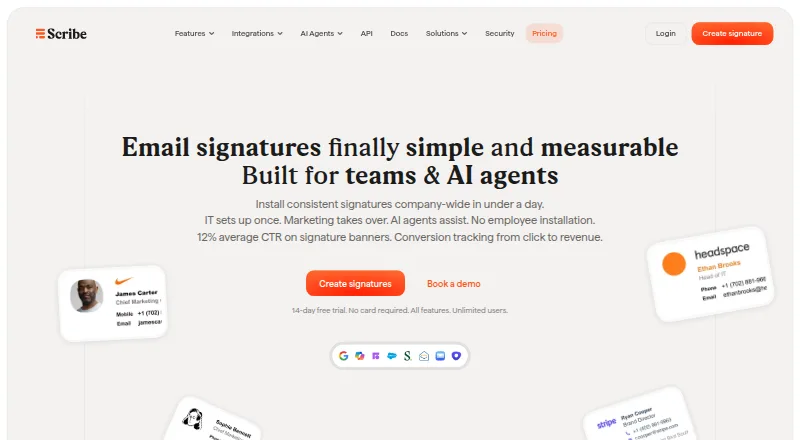
Scribe is an email signature management platform for teams and AI agents to design, deploy, and update branded signatures centrally. Its listed tools include team signature installation, installation monitoring, and instant updates. Teams can run signature banner campaigns and track click-to-revenue attribution. Smartfields sync external data sources to fill teammate signatures automatically. Scribe deploys signatures to Google Workspace, Microsoft 365, Apple Mail, and through server-side rewriting. It says it connects to more than 30 tools, including HRIS systems, business phone providers, calendars, and sales execution platforms. Developer interfaces include a REST API, hosted MCP server, webhooks, CLI, and tracking SDK. The trust center lists SOC 2 Type 2 and GDPR as compliant frameworks. Scribe says it cannot read or edit emails or change teammate information from an email provider. The company identifies itself as Scribe SAS, a French software company founded in 2020. Free allows up to two users and one signature template. Business is $68 a month, billed for 30 users, with three to 99 users and unlimited signature templates. A 14-day trial includes all features and unlimited users and requires no card.
Who it suits
Scribe suits teams that need centrally managed branded email signatures across supported email platforms, with monitoring and updates. Its developer tools and integrations may also suit teams connecting signature management with external systems or custom workflows.
What it does well
- Central installation, monitoring, and instant signature updates.
- Smartfields use external data sources to fill teammate signatures.
- Supports Google Workspace, Microsoft 365, Apple Mail, and server-side rewriting.
- Includes a REST API, hosted MCP server, webhooks, CLI, and tracking SDK.
- 14-day trial includes all features and unlimited users without a card.
What to know first
- Free allows only two users and one signature template.
- Business costs $68 a month for 30 users.
- Enterprise is for teams with 100 or more users.
Limits
Free allows up to two users and one signature template. The 14-day trial includes all features and unlimited users; Business is listed for three to 99 users.
Plans
| Plan | Billed and limits | Price |
|---|---|---|
| Free | Up to 2 users · 1 signature template | Free |
| Business | $68/month for 30 users; yearly billing saves 20% · 3–99 users · unlimited signature templates | $68 a month |
| Enterprise | 100+ users · volume discount | On request |
As scribe-mail.com lists them, read 15 Oct 2026. The maker's own page has the final word.
Getting started
- Visit the Scribe website.
- Choose Free for up to two users and one signature template, or start the 14-day trial from the pricing page.
- Use the trial for all features and unlimited users; it requires no card.
- Select a deployment option: Google Workspace, Microsoft 365, Apple Mail, or server-side rewriting.
- Connect relevant external data sources for Smartfields to fill teammate signatures.
Scribe is a centrally managed email-signature platform for teams and AI agents. It suits organizations that need to keep signatures consistent while coordinating updates, campaigns, or connected team data.
Overview
Scribe brings signature administration and marketing functions into one platform: teams can deploy signatures centrally, monitor installation, and update them instantly, while using signature banners for campaigns and click-to-revenue attribution. That combination is more compelling for organizations treating signatures as both a brand standard and a communication channel than for individuals seeking a simple personal signature tool.
One useful boundary is that Scribe says it cannot read or edit emails or change teammate information through an email provider. Teams can still use Smartfields to draw on external data sources, but should not expect the product to manage mailbox content.
Key features
Deployment supports Google Workspace, Microsoft 365, Apple Mail, and server-side rewriting. Alongside hybrid deployment, directory sync, and automatic updates, these options give administrators several ways to roll out and maintain signatures. Installation monitoring helps identify deployment status, while instant updates reduce the need to rely on every teammate to make changes themselves.
Banner campaigns and click-to-revenue attribution make Scribe relevant to teams that want to connect signature placements with marketing activity. Smartfields can populate teammate signatures from external data sources, and Scribe connects to more than 30 tools across HRIS, business phone, calendar, and sales execution categories. This is useful when signature details need to track changing team or business data, though the product's email-provider access boundary remains important.
For teams building their own workflows, Scribe provides a REST API, hosted MCP server, webhooks, CLI, and tracking SDK. Signature analytics add measurement to the administrative toolkit. The breadth will matter most to organizations with integration or developer needs; smaller teams that only need a basic signature template may not need it.
Scribe identifies SOC 2 Type 2 and GDPR as compliant frameworks. It is made by Scribe SAS, a French software company founded in 2020.
Pricing
The Free plan costs nothing and allows up to 2 users and 1 signature template. That is a useful small-team starting point, but the two-user ceiling and single template make it unsuitable for broader rollouts or teams that need multiple designs.
Business costs $68 a month, billed for 30 users, and covers teams from 3 to 99 users with unlimited signature templates. It fits organizations that have outgrown Free and want room for multiple templates; the 30-user billing basis is a material consideration for teams at the lower end of that range. A paid user is a teammate with a signature assigned to their primary email address, and aliases do not add paid users.
Enterprise has custom pricing for 100+ users and includes a volume discount. It is the relevant tier for larger organizations, but not a published-price option for buyers who need a fixed quote to compare upfront.
The 14-day trial includes all features and unlimited users, requires no card, and is offered on the pricing page. It gives teams a chance to assess the full platform before choosing a plan.
Platforms
Scribe is available on Android, iOS, macOS, and the web, and also provides an API. Its email signature deployment supports Google Workspace, Microsoft 365, Apple Mail, and server-side rewriting.
Who it's for
Scribe is best suited to teams that need centralized control over signature rollout and updates, particularly when they also want banner campaigns, attribution, external-data-driven fields, or custom integrations. Teams with 100 or more users can consider Enterprise; smaller groups can start with the capped Free plan or move to Business when they need more users and templates. It is a weaker fit for individuals or very small teams that only need a personal signature, and for anyone seeking software that can read or edit email.
Pros and cons
- Pros: Central installation, monitoring, and instant updates reduce the administrative burden of keeping team signatures current.
- Pros: Campaign banners, click-to-revenue attribution, and signature analytics support use of signatures as a measurable marketing channel.
- Pros: Smartfields, 30+ integrations, and developer tools support workflows that tie signatures to external data and custom systems.
- Pros: The no-card, 14-day trial includes all features and unlimited users, making the larger-team capabilities assessable before purchase.
- Cons: Free is limited to two users and one template, so it does not stretch far beyond a small team.
- Cons: Business is billed for 30 users even though its stated range begins at three, which may be a poor fit for smaller teams that need more than Free allows.
- Cons: Enterprise uses custom pricing, so larger buyers do not get a published price for direct comparison.
Alternatives
Signitic is worth considering for a team that wants a free allowance of up to 19 employees with one template and one banner campaign, and can accept its displayed badge on the free plan.
Signite may suit a smaller team that values an unlimited-duration free plan for up to five deployed users, with basic fields and a logo, and does not need premium features.
AdSigner is an option for buyers weighing a free single-user plan that includes 6.00 GiB monthly data transfer.
HiHello Email Signature Manager is another option to compare.
MySignature is an alternative to consider.
SyncSignature may appeal to someone who wants a free template with unlimited edits and copy/paste installation, or a Solo plan at $6 a month billed annually.
gSignature is another alternative to compare.
Newoldstamp offers a five-signature team plan at $109 a year, which may suit a buyer comparing a fixed annual cost for a small signature set.
Browse more options in Email Signature Software or Email Signature Management Software.
Verdict
Choose Scribe if your team needs centrally managed signatures that can stay current across supported email platforms, with campaigns and integrations in the same toolkit. Its main advantage is the combination of administration, attribution, and extensibility; look elsewhere if a generous free tier, a personal signature, or a published Enterprise price matters more.
Verdict
Choose Scribe if your team needs centrally deployed signatures, banner campaigns, or signature updates across its supported email platforms. Free is limited to two users and one template; larger teams can consider Business, while Enterprise is for 100 or more users.
Questions
Is there a free plan?
Yes. Free costs nothing and allows up to two users and one signature template.
How long is the trial, and what does it include?
The trial lasts 14 days and includes all features and unlimited users. It requires no card.
How much does Business cost?
Business is listed at $68 a month, billed for 30 users. It covers three to 99 users and unlimited signature templates.
Which email platforms does Scribe support?
It deploys signatures to Google Workspace, Microsoft 365, and Apple Mail, and supports server-side rewriting.
Does Scribe read or edit email?
Scribe says it cannot read or edit emails or modify teammate information from an email provider.
Who makes Scribe?
Scribe says it is made by Scribe SAS, a French software company founded in 2020.
Facts from Scribe's own pages
- Analytics
- Scribe reports signature views, clicks and click-through rates and supports click-to-revenue attribution. · scribe-mail.com, 15 Oct 2026
- API
- Scribe exposes a REST API using JSON over HTTPS at a versioned /v1 base URL. · scribe-mail.com, 15 Oct 2026
- API resources
- API endpoints cover signatures, teammates, email addresses and aliases, smart fields, folders, assets, campaigns and integrations. · scribe-mail.com, 15 Oct 2026
- API security
- API keys act as the creating member and can be scoped to selected resources within one workspace. · scribe-mail.com, 15 Oct 2026
- Billing
- A paid user is a teammate whose primary email address has an assigned signature; alias emails do not count as additional paid users. · scribe-mail.com, 29 Sept 2026
- Branding
- Signatures support custom colors, layouts and company branding. · scribe-mail.com, 15 Oct 2026
- Company
- Scribe says it is made by Scribe SAS, a French software company founded in 2020. · scribe-mail.com, 29 Sept 2026
- Company funding
- Crunchbase lists Scribe as a private seed-stage company in Paris with one seed round involving Calm Company Fund. · crunchbase.com, 15 Oct 2026
- Company headquarters
- LinkedIn lists Scribe's headquarters at 66 Avenue des Champs-Élysées, Paris, France. · linkedin.com, 15 Oct 2026
- Company legal name
- The maker identifies itself as Scribe SAS, a French software company founded in 2020. · scribe-mail.com, 15 Oct 2026
- Company size
- LinkedIn lists the company size as 2–10 employees. · linkedin.com, 15 Oct 2026
- Current status
- The status page reported all services online, with 100% application, signatures and custom-domain-signature uptime and 99.998% API uptime over the displayed period. · status.scribe-mail.com, 15 Oct 2026
- Department signatures
- Teams can create different signature designs for sales, support, marketing and other departments. · scribe-mail.com, 15 Oct 2026
- Developer tools
- The product provides a REST API, hosted MCP server, webhooks, CLI, and tracking SDK. · scribe-mail.com, 29 Sept 2026
- Documentation
- The API page links authentication, signature-content, endpoint-reference and MCP documentation, including request builders. · scribe-mail.com, 15 Oct 2026
- Email access
- Scribe says it cannot read or edit emails or modify teammate information from an email provider. · scribe-mail.com, 29 Sept 2026
- Email platforms
- Scribe deploys signatures to Google Workspace, Microsoft 365, Apple Mail, and server-side rewriting. · scribe-mail.com, 29 Sept 2026
- Email privacy
- Scribe says it cannot read or edit email content and cannot modify teammate information in the connected email provider. · scribe-mail.com, 15 Oct 2026
- Founded
- 2020 · scribe-mail.com, 28 Sept 2026
- Google Workspace deployment
- Google Workspace server-side routing adds signatures to outgoing mail on any device or email client, with setup described as about five minutes. · scribe-mail.com, 15 Oct 2026
- Headquarters
- France · scribe-mail.com, 28 Sept 2026
- Integrations
- The service supports Google Workspace, Microsoft 365, Apple Mail, server-side rewriting and more than 30 connected tools. · scribe-mail.com, 15 Oct 2026
- Limit: bugs and data loss
- An AppSumo reviewer reported buggy loading, inconsistent images, an update deleting signatures and unwanted contact imports. · appsumo.com, 15 Oct 2026
- Limit: mobile installation
- Tiny Thunder Studio reported that signatures could not then be synchronized automatically to iPhone and required manual addition. · tinythunder.com, 15 Oct 2026
Where Scribe stands on Freedom251
- Email Signature Management Software#5 of 41
- Email Signature Software#5 of 29