Freedom251 › Email Signature Management Software

Signally
What Signally is
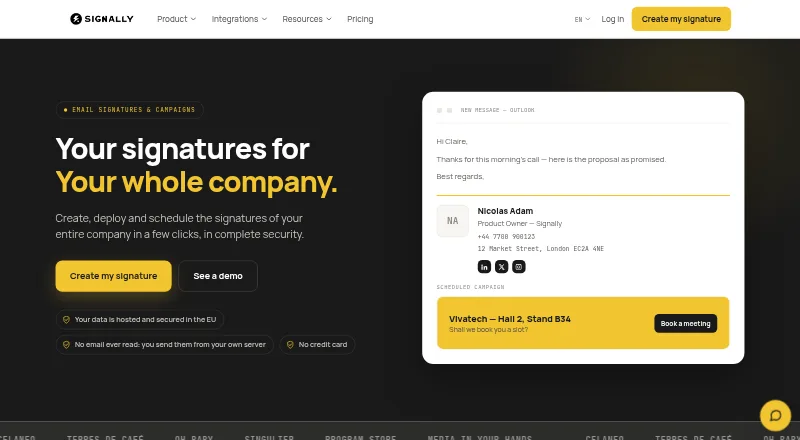
Signally manages company email signatures and banner campaigns. Its visual editor lets users assemble signatures from drag-and-drop blocks without writing HTML. Signature fields can draw information from Microsoft Entra ID or Google Directory. Administrators can set templates for subsidiaries, brands, departments, countries, or groups, and lock selected fields. Banner campaigns can be scheduled, aimed at teams, and tracked through click statistics. Signally offers integrations for Microsoft 365 and Outlook, as well as Google Workspace and Gmail; the Google add-on can be installed across a domain from the admin console, with templates assigned by organisational unit or group. Signally says it does not read, analyse, or store email content, and messages do not pass through its servers. It places its infrastructure in France and says service data stays within the European Union. The free editor allows manual signature creation and installation. Automatic company-wide deployment and campaigns require a subscription. Paid pricing is €1.50 excl. VAT per user / month for 1–10 users and falls with higher headcounts, reaching €0.50/user/mo for 500+.
Who it suits
Signally suits organisations that need centrally managed email signatures and team-targeted banner campaigns. It can also suit teams using Microsoft or Google directories and mail platforms.
What it does well
- Build signatures with drag-and-drop blocks.
- Populate fields from Microsoft Entra ID or Google Directory.
- Target and measure scheduled banner campaigns.
- Support is included at every headcount.
What to know first
- Free plan requires manual signature installation.
- Automatic deployment and campaigns require a subscription.
- Listed per-user rates depend on headcount.
Limits
The free signature editor supports manual creation and installation; automatic company-wide deployment and campaigns require a subscription. The paid plan is priced per user per month, with listed rates from €1.50 a month for 1–10 users down to €0.50 a month for 500+ users, excluding VAT.
Plans
| Plan | Billed and limits | Price |
|---|---|---|
| Free signature editor | Free; no credit card required · Create and install signatures manually; automatic company-wide deployment and campaigns require a subscription | Free |
| Signally | €1.50 excl. VAT per user / month for 1–10 users; €1.25 for 11–50; €1.00 for 51–100; €0.75 for 101–500; €0.50 for 500+ · All features included; price falls with headcount | €1.50 a month |
As signally.io lists them, read 29 Sept 2026. The maker's own page has the final word.
Getting started
- Visit https://www.signally.io/en.
- Use the free signature editor to create and install signatures manually without a credit card.
- Connect the Microsoft 365 and Outlook add-in or Google Workspace and Gmail add-on.
- For domain-wide Google deployment, install the add-on from the admin console.
- Choose the Signally subscription for automatic company-wide deployment and campaigns.
Overview
Signally is a company email-signature manager with banner campaigns for organizations that need consistent signatures across teams. It is best suited to businesses using Microsoft 365 or Google Workspace that want directory-fed details and centralized template control. The free editor handles manual creation and installation, while organization-wide deployment and campaigns sit behind the paid plan.
For a broader category comparison, see our Email Signature Management Software guide.
Key features
Build signatures without HTML
A drag-and-drop editor assembles signatures from blocks, so teams can create layouts without writing HTML. Fields can draw information from Microsoft Entra ID or Google Directory, which helps keep employee details aligned with the directory instead of relying on manual updates.
Control templates by team
Administrators can assign templates by subsidiary, brand, department, country, or group, and lock selected fields. That combination suits organizations with different regional or business-unit needs while preserving control over designated content.
Use signatures for campaigns
Banner campaigns can be scheduled, targeted by team, and measured through click statistics. That adds a coordinated promotional channel to everyday email, though organizations seeking only static contact details may not need the subscription features.
Deploy and preview across mail clients
Signally provides a Microsoft 365 and Outlook add-in and a Google Workspace and Gmail add-on. Google deployment can be installed domain-wide from the admin console, with templates assigned by organisational unit or group. Signatures can be previewed for Outlook on Windows and Mac, Outlook Web, Gmail, Apple Mail, iOS, and Android, giving administrators a way to check layouts across common environments.
Privacy and data location
Signally says it does not read, analyse, or store email content, and messages do not pass through its servers. Its infrastructure is in France, and it says service data is not transferred outside the European Union. These commitments may matter to organizations weighing email-signature tools against internal privacy and data-location requirements.
Pricing
Free signature editor
The free plan costs nothing, requires no credit card, and lets users create and install signatures manually. It is useful for an individual or small team that can handle installation itself, but it does not include automatic company-wide deployment or campaigns.
Signally
The paid Signally plan includes all features and is priced by mailbox count: €1.50 excl. VAT per user / month for 1–10 users; €1.25 for 11–50; €1.00 for 51–100; €0.75 for 101–500; and €0.50 for 500+. The declining per-user rate favors larger organizations, while smaller teams pay the highest tier rate. A user means a mailbox receiving a managed signature; shared mailboxes and aliases are not billed separately. Support is included at every headcount.
The free plan gives up the central deployment and campaign capabilities that distinguish the subscription. Teams should count managed mailboxes, rather than aliases or shared mailboxes, when estimating the paid plan.
Platforms
Signally supports Android, iOS, macOS, web, and Windows. Its compatibility previews cover Outlook on Windows and Mac, Outlook Web, Gmail, Apple Mail, iOS, and Android.
Who it's for
Signally is a strong fit for organizations that need centrally governed signatures across subsidiaries, brands, departments, countries, or groups, especially when employee fields can come from Microsoft Entra ID or Google Directory. Teams already using Microsoft 365 or Google Workspace also have an integration path suited to those environments. A person or small organization needing only a manually installed signature can start free; a business requiring automated rollout or banner campaigns needs the paid plan.
Pros and cons
Pros
- Directory-fed fields: Microsoft Entra ID and Google Directory can populate signature fields, reducing manual upkeep.
- Granular template control: Administrators can target templates to organizational groups and lock selected fields.
- Campaign measurement: Scheduled, team-targeted banners include click statistics.
- Mailbox-based billing: Shared mailboxes and aliases do not incur separate charges.
- Free manual option: Users can create and install signatures without a credit card.
Cons
- Paid features are needed for scale: Central management and campaign use require a subscription.
- Small teams pay the top rate: The lowest per-user price applies only at 500+ users.
Alternatives
Signitic is another freemium option; its free plan covers up to 19 employees, one signature template, and one banner campaign, with a Signitic badge displayed.
Scribe offers a free plan for up to two users and one signature template, making it an option for a very small team comparing basic free allowances.
Lastline has a web-based free Starter plan with three seats, ten templates, basic analytics, and ten AI signature generations per month; its Grow plan is $10 a month.
SIGNandGO is a paid alternative with plans for 5–300 users, including monthly and annual options.
Sigsync is a paid option with a monthly plan priced at $91 a month and a free trial.
Email Signature Rescue is a paid alternative with a Conquer plan at $2 a month, billed per user per month, for 21+ signatures.
HiHello Email Signature Manager is a freemium option for web, iOS, and Android.
MySignature is a freemium option for web, iOS, and Android.
Verdict
Choose Signally if your organization needs controlled signature templates, directory-fed fields, and targeted banner campaigns across Microsoft or Google mail environments. Its clearest advantage is the combination of team-level governance and campaign measurement, with mailbox pricing that does not separately bill shared mailboxes or aliases. Look elsewhere if you need only a free signature with automated company-wide rollout: Signally's free tier requires manual installation, and central deployment requires a subscription.
Verdict
Signally combines signature management with targeted banner campaigns and directory-based fields. Its free option is limited to manual creation and installation; company-wide deployment and campaigns require a subscription.
Questions
Does Signally have a free plan?
Yes. The Free signature editor costs 0.00 EUR, is billed free and does not require a credit card. It supports manual signature creation and installation.
What does the paid Signally plan cost?
For 1–10 users, the listed price is €1.50 a month per user, excluding VAT. The listed rate falls by headcount, reaching €0.50 a month per user for 500+ users.
Which email platforms does Signally connect to?
It offers an add-in for Microsoft 365 and Outlook and an add-on for Google Workspace and Gmail.
Can Signally deploy signatures across a company?
Yes, through its subscription. The Google add-on can be installed domain-wide from the admin console, with templates assigned by organisational unit or group.
Does Signally process email content?
Signally says it does not read, analyse or store email content, and messages do not pass through its servers.
Where is Signally's infrastructure located?
Signally says its infrastructure is in France and service data is not transferred outside the European Union.
Facts from Signally's own pages
- Campaigns
- Banner campaigns can be scheduled, targeted by team, and measured with click statistics. · signally.io, 29 Sept 2026
- Compatibility
- Signatures are previewable for Outlook on Windows and Mac, Outlook Web, Gmail, Apple Mail, iOS, and Android. · signally.io, 29 Sept 2026
- Data location
- Signally says its infrastructure is located in France and service data is not transferred outside the European Union. · signally.io, 29 Sept 2026
- Dynamic fields
- Signature fields can be populated from Microsoft Entra ID or Google Directory. · signally.io, 29 Sept 2026
- Email access
- Signally says it does not read, analyse, or store email content, and messages do not pass through its servers. · signally.io, 29 Sept 2026
- Google deployment
- The Google add-on is installed domain-wide from the admin console and supports templates by organisational unit or group. · signally.io, 29 Sept 2026
- Integrations
- Signally offers a Microsoft 365 and Outlook add-in and a Google Workspace and Gmail add-on. · signally.io, 29 Sept 2026
- Pricing limits
- The maker says a user is a mailbox receiving a managed signature; shared mailboxes and aliases are not billed separately. · signally.io, 29 Sept 2026
- Purpose
- Signally manages company email signatures and banner campaigns. · signally.io, 29 Sept 2026
- Support
- The pricing page says support is included at every headcount. · signally.io, 29 Sept 2026
- Team templates
- Administrators can assign templates to subsidiaries, brands, departments, countries, or groups and lock selected fields. · signally.io, 29 Sept 2026
- Visual editor
- The editor lets users build signatures with drag-and-drop blocks without writing HTML. · signally.io, 29 Sept 2026