Freedom251 › Email Signature Management Software

Sigsync
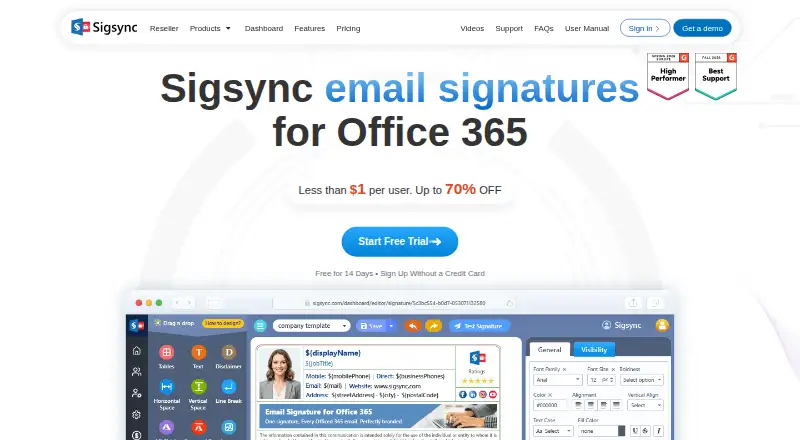
What Sigsync is
Sigsync centralizes email signatures and disclaimers for Microsoft 365 and Exchange. It offers Centralized (Combo), Server, and Client deployment modes, with hybrid deployment listed. The editor supports drag-and-drop elements, imported HTML, tables, images, social icons, vCards, surveys, and Azure AD fields. Azure AD placeholders can populate signatures with details such as display name, company, job title, department, and profile photo. Server-side signatures work across Outlook, Outlook Web App, Apple Mail, Thunderbird, phones, Macs, and iPhones. Sigsync also supports promotional banners, scheduled campaigns, analytics, and CSAT integrations. Its monthly plan is $91 a month, with cost based on users or licenses; pricing starts at $0.91/user/mo. A 14-day trial is available, but there is no free plan. Licenses are user-based, with no limit on the number of emails sent by each licensed user. Deployments covering more than 200 users require customized pricing.
Who it suits
Sigsync suits organizations using Microsoft 365 or Exchange that want centralized control of signatures and disclaimers. Its deployment modes and editor may serve teams managing signature content across different email clients.
What it does well
- Supports three deployment modes.
- Azure AD placeholders can populate user details.
- No per-user cap on emails sent.
- Free 24/7 technical support is available.
- Includes signature analytics and directory sync.
What to know first
- There is no free plan.
- Deployments over 200 users require customized pricing.
- License costs depend on users or licenses.
Limits
There is no free plan, and the trial lasts 14 days. Licenses are user-based; Sigsync requests customized pricing for more than 200 users.
Plans
| Plan | Billed and limits | Price |
|---|---|---|
| Monthly plan | monthly · full access to all features, without any restrictions · cost based on users/licenses | $91 a month |
| Yearly plan | one-time payment per year · one-month subscription free · cost based on users/licenses | On request |
As sigsync.com lists them, read 1 Oct 2026. The maker's own page has the final word.
Getting started
- Visit the Sigsync website.
- Start the 14-day trial.
- Choose a Centralized (Combo), Server, or Client deployment mode.
- Connect Sigsync with Microsoft 365 or Exchange and the relevant listed integrations.
- Set up signatures using the editor and Azure AD fields.
Verdict
Sigsync combines centralized signature management with flexible deployment modes and broad email-client support. Consider its user-based licensing and customized pricing requirement for larger deployments.
Questions
How much does Sigsync cost?
Pricing starts at $0.91/user/mo. The monthly plan is $91 a month, billed monthly, with cost based on users or licenses; customized pricing is requested for more than 200 users.
Is there a free plan or trial?
There is no free plan. Sigsync offers a 14-day trial.
Which email platforms does Sigsync support?
Sigsync is for Microsoft 365 and Exchange. Its listed platforms are Android, extension, iOS, Linux, macOS, web, and Windows.
What deployment modes are available?
Sigsync supports Centralized (Combo), Server, and Client deployment modes.
Which integrations does it offer?
Listed integrations include Office 365, Exchange, Exchange Online connectors, Azure AD, Outlook, and OWA. It also supports CSAT integrations with Simplesat and Thermometer.
Who makes Sigsync?
Sigsync is headquartered in Rehoboth Beach, Delaware, United States.
Facts from Sigsync's own pages
- Compliance
- Sigsync states that it is ISO certified and compliant with GDPR and HIPAA. · sigsync.com, 1 Oct 2026
- Deployment modes
- It supports Centralized (Combo), Server, and Client deployment modes. · sigsync.com, 1 Oct 2026
- Dynamic data
- Azure AD placeholders can populate signatures with user attributes such as display name, company, job title, department, and profile photo. · sigsync.com, 1 Oct 2026
- Email clients
- Server-side signatures work across Outlook, Outlook Web App, Apple Mail, Thunderbird, mobile phones, Macs, and iPhones. · sigsync.com, 1 Oct 2026
- Headquarters
- Rehoboth Beach, Delaware, United States · sigsync.com, 28 Sept 2026
- Integrations
- Sigsync integrates with Office 365, Exchange, Exchange Online connectors, Azure AD, Outlook, and OWA. · sigsync.com, 1 Oct 2026
- Large deployments
- Sigsync requests customized pricing for licenses covering more than 200 users. · sigsync.com, 1 Oct 2026
- License limit
- Licenses are based on users, with no restriction on the number of emails sent by each licensed user. · sigsync.com, 1 Oct 2026
- Marketing
- It supports promotional banners, scheduled email campaigns, social media icons, analytics, and CSAT integrations including Simplesat and Thermometer. · sigsync.com, 1 Oct 2026
- Product
- Sigsync is a centralized email signature and disclaimer management service for Microsoft 365 and Exchange. · sigsync.com, 1 Oct 2026
- Security
- Sigsync states that it is SOC 2 Type 2 certified and uses OAuth 2.0 authentication with TLS encryption. · sigsync.com, 1 Oct 2026
- Signature editor
- The editor supports drag-and-drop elements, imported HTML, tables, images, social icons, vCards, surveys, and Azure AD fields. · sigsync.com, 1 Oct 2026
- Support
- Sigsync provides free 24/7 technical support through live chat, email, and phone. · sigsync.com, 1 Oct 2026
Where Sigsync stands on Freedom251
- Email Signature Management Software#25 of 41
- Email Signature Software#19 of 29