Freedom251 › Email Signature Software

Signite
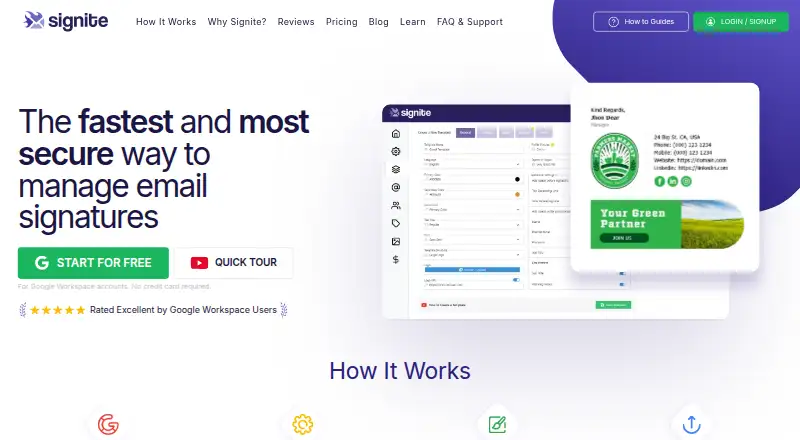
What Signite is
Signite manages and deploys email signatures for organizations using Google Workspace. Administrators can customize built-in templates and assign them to teams, roles, departments, groups, or organizational units. It synchronizes users, domains, directory information, organizational units, and custom attributes from Google Workspace, then applies signatures inside Gmail through secure API access without SMTP changes, email routing, or end-user setup. Premium adds banners, custom colors, linked logos, profile pictures, alias signatures, HTML download, automated synchronization and deployment, and Retina support. Organizations can schedule promotional banners and change or remove them centrally. Signite says it does not access, read, or store email content and does not track recipients or collect email opens, clicks, or recipient profiles. Signatures can appear in supported Gmail apps on iOS and Android without a separate Signite mobile app. Free supports up to five users, has basic fields and logo, and adds Signite branding. Premium is $59 a year for up to five users, $106 a year for up to ten, or $198 a year for up to twenty.
Who it suits
Signite is intended for Google Workspace administrators, marketing teams, digital agencies, and growing businesses managing signatures across an organization. It may suit organizations that want centrally assigned templates and scheduled banners.
What it does well
- Templates can be assigned by team, role, or unit.
- Directory details synchronize from Google Workspace.
- Signatures apply within Gmail without end-user setup.
- Mobile Gmail display needs no separate Signite app.
- Premium offers scheduled, centrally managed banners.
What to know first
- Free supports up to five deployed users.
- Free signatures include a Signite branding credit.
- Free excludes Premium features.
- No free trial is offered.
Limits
Free supports up to five deployed users, includes basic fields and a logo, adds a Signite branding credit, and excludes Premium features. Premium plans cover up to five, 10, or 20 users; the listed prices are annual fees, and charges are based on deployed users and unique aliases.
Plans
| Plan | Billed and limits | Price |
|---|---|---|
| Free | unlimited duration · basic fields and logo · Signite branding credit · up to 5 deployed users | Free |
| Up to 100 users | 594 annual fee · 0.49 user/month · all premium features · up to 100 deployed users | $0.49 |
| Up to 50 users | 396 annual fee · 0.66 user/month · all premium features · up to 50 deployed users | $0.66 |
| Up to 20 users | 198 annual fee · 0.82 user/month · all premium features · up to 20 deployed users | $0.82 |
| Up to 10 users | 106 annual fee · 0.88 user/month · all premium features · up to 10 deployed users | $0.88 |
| Up to 5 users | 59 annual fee · 0.98 user/month · all premium features · up to 5 deployed users | $0.98 |
| Premium — up to 10 users | Annual fee · Up to 10 users · All premium features · Charged for deployed users and unique aliases | $106 a year |
| 1 user | 12 annual fee · 1.00 user/month · all premium features · billed by deployed users and unique aliases | $12 |
The first 8 of 10 plans, as signite.io lists them, read 14 Oct 2026. The maker's own page has the final word. Every plan
Getting started
- Visit Signite's website.
- Choose the Free plan or a Premium plan sized for the number of users.
- Connect Signite to Google Workspace to synchronize directory information and manage signature settings.
- Customize a built-in template and assign it to the relevant teams, roles, departments, groups, or organizational units.
- Deploy signatures inside Gmail; supported Gmail apps on iOS and Android can display them.
Signite centrally manages Gmail signatures for organizations using Google Workspace. It is best suited to administrators and marketing teams that need signatures assigned by role or organizational unit. Its main advantage is centrally controlled deployment without changing mail routing; the five-user, branded free tier is a narrow starting point.
Overview
Signite syncs users, domains, organizational units, directory information, and custom attributes from Google Workspace. Administrators can adapt built-in templates and assign them to teams, roles, departments, groups, or organizational units. That makes it a stronger fit for organizations with different signature needs across teams than for someone who only needs to create one personal signature.
Signatures are applied within Gmail through secure API access, without SMTP changes, email routing, or setup by each end user. Signite says it does not access, read, or store email content, and limits its access to signature settings. It also says it does not track recipients, opens, clicks, recipient behavior, IP addresses, geolocation, devices, or recipient profiles. Signite states that it has implemented security and privacy measures to comply with GDPR provisions and provides a data processing agreement.
Key features
Central assignment of templates gives administrators a practical way to keep signatures aligned with team or organizational structure. Directory synchronization supplies the user and organizational data behind that assignment, while cloud deployment avoids changes to mail routing and individual employee setup.
Premium adds promotional banners that organizations can schedule and manage centrally, along with custom colors, linked logos, profile pictures, alias signatures, HTML download, automated synchronization and deployment, and Retina support. These tools make the paid tier more useful for coordinated branding and campaigns; the free tier lacks all Premium features. Signite offers technical support by chat and email on Free, and adds in-person Zoom support on Premium. It advertises a full refund within 14 days of a Premium purchase.
Signatures can display in supported Gmail apps on iOS and Android without a separate Signite mobile app. Signite also supports Android, iOS, macOS, and web. It does not provide signature analytics or API access, so organizations looking for those capabilities should consider another option.
Pricing
The Free plan costs nothing and runs for unlimited duration. It covers up to five deployed users, basic fields and a logo, but adds a Signite branding credit and excludes Premium features. That is enough for a small team evaluating centrally managed signatures, but the cap and visible branding limit its usefulness as a polished organization-wide rollout.
Premium is billed annually and charges for deployed users and unique aliases. The up-to-five-user plan is $59 a year; the up-to-10-user plan is $106 a year; and the up-to-20-user plan is $198 a year. Each includes all Premium features. These tiers suit teams that need unbranded signatures, campaign banners, or the other paid controls, with the user cap determining which plan fits. Larger organizations should confirm custom pricing.
There is no free trial. The advertised 14-day refund provides a limited fallback after purchase, but does not replace a trial period.
Platforms
Signite supports Android, iOS, macOS, and web, while its signature management is specifically for Google Workspace and Gmail. Supported Gmail apps on Android and iOS can display signatures without a separate Signite mobile application.
Who it's for
Google Workspace administrators who need centrally assigned signatures are the clearest fit. Marketing teams can use scheduled banners to coordinate promotions, while digital agencies and growing businesses can benefit from role- or unit-specific templates as their organizations expand. It is less suitable for teams outside Google Workspace, or those that require signature analytics or API access.
Pros and cons
- Pros: Template assignment by team, role, department, group, or organizational unit supports structured organizations.
- Pros: Gmail deployment avoids SMTP changes, routing changes, and end-user setup.
- Pros: Premium banner scheduling and centralized updates give marketing teams control over signature campaigns.
- Pros: The free plan has unlimited duration and supports up to five deployed users.
- Cons: Free signatures carry Signite branding, and the free plan excludes every Premium feature.
- Cons: Paid tiers are billed annually, with seat limits and charges tied to deployed users and unique aliases.
- Cons: Signite offers no signature analytics or API access.
Alternatives
For other options, browse Email Signature Software or Email Signature Management Software.
- Signitic is worth comparing if a free plan for up to 19 employees, one template, and one banner campaign is a better starting point; its free tier also displays a badge.
- Scribe is another freemium option, with a free tier for up to two users and one template.
- AdSigner is a paid-model alternative that also offers a free plan and trial.
- HiHello Email Signature Manager may suit someone who also wants digital business cards: its Personal plan is free and includes one user, four cards, a personal signature, and five card and badge scans per month.
- MySignature offers a free tier with basic signatures and one signature per email address.
- SyncSignature is a web-based option with a free template, unlimited edits, and copy-and-paste installation.
- gSignature is another freemium signature option.
- Newoldstamp offers a team plan for five signatures at $109 a year.
Verdict
Choose Signite if your organization runs Google Workspace and needs administrators to assign, deploy, and update Gmail signatures centrally. Its routing-free deployment and organizational template controls are the strongest reasons to choose it. Look elsewhere if you need analytics or API access, or if a five-user branded free plan cannot meet your rollout needs.
Verdict
Signite focuses on centrally managed signatures for Google Workspace and Gmail, with organization-based template assignment and optional Premium tools. Its free plan is limited to five users and includes Signite branding; larger user tiers are billed annually.
Questions
How much does Signite cost?
The Free plan costs nothing. Premium costs $59 a year for up to five users, $106 a year for up to 10 users, or $198 a year for up to 20 users. Premium charges are based on deployed users and unique aliases.
Is there a free plan or free trial?
There is an unlimited-duration Free plan for up to five deployed users. Signite lists no free trial.
Which email platform does Signite support?
Signite manages signatures for Google Workspace and applies them inside Gmail. Supported Gmail apps on iOS and Android can display the signatures.
What does Premium add?
Premium includes banners, custom colors, linked logos, profile pictures, alias signatures, HTML download, automated synchronization and deployment, and Retina support.
Does Signite read or track email content and recipients?
Signite says it does not access, read, or store email content. It also says it does not track recipients or collect opens, clicks, recipient behavior, IP addresses, geolocation, device tracking, or recipient profiles.
Does Signite offer support or refunds?
Free and Premium include technical support by chat and email; Premium also adds in-person Zoom support. Signite advertises a full refund within 14 days of a Premium purchase.
Facts from Signite's own pages
- Alias support
- Premium supports aliases with either shared signatures or distinct templates and signatures for unique aliases. · signite.io, 14 Oct 2026
- API integration
- Signite applies signatures through authorized Google Workspace APIs using OAuth rather than SMTP relay or message interception. · signite.io, 14 Oct 2026
- Banner campaigns
- Premium accounts can upload promotional or informational banners and schedule their visibility by user or group. · signite.io, 14 Oct 2026
- Banner scheduling
- Organizations can upload promotional banners, schedule when they appear, and update or remove them centrally. · signite.io, 7 Oct 2026
- Company founded
- LinkedIn lists Signite as founded in 2020. · linkedin.com, 14 Oct 2026
- Company headquarters
- Crunchbase places Signite in Caesarea, Hefa, Israel. · crunchbase.com, 14 Oct 2026
- Company legal name
- Crunchbase lists the legal name as Imark Ltd. and operating status as active. · crunchbase.com, 14 Oct 2026
- Company size
- LinkedIn lists the company size as 2–10 employees. · linkedin.com, 14 Oct 2026
- Deployment
- Signatures are applied inside Gmail through secure API access, without SMTP changes, email routing, or end-user setup. · signite.io, 7 Oct 2026
- Directory sync
- Signite synchronizes users, domains, directory information, organizational units, and custom attributes from Google Workspace. · signite.io, 7 Oct 2026
- Documentation
- The help center lists guides covering installation, permissions, templates, synchronization, aliases, mobile Gmail, HTML export, troubleshooting, payments and deployment. · signite.io, 14 Oct 2026
- Email access
- Signite says it does not access, read, or store email content and only manages signature settings through authorized API access. · signite.io, 7 Oct 2026
- GDPR
- Signite states that it has implemented measures intended to comply with the GDPR and provides a data-processing agreement. · signite.io, 14 Oct 2026
- Google Marketplace adoption
- The Signite Marketplace listing shows more than 152,000 installs or users and was updated June 11, 2025. · workspace.google.com, 14 Oct 2026
- Google permissions
- The Marketplace listing requests Gmail signature-setting access plus visibility of domains, groups, organizational units, users, schemas and customer information. · workspace.google.com, 14 Oct 2026
- HTML export
- Premium users can download generated signatures as HTML for use in other mail clients. · signite.io, 14 Oct 2026
- Intended users
- Signite identifies Google Workspace administrators, marketing teams, digital agencies, and growing businesses as intended users. · signite.io, 7 Oct 2026
- Limit: annual cancellation
- Paid accounts are annual; the terms say cancellation normally does not stop charges for the remainder of the year, except under the 14-day refund rule. · app.signite.io, 14 Oct 2026
- Limit: dark mode
- Gmail does not support separate light and dark signature designs, and Gmail may alter colors in dark mode. · signite.io, 14 Oct 2026
- Limit: external HTML
- Signite does not allow arbitrary external HTML code inside templates and requires its built-in template system. · signite.io, 14 Oct 2026
- Limit: Free branding
- Free-plan signatures must include a visible Signite credit, which is removed after upgrading. · app.signite.io, 14 Oct 2026
- Limit: Free capacity
- The free plan is limited to five deployed signatures and excludes premium functions such as banners and advanced customization. · signite.io, 14 Oct 2026
- Mobile support
- Gmail signatures can be deployed to Gmail apps on iOS and Android without requiring a dedicated Signite mobile app. · signite.io, 14 Oct 2026
- Notable limit
- The free plan excludes premium features, supports up to five deployed users, and adds a Signite branding credit to signatures. · signite.io, 7 Oct 2026
Where Signite stands on Freedom251
- Email Signature Software#6 of 29
- Email Signature Management Software#9 of 41