SilverBullet
What SilverBullet is
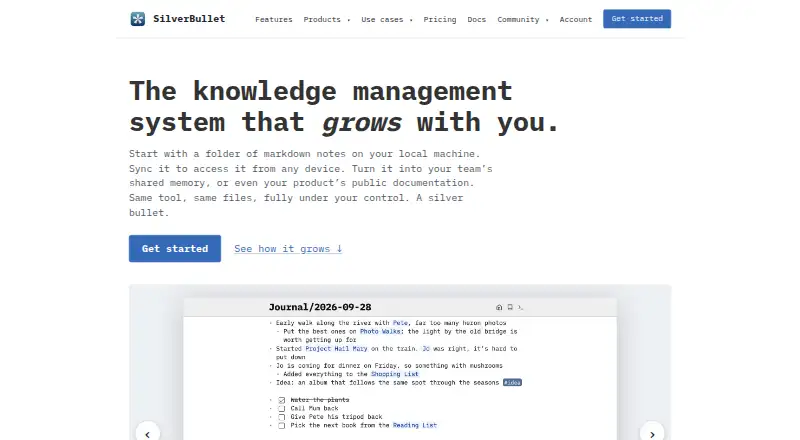
SilverBullet is a Markdown knowledge management system for personal notes, team wikis, product documentation, and family spaces. Each space is a folder of plain Markdown files, which users can open in other editors and store on a computer, their own server, or with a hosting provider. Writing tools include live preview, tasks, templates, daily journals, outlining, Vim mode, comments, and support for images, PDFs, audio, and video. Pages can connect through wiki links, linked mentions, transclusions, tags, and live queries. Users can customize spaces with Lua commands, widgets, and automations, as well as CSS styling. The server supports accounts, shared spaces, comments, mentions, and edits that appear as teammates make them. SilverBullet works in desktop and mobile browsers, can be installed as a PWA, and supports offline work that syncs after reconnecting. The maker says it has no trackers or telemetry. Free options include Desktop Personal for personal use and education and a self-hosted Server plan. Cloud on PikaPods costs $2 a month; Desktop Pro costs $50 a year.
Who it suits
SilverBullet suits people organizing personal notes or shared team, product, or family knowledge. Its plain Markdown files and choice of storage locations may appeal to users who want control over their files.
What it does well
- Plain Markdown files can be opened in other editors
- Offline work syncs after reconnecting
- Pages support links, tags, and live queries
- Server supports shared spaces and teammate edits
- Free personal and self-hosted options
What to know first
- Shared libraries are marked beta
- Space object graph is experimental
- Desktop Pro costs $50 a year
- Cloud on PikaPods costs $2 a month
Limits
Desktop Personal is for personal use and education. The free Server plan is self-hosted; Cloud on PikaPods starts at $2 a month, and Desktop Pro for work use costs $50 per user per year.
Plans
| Plan | Billed and limits | Price |
|---|---|---|
| Desktop Personal | Personal use and education · sync with any SilverBullet Server | Free |
| Server | Any number of users · self-hosted | Free |
| Cloud on PikaPods | From $2/month on PikaPods · Hosted SilverBullet Server · one-click deployment | $2 a month |
| Desktop Pro | $50 per user per year · Per user · work use · bulk seats available | $50 a year |
As silverbullet.md lists them, read 10 Oct 2026. The maker's own page has the final word.
Getting started
- Visit https://silverbullet.md/.
- Choose Desktop Personal for personal use and education, or Server for self-hosting.
- Store the space on your computer, your own server, or with a hosting provider.
- Open SilverBullet in a modern desktop or mobile browser, or install it as a PWA.
- For hosted use, choose Cloud on PikaPods, listed from $2 a month.
Overview
SilverBullet is a Markdown knowledge system for notes, documentation, and shared wikis. It suits people who want portable files and the choice to keep them on their own computer or server. Its best case is linking personal knowledge with optional team collaboration; people who want a fully managed service without hosting decisions may prefer a simpler fit.
Key features
Each space is a folder of plain Markdown files that can be opened in other editors and moved between a computer, a personal server, or a hosting provider. That gives users direct control over their material and keeps it usable outside SilverBullet, though it also means they must decide where it lives.
The editor brings together live preview, tasks, templates, a daily journal, outlining, Vim mode, comments, and support for images, PDFs, audio, and video. Wiki links, linked mentions, transclusions, tags, and live queries help connect and retrieve material across a space. The object graph is experimental, so it is better treated as an extra than as the basis of a workflow.
Space Lua can add commands, widgets, and automations, while Space Style allows CSS customization. These features give technically inclined users room to shape a workspace around their process; shared libraries are still beta. GitHub is the listed integration.
The server supports accounts, shared spaces, comments, @-mentions with a Mention Inbox, and edits that appear to teammates as they happen. SilverBullet also works offline in modern desktop and mobile browsers, can be installed as a PWA, and syncs offline changes after reconnection. The maker says there are no trackers or telemetry, and the server encrypts the browser’s local copy on shared devices.
Pricing
SilverBullet offers free options for personal use and self-hosting, plus paid hosted and work-use plans. The free choices suit people willing to manage their own setup; the paid options reduce that burden or cover work use.
| Plan | Price | What it includes and who it suits |
|---|---|---|
| Desktop Personal | free | Personal use and education, with sync to any SilverBullet Server. A fit for individual and educational use. |
| Server | free | Self-hosted, with any number of users. This suits teams prepared to run their own server. |
| Cloud on PikaPods | $2 a month | Hosted SilverBullet Server with one-click deployment. The billing description says “From $2/month on PikaPods,” so the stated amount is a starting price. |
| Desktop Pro | $50 a year | $50 per user per year for work use; bulk seats are available. This is the plan for professional use, with per-user pricing to account for as seats are added. |
The free desktop plan is limited to personal use and education, while the free Server plan requires self-hosting. The paid plans cover hosted deployment or work use. No trial terms are given for these plans.
Platforms
SilverBullet supports web, Windows, macOS, Linux, iOS, Android, and self-hosting. Browser access and PWA installation extend it to desktop and mobile use, while offline work helps when a connection drops; changes sync once service returns.
Who it's for
SilverBullet is a strong fit for people who want Markdown files they can keep and move, and who value links, queries, and customization alongside writing tools. It can serve personal notes, product documentation, family spaces, or a team wiki. Self-hosting makes the free multi-user option attractive to teams with the capacity to run a server. Those who want managed hosting can pay for PikaPods; work users can choose Desktop Pro.
It is less compelling for someone who wants every part of the experience fully managed, or who would rather avoid making storage and hosting choices. Users who need a mature shared library system should also account for its beta status.
Pros and cons
- Portable Markdown files: Spaces work in other editors and can be moved between local, self-hosted, and provider-hosted storage.
- Useful knowledge links: Wiki links, mentions, transclusions, tags, and live queries connect notes and help surface related content.
- Collaboration with offline support: Shared spaces, live teammate edits, comments, and mentions pair with offline work that syncs after reconnection.
- Choice comes with responsibility: Users choose where files live, and the free multi-user plan requires self-hosting.
- Some extensibility is unsettled: The object graph is experimental and shared libraries are beta.
Alternatives
Readers comparing note and knowledge tools can browse Personal Knowledge Management Software and Note-taking apps.
- Logseq is another free option with a free personal-use plan and support for Android, iOS, Linux, macOS, web, and Windows. Its Sync Backer plan is a $5 a month recurring donation for beta sync access.
- Obsidian is worth considering for readers seeking a freemium option with a listed Sync Standard plan at $5 a month, billed annually, for one synced vault, 1 GB total storage, and a 5 MB maximum file size.
- SiYuan is another open-source choice; its download page describes most features as free, including for commercial use.
- Supernotes may suit readers who prefer card-based notes: Starter includes 100 cards, while Unlimited costs £6 a month, billed £72 annually.
- TheBrain offers a free app plan with unlimited thoughts, links, and brains, plus private sync up to 1,000 thoughts and 100 MB of synced attachments.
- TiddlyWiki is a free, open-source project for readers considering another self-hosted option.
- Capacities has a free Basic plan with 5 GB of media uploads total and 100 MB per month afterward.
- Neoma offers a free Personal plan across its listed platforms, with no account, limits, or expiry.
Verdict
Choose SilverBullet if you want linked Markdown notes that remain yours as ordinary files, with offline use and the option to collaborate. Its free personal and self-hosted plans make it especially appealing to people comfortable managing storage or a server. Look elsewhere if you want to avoid those choices or need mature shared libraries as a core part of your workflow.
Verdict
SilverBullet combines Markdown-based writing and knowledge links with offline use and collaboration. Its free options cover personal and self-hosted use, while hosted and work-use options have listed prices.
Questions
Is SilverBullet free?
Yes. Desktop Personal is free for personal use and education, and Server is free for any number of self-hosted users.
What are the paid plans?
Cloud on PikaPods is $2 a month, billed from $2/month on PikaPods. Desktop Pro is $50 a year, billed $50 per user per year, for work use.
Which platforms does it support?
SilverBullet supports web, Windows, macOS, Linux, iOS, Android, and self-hosted use. It works in modern desktop and mobile browsers and can be installed as a PWA.
Is SilverBullet open source?
Yes. The project is open source, and SilverBullet Server and the sb CLI are MIT licensed.
Can it work offline?
Yes. SilverBullet supports offline work that syncs when reconnected.
Who created SilverBullet?
SilverBullet was created by Zef Hemel and started in 2022 as an open source project.
Facts from SilverBullet's own pages
- Collaboration
- Server supports accounts, shared spaces, comments, @-mentions with a Mention Inbox, and edits from teammates appearing as they happen. · silverbullet.md, 10 Oct 2026
- Customization
- Space Lua lets users add commands, widgets, and automations, while Space Style supports CSS customization and shared libraries are marked beta. · silverbullet.md, 10 Oct 2026
- Data control
- Users choose to store their files on their computer, their own server, or with a hosting provider, and can move the folder between those locations. · silverbullet.md, 10 Oct 2026
- Integrations
- Spaces can be synced with tools such as Syncthing or Dropbox, and Desktop can sync with a self-hosted or hosted SilverBullet Server. · silverbullet.md, 10 Oct 2026
- Knowledge navigation
- Pages support wiki links, linked mentions, transclusions, tags, live queries, and an experimental object graph. · silverbullet.md, 10 Oct 2026
- License
- SilverBullet Server and the sb CLI are MIT licensed and open source. · silverbullet.md, 10 Oct 2026
- Maker and history
- SilverBullet was created by Zef Hemel and started in 2022 as an open source project. · silverbullet.md, 10 Oct 2026
- Note sharing
- Yes · silverbullet.md, 20 Sept 2026
- Offline access
- Yes · silverbullet.md, 20 Sept 2026
- Offline and mobile
- SilverBullet works in modern desktop and mobile browsers, can be installed as a PWA, and supports offline work that syncs when reconnected. · silverbullet.md, 10 Oct 2026
- Plain files
- A SilverBullet space is a folder of plain Markdown files that users can open in other editors and keep under their control. · silverbullet.md, 10 Oct 2026
- Supported platforms
- web,Windows,macOS,Linux,iOS,Android,self-hosted · silverbullet.md, 20 Sept 2026
- Purpose
- SilverBullet is a markdown knowledge management system for personal notes, team wikis, product documentation, and family spaces. · silverbullet.md, 10 Oct 2026
- Real-time collaboration
- Yes · silverbullet.md, 20 Sept 2026
- Security and privacy
- The maker says SilverBullet has no trackers or telemetry, and Server encrypts the browser’s local copy of a space on shared devices. · silverbullet.md, 10 Oct 2026
- Support
- Support is available through the documentation and community forum; Server bugs can be reported on GitHub, and private billing or account questions can be emailed to [email protected]. · silverbullet.md, 10 Oct 2026
- Writing features
- Features include a live preview editor, tasks, templates, daily journal, outlining, Vim mode, comments, and support for images, PDFs, audio, and video. · silverbullet.md, 10 Oct 2026
Where SilverBullet stands on Freedom251
- Note-taking apps#47 of 216
- Personal Knowledge Management Software#15 of 32