Freedom251 › Secure Notes Apps

Dash
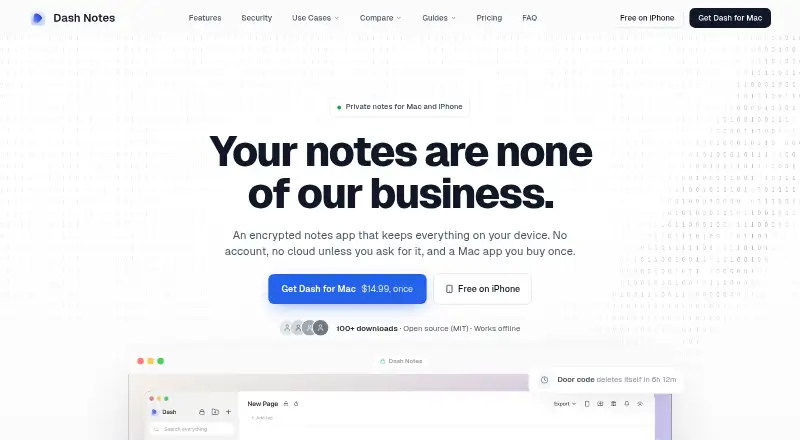
What Dash is
Dash is a notes app for Mac and iPhone, with a web PWA that also provides access on Android. Notes stay on the device, and the app works offline unless sync is enabled. Locked notes use AES-256-GCM encryption, with keys derived through PBKDF2-SHA256 using 600,000 iterations. App locking supports a master password, Touch ID or Face ID, plus configurable auto-lock timers. A duress password opens decoy notes while real notes remain encrypted; notes can also be set to delete after one hour, one day, one week or one month. The block editor includes wiki-style links, folders and tags. Local AI works with Ollama, LM Studio, LocalAI, Jan and other OpenAI-compatible servers running on localhost, and rejects non-local endpoints. Pages and folders can be exported as Markdown, DOCX or PDF, with encrypted .dashpack backups also available. Dash is open source under the MIT license. The web PWA and iPhone options are free; Mac lifetime access is listed at $14.99 a month, and sync starts at $4.99 a month with a 7-day free trial.
Who it suits
Dash suits people seeking notes that stay on their device and work offline, with optional sync. Its local AI support and export formats may suit users who want those tools without sending note data through a non-local AI endpoint.
What it does well
- Works offline unless sync is enabled.
- App lock supports Touch ID and Face ID.
- Local AI rejects non-local endpoints.
- Exports Markdown, DOCX and PDF.
- Open source under the MIT license.
What to know first
- Windows and Linux apps are not shipped yet.
- Android uses the web PWA.
- Real-time collaboration is not supported.
Limits
The free Web PWA and iPhone options do not include a stated sync plan; Dash Sync costs $4.99 a month or $47.99 a year, each with a 7-day free trial. Android uses the web PWA, and Windows and Linux apps are not shipped.
Plans
| Plan | Billed and limits | Price |
|---|---|---|
| Web PWA / iPhone | Free ongoing use · Works offline · No account required | On request |
| Dash Web PWA | any browser · no installation required · free forever | Free |
| Dash for iPhone | no purchase · no trial · no account | Free |
| Dash for Mac | one-time purchase · Apple Silicon and Intel · local-first · optional sync separately | $14.99, paid once |
| Dash Sync yearly | $47.99 / year · optional · Mac, iPhone, iPad and web · 7-day trial | $47.99 a year |
| Dash Sync monthly | $4.99 / mo · optional · Mac, iPhone, iPad and web · 7-day trial | $4.99 a month |
As dashnote.io lists them, read 20 Sept 2026. The maker's own page has the final word.
Getting started
- Open the Dash website or use the web PWA in a browser.
- Use the free iPhone option without a purchase, trial or account.
- Use the free web PWA in a browser without installing it or creating an account.
- Choose Dash for Mac for lifetime access, or select a Sync plan for cross-device syncing.
- Start the 7-day free trial for a Sync plan if you want to evaluate syncing.
Overview
Dash is a private notes app with local AI support and an open-source MIT license. It will appeal most to people who want device-held notes and privacy controls rather than broad platform coverage. The core app works offline; syncing across devices costs extra.
Key features
Dash keeps notes on the device and works offline unless you enable sync. Locked notes use AES-256-GCM, with keys derived by PBKDF2-SHA256 at 600,000 iterations. App locking supports a master password, Touch ID or Face ID, and configurable auto-lock timers. A duress password opens decoy notes while the real notes stay encrypted, and notes can be set to delete after one hour, one day, one week or one month. These controls suit sensitive personal notes, though they do not replace protecting the device itself.
The block editor combines folders and tags with wiki-style links, giving connected notes some structure without requiring a more elaborate system. Local AI works with Ollama, LM Studio, LocalAI, Jan and other OpenAI-compatible servers running on localhost. Dash rejects non-local endpoints, so note data cannot leave the machine through its AI feature. That is a useful safeguard for local-model users, but rules out hosted AI services.
Pages and folders export to Markdown, DOCX or PDF, while encrypted .dashpack backups offer a separate way to preserve notes. Dash Sync encrypts notes on the device before sending them; the relay stores only ciphertext. Note sharing is supported, but real-time collaboration is not, so Dash is better suited to personal notes than shared live editing.
Pricing
Dash separates free note-taking from paid access to its Mac app and cross-device sync. The Web PWA and iPhone options are free ongoing use, and neither requires an account. The iPhone plan is free, with no purchase or trial; the Web PWA is free, works in any browser without installation and is free forever. These are the clearest choices for readers who do not need the native Mac app or paid sync.
Dash for Mac costs $14.99 a month, billed as lifetime access with no subscription required. It includes the native macOS app, automatic updates, Touch ID support and offline-by-default use. The unusual monthly price wording sits alongside lifetime access, so buyers should pay attention to the stated billing terms; the plan is for Mac users who want the native app rather than just the free PWA.
Dash Sync Monthly costs $4.99 a month after a 7-day free trial and includes end-to-end encrypted syncing across devices; it can be cancelled anytime. Dash Sync Yearly costs $47.99 a year, also with a 7-day free trial, and the page says it saves two months versus monthly billing. The yearly option fits people committed to syncing; monthly is the more flexible choice. Sync is the paid step for users who want notes to move between devices, while free use remains offline or browser-based.
Platforms
Dash supports macOS, iOS and the web, with Android access through a web PWA. There are no shipped Windows or Linux apps. That makes it a natural fit for Mac and iPhone owners, while Android users must accept a browser-based app and Windows or Linux users should look elsewhere. Offline access is supported, but Dash Sync is a separate paid plan.
Who it's for
Choose Dash if you want offline notes, device-side encryption, granular lock options and AI that stays local, especially if you already use a Mac or iPhone or run a compatible local model. It is less suitable if you need a native Windows or Linux app, hosted AI, or real-time collaboration.
Pros and cons
- Pro: Notes stay on-device by default and work offline, with device-side encryption for locked notes.
- Pro: Duress access, timed deletion and configurable auto-lock give privacy-conscious users more control over note access.
- Pro: Local AI rejects non-local endpoints, and exports include Markdown, DOCX and PDF.
- Con: Windows and Linux apps are not shipped, and Android access is through the web PWA.
- Con: Cross-device sync requires a paid plan, and collaboration is not real-time.
- Con: Local AI requires a compatible server running on localhost; hosted AI endpoints are excluded.
Alternatives
Notesnook is a better fit if you need apps across Windows, Linux, Android, iOS, macOS and the web; its free plan has a 50 MB storage-per-month limit and a 10 MB maximum file size.
Cryptee suits readers who want a free plan with 100 MB and software and cryptography its maker says can be reviewed independently, alongside wider platform coverage.
PrivacyNotes is worth considering if you want apps across desktop and mobile platforms and published app and encryption code under AGPL.
Standard Notes is an alternative for plain-text notes, offline access and unlimited device sync on its free Standard plan.
Nolio is a free, open-source encrypted-notes option with no specific usage limits stated.
Notyra is a free option whose site says every line of code is auditable.
QOwnNotes is another free alternative.
Turtl is an alternative if you need collaboration: its Basic plan allows three collaborators per Space and 50MB storage.
For more options, browse Secure Notes Apps or Note-taking apps.
Verdict
Dash is a strong choice for Mac and iPhone users who want offline notes, device-side privacy controls and local AI without sending note content to a hosted AI service. Its main reasons to look elsewhere are limited native platform reach and the extra cost of cross-device sync.
Verdict
Dash combines offline notes, device-side encryption and local AI support, with free web and iPhone options. Note the platform limits: there are no shipped Windows or Linux apps, and Android access uses the web PWA.
Questions
Is Dash free?
Yes. The Web PWA and iPhone options are free; the iPhone option has no purchase, trial or account requirement.
How much does Dash cost?
Dash for Mac is listed at $14.99 a month, billed as lifetime access with no subscription required. Sync is $4.99 a month or $47.99 a year, with a 7-day free trial for each.
Which platforms does Dash support?
Dash supports the web, macOS, iOS and Android through the web PWA. Windows and Linux apps are not shipped.
Does Dash work offline?
Yes. Notes stay on the device and Dash works fully offline unless sync is enabled.
Is Dash open source?
Yes. Dash is open source under the MIT license.
Which AI services does Dash support?
Dash connects to Ollama, LM Studio, LocalAI, Jan and other OpenAI-compatible servers running on localhost. It rejects non-local AI endpoints.
Facts from Dash's own pages
- AI privacy
- Dash rejects non-local AI endpoints, so note data cannot leave the machine through its AI feature. · dashnote.io, 1 Oct 2026
- App lock
- Dash supports app locking with a master password, Touch ID or Face ID, and configurable auto-lock timers. · dashnote.io, 1 Oct 2026
- Duress protection
- A duress password opens decoy notes while the real notes remain encrypted. · dashnote.io, 1 Oct 2026
- Editor
- Dash provides a block editor with wiki-style links, folders and tags. · dashnote.io, 1 Oct 2026
- Encryption
- Locked notes use AES-256-GCM with keys derived through PBKDF2-SHA256 using 600,000 iterations. · dashnote.io, 1 Oct 2026
- Exports
- Dash exports pages or folders as Markdown, DOCX and PDF, and supports encrypted .dashpack backups. · dashnote.io, 1 Oct 2026
- Free plan
- Yes · dashnote.io, 20 Sept 2026
- Integrations
- Ollama,LM Studio · dashnote.io, 20 Sept 2026
- Local AI
- Dash local AI supports Ollama, LM Studio, LocalAI, Jan and other OpenAI-compatible servers running on localhost. · dashnote.io, 1 Oct 2026
- Local storage
- Notes stay on the device and Dash works fully offline unless sync is enabled. · dashnote.io, 1 Oct 2026
- Note sharing
- Yes · dashnote.io, 20 Sept 2026
- Offline access
- Yes · dashnote.io, 20 Sept 2026
- Open source
- Dash is open source under the MIT license. · github.com, 1 Oct 2026
- Platform limits
- Windows and Linux apps are not shipped yet; Android uses the web PWA. · dashnote.io, 1 Oct 2026
- Supported platforms
- web,macOS,iOS,Android via web PWA · dashnote.io, 20 Sept 2026
- Product
- Dash is a private, encrypted notes app for Mac and iPhone. · dashnote.io, 1 Oct 2026
- Real-time collaboration
- No · dashnote.io, 20 Sept 2026
- Self-destruct
- Notes can be set to delete automatically after one hour, one day, one week or one month. · dashnote.io, 1 Oct 2026
- Sync security
- Dash Sync encrypts notes on the device first and the relay stores only ciphertext. · dashnote.io, 1 Oct 2026
Where Dash stands on Freedom251
- Secure Notes Apps#5 of 30
- Note-taking apps#49 of 216