Freedom251 › Secure Notes Apps
Nolio
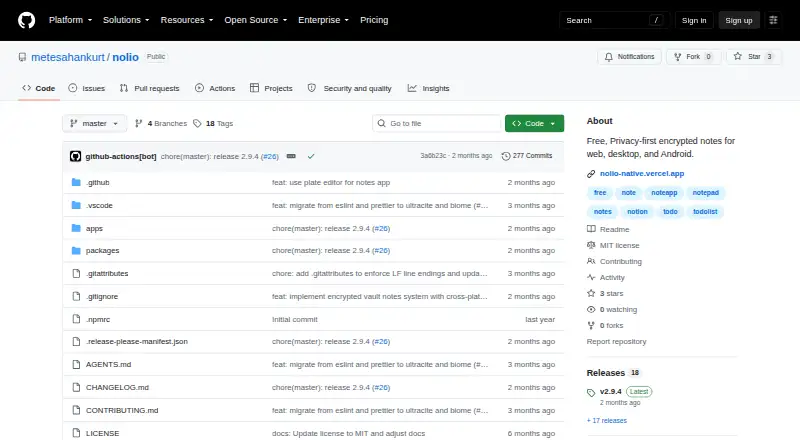
What Nolio is
Nolio is a free, open-source notes app that stores encrypted notes locally, without cloud storage, third-party servers, or telemetry. It runs in a browser and on Windows, macOS, Linux, and Android. Each note uses AES-256-GCM encryption, with keys derived using Argon2id or a 600,000-iteration PBKDF2 fallback. The master password is essential: the maker says notes cannot be recovered without it and there is no password reset. A configurable idle period can lock the vault, and users can also lock it with Cmd/Ctrl + Shift + L. The Plate-based editor supports headings, lists, task lists, quotes, code blocks, callouts, tables, images, and links. Pasted Markdown converts to rich blocks, while slash commands insert blocks. Notes can be arranged in nested pages with unlimited subpages, alongside Favorites, Recent, All Notes, Trash, and a command palette. Desktop users can open resizable sticky-note windows and pin them above other windows. Encrypted backups can be exported to a chosen location; imports verify the backup password before writing data.
Who it suits
Nolio suits people who want encrypted notes kept locally across its listed platforms, with no cloud or telemetry. It may fit users comfortable managing a master password and their own encrypted backups.
What it does well
- Free and open source.
- Stores notes locally without cloud, third-party servers, or telemetry.
- Supports nested pages with unlimited subpages.
- Encrypted backups can be exported to a chosen location.
- Available in browser, desktop, and Android.
What to know first
- Notes cannot be recovered without the master password.
- There is no password reset.
- No cloud storage is provided.
Limits
Notes cannot be recovered without the master password, and Nolio has no password reset. No specific usage limits are stated for the free plan.
Plans
| Plan | Billed and limits | Price |
|---|---|---|
| Free | Free encrypted notes; no specific usage limits stated | Free |
As github.com lists them, read 8 Oct 2026. The maker's own page has the final word.
Getting started
- Open the Nolio project website on GitHub.
- Choose the web app or a platform that suits your device.
- For desktop, select a Windows EXE or MSI, macOS DMG, or Linux AppImage, DEB, or RPM package.
- Use the free plan to create encrypted notes.
- Set a master password and keep it available for access to the vault.
Nolio is a free, open-source notes app that keeps an encrypted vault on your devices rather than in a hosted account. It is best for privacy-conscious users who still want structured, multimedia notes on desktop, web, and Android. The trade-off is absolute responsibility for the master password and backups.
Overview
Nolio takes a local-first approach: notes remain on the device, with no cloud service, third-party server, or telemetry in the product’s design. Desktop data is held in encrypted SQLite, while the web version uses IndexedDB. That makes it suitable for journals, research, personal records, and work material that you do not want routed through a vendor’s infrastructure.
The same architecture removes account-style recovery. There is intentionally no password reset, and notes cannot be recovered without the master password. You can export an encrypted vault backup to a location you select; importing verifies the backup password before changing the vault. Users who want control over storage will appreciate that arrangement, while anyone who regularly forgets credentials should look elsewhere.
Key features
Rich editing and Markdown
The Plate-based editor supports headings, lists, task lists, quotations, code blocks, callouts, tables, images, and links. Pasted Markdown is converted into rich blocks, and slash commands let keyboard users insert blocks without leaving the editor. It is a credible choice for project documentation and knowledge notes, not merely short text memos.
Organization and quick access
Notes can sit in nested pages with unlimited subpages. Favorites, Recent, All Notes, Trash, and a command palette provide several ways to reach material as the vault grows. The structure favors users who build topic hierarchies; it may be more machinery than someone seeking a single flat inbox.
Security controls
Each note uses AES-256-GCM encryption. Keys are derived with Argon2id, or with a 600,000-iteration PBKDF2 fallback. The vault can auto-lock after a configurable idle period, and Cmd/Ctrl + Shift + L locks it immediately. These controls reduce exposure on shared or unattended machines, but they do not compensate for a lost master password.
Desktop widgets
Desktop editions can open resizable, frameless sticky-note windows and pin them above other windows. That is useful for temporary checklists or reference snippets while working in another application, especially for users who prefer an always-visible desktop surface.
Pricing
| Plan | Price | Includes | Best for |
|---|---|---|---|
| Free | free | Free encrypted notes; no specific usage limits stated | Anyone wanting local encrypted note-taking without a subscription |
There is no free trial because the product is free, and no paid tier or renewal term is given. The absence of a stated quota is attractive for personal vaults, but readers who require a contractual storage allowance or hosted synchronization should consider a service with explicit capacity terms.
Platforms
Nolio runs in a browser and on Windows, macOS, Linux, and Android. Desktop downloads include Windows EXE and MSI installers, macOS DMGs for Apple Silicon and Intel, and Linux AppImage, DEB, and RPM packages. The broad desktop coverage suits mixed-device households, while Android support extends the vault beyond a computer. No iOS edition is included. The project describes local features but does not list third-party integrations or an API.
Who it's for
Choose Nolio if keeping data off vendor servers matters, you want a capable block editor, and you are prepared to maintain encrypted backups. It is particularly well matched to technically confident users who value open-source software and cross-platform access.
It is a weaker fit for teams needing collaboration, integrations, or centralized account recovery. The local vault model also puts migration and backup responsibility on the individual rather than a service operator.
Pros and cons
- Pros: per-note AES-256-GCM encryption with Argon2id or a strong PBKDF2 fallback; no cloud, telemetry, or third-party storage; rich blocks, Markdown conversion, and slash commands; unlimited nested pages; configurable auto-lock and encrypted exports; free and open source across five platform categories.
- Cons: no password reset, so a forgotten master password can permanently block access; no iOS app; no stated usage quota or service-level storage terms; no listed integrations or API; backups and recovery are your responsibility.
Alternatives
For a broader directory of privacy-focused choices, see Secure Notes Apps.
- Notesnook is the better pick if you want freemium service terms, a free trial, iOS support, and a free tier with stated storage limits.
- Cryptee suits readers who want open-source cryptography, iOS support, and a free 100 MB tier.
- PrivacyNotes is worth choosing for an AGPL-published web, desktop, and mobile codebase with iOS coverage.
- Standard Notes is an alternative for end-to-end encryption, unlimited device sync, plain-text notes, and offline access.
- Dash fits users seeking an open-source, offline-capable PWA or iPhone app without an account.
- Notyra is another free, open-source option that begins without an account.
- QOwnNotes is an alternative free application with a wider set of listed deployment options.
- Turtl is the better direction when collaborators and explicit storage tiers matter, including a Premium plan at $3 a month.
Verdict
Nolio is a strong choice for an individual who wants rich notes, broad platform coverage, and encryption that stays under personal control at no cost. Its decisive weakness is the lack of password recovery, compounded by the need to manage backups yourself. Pick it for privacy and ownership; look elsewhere if dependable account recovery, iOS support, collaboration, or hosted integrations are priorities.
Verdict
Nolio combines local encrypted storage with a broad editor and multiple ways to organize notes. The master password is critical, and users must manage recovery through encrypted backups.
Questions
Is Nolio free?
Yes. The Free plan costs nothing and includes free encrypted notes.
Is there a free trial?
No, Nolio does not offer a free trial.
Which platforms does Nolio support?
Nolio runs in a browser and on Windows, macOS, Linux, and Android.
Is Nolio open source?
Yes, Nolio is open source.
Can notes be recovered if I forget the master password?
The maker says notes cannot be recovered without the master password, and there is no password reset.
Does Nolio list integrations or an API?
The README describes local storage and app features but does not list third-party integrations or an API.
Facts from Nolio's own pages
- Auto-lock
- The vault automatically locks after a configurable idle period and can also be locked with Cmd/Ctrl + Shift + L. · github.com, 8 Oct 2026
- Backups
- Encrypted vault backups can be exported to a user-selected location; imports verify the backup password before writing data. · github.com, 8 Oct 2026
- Desktop widgets
- Desktop users can open resizable, frameless sticky note windows that can be pinned above other windows. · github.com, 8 Oct 2026
- Downloads
- The README lists Windows EXE and MSI installers, macOS DMG installers for Apple Silicon and Intel, and Linux AppImage, DEB, and RPM packages. · github.com, 8 Oct 2026
- Encryption
- The vault uses per-note AES-256-GCM encryption, with keys derived using Argon2id or a 600,000-iteration PBKDF2 fallback. · github.com, 8 Oct 2026
- Integrations and API
- The README describes local storage and app features but does not list third-party integrations or an API. · github.com, 8 Oct 2026
- Markdown
- Pasted Markdown is automatically converted into rich blocks, and slash commands insert blocks from the keyboard. · github.com, 8 Oct 2026
- Organization
- Notes can be organized into nested pages with unlimited subpages, and the app includes Favorites, Recent, All Notes, Trash, and a command palette. · github.com, 8 Oct 2026
- Password recovery
- The maker says notes cannot be recovered without the master password and that there is deliberately no password reset. · github.com, 8 Oct 2026
- Rich text editing
- Its Plate-based editor supports headings, lists, task lists, quotes, code blocks, callouts, tables, images, and links. · github.com, 8 Oct 2026
- Storage and platforms
- The desktop app uses encrypted SQLite storage, the web app uses IndexedDB, and the product runs in a browser, on Windows, macOS, Linux, and Android. · github.com, 8 Oct 2026
- What it does
- Nolio is a local-first encrypted notes app that stores notes on the device, with no cloud, third-party servers, or telemetry. · github.com, 8 Oct 2026
Where Nolio stands on Freedom251
- Secure Notes Apps#8 of 30