Freedom251 › Secure Notes Apps
PrivacyNotes
What PrivacyNotes is
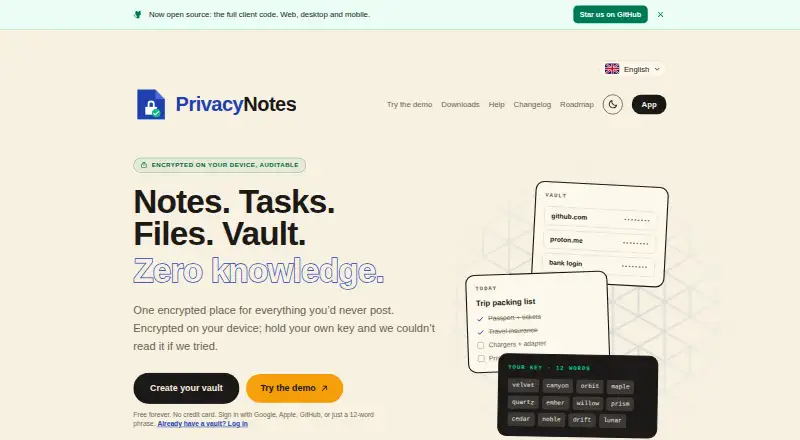
PrivacyNotes is an end-to-end encrypted workspace for notes, tasks, files, a vault, journals and bookmarks. Notes are encrypted on the device with XChaCha20-Poly1305 before synchronization, using keys derived from a 12-word BIP-39 phrase. Reading, writing and searching work offline; changes sync when connectivity returns. The synchronized copy is kept on servers in Zurich, Switzerland, as encrypted blobs rather than readable note text. Users can create a vault with a phrase and no email, or sign in with Google, Apple or GitHub and select server-held or device-only key custody. Imports cover numerous note, journal, password and bookmark services, as well as Markdown files. The web, desktop and mobile apps and encryption code are published on GitHub under the AGPL. The free plan costs nothing, billed Free forever; Pro is $48, paid once. With self-custody, the company cannot recover notes if the phrase is lost and there is no signed-in device.
Who it suits
PrivacyNotes may suit people who want encrypted notes and related personal materials across devices, including offline access. Its self-custody option is for users prepared to keep their recovery phrase safe.
What it does well
- Reading, writing and searching work offline
- Encrypted synchronization stored in Zurich
- Create a vault without an email address
- Imports from many note and password services
- Apps and encryption code published under the AGPL
What to know first
- Losing the self-custody phrase can make notes unrecoverable
- Free plan syncs across 2 devices
- Free plan limits each file to 5 MB
- No free trial
Limits
The Free plan syncs across two devices and limits files to 5 MB each. Pro raises those limits to unlimited devices and 50 MB per file; it costs $48, paid once. With self-custody, losing the 12-word phrase without a signed-in device means the company cannot recover the notes.
Plans
| Plan | Billed and limits | Price |
|---|---|---|
| Free | Free forever · 2 devices · 50 MB sync storage · 5 MB per file | Free |
| 5 GB storage add-on | $18 per year · Adds 5 GB encrypted storage | $18 a year |
| 1 GB storage add-on | $4.80 per year · Adds 1 GB encrypted storage | $4.80 a year |
| Pro | Pay once; early-adopter price, regular price $89 · Unlimited devices · 500 MB storage · 50 MB per file · 20-version history · PIN/read-only notes · wellness analytics · Zen mode · extra themes | $48, paid once |
| 2 GB storage add-on | $8.40 per year · Adds 2 GB encrypted storage | $8.40 a year |
As privacynotes.app lists them, read 14 Oct 2026. The maker's own page has the final word.
Getting started
- Open the PrivacyNotes website and try the browser demo without signup or email, if desired.
- Create a vault with a phrase and no email, or sign in with Google, Apple, or GitHub.
- Install or open PrivacyNotes on a supported platform.
- Import supported notes or files, then use the workspace online or offline.
PrivacyNotes brings notes, tasks, files, a vault, journals and bookmarks into one encrypted workspace. It is best suited to people who want private, searchable notes that remain usable offline and can be imported from several established apps. Its free tier is a practical starting point, but its two-device cap and small file allowance make the one-time Pro plan worth considering.
Overview
PrivacyNotes encrypts notes on the device before syncing them, using XChaCha20-Poly1305 with keys derived from a 12-word BIP-39 phrase. The synchronized copy is kept as encrypted blobs on servers in Zurich, Switzerland, rather than readable note text. This is a strong fit for users who want encryption before synchronization, but self-custody puts recovery in the user's hands: if the phrase is lost and no signed-in device remains, the company cannot restore the notes.
A vault can be created with a phrase and no email, or users can sign in with Google, Apple or GitHub. Provider sign-in supports server-held or device-only key custody, giving users a choice about where keys are held. PrivacyNotes has no AI features or background AI processing and does not train models on user content. Its web, desktop and mobile apps, along with their encryption code, are published on GitHub under the AGPL; security vulnerabilities can be reported by email, with coordinated disclosure offered when needed.
Key features
Notes, tasks, files, a vault, journals and bookmarks share one workspace. Free includes full-text search and tags, while local-first operation keeps reading, writing and searching available offline; changes sync when connectivity returns. That makes the app useful during travel or outages, though offline access does not remove the need to sync across devices.
Imports cover Apple Notes, Obsidian, Evernote, Standard Notes, Notesnook, UpNote, Google Keep, Simplenote, Samsung Notes, Apple Journal, Bitwarden, browser passwords, browser bookmarks and Markdown files. Google Keep checklists can become native task lists, and Markdown folders can be edited directly from desktop apps or supported desktop browsers. The breadth is valuable for consolidating existing material, while those specific conversion and editing workflows make it more than a basic notes-only destination.
Exports are supported in Markdown, JSON, HTML, PDF and encrypted backups. A browser demo runs without signup or email, makes no server calls, saves nothing and clears when the tab closes, so prospective users can explore the workspace without creating an account.
Pricing
PrivacyNotes is freemium, with no free trial. Free costs nothing, billed Free forever, with no credit card and no time limit. It includes notes, tasks, files, a vault, journal and bookmarks; sync across 2 devices; 5 MB per file; full-text search and tags; import and export; Burn After Reading; mood and wellness tracking; and dark and light mode. That is a substantial no-cost toolkit, but the device ceiling and file cap will constrain people using several devices or larger attachments.
Pro costs $48, paid once, billed Pay $48 once; its early-adopter price is locked before it rises to $89. It includes everything in Free, unlimited devices, the last 20 note versions, read-only notes, PIN-protected notes, wellness analytics and export, Zen mode, extra themes, 500 MB storage and 50 MB per file. The one-time price suits users who need wider sync and larger attachments without a recurring bill; the main trade-off is that Free users give up those higher limits and Pro tools. Free is the better fit for a small, light personal workspace.
Platforms
PrivacyNotes runs on Android, iOS, Linux, macOS, the web and Windows. That range makes it a reasonable choice for people mixing mobile and desktop devices, though Free sync is capped at two devices.
Who it's for
Choose PrivacyNotes if you want a single offline-capable home for notes and adjacent personal material, need broad import options, or value a no-email vault and encrypted synchronization. It is less suitable for anyone who may be unable to safeguard a recovery phrase while using self-custody, or whose free workflow needs more than two synced devices or files above 5 MB.
Pros and cons
- Pros: Device-side encryption and encrypted synchronized blobs keep readable note text off the server.
- Pros: Offline reading, writing and search continue through a lost connection, with changes syncing again later.
- Pros: Wide-ranging imports and multiple export formats make it easier to move material in or out.
- Pros: A free plan has no time limit or card requirement, and the browser demo needs no signup.
- Cons: Under self-custody, losing the phrase without a signed-in device makes notes unrecoverable by the company.
- Cons: Free sync covers only two devices and limits files to 5 MB each.
- Cons: Pro's stated early-adopter price is set to rise from $48 to $89, so its one-time price is not permanent for future buyers.
Alternatives
Secure Notes Apps is a useful starting point if you want to compare the category rather than choose a single app immediately.
Choose Notesnook if its free plan's 50 MB storage per month and 10 MB maximum file size better suit your attachment needs; it also offers a free trial. Cryptee is another freemium option on the same broad set of platforms, with a free tier of 100 MB and software and cryptography it says can be reviewed independently. Standard Notes may suit readers who prefer unlimited device sync and plain-text notes on its free Standard plan, which also includes offline access.
Dash is a free option with ongoing Web PWA and iPhone use, offline support and no account requirement. Notyra is free forever, requires no account to begin and says every line of code is auditable. Choose Turtl if its Basic plan's three collaborators per Space and 50 MB storage better match a collaborative setup; Premium is $3 a month for 10GB note storage. Binderus offers a free desktop app with every feature included and no account required, while Paste is a free, open-source option for Linux, macOS and Windows.
Verdict
PrivacyNotes is a good choice for people who want an encrypted, offline-ready personal workspace with broad import support and a generous free starting point. Pro makes the most sense when two-device sync or 5 MB attachments are too restrictive. Look elsewhere if you cannot reliably protect a self-custody phrase or need a recovery route that does not depend on a signed-in device.
Verdict
PrivacyNotes combines offline access, encrypted sync and broad import options in one personal workspace. Choose its self-custody route only if you can protect the recovery phrase, since the company cannot restore notes without it.
Questions
How much does PrivacyNotes cost?
The Free plan costs nothing and is billed free forever. Pro is $48, paid once, billed as a one-time payment.
What platforms does PrivacyNotes support?
It is available on web, Windows, macOS, Linux, iOS, and Android.
Is PrivacyNotes open source?
Its web, desktop, and mobile apps and encryption code are published on GitHub under the AGPL.
Can I use it without an internet connection?
Yes. Reading, writing, and searching work offline, and changes sync when connectivity returns.
Can I import from other apps?
PrivacyNotes imports from services including Apple Notes, Obsidian, Evernote, Google Keep, and Standard Notes, along with Markdown files and other listed sources.
Can the company recover notes if I lose my phrase?
With self-custody, if you lose the 12-word phrase and have no signed-in device, the company cannot recover the notes.
Facts from PrivacyNotes's own pages
- AI policy
- The app has no AI features, performs no background AI processing, and does not train models on user content. · privacynotes.app, 30 Sept 2026
- API and SDKs
- The published materials describe an internal sync REST endpoint but provide no public developer API or SDK for third-party applications. · github.com, 14 Oct 2026
- Burn notes
- Burn notes create one-time encrypted links that are deleted after reading and otherwise expire between one hour and seven days. · privacynotes.app, 14 Oct 2026
- Client encryption
- Notes are encrypted on the device before synchronization using XChaCha20-Poly1305, with keys derived from a 12-word BIP-39 phrase. · privacynotes.app, 30 Sept 2026
- Company ownership
- Lifetime Labs says PrivacyNotes began in 2025 with two Swiss developers and was funded from the PrivacyTools.io owner's personal savings without venture capital. · lifetimelabs.dev, 14 Oct 2026
- Company structure
- The maker identifies itself as Lifetime Labs LLC, a US company whose core team is German and Swiss with Philippine freelancers. · lifetimelabs.dev, 14 Oct 2026
- Compliance statement
- The service says synced ciphertext is hosted in Zurich, Switzerland and that it uses row-level security keyed to the user's public key. · privacynotes.app, 14 Oct 2026
- Demo
- A full browser demo is available without signup or email, saves nothing, makes no server calls, and clears when the tab closes. · privacynotes.app, 30 Sept 2026
- Documentation
- The help center contains detailed security, recovery, import, storage, platform and troubleshooting articles, plus a public roadmap and changelog. · privacynotes.app, 14 Oct 2026
- Encryption
- The clients encrypt note data locally with XChaCha20-Poly1305 before synchronization. · privacynotes.app, 14 Oct 2026
- Exports
- Notes can be exported as Markdown, HTML, PDF or encrypted backups. · privacynotes.app, 14 Oct 2026
- File storage
- Attachments accept arbitrary file types and are encrypted like notes; free files are capped at 5 MB and Pro files at 50 MB. · privacynotes.app, 14 Oct 2026
- Founded
- 2026 · privacynotes.app, 23 Sept 2026
- Imports
- Supported import sources include Evernote, Apple Notes, Apple Journal, Google Keep, Obsidian, Notesnook, Standard Notes, Simplenote, Samsung Notes, Bitwarden, browser data and Markdown. · privacynotes.app, 14 Oct 2026
- Independent limitation: cloud dependence
- Privacy Guides participants noted that extra storage requires recurring payment and that users relying on hosted sync have less storage flexibility than local-file tools. · discuss.privacyguides.net, 14 Oct 2026
- Independent limitation: maturity
- The Substack review said the mobile apps were still beta and that the web app was the most reliable option at that time. · cr1337.substack.com, 14 Oct 2026
- Independent limitation: recovery
- Independent coverage repeatedly warns that losing a self-custody phrase without a signed-in device makes recovery impossible. · itsfoss.com, 14 Oct 2026
- Independent limitation: task reminders
- A Privacy Guides forum tester reported that the task system lacked reminder functionality and platform notifications. · discuss.privacyguides.net, 14 Oct 2026
- Independent praise: feature breadth
- It's FOSS highlighted the combination of Markdown notes, vault entries, journals, files, imports and burn-after-reading sharing. · itsfoss.com, 14 Oct 2026
- Independent praise: portability
- It's FOSS liked the desktop ability to edit local Markdown files in place without conversion. · itsfoss.com, 14 Oct 2026
- Independent praise: pricing
- A Substack reviewer considered the $48 lifetime Pro price inexpensive compared with several separate subscriptions. · cr1337.substack.com, 14 Oct 2026
- Independent praise: privacy
- It's FOSS described client-side encryption and Switzerland-hosted storage as the product's central privacy benefit. · itsfoss.com, 14 Oct 2026
- Integrations
- Sign-in can use Google, Apple or GitHub, while Bitwarden, browser passwords and browser bookmarks have import paths. · privacynotes.app, 14 Oct 2026
- Journal
- Journal entries can track mood, sleep, energy, activity and medication, with Pro charts and doctor PDF export. · cr1337.substack.com, 14 Oct 2026
Where PrivacyNotes stands on Freedom251
- Secure Notes Apps#2 of 30