
SiYuan
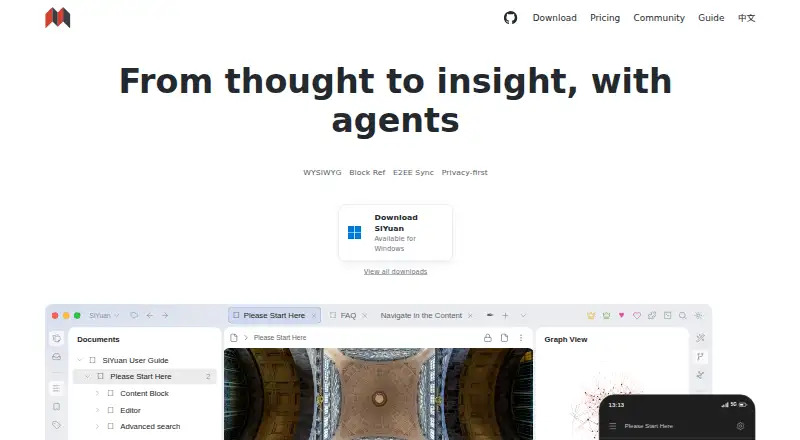
What SiYuan is
SiYuan is a personal knowledge management system for Markdown notes, block-level references, and bidirectional links. It organizes content into more than 20 block types and more than 10 span types; the maker says dynamic loading supports editing documents with millions of words on ordinary computers. Users can search and filter backlinks, view relationship graphs, build databases with relations and rollups, and review flashcards using the FSRS spaced-repetition algorithm. Its AI feature connects to OpenAI for writing continuation, translation, summaries, brainstorming, and language corrections. SiYuan supports offline use, browser extensions, an API, and Docker self-hosting. The maker says personal information and usage data are not collected, data remains on the user's device, and multi-device sync is end-to-end encrypted and incremental. The free plan costs nothing and includes basic functions with local storage. PRO Features is listed at $64 a month, described as a one-time lifetime payment; the $148 a month subscription listing displays lifetime pricing, while its FAQ also refers to an annual subscription.
Who it suits
SiYuan may suit people who want a block-based personal knowledge system with backlinks, databases, and offline use. It also offers options for users who want Docker self-hosting or third-party storage integrations.
What it does well
- Offline access is available.
- Backlinks support filtering and search.
- Databases include relations, rollups, and templates.
- Flashcards use the FSRS algorithm.
- Docker self-hosting is supported.
What to know first
- Free plan includes local storage only.
- Third-party storage is excluded from PRO Features.
- Subscription pricing information is inconsistent.
Limits
The free plan includes basic functions and local storage. The listed PRO Features plan includes third-party S3 and WebDAV sync and backup integrations, while the Subscription plan lists 8GB cloud storage.
Plans
| Plan | Billed and limits | Price |
|---|---|---|
| Free | $0 Lifetime · Basic functions · Local storage | Free |
| Subscription | $148 Lifetime~~$296~~ · PRO Features · 8GB official cloud storage · Cloud assets hosting · Cloud Inbox · Official data sync and backup | $148, paid once |
| PRO Features | $64 Lifetime~~$96~~ · Basic functions · Third-party S3 and WebDAV sync and backup integrations; storage service not included | $64, paid once |
As b3log.org lists them, read 4 Oct 2026. The maker's own page has the final word.
Getting started
- Visit https://b3log.org/siyuan/en/.
- Choose a supported route: Windows, macOS, Linux, iOS, Android, web interface, Chrome or Edge extension, or Docker self-hosting.
- Start with the free plan for basic functions and local storage.
- In SiYuan Desktop, open Settings - Account to enable a trial subscription.
- For server deployment, use the Docker image and control access with an authorization code.
Overview
SiYuan is a Markdown-based personal knowledge system for people who want notes, databases, and review cards to work together. It is a strong fit if offline use, data control, or self-hosting matters; the unclear paid-plan terms make a free start easier to recommend than an immediate subscription.
Key features
SiYuan builds documents from blocks, with more than 20 block-level element types and more than 10 span-level types. Block references, searchable and filterable backlinks, and global and block-level relationship graphs make it useful for tracing connections across a knowledge base. That structure can be powerful for research and linked notes, but may feel like unnecessary machinery if you mainly want a simple place to write.
Databases support relations, rollups, and templates, and flashcards use the FSRS spaced-repetition algorithm. This combination suits users who want to organize information and revisit it over time without treating notes, structured records, and study material as separate workflows.
The maker says dynamic loading supports smooth editing of documents with millions of words on ordinary computers. OpenAI-powered tools can continue writing, translate, summarize, brainstorm, and correct grammar and spelling. Amazon S3-compatible storage and WebDAV are supported for sync and backup integrations.
The privacy policy says SiYuan does not collect personal information or usage data, and that data stays on the user's device under their control. The maker describes multi-device sync as incremental and end-to-end encrypted. Users can also deploy SiYuan with Docker on a server, controlling access through an authorization code. The app is open source, and most features are free for commercial use. Notebook documents use .sy files in JSON format.
Pricing
The Free plan costs nothing (billed $0 Lifetime) and includes basic functions with local storage. It is the sensible starting point for anyone who can keep data locally and does not need the paid sync integrations or cloud storage.
PRO Features costs $64 a month (billed Pay once, use for life). It includes basic functions and third-party S3 and WebDAV data sync and backup integrations, but third-party storage is not included. The price and billing description do not align clearly, so confirm the actual payment terms before buying.
Subscription costs $148 a month; the pricing page displays Lifetime, while the FAQ also refers to an annual subscription. It includes 8GB cloud storage. This may suit users who want SiYuan's cloud storage, but the conflicting term and steep stated price make confirmation essential. The pricing FAQ says subscriptions are non-refundable.
A trial subscription can be enabled in SiYuan Desktop under Settings - Account.
Platforms
SiYuan supports Windows, macOS, Linux, iOS, Android, a web interface, and Chrome and Edge extensions. It also offers an API and Docker self-hosting. Offline access is supported, giving users options beyond a browser-only workflow.
Who it's for
Choose SiYuan if you want a structured, connected knowledge base with databases and spaced repetition, and value local control, offline access, or self-hosting. Look elsewhere if you want a conventional note-taking app without block-level organization, or if you need simple, unambiguous subscription terms before committing.
Pros and cons
Pros
- Deep knowledge structure: Blocks, references, backlinks, and relationship graphs support connecting information at multiple levels.
- Notes and study tools together: Databases and FSRS flashcards add structured records and spaced repetition to the same system.
- Control over data: Local storage, offline use, encrypted sync, open-source code, and Docker self-hosting offer several ways to keep data under user control.
- Usable free foundation: Basic functions and local storage are available on the lifetime free plan.
Cons
- Paid terms are hard to reconcile: The PRO plan pairs a monthly price with pay-once, lifetime billing, while Subscription pairs a monthly price with Lifetime and annual language.
- Cloud storage is limited: The Subscription plan includes 8GB, and the PRO plan excludes third-party storage itself.
- Structure may be excessive for simple notes: The block-and-graph approach is best justified when users will make use of connected information and databases.
Alternatives
Logseq is worth choosing instead if free personal use is the priority: its Free plan is forever for personal use, while Sync Backer costs $5 a month as a recurring donation for beta sync access.
Obsidian may suit users comparing note-taking options who want to consider its Sync Standard plan, priced at $5 a month billed annually per user, with one synced vault, 1 GB total storage, and a 5 MB maximum file size.
Supernotes is an alternative for a card-based note workflow: its Starter plan includes 100 cards, and Unlimited costs £6 a month billed £72 billed annually.
TheBrain is another freemium option; its Free App plan offers unlimited thoughts, links, and brains, plus private sync for up to 1,000 thoughts and 100 MB synced attachments.
TiddlyWiki is a free and open-source alternative if that is the main criterion.
Capacities may be a better match for users weighing media-upload allowances: its Basic plan includes 5 GB of total media uploads, then 100 MB per month afterwards, while Pro is 9.99 USD.
Neoma offers a free Personal plan described as covering every feature and platform with no account, limits, or expiry; its Team plan costs A$22 a month.
Mem Agent is another freemium alternative.
Browse more options in Personal Knowledge Management Software and Note-taking apps.
Verdict
SiYuan is a compelling choice for people who want linked, block-based notes alongside databases and spaced-repetition cards, especially when local control or self-hosting is important. Start with the free local plan if it meets your needs; choose another tool or resolve the billing terms first if you need a straightforward paid subscription or included cloud storage beyond the stated 8GB.
Verdict
SiYuan combines structured notes, knowledge links, databases, and spaced repetition, with local and self-hosted options. Review the plan terms carefully: the listed subscription price and billing description do not agree clearly.
Questions
Is SiYuan free?
Yes. The Free plan costs nothing, billed $0 Lifetime, and includes basic functions and local storage.
What do the paid plans cost?
PRO Features is listed at $64 a month, with payment described as once for lifetime use. Subscription is listed at $148 a month; the pricing page displays Lifetime, while its FAQ also refers to an annual subscription.
Which platforms does SiYuan support?
It supports Windows, macOS, Linux, iOS, Android, a web interface, a Chrome or Edge extension, API access, and Docker self-hosting.
Can I try a subscription?
Yes. The pricing FAQ says to enable a trial subscription in SiYuan Desktop under Settings - Account.
Is SiYuan open source?
Yes. The download page describes SiYuan as completely open source and says most features are free, including for commercial use.
Which integrations are available?
SiYuan lists the OpenAI API, Amazon S3-compatible storage, and WebDAV. The PRO Features plan includes third-party S3 and WebDAV sync and backup integrations.
Facts from SiYuan's own pages
- AI
- The AI feature accesses OpenAI and can help continue writing, translate, summarize, brainstorm, and correct grammar and spelling. · b3log.org, 4 Oct 2026
- Block editing
- It organizes content as blocks and includes more than 20 block-level element types and more than 10 span-level element types. · b3log.org, 4 Oct 2026
- Databases
- Databases support relations, rollups, and templates. · b3log.org, 4 Oct 2026
- Data format
- The download FAQ says notebook documents use .sy files and the data format is JSON. · b3log.org, 4 Oct 2026
- Encrypted sync
- The maker describes multi-device sync as end-to-end encrypted and incremental. · b3log.org, 4 Oct 2026
- Flashcards
- Spaced repetition uses the FSRS algorithm. · b3log.org, 4 Oct 2026
- Free plan
- Yes · b3log.org, 20 Sept 2026
- Integrations
- Paid options include third-party S3 and WebDAV data sync and backup; users must provide their own storage, and Nutstore is not supported for WebDAV. · b3log.org, 4 Oct 2026
- Knowledge links
- The product provides backlinks with filtering and search, plus global and block-level relationship graphs. · b3log.org, 4 Oct 2026
- Large documents
- The maker says dynamic loading allows documents with millions of words to be edited smoothly on ordinary computers. · b3log.org, 4 Oct 2026
- Note sharing
- Yes · b3log.org, 20 Sept 2026
- Offline access
- Yes · b3log.org, 20 Sept 2026
- Open source
- The download page says SiYuan is completely open source and that most features are free, including for commercial use. · b3log.org, 4 Oct 2026
- Supported platforms
- Windows,macOS,Linux,iOS,Android,web interface,Chrome/Edge extension,API,Docker self-hosting · b3log.org, 20 Sept 2026
- Privacy
- The privacy policy says SiYuan does not collect user personal information or usage data and that data is kept on the user's device under their control. · b3log.org, 4 Oct 2026
- Purpose
- SiYuan describes itself as a privacy-first personal knowledge management system supporting Markdown, block-level references, and bidirectional links. · b3log.org, 4 Oct 2026
- Self-hosting
- SiYuan can be deployed on a server using its Docker image, with access rights controlled through an authorization code. · b3log.org, 4 Oct 2026
- Storage limit
- 8 · b3log.org, 20 Sept 2026
- Support and trial
- The pricing FAQ says users can enable a trial subscription in SiYuan Desktop under Settings - Account, but does not state its duration; it also says subscriptions are non-refundable. · b3log.org, 4 Oct 2026
Where SiYuan stands on Freedom251
- Note-taking apps#20 of 216
- Personal Knowledge Management Software#17 of 32