
Amplenote
What Amplenote is
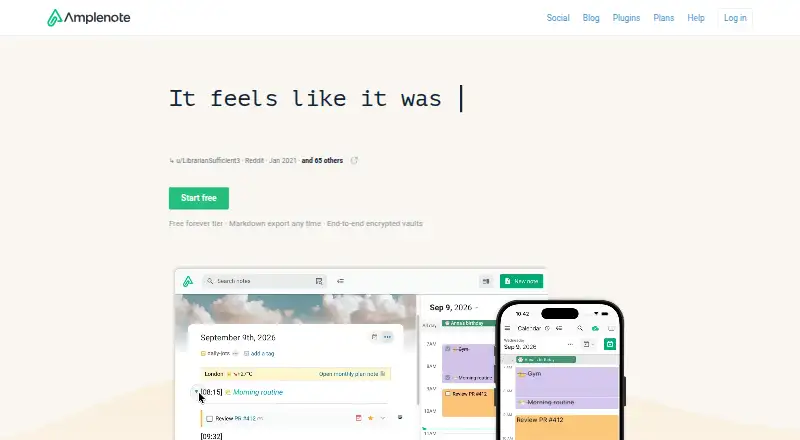
Amplenote brings note taking, tasks, and calendar scheduling together in four modes: Jots, Notes, Tasks, and Calendar. Its Idea Execution Funnel is intended to help users move from ideas toward long-term goals. Tasks can be scheduled in Amplenote’s calendar, and on Pro or higher they can sync with connected Google, Outlook, or Apple calendars.
The app supports offline access, note sharing, and real-time collaboration. Users can share notes, while tag sharing is listed as a Pro feature. Calendar and productivity connections include Google Calendar, Microsoft Outlook Calendar, Apple Calendar, Siri Shortcuts, IFTTT, Pipedream, and Google Drive. The Unlimited plan adds publishing notes as web pages and embedding notes on websites.
Amplenote is available on the web, Windows, macOS, Linux, iOS, and Android, with browser extensions for Chrome and Firefox. The latest Chrome, Firefox, and Safari versions are supported for web use on Windows, Linux, and macOS. Downloadable PWAs are supported; the native Windows, macOS, and Linux desktop app requires Pro, Unlimited, or Founder. The free Personal plan allows file uploads up to 5 MB and is for non-commercial use, and a 15-day trial is available. Vault Notes use a client-derived Vault Key, while standard notes are not end-to-end encrypted by default; attachments are not encrypted, including with Vault Notes.
Who it suits
Amplenote suits people who want notes, tasks, and calendar scheduling in one app, with offline access and live collaboration. It can also fit users who connect calendars or want publishing features on Unlimited, while desktop app users need Pro, Unlimited, or Founder.
What it does well
- Combines Jots, Notes, Tasks, and Calendar modes.
- Supports offline access and real-time collaboration.
- Connects with Google, Outlook, and Apple calendars.
- Available on web, mobile, and desktop platforms.
- Unlimited includes publishing notes as web pages.
- Vault Notes use a key derived on the client.
What to know first
- Personal file uploads are limited to 5 MB.
- Personal is for non-commercial use and has no customer support.
- The native desktop app requires Pro, Unlimited, or Founder.
- Attachments are not encrypted, including those associated with Vault Notes.
Limits
Personal limits file uploads to 5 MB and is for non-commercial use. Task syncing with connected Google, Outlook, or Apple calendars requires Pro or higher; the native desktop app requires Pro, Unlimited, or Founder.
Plans
| Plan | Billed and limits | Price |
|---|---|---|
| Personal | Notes, tasks and calendar · mobile apps · Windows/macOS PWA · 5 MB file uploads · non-commercial license · no customer support | Free |
| Unlimited | billed annually · Pro features · Vault Notes · publish notes as web pages · desktop MCP Server · 8 themes | $10 a month |
| Founder | billed annually · Unlimited features · Ample Agent Pro plugin included · 10 themes · early feature access · 10x roadmap votes · Discord channel · onboarding call | $20 a month |
| Pro | billed annually · Native desktop app · Graph View · Sidebar note viewer · external calendar sync · 6 themes · tag sharing · table of contents · uploads over 5 MB | $5.84 a month |
As amplenote.com lists them, read 19 Oct 2026. The maker's own page has the final word.
Getting started
- Open the Amplenote website.
- Choose the free Personal plan or start the 15-day trial.
- Use the web app or a supported mobile platform; select Pro, Unlimited, or Founder for the native desktop app.
- Connect Google Calendar, Microsoft Outlook Calendar, or Apple Calendar if you want calendar syncing on Pro or higher.
- Install the Chrome or Firefox Amplecap extension if you want browser capture.
Verdict
Choose Amplenote if you want notes, tasks, and calendar scheduling with offline access, collaboration, and calendar connections. Check the plan requirements if you need the native desktop app, larger uploads, calendar syncing, or publishing; also note that standard notes are not end-to-end encrypted by default and attachments are not encrypted.
Questions
Does Amplenote have a free plan or trial?
Yes. It has a free Personal plan and a 15-day trial.
Which platforms are supported?
Amplenote supports web, Windows, macOS, Linux, iOS, and Android. Its supported platform list also includes a Chrome extension and API.
What is the Personal plan limit?
Personal allows file uploads up to 5 MB and is for non-commercial use.
Which calendars can Amplenote connect to?
It integrates with Google Calendar, Microsoft Outlook Calendar, and Apple Calendar. Task syncing with those calendars requires Pro or higher.
Does the native desktop app require a paid plan?
The native Windows, macOS, and Linux desktop app requires Pro, Unlimited, or Founder. Downloadable PWAs are also supported.
Are Amplenote notes and attachments end-to-end encrypted?
Standard notes are encrypted before leaving the device and at rest on Amplenote’s servers, but are not end-to-end encrypted by default. Attachments are not encrypted, including when associated with Vault Notes.
Facts from Amplenote's own pages
- API documentation
- A full RESTful API reference is linked from the API application page. · amplenote.com, 19 Oct 2026
- Attachment limitation
- Attachments such as images and PDFs are not encrypted, including when associated with Vault Notes. · amplenote.com, 11 Oct 2026
- Authentication security
- The API uses OAuth2 authorization-code flow with PKCE, two-hour access-token expiry and refresh tokens; passwords use BCrypt cost 10. · amplenote.com, 19 Oct 2026
- Browser support
- The web app supports the latest versions of Chrome, Firefox, and Safari on Windows, Linux, and macOS. · amplenote.com, 11 Oct 2026
- Calendar integrations
- Pro and higher plans support two-way synchronization with Google, Microsoft Outlook and Apple calendars. · amplenote.com, 19 Oct 2026
- Calendar modes
- External calendars can be configured as event-import-only or to receive tasks scheduled in Amplenote. · amplenote.com, 19 Oct 2026
- Changelog
- The product changelog is automatically generated from commit activity through GitClear Snap Changelog. · amplenote.com, 19 Oct 2026
- Collaboration
- Notes can be shared for multi-party editing and published as web pages. · play.google.com, 19 Oct 2026
- Company
- Amplenote is built by Alloy.dev; its About page says the beta began in 2019 and the official launch followed in 2020. · amplenote.com, 11 Oct 2026
- Desktop access
- The native Windows, macOS, and Linux desktop app requires a Pro, Unlimited, or Founder subscription; downloadable PWAs are also supported. · amplenote.com, 11 Oct 2026
- Desktop availability
- Native Windows, macOS and Linux clients require Pro, Unlimited, Founder or an active subscription trial. · amplenote.com, 19 Oct 2026
- Desktop requirements
- Native desktop minimums are 1 GB RAM and 300 MB disk; recommended resources are 2 GB RAM and 1 GB disk. · amplenote.com, 19 Oct 2026
- Documentation and support
- The help center provides topic documentation, videos, Reddit, Discord and email support; free users lack customer support on the Personal plan. · assets.amplenote.com, 19 Oct 2026
- Encryption
- Standard note content uses client-side AES-256-CBC encryption, while Vault keys are never transmitted to Amplenote servers. · amplenote.com, 19 Oct 2026
- Encryption limitation
- Standard notes are encrypted before leaving the device and at rest on Amplenote’s servers, but are not end-to-end encrypted by default. · amplenote.com, 11 Oct 2026
- Free plan
- Yes · amplenote.com, 21 Sept 2026
- Idea workflow
- Amplenote describes its mission as helping users set and achieve long-term goals through an Idea Execution Funnel. · amplenote.com, 11 Oct 2026
- Import and export
- An Evernote importer preserves notes and tags, and note content can be downloaded. · play.google.com, 19 Oct 2026
- Integrations
- Google Calendar,Microsoft Outlook Calendar,Apple Calendar,Siri Shortcuts,IFTTT,Pipedream,Google Drive · amplenote.com, 21 Sept 2026
- Legal entity and funding
- Crunchbase identifies the legal name as Alloy.dev, Inc., active and for-profit, with one undisclosed venture round and Vantera VC listed as investor. · crunchbase.com, 19 Oct 2026
- Limit: interface and learning curve
- Independent reviews describe the interface as dated or cluttered and the organization model as requiring a learning period. · softwareadvice.com, 19 Oct 2026
- Limit: mobile feature gap
- G2 reviewers report that mobile lacks desktop capabilities such as Graph View and completed-task views. · g2.com, 19 Oct 2026
- Limit: task structure
- Reviewers complain that tasks must live inside notes and that task completion can require extra steps. · g2.com, 19 Oct 2026
- Limit: widget workflow
- An App Store reviewer reports that the task widget cannot complete a task directly and requires opening the app. · apps.apple.com, 19 Oct 2026
Where Amplenote stands on Freedom251
- Note-taking apps#19 of 216