Freedom251 › Collaborative Document Software
AppFlowy
What AppFlowy is
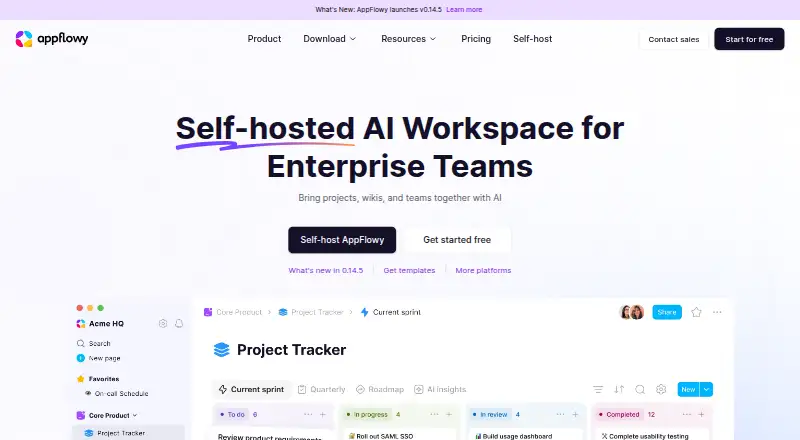
AppFlowy is an open-source workspace for wikis and projects, available on mobile, desktop, web, and self-hosted setups. Its listed capabilities include AI search, writing, chat, research, and meeting notes. AppFlowy AI can help draft ideas, summarize or expand content, fill columns, and answer questions. The Free plan offers real-time collaboration, but is limited to one collaborative workspace for up to two members and 5 GB of storage. Pro is described for small teams managing projects and team knowledge. Connections include Slack, Microsoft Teams, Google Calendar, ChatGPT, Airtable, Gmail, GitHub, Google Drive, Jira, Claude, Zapier, Loom, and Salesforce. Enterprise connection options include SAML and OIDC SSO, SCIM, LDAP, MCP, and public APIs. AppFlowy can run on customer infrastructure, in a cloud, or in an air-gapped environment, with self-hosted LLMs and embedding models. For self-hosted instances, customers control data storage and processing, and the vendor says it cannot access the instance. Paid access is listed from $12.50/user/mo.
Who it suits
It suits individuals and teams organizing wikis, projects, and shared knowledge, including teams that want AI workspace tools. Organizations can consider self-hosted or air-gapped deployment and listed enterprise connections.
What it does well
- Open-source workspace for wikis and projects.
- AI tools cover search, writing, chat, and research.
- Free plan includes real-time collaboration.
- Can run on customer infrastructure or air-gapped.
- Self-hosted customers control data location and processing.
What to know first
- Free plan allows one collaborative workspace.
- Free plan is limited to two members.
- Free plan includes 5 GB storage.
- Paid access starts at $12.50/user/mo.
Limits
The Free plan is limited to one collaborative workspace with up to two members and 5 GB storage. It includes 10 AI responses and two AI images.
Plans
| Plan | Billed and limits | Price |
|---|---|---|
| Free | forever · 1 collaborative workspace up to 2 members · unlimited pages and blocks · 5 GB storage · 10 AI responses · 2 AI images | Free |
| Pro | billed annually · per user · unlimited storage · up to 50 workspace members · up to 100 guest editors · unlimited AI responses · 50 AI images per month · unlimited file uploads | $10 a month |
| Vault Workspace | billed annually · per user · local AI on your own hardware · unlimited AI responses and file size for AI Chat | $6 a month |
| AppFlowy AI MAX | billed monthly · per user · unlimited AI responses · unlimited file uploads · 50 AI images per month | $8 a month |
As appflowy.com lists them, read 29 Sept 2026. The maker's own page has the final word.
Getting started
- Visit https://appflowy.com/.
- Choose the Free plan or review the paid plans and their billing terms.
- Use the web version or download the app for Android, iOS, Linux, macOS, or Windows.
- For self-hosting, run AppFlowy on your infrastructure, in a cloud, or in an air-gapped environment.
AppFlowy is an open-source workspace that brings wiki and project work together, with AI tools and several deployment choices. It is best suited to people or teams who want control over where their workspace runs; its free tier is tightly capped for collaboration.
Overview
AppFlowy combines shared knowledge and project work with real-time editing, comments, guest access, and offline access. AI search, writing, chat, research, and meeting notes extend that workspace, while integrations include Slack, Google Calendar, Google Drive, GitHub, Jira, and others. The breadth is appealing, but the Free plan's two-member ceiling makes it a limited starting point for a team.
Key features
Projects, wikis, and collaboration
Unlimited pages and blocks on Free leave room to build out a knowledge base, but that plan permits only one collaborative workspace, two members, and 5 GB of storage. That works for an individual with one collaborator, not a growing group. Pro raises the member limit to 50 and adds up to 100 guest editors.
AI tools and deployment
AppFlowy AI can brainstorm drafts, summarize or expand content, autofill columns, and answer questions. The Free plan's 10 AI responses and two AI images are modest allowances; paid plans expand or remove some of those caps. Vault Workspace is distinctive for local AI on a user's own hardware, while self-hosted deployments can use self-hosted language and embedding models.
Organizations can run AppFlowy on their own infrastructure, in the cloud, or in an air-gapped environment. For self-hosted instances, customers control data storage and processing, and the vendor says it has no access to the instance. Built-in identity and access management, granular permissions, admin controls, and fine-grained AI access controls suit environments with tighter governance needs. SOC 2 Type II, GDPR, HIPAA, and ISO/IEC 27001 badges are displayed.
Connections
Connections include Microsoft Teams, Gmail, Airtable, ChatGPT, Claude, Zapier, Loom, and Salesforce, alongside Slack, Google Calendar, GitHub, Google Drive, and Jira. SAML and OIDC SSO, SCIM, LDAP, MCP, and public APIs provide further options for fitting into an existing stack.
Pricing
The Free plan costs nothing, billed forever. It includes one collaborative workspace for up to two members, unlimited pages and blocks, 5 GB of storage, 10 AI responses, and two AI images. It is a useful way to start, but the member and storage caps can make it unsuitable for teams.
Vault Workspace costs $6 a month per user, billed annually. It includes local AI on the user's hardware, unlimited AI responses, and unlimited file size for AI Chat. Choose it when local AI is the priority; the plan's stated inclusions do not offer Pro's published workspace and guest-editor limits.
AppFlowy AI MAX costs $8 a month per user, billed monthly. It gives unlimited AI responses and file uploads, plus 50 AI images per month. The monthly billing and larger AI allowances suit users focused on AI without an annual commitment.
Pro costs $10 a month per user, billed annually. It includes unlimited storage, up to 50 workspace members, up to 100 guest editors, unlimited AI responses and file uploads, and 50 AI images per month. Its higher collaboration ceiling makes it the clearest fit for small teams, though the annual billing is less flexible than AI MAX's monthly term. The published paid-from price is 12.5 /user/mo.
Platforms
AppFlowy supports Android, iOS, Linux, macOS, Windows, web, API, and self-hosted deployments. That spread makes it a plausible choice for teams spanning desktop and mobile systems or needing to run software on their own infrastructure.
Who it's for
AppFlowy fits individuals and small teams that want project and wiki work in one workspace, especially when AI, self-hosting, or control over data location matters. It is less compelling for a team that needs more than two collaborators without moving to a paid plan, or for anyone seeking a free shared workspace beyond the single-workspace and 5 GB limits.
Pros and cons
- Pros: Self-hosting can extend to air-gapped environments, with customer control over data storage and processing.
- Pros: AI spans drafting, summarizing, autofill, and question answering, with paid options for unlimited responses.
- Pros: Pro supports up to 50 members and 100 guest editors, alongside unlimited storage.
- Cons: Free collaboration is limited to two members and one workspace, restricting its usefulness for a team.
- Cons: Pro is billed annually, while AI MAX is monthly, so the plan with larger team allowances has the less flexible term.
Alternatives
Lark is worth considering when a larger free team allowance matters: its Starter plan includes 20 users and 100 GB of storage, as well as 18 months of message history and 1,000 monthly automations.
Nuclino offers a free plan with up to 50 items, three canvases, and 2 GB of storage, plus a free trial. It may suit someone willing to work within those smaller content and storage allowances.
WPS Docs has a free plan with 1 GB of cloud space, limited template downloads, basic PDF features, and support for 47 file formats.
Collabora Online offers a free on-premise Development Edition with rolling updates for testing and home use; consider it for those uses.
ContactOffice has a free plan with a 500 MB mailbox, 500 MB of documents, 200 address book entries, and no monthly SMS allowance. Its Light plan costs €5 a month, billed 6 months.
Craft provides a free plan with 1,500 blocks, 1 GB storage, a 25 MB media upload limit, seven days of version history, and 15 AI assistant credits.
ONLYOFFICE Docs offers a free Community edition for up to 20 recommended users under GNU AGPL v.3, with community support.
Zoho Writer has a free individual edition that includes Writer features and 200 document automation credits per month per organization.
For a broader set of options, browse Collaborative Document Software.
Verdict
Choose AppFlowy if you want a combined wiki and project workspace with integrated AI and the option to control deployment and data location. Its strongest case is for privacy-conscious individuals or teams willing to pay for more room to collaborate; look elsewhere if a free plan must support a larger group.
Verdict
AppFlowy combines project and wiki workspaces with AI features and several deployment choices. Check the Free plan's workspace, member, and storage limits against your team's needs.
Questions
Is AppFlowy free?
Yes. The Free plan is billed forever at no cost. It includes one collaborative workspace for up to two members, unlimited pages and blocks, and 5 GB storage.
What platforms does AppFlowy support?
AppFlowy lists Android, iOS, Linux, macOS, Windows, and web, as well as self-hosted deployment.
Is AppFlowy open source?
Yes. AppFlowy describes itself as an open-source workspace for wikis and projects.
Can AppFlowy be self-hosted?
Yes. It can run on customer infrastructure, in a cloud, or in an air-gapped environment. For self-hosted instances, AppFlowy says customers control where data is stored and processed and that the vendor has no access.
What integrations does AppFlowy list?
Listed connections include Slack, Microsoft Teams, Google Calendar, ChatGPT, Airtable, Gmail, GitHub, Google Drive, Jira, Claude, Zapier, Loom, and Salesforce.
What does Pro include?
Pro costs $10 a month when billed annually. It includes unlimited storage, up to 50 workspace members, up to 100 guest editors, unlimited AI responses, 50 AI images per month, and unlimited file uploads.
Facts from AppFlowy's own pages
- AI features
- AppFlowy AI can brainstorm drafts, summarize or expand content, autofill columns, and answer questions. · appflowy.com, 29 Sept 2026
- AI workspace
- The product page lists AI search, AI writing, AI chatbot, AI research, and AI meeting notes among its workspace capabilities. · appflowy.com, 29 Sept 2026
- Collaboration
- The Free plan includes real-time collaboration, and Pro is described as a plan for small teams managing projects and team knowledge. · appflowy.com, 29 Sept 2026
- Compliance
- The product page displays SOC 2 Type II, GDPR, HIPAA, and ISO/IEC 27001 badges. · appflowy.com, 29 Sept 2026
- Enterprise connections
- The product page names SAML and OIDC SSO, SCIM, LDAP, MCP, and public APIs as supported ways to fit into an existing stack. · appflowy.com, 29 Sept 2026
- Integrations
- The product page lists connections or integrations including Slack, Microsoft Teams, Google Calendar, ChatGPT, Airtable, Gmail, GitHub, Google Drive, Jira, Claude, Zapier, Loom, and Salesforce. · appflowy.com, 29 Sept 2026
- Maker
- The about page identifies co-founder Annie Wang and presents AppFlowy as serving individuals, teams, and enterprises with differing workplace needs. · appflowy.com, 29 Sept 2026
- Plan limit
- The Free plan is limited to one collaborative workspace with up to two members and 5 GB storage. · appflowy.com, 29 Sept 2026
- Platforms
- AppFlowy is listed as available on macOS, Windows, Linux, iOS, Android, and the web, with syncing across devices. · appflowy.com, 29 Sept 2026
- Privacy and residency
- For self-hosted instances, AppFlowy says customers control where data is stored and processed and that the vendor has no access to the instance. · appflowy.com, 29 Sept 2026
- Security
- The product page lists built-in identity and access management, granular permissions and admin controls, and fine-grained control over AI access and usage. · appflowy.com, 29 Sept 2026
- Self-hosting
- AppFlowy can run on a customer's infrastructure, cloud, or in a fully air-gapped environment, with self-hosted LLMs and embedding models. · appflowy.com, 29 Sept 2026
- Support
- The pricing page links to help articles and contact support, while the download page links to bug reporting, a community server, and forums. · appflowy.com, 29 Sept 2026
- Workspace
- AppFlowy describes itself as an open-source workspace for wikis and projects. · appflowy.com, 29 Sept 2026
Where AppFlowy stands on Freedom251
- Collaborative Document Software#3 of 33