Freedom251 › Collaborative Document Software
ContactOffice
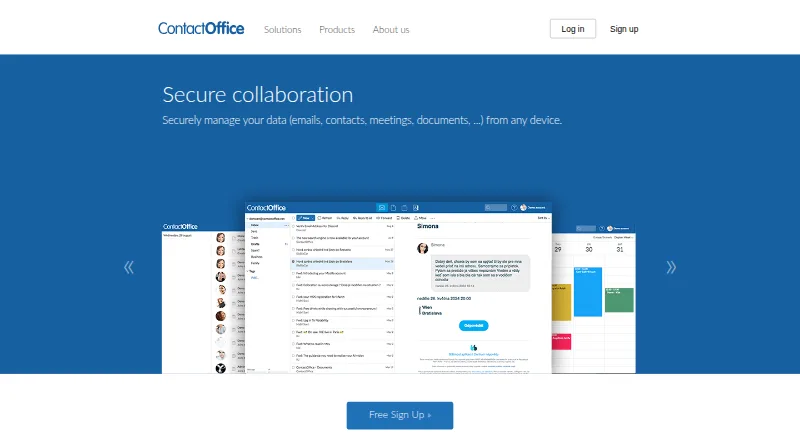
What ContactOffice is
ContactOffice combines email, calendars, contacts, document storage, and collaboration in an online workspace. Its messaging center can consolidate POP3, IMAP, Gmail, and Yahoo accounts, with POP3 or IMAP software access and SMTP relay. Calendar tools include shared agendas, invitations, polls, reminders, and CalDAV synchronization. Contacts support photos and comments, plus CSV and vCard imports and CardDAV synchronization. The document area supports shared files, collaborative editing, PDF conversion, and WebDAV access. ContactOffice runs on Android, iOS, Linux, macOS, Windows, and the web, and supports mobile synchronization with iPhone, iPad, Android, and other Exchange-capable devices. Global synchronization is limited to paid subscriptions. The maker says data and backups are hosted exclusively in Europe and transfers use TLS/SSL encryption; two-factor authentication is also listed. Individual access rights are available, and private data is accessible only to its account owner by default. The free plan costs nothing and includes 500 MB mailbox and document storage and 200 address-book entries. Paid plans start at €5 a month, billed 6 months.
Who it suits
ContactOffice suits individuals wanting email, calendars, contacts, and documents in one workspace, as well as work groups using its collaboration tools. Mobile synchronization across devices is available, though global synchronization requires a paid subscription.
What it does well
- Combines email, calendars, contacts, and documents
- Supports CalDAV, CardDAV, and WebDAV
- Lists TLS/SSL encryption and two-factor authentication
- Users can export data in standard formats
What to know first
- Free plan has 500 MB mailbox and document storage
- Free plan allows 200 address-book entries
- Global synchronization is limited to paid subscriptions
Limits
The Free plan includes a 500 MB mailbox, 500 MB for documents, 200 address book entries, and 0 SMS/month. Global synchronization is limited to paid subscriptions.
Plans
| Plan | Billed and limits | Price |
|---|---|---|
| Free | 500 MB mailbox · 500 MB documents · 200 address book entries · 0 SMS/month | Free |
| Regular | 3 months · 10 GB mailbox · 4 GB documents · 3.000 address book entries · 20 SMS/month | €10 a month |
| Advanced | 3 months · 15 GB mailbox · 5 GB documents · 5.000 address book entries · 30 SMS/month | €20 a month |
| Light | 6 months · 5 GB mailbox · 3 GB documents · 2.000 address book entries · 10 SMS/month | €5 a month |
As contactoffice.com lists them, read 29 Sept 2026. The maker's own page has the final word.
Getting started
- Visit the ContactOffice website.
- Choose the Free plan or a paid plan: Light, Regular, or Advanced.
- Open ContactOffice on web or use a listed platform such as Android, iOS, Linux, macOS, or Windows.
- Connect compatible email, calendar, contact, or file services using the listed protocols and integrations.
- For mobile synchronization, use an iPhone, iPad, Android device, or other Exchange-capable device; global synchronization requires a paid subscription.
ContactOffice is an online workspace combining mail, calendars, address books, files, and collaboration. It suits individuals and work groups that want one account to cover those jobs while still connecting to established desktop and mobile protocols. Its broad integration range is useful, but modest storage ceilings and paid-only global synchronization make the paid tiers more practical for serious use.
For light personal coordination, the free account can be sufficient. Teams and users with larger archives should budget for a subscription and check the mailbox, document, and address-book quotas before moving existing data.
Overview
ContactOffice brings communication and organization into a single service rather than requiring separate mail, calendar, contacts, and file products. It supports web access across major desktop and mobile platforms, and its compatibility with POP3, IMAP, SMTP, CalDAV, CardDAV, WebDAV, and SMB/CIFS helps it fit mixed software environments.
The service is hosted in Europe, with TLS/SSL-protected transfers, two-factor authentication, managed backups, and a stated 99.8% accessibility service level. Individual access rights apply to each item, with private data restricted to the account owner by default. Users can export their data in standard formats when leaving, which reduces lock-in.
Key features
Mail, calendars, and contacts
The messaging center can combine POP3, IMAP, Gmail, and Yahoo accounts. POP3/IMAP software access and SMTP relay make it workable with conventional mail clients rather than only a browser. Shared agendas, invitations, polls, reminders, and CalDAV synchronization support group scheduling, while contacts can store photos, comments, instant-messaging addresses, and maps. CSV and vCard import plus CardDAV synchronization are helpful when bringing an existing address book into the service.
Documents and collaboration
The documents area provides shared files, collaborative editing, PDF conversion, and WebDAV access. Listed compatibility with Dropbox, Google Drive, Outlook, Apple Mail, Thunderbird, Gmail, Yahoo, WebDAV, SMB/CIFS, CalDAV, and CardDAV broadens its role as a hub for established tools. The maximum stated capacity is 0.009 TB, so it is better for working files and moderate archives than for a large media or document library.
Mobile and synchronization
Synchronization covers iPhone, iPad, Android, and other Exchange-capable devices. That device breadth is a strength for households and distributed groups, but global synchronization is restricted to paid subscriptions; users who need every device updated automatically should not plan around the free tier.
Pricing
ContactOffice uses a freemium model. The Free plan costs nothing and includes a 500 MB mailbox, 500 MB of documents, 200 address-book entries, and 0 SMS/month. It is suitable for a small personal account or a trial of the workspace, but the storage and contact limits arrive quickly.
Light costs €5 a month, billed 6 months, with 5 GB of mailbox space, 3 GB of documents, 2,000 address-book entries, and 10 SMS/month. It is the sensible step up for an individual who needs paid synchronization without large quotas.
Regular costs €10 a month, billed 3 months, and raises capacity to 10 GB of mail, 4 GB of documents, 3,000 contacts, and 20 SMS/month. Advanced costs €20 a month, billed 3 months, providing 15 GB of mail, 5 GB of documents, 5,000 contacts, and 30 SMS/month. These tiers fit heavier personal or group use, though even Advanced remains limited for extensive archives. The published paid entry point is €5/user/mo; plans without a separately stated seat arrangement should be evaluated against the number of accounts required.
Platforms
ContactOffice runs on the web and supports Android, iOS, Linux, macOS, and Windows. Exchange-capable devices, standard mail protocols, CalDAV, CardDAV, WebDAV, and SMB/CIFS make it adaptable across operating systems and existing software.
Who it's for
Choose it for a personal setup or work group that values one European-hosted workspace for communication, scheduling, contacts, and shared documents. It is less suitable for organizations needing very large storage quotas or free, account-wide synchronization across devices.
Pros and cons
Pros
- Combines email, calendars, contacts, and collaborative documents in one workspace, reducing the need to connect separate services.
- Broad protocol support, including POP3/IMAP, SMTP, CalDAV, CardDAV, WebDAV, and SMB/CIFS, helps it coexist with established clients and storage systems.
- European hosting, encrypted transfers, two-factor authentication, item-level permissions, backups, and data export address security and portability concerns.
- Runs on web, Android, iOS, Linux, macOS, and Windows, with synchronization for Exchange-capable devices.
Cons
- The Free plan allows only 500 MB each for mail and documents and 200 contacts, making it a short-term or light-use option.
- Advanced tops out at 15 GB of mailbox space and 5 GB of documents, which can constrain large archives.
- Global synchronization requires a paid subscription, reducing the free plan's usefulness across multiple devices.
- Paid plans use six-month or three-month billing terms, so the listed monthly rate is not a month-to-month commitment.
Alternatives
Collaborative Document Software is the broader category to browse when shared editing is the primary requirement rather than an all-in-one mail and contacts workspace.
AppFlowy is a freemium option spanning desktop, mobile, web, API, and self-hosted deployments, making it a better direction for teams or enterprises wanting deployment flexibility.
Lark offers a free Starter plan for 20 users with 100 GB storage, 18 months of message history, and 1,000 automations per month, so it is worth considering for a larger collaboration workspace.
Nuclino has a free tier limited to 50 items, three canvases, and 2 GB total storage, fitting a smaller knowledge-work collection rather than ContactOffice's mail-centered bundle.
Tencent Meeting & VooV Meeting is oriented toward online meetings, with a free edition supporting up to 300 participants per meeting.
WPS Docs provides a free 1 GB cloud tier, broad file-format support, and basic PDF features for document-focused users.
Collabora Online offers a free on-premise development edition for testing and home use, which better suits self-hosting than a managed workspace.
Craft is a freemium document workspace with a free plan capped at 1,500 blocks and 1 GB storage.
Hancom Docs has a free 2 GB plan with web and mobile Hancom Office access, making it a document-suite alternative rather than a mail-and-calendar hub.
Verdict
ContactOffice is a strong fit for individuals and work groups that want European-hosted email, scheduling, contacts, and shared files with extensive protocol compatibility. Choose it primarily for that integrated, standards-friendly workspace; look elsewhere if you need generous storage or global synchronization without paying.
Verdict
ContactOffice brings communication, scheduling, contacts, and document collaboration together, with multiple synchronization options. Its free plan has storage and contact limits, and global synchronization requires a paid subscription.
Questions
Is there a free plan?
Yes. The Free plan costs nothing and includes a 500 MB mailbox, 500 MB for documents, 200 address book entries, and 0 SMS/month.
What do the paid plans cost?
Light is €5 a month (billed 6 months); Regular is €10 a month (billed 3 months); Advanced is €20 a month (billed 3 months).
Which platforms does ContactOffice support?
The listed platforms are Android, iOS, Linux, macOS, web, and Windows.
Which services and protocols can it work with?
The maker lists Outlook, Apple Mail, Thunderbird, Gmail, Yahoo, Dropbox, Google Drive, WebDAV, SMB/CIFS, CalDAV, and CardDAV compatibility or access. Mail support includes POP3, IMAP, and SMTP relay.
Who is ContactOffice for?
The maker describes its individual version as a personal solution and its group version as a solution for work groups.
Where does ContactOffice host data and backups?
The maker says data and backups are hosted exclusively in Europe and that transfers use TLS/SSL encryption.
Facts from ContactOffice's own pages
- Access controls
- The maker says each item has individual access rights and private data is accessible only to the account owner by default. · contactoffice.com, 29 Sept 2026
- Calendar
- Calendar features include shared agendas, meeting invitations, polls, reminders, and CalDAV synchronization. · contactoffice.com, 29 Sept 2026
- Contacts
- Contacts can include IM addresses, photos, comments, and access maps, with CSV and vCard import and CardDAV synchronization. · contactoffice.com, 29 Sept 2026
- Documents
- The documents tool supports shared files, collaborative editing, PDF conversion, and WebDAV access. · contactoffice.com, 29 Sept 2026
- The messaging center can consolidate email addresses including POP3, IMAP, Gmail, and Yahoo, and supports POP3/IMAP software access and SMTP relay. · contactoffice.com, 29 Sept 2026
- Exports
- The maker says users can export all their data in standard formats when ending use of the service. · contactoffice.com, 29 Sept 2026
- Headquarters
- Brussels, Belgium · contactoffice.com, 28 Sept 2026
- Integrations
- The maker lists Outlook, Apple Mail, Thunderbird, Gmail, Yahoo, Dropbox, Google Drive, WebDAV, SMB/CIFS, CalDAV, and CardDAV compatibility or access. · contactoffice.com, 29 Sept 2026
- Intended users
- The maker describes the individual version as a personal solution and its group version as a solution for work groups. · contactoffice.com, 29 Sept 2026
- Mobile
- ContactOffice supports mobile synchronization with iPhone, iPad, Android, and other Exchange-capable devices, while global synchronization is limited to paid subscriptions. · contactoffice.com, 29 Sept 2026
- Product
- ContactOffice combines email, calendars, contacts, document storage, and collaboration tools in an online workspace. · contactoffice.com, 29 Sept 2026
- Security
- The maker says data and backups are hosted exclusively in Europe and that data transfers use TLS/SSL encryption; it also lists two-factor authentication. · contactoffice.com, 29 Sept 2026
- Service level
- The security page lists a 99,8% service level for accessibility and describes continuous monitoring and backup servers. · contactoffice.com, 29 Sept 2026
- Support
- The company page lists commercial and product requests and technical support, with a Brussels telephone number. · contactoffice.com, 29 Sept 2026
Where ContactOffice stands on Freedom251
- Collaborative Document Software#5 of 33