Freedom251 › Word Processing Software
Dropbox Paper
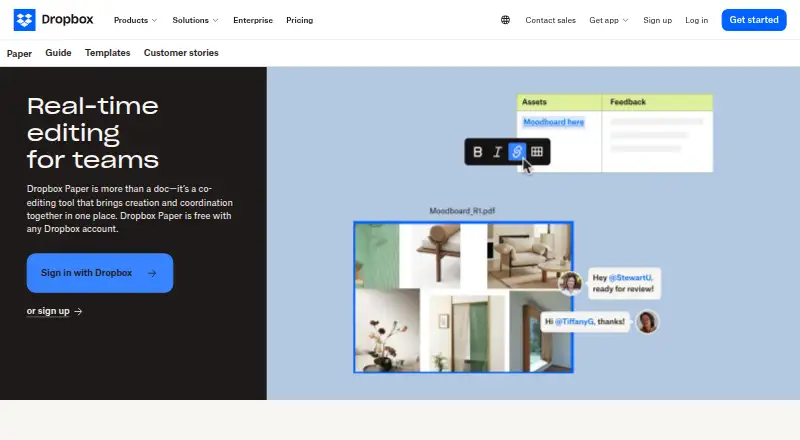
What Dropbox Paper is
Dropbox Paper is a collaborative document for teams, combining timelines, to-dos, and tables. People can assign to-dos, set due dates, and follow them in a Things to do sidebar. Timelines collect deadlines, files, and to-dos, with week, month, quarter, and year views. Paper supports real-time collaboration, track changes, and offline editing. It is free, and a Dropbox account with sign-in is required to create or access documents. There is no limit on the number of Paper documents in an account, and each uses less than 100 bytes of Dropbox storage. Paper remains available on the web, but the separate mobile app was discontinued on October 9, 2025; timelines on mobile are read-only. In the Dropbox desktop app, Paper documents open on dropbox.com unless exported as PDF, DOCX, or Markdown. Some users can connect Google or Outlook calendars to link documents to events and create meeting notes. Paper documents are encrypted at rest with 256-bit AES and in transit with SSL/TLS.
Who it suits
Paper suits teams that want shared documents with task tracking and timeline views. Users need a Dropbox account, and mobile timeline users should note the read-only limit.
What it does well
- Free to use
- No limit on Paper documents
- To-dos support assignees and due dates
- Timelines offer four time views
- Supports real-time collaboration and offline editing
What to know first
- Requires a Dropbox account and sign-in
- Separate mobile app was discontinued
- Mobile timelines are read-only
- Desktop app opens documents on dropbox.com unless exported
Limits
Paper itself is free and has no document-count limit. Timeline views on mobile are read-only, and documents accessed through the Dropbox desktop app open on dropbox.com unless exported.
Plans
| Plan | Billed and limits | Price |
|---|---|---|
| Basic | 2 GB storage | Free |
| Basic Extra | Billed yearly · 50 GB storage · 3 devices | $0.99 a month |
| Standard | monthly · 3 TB team storage · 1 person or more · 180-day file recovery | $15 a month |
| Advanced | monthly · 15 TB team storage · 3 people or more · 1-year file recovery | $24 a month |
| Plus | monthly · 2 TB storage · 1 person · 30-day file recovery | $9.99 a month |
| Enterprise | enterprise-grade security · security integrations · dedicated live support | On request |
As dropbox.com lists them, read 1 Oct 2026. The maker's own page has the final word.
Getting started
- Open the Dropbox Paper website.
- Sign in with a Dropbox account or create one.
- Create or access Paper documents on the web.
- On desktop, open Paper documents on dropbox.com or export them as PDF, DOCX, or Markdown.
Overview
Dropbox Paper is a collaborative workspace that puts shared documents, assigned tasks, tables, and project timelines together. It is best for teams that already rely on Dropbox and want meeting notes or plans to become accountable work without adding a separate task tool. The main compromise is that Paper is fundamentally web-based, with important limits on desktop-app access and mobile timeline editing.
You need a Dropbox account and must be signed in to create or open Paper documents. Paper itself is free, there is no cap on document count, and each document uses less than 100 bytes of Dropbox storage. That makes it practical for maintaining a large archive, although your Dropbox account's storage allowance still matters for other files.
Key features
Paper to-dos can be assigned to individuals and given due dates. The Things to do sidebar collects those assignments, so a project brief or meeting record can also serve as a lightweight work queue. This suits small teams that need clear ownership inside shared documents; it is less compelling if you need a dedicated, highly structured task-management system.
Real-time collaboration supports simultaneous editing, while track changes helps teams review revisions. Timelines add deadlines, files, and to-dos to a schedule with week, month, quarter, and year views. Switching between those scales is useful for both immediate delivery planning and longer roadmaps, but timelines are read-only on mobile, preventing phone-based updates.
Some users can connect Paper with Google or Outlook calendars to link documents to events and create meeting notes. Slack can search for and create Paper documents and preview links, but commands and previews do not work with the new Paper release. That makes the Slack connection less dependable for teams expecting to manage documents from conversations.
Paper documents receive Dropbox's security level, with some exceptions for Dropbox teams. Documents are encrypted at rest with 256-bit AES and in transit with SSL/TLS. Those protections are useful for ordinary collaborative work, while organizations with specialized compliance requirements should confirm that Dropbox's team exceptions meet their policies.
Pricing
Dropbox Paper is free, with the Basic Dropbox plan providing 2 GB of storage at no cost. That is the natural choice for individuals and small groups that mainly need Paper documents and light Dropbox storage.
Basic Extra costs $0.99 a month, billed yearly, and includes 50 GB of storage for up to three devices. It gives a low-cost route to more Dropbox capacity, but it does not change Paper's web-based workflow or mobile timeline restriction.
Plus has custom pricing and includes 2 TB of storage and 50 GB of transfers, fitting individuals or households whose broader Dropbox storage needs exceed Basic. Standard costs $15 a month, billed monthly, for one or more users, with 3 TB of starting team storage and 100 GB of transfers. It is the clearest paid fit for a small team sharing substantial files alongside Paper.
Advanced uses custom pricing, requires three or more users, and starts with 15 TB of team storage plus 100 GB of transfers. Enterprise also uses custom pricing and adds online documents and note taking, enterprise-grade security, custom storage, and dedicated live support. Those tiers are aimed at organizations that need capacity, administration, or support beyond a free Paper workspace.
Platforms
Paper is available on Android, iOS, the web, and through an API. Offline editing is supported, and real-time collaboration works across shared documents. There is no Dropbox desktop app for native Paper editing: Paper files shown in the desktop app open only on dropbox.com unless exported as PDF, DOCX, or Markdown. The dedicated Dropbox Paper mobile app was discontinued on October 9, 2025; Paper remains available on the web, with mobile timelines limited to viewing.
Who it's for
Choose Paper for Dropbox-based teams turning meeting notes, briefs, and plans into assigned actions and date-based schedules. It is particularly suitable when unlimited document creation and very small per-document storage use matter. Look elsewhere if your team needs a native desktop editor, editable schedules from phones, or Slack commands and previews that work with the current Paper release.
Pros and cons
- Pro: Unlimited Paper documents make it easy to keep an extensive project and meeting archive.
- Pro: Assigned, dated to-dos and the Things to do sidebar connect writing directly to responsibility.
- Pro: Timeline views from week through year combine deadlines, files, and tasks in one planning surface.
- Pro: AES-256 at-rest and SSL/TLS in-transit encryption provide established Dropbox protection.
- Con: Desktop-app Paper files still require dropbox.com unless exported, so Paper is not a native desktop word processor.
- Con: Mobile timelines are read-only, ruling out schedule maintenance from a phone.
- Con: The discontinued Paper mobile app and broken Slack commands and previews narrow mobile and chat-centered workflows.
Alternatives
For broader comparisons, see Word Processing Software, Document Collaboration Software, Collaborative Document Software, and Note-taking apps.
Calmly Writer is a freemium writing tool with a free trial and Android, Linux, macOS, web, and Windows support; choose it when focused writing across desktop platforms matters more than Paper's task and timeline layer.
Collabora Online is a freemium option spanning web, desktop, mobile, and self-hosted deployments; it suits organizations seeking an on-premise or wider-platform office setup.
ONLYOFFICE Docs offers a free community edition for up to 20 recommended users and self-hosted support; pick it when deployment control and conventional office-document compatibility take priority.
SSuite Office is a free office suite for Android, iOS, Linux, macOS, web, and Windows.
Tencent Meeting & VooV Meeting is a freemium meeting platform with a free edition for up to 300 participants per meeting; choose it when live meetings, rather than document-centered planning, are central.
Zoho Writer is a freemium word processor available on web, desktop, mobile, and through an API, with a free individual edition.
Hancom Docs is a paid service with a free tier and web/mobile office access; consider it when Hancom document tools fit your workflow.
Microsoft Word offers a free web edition with sharing, real-time collaboration, basic spelling and grammar, and 5 GB of cloud storage.
Verdict
Dropbox Paper is a strong choice for Dropbox-using teams that want shared documents to carry assigned tasks and visual schedules at no additional Paper charge. Choose it for lightweight coordination and an unlimited document archive; look elsewhere if native desktop editing, editable mobile timelines, or fully functioning Slack integration are essential.
Verdict
Dropbox Paper combines collaborative documents with task and timeline features at no charge. Its web-based access and mobile timeline limitation are important to consider.
Questions
Does Dropbox Paper cost anything?
Paper is free. Dropbox lists Basic at no cost with 2 GB storage and Basic Extra at $0.99 a month billed yearly with 50 GB storage and 3 devices.
What platforms can I use?
Paper is available on the web, Android, iOS, and through an API. The separate Paper mobile app was discontinued on October 9, 2025, while Paper remains available on the web.
Do I need a Dropbox account?
Yes. You need to be signed in to a Dropbox account to create or access Paper documents.
Can I connect Paper to a calendar?
Some users can connect Google or Outlook calendars to link documents to events and create meeting notes.
Can I use Paper timelines on mobile?
Timelines are read-only on mobile devices.
How are Paper documents encrypted?
Documents are encrypted at rest with 256-bit AES and in transit with SSL/TLS.
Facts from Dropbox Paper's own pages
- Account requirement
- You need a Dropbox account and must be signed in to create or access Paper documents. · help.dropbox.com, 1 Oct 2026
- Calendar integration
- Some users can connect Paper to Google or Outlook calendars to link documents to events and create meeting notes. · help.dropbox.com, 1 Oct 2026
- Desktop limitation
- On the Dropbox desktop app, Paper documents are web-based files that can only open on dropbox.com unless exported as PDF, DOCX, or Markdown. · help.dropbox.com, 1 Oct 2026
- Document limit
- There is no limit on the number of Paper documents you can create with a Dropbox account. · help.dropbox.com, 1 Oct 2026
- Encryption
- Dropbox Paper documents are encrypted at rest with 256-bit AES and in transit with SSL/TLS. · dropbox.com, 1 Oct 2026
- Founded
- 2007 · dropbox.com, 28 Sept 2026
- Free plan
- Yes · dropbox.com, 22 Sept 2026
- Headquarters
- San Francisco, California, USA · dropbox.com, 28 Sept 2026
- Mobile app status
- The Dropbox Paper mobile app was discontinued on October 9, 2025, while Paper remains available on the web. · help.dropbox.com, 1 Oct 2026
- Mobile timeline limit
- Paper timelines are currently read-only on mobile devices. · help.dropbox.com, 1 Oct 2026
- Paper pricing
- Dropbox Paper is free. · help.dropbox.com, 1 Oct 2026
- Purpose
- Dropbox Paper is a collaborative document for teams with timelines, to-dos, and tables. · dropbox.com, 1 Oct 2026
- Security
- Paper has the same level of security as Dropbox, with a few exceptions for Dropbox teams. · help.dropbox.com, 1 Oct 2026
- Slack integration
- The Paper Slack integration can search and create Paper documents and preview links, but commands and previews do not work with the new Paper release. · help.dropbox.com, 1 Oct 2026
- Storage use
- Paper documents use less than 100 bytes of Dropbox storage each. · help.dropbox.com, 1 Oct 2026
- Timelines
- Paper timelines track deadlines, files, and to-dos, and can be viewed by week, month, quarter, or year. · help.dropbox.com, 1 Oct 2026
- To-dos
- Paper to-dos can be assigned to people, given due dates, and viewed in a Things to do sidebar. · help.dropbox.com, 1 Oct 2026
Where Dropbox Paper stands on Freedom251
- Word Processing Software#8 of 45
- Content Collaboration Software#5 of 28
- Note-taking apps#41 of 216
- Cloud Content Collaboration Software#6 of 30
- Collaborative Document Software#7 of 33
- Document Creation Software#6 of 25
- Document Collaboration Software#8 of 32