Freedom251 › Personal Knowledge Management Software
Neoma
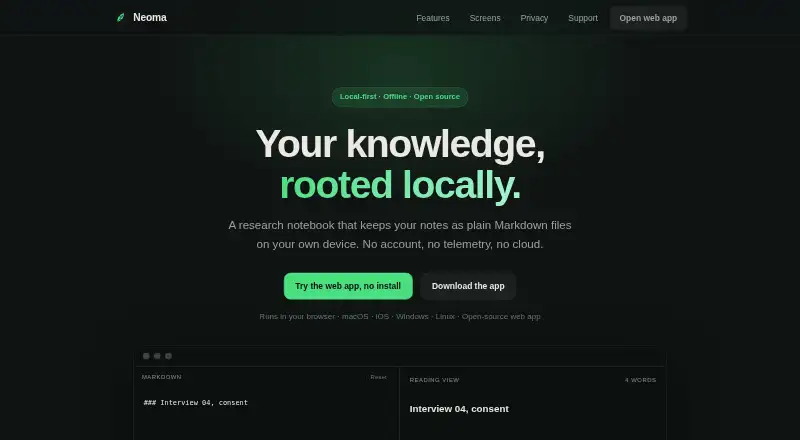
What Neoma is
Neoma is a notes app for Markdown files, links, search, and publishing. Notes are plain Markdown files stored in a folder the user chooses, and the app works offline. It can publish selected notes as a static HTML site that can be hosted anywhere. Search uses a local index, and Neoma indexes links between notes for display as a graph. The privacy policy says the app has no account, telemetry, or cloud storage, and notes remain on the user's device. Remote images and video embeds are blocked by default, but can be enabled in Settings. The homepage says its Content Security Policy prevents the app from sending notes elsewhere. Neoma is available on the web, macOS, Windows, Linux, and iOS; iPhone and iPad are listed as beta. The Personal plan is free. Team costs A$22 a month and includes invoicing, a compliance pack, and priority support. Institutional costs A$4,500 a year and offers a site licence for a faculty, hospital, or department.
Who it suits
Neoma suits people who want offline notes stored as local Markdown files, and organisations that need the listed Team or Institutional options. Its publishing feature may suit users who want to make selected notes into a static site.
What it does well
- Notes stay as plain Markdown files in a chosen folder
- Works without a network connection
- Can publish selected notes as a static HTML site
- Personal plan is free
- Available on web, macOS, Windows, Linux, and iOS
What to know first
- Remote images and video embeds are blocked by default
- Desktop and App Store editions are proprietary
- Team costs A$22 a month
- Institutional costs A$4,500 a year
Limits
Personal has no listed feature, platform, usage or expiry limits. Team costs 22 AUD/user/mo, and Institutional costs A$4,500 a year.
Plans
| Plan | Billed and limits | Price |
|---|---|---|
| Personal | Free, forever · Every feature · Every platform · No account · No limits · No expiry | Free |
| Team | billed monthly · For firms, labs, clinics and practices · Invoicing · Compliance pack · Priority support | A$22 a month |
| Institutional | From A$4,500 / year · For a faculty, hospital or department · One site licence covers everyone · No seat counting · Written answers to security questionnaires | A$4,500 a year |
| Free | Free, on everything · macOS, Windows, Linux, iPhone and iPad beta, web | Free |
As neomadev.app lists them, read 20 Sept 2026. The maker's own page has the final word.
Getting started
- Visit the Neoma website.
- Choose web access or a listed platform: macOS, Windows, Linux or iOS.
- Use the free Personal plan, which requires no account, or review Team and Institutional plans for organisational needs.
- Choose a folder for your Markdown notes.
Neoma is a Markdown-first notes app for people who want their files kept locally while still getting search, linking and publishing tools. It suits privacy-conscious individuals, and organisations that need a site licence or formal support. Its strongest case is a no-account, cross-platform workflow; readers needing mobile Android support or built-in cloud sync should look elsewhere.
Overview
Neoma stores notes as ordinary Markdown files in a folder you choose, so your material remains readable outside the app and stays on your device. It works without a network connection and does not require an account. The privacy policy says there is no telemetry or cloud storage, while the homepage describes a Content Security Policy that blocks remote hosts in connect-src, preventing notes from being sent elsewhere.
This local approach is a practical advantage for private journals, research collections and documentation that must remain under the owner's control. It also means Neoma is not a hosted collaboration system: the published plans add organisation-focused services rather than shared cloud note storage.
Key features
Markdown files, search and graph
Notes are plain Markdown, avoiding a proprietary document format. Search uses a local MiniSearch index running in a Web Worker, which keeps indexing work in the app rather than on a remote service. Neoma also indexes links between notes and presents them as a graph, making connected material easier to navigate than a folder list alone.
Static-site publishing
You can select notes and turn them into a static HTML site hosted anywhere. That is useful for documentation, a public knowledge base or a personal site when you want to choose the hosting provider yourself. Publishing is separate from storing the source notes, so your working files can remain private while selected material is released.
Privacy controls
Remote images and video embeds are blocked by default and can be enabled in Settings. The default protects against unintended external requests, while the switch accommodates notes that deliberately include remote media.
Pricing
Personal
The Personal plan is free forever at no cost. It includes every feature on every platform, requires no account, imposes no limits and has no expiry. There is no free trial because the individual plan is permanently free, so this is the straightforward choice for personal use.
Team
Team costs A$22 per user per month, billed monthly. It is aimed at firms, labs, clinics and practices and adds invoicing, a compliance pack and priority support. Choose it when an organisation needs those administrative and support provisions; individual users gain no stated feature advantage over Personal.
Institutional
Institutional starts at A$4,500 a year. One site licence covers everyone in a faculty, hospital or department, with no seat counting and written answers to security questionnaires. It fits larger institutions that would otherwise have to manage many user subscriptions and formal security responses.
Free
A separate Free listing is priced at 0.00 USD forever and covers macOS, Windows, Linux, iPhone and iPad beta, and the web. The Personal plan is the clearer individual offer because it states every feature, every platform and no limits; organisations should compare Team or Institutional provisions instead.
Platforms
Neoma supports web, macOS, Windows, Linux and iOS. The compatibility list specifically includes iPhone and iPad beta access. Android is not among the supported platforms, so Android-only users need another app or a web-based workflow.
The web app is free and open source under AGPL-3.0-or-later. Desktop and App Store editions are proprietary, creating a meaningful licensing distinction for users who require open-source code across every client.
Who it's for
Neoma is well suited to individuals building a durable personal knowledge base from local Markdown, especially where offline access and privacy matter. Writers and technical teams can use static publishing to expose selected notes without moving the whole collection to a hosted service. Team is relevant to firms, labs, clinics and practices that need invoicing, compliance material or priority support; Institutional targets departments wanting one licence and no seat administration.
It is a poor fit for Android-first users, people seeking built-in cloud synchronisation, or teams that expect a conventional shared online workspace. Its local-file model gives control, but collaboration and remote access require workflows beyond the features described here.
Pros and cons
Pros
- Local Markdown storage: files remain readable and under your control.
- Offline and no-account operation: useful for travel, privacy-sensitive work and users avoiding cloud dependencies.
- Local search and link graph: combines fast discovery with a visual view of relationships between notes.
- Static publishing: selected notes can become portable HTML hosted on any provider.
- Generous Personal plan: every feature and platform is free forever with no stated limits.
Cons
- No Android client: Android users are limited to whatever access the web version provides.
- Mixed licensing: only the web edition is identified as AGPL-3.0-or-later; desktop and App Store editions are proprietary.
- No built-in cloud storage: remote collaboration or synchronisation is not part of the stated product model.
- Organisation pricing rises quickly: Team is charged per user monthly, while Institutional starts at A$4,500 annually.
Alternatives
SiYuan is the better pick if Android support, self-hosting and a completely open-source distribution matter; it is freemium and offers a free trial.
Supernotes suits users who prefer card-based notes and want an optional Unlimited plan at £6 a month billed annually.
TheBrain is an alternative for users who want a free app with unlimited thoughts, links and brains plus private sync up to 1,000 thoughts.
TiddlyWiki is a free, open-source project for readers who want a highly portable self-hosted wiki rather than Neoma's dedicated app workflow.
Capacities is worth considering if structured objects and media uploads are more important than plain local Markdown; its Basic plan includes 5 GB of media uploads.
Logseq fits personal users seeking a free forever knowledge tool, with an optional 5.00 USD monthly Sync Backer donation for beta sync access.
Obsidian is a strong alternative when a broad plugin-oriented Markdown ecosystem and optional Sync are priorities; Sync Standard costs $5 a month billed annually.
SilverBullet is another free, self-hostable option for users who want to sync with any SilverBullet Server.
Verdict
Choose Neoma for a private, local Markdown knowledge base that can work offline, map links and publish selected notes as a static site. The free Personal plan removes cost and account barriers for individuals, while Team and Institutional cover formal organisational needs. Look elsewhere if Android support, hosted synchronisation or fully open-source desktop clients are essential.
Verdict
Neoma combines local Markdown notes with offline use, search, link graphs, and static-site publishing. The free Personal plan covers the listed individual use, while Team and Institutional plans add organisation-focused provisions.
Questions
Is Neoma free?
The Personal plan costs nothing and includes every feature and platform, with no account, limits or expiry.
What does Neoma cost for organisations?
Team costs 22 AUD/user/mo and includes invoicing, a compliance pack and priority support. Institutional costs A$4,500 a year for a site licence covering a faculty, hospital or department, without seat counting.
Which platforms does Neoma support?
Neoma is available on the web, macOS, Windows, Linux and iOS. Its compatibility information includes an iPhone and iPad beta.
Is Neoma open source?
The web app is free and open source under AGPL-3.0-or-later. Desktop and App Store editions are proprietary.
Does Neoma work offline?
Yes. Neoma works without a network connection, and notes remain on the user's device.
Does Neoma require an account or store notes in the cloud?
Neoma says it has no account, telemetry or cloud storage. Notes are plain Markdown files in a folder you choose.
Facts from Neoma's own pages
- Compatibility
- The homepage lists macOS, Windows, Linux, iPhone and iPad beta, and web access. · neomadev.app, 7 Oct 2026
- Free plan
- Yes · neomadev.app, 20 Sept 2026
- Graph
- Neoma indexes note links and displays them as a graph. · neomadev.app, 7 Oct 2026
- License
- The web app is free and open source under AGPL-3.0-or-later; desktop and App Store editions are proprietary. · neomadev.app, 7 Oct 2026
- Local files
- Notes are plain Markdown files in a folder you choose. · neomadev.app, 7 Oct 2026
- Offline
- The privacy policy says the app works without a network connection. · neomadev.app, 7 Oct 2026
- Offline access
- Yes · neomadev.app, 20 Sept 2026
- Supported platforms
- web,macOS,Windows,Linux,iOS · neomadev.app, 20 Sept 2026
- Privacy
- The privacy policy says Neoma has no account, telemetry or cloud storage, and notes remain on the user's device. · neomadev.app, 7 Oct 2026
- Product
- Neoma is a notes app for Markdown files, links, search and publishing. · neomadev.app, 7 Oct 2026
- Publishing
- Neoma can turn selected notes into a static HTML site that can be hosted anywhere. · neomadev.app, 7 Oct 2026
- Remote content
- Remote images and video embeds are blocked by default and can be enabled in Settings. · neomadev.app, 7 Oct 2026
- Search
- The site describes search as a local index using MiniSearch and a Web Worker. · neomadev.app, 7 Oct 2026
- Security
- The homepage says the app's Content Security Policy has no remote host in connect-src, preventing the app from sending notes elsewhere. · neomadev.app, 7 Oct 2026
- Support
- Privacy questions can be raised as an issue on the GitHub repository. · neomadev.app, 7 Oct 2026
Where Neoma stands on Freedom251
- Personal Knowledge Management Software#9 of 32
- Note-taking apps#64 of 216