Freedom251 › Remote Monitoring and Management Software
NetLock RMM
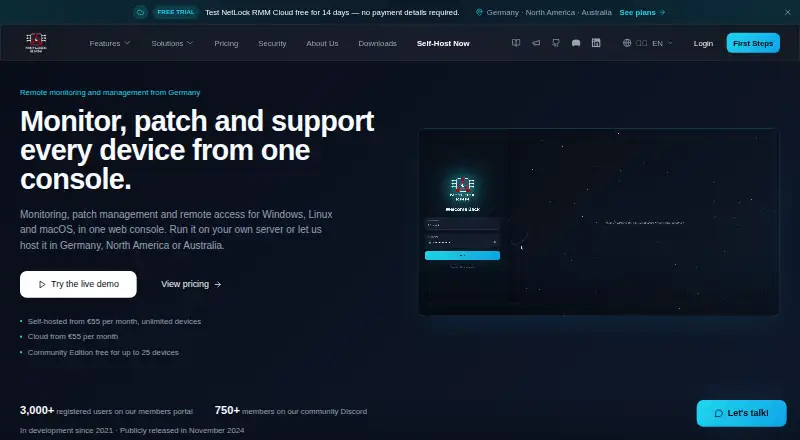
What NetLock RMM is
NetLock RMM is a remote monitoring and management platform for endpoints, available as self-hosted software or through the vendor's cloud service. The cloud platform is hosted in Germany, North America, or Australia. Native agents are listed for Windows, Linux, macOS, and Android, with a browser-based console. Remote tools include desktop control, shell access, file management, event log viewing, and encrypted relay tunnels. Monitoring and automation cover sensors, alerts, scheduled jobs, scripts, patch management, and software deployment. Its ticket system handles end-user or inbound email requests and includes ticket history, time tracking, and an SLA engine. Integrations include SMTP, Microsoft Teams webhooks, Telegram, ntfy.sh, generic webhooks, identity providers, software catalogues, and AI providers; the server also exposes a REST API. The maker describes encrypted server-agent communication and outbound-only agent connections. Community Edition is free for up to 25 devices. Pro costs €55 a month, with cloud plan pricing differing; a 14-day trial is listed.
Who it suits
NetLock RMM suits teams managing endpoints across supported operating systems that need remote access, monitoring, automation, and ticketing. Its self-hosted and cloud deployment options serve teams with different hosting preferences.
What it does well
- Self-hosted and cloud deployment options
- Remote desktop, shell, and file management
- Patch management and script automation
- Built-in ticket history, time tracking, and SLA engine
- Free Community Edition for up to 25 devices
What to know first
- Pro cloud pricing differs
- Community Edition is limited to 25 devices
Limits
Community Edition is free for up to 25 devices. Pro is listed at €55 a month, billed monthly, with unlimited devices, tenants, users, and locations; cloud plan pricing differs.
Plans
| Plan | Billed and limits | Price |
|---|---|---|
| Community Edition | Up to 25 devices · Unlimited tenants, users & locations · All features included | Free |
| Pro | Monthly; cancel monthly · Unlimited devices, tenants, users & locations · All features included · Cloud plan pricing differs | €55 a month |
As netlockrmm.com lists them, read 2 Oct 2026. The maker's own page has the final word.
Getting started
- Visit https://netlockrmm.com/.
- Choose self-hosted deployment or the vendor’s cloud platform.
- Start with Community Edition or use the 14-day trial.
- Install a native agent on Windows, Linux, macOS, or Android devices.
- Open the browser-based web console to manage endpoints.
Overview
NetLock RMM is a remote monitoring and management platform for IT teams and service providers handling endpoints across multiple customer or internal environments. It is best for teams that want remote support, maintenance automation, and ticket handling together, with a choice of self-hosting or vendor cloud. Its breadth and flexible deployment are appealing, though the free edition is limited to 25 devices.
Key features
Technicians can use remote desktop control, remote shell, file management, event-log viewing, and encrypted relay tunnels. That range supports varied support tasks, while sensors and alerts, scheduled jobs, scripts, patch management, and software deployment cover ongoing maintenance. The mix is useful when a team wants routine endpoint work and remote troubleshooting in one platform rather than separate tools.
The ticket system accepts end-user or inbound email requests and includes ticket history, time tracking, and an SLA engine. That makes NetLock more relevant to service workflows than a monitoring console alone. Documented integrations include SMTP, Microsoft Teams webhooks, Telegram, ntfy.sh, generic webhooks, identity providers, software catalogues, and AI providers; a REST API under /v1 provides another route for connecting external systems.
The maker says server-agent communications are encrypted, agents make outbound-only connections, and agents reject packages when Trust Server hash verification detects a mismatch. The core is described as AGPL-3.0 licensed, with no hidden telemetry or analytics trackers. These are meaningful points for organizations that prioritize control and privacy, though the product still requires teams to choose and operate a deployment model.
Pricing
Community Edition costs nothing and supports up to 25 devices, with unlimited tenants, users, and locations and all features included. It is a substantial no-cost option for a small fleet or evaluation, but the device cap is a firm constraint for larger deployments. Community Edition support includes Community Discord and account and sales email support.
Pro costs €55 a month, billed monthly, and can be cancelled monthly. It removes device, tenant, user, and location limits while retaining all features, making it the straightforward choice when the Community Edition ceiling no longer fits. The maker notes that cloud plan pricing differs, so this monthly price should not be assumed to cover cloud use. Pro support includes weekday email support and online meetings. A 14-day trial is available.
Platforms
Native agents are available for Windows, Linux, macOS, and Android, with a browser-based web console. Teams can self-host or use the vendor's cloud platform, hosted in Germany, North America, or Australia. This hybrid choice helps organizations match deployment to their operational or location preferences; self-hosting also means taking responsibility for the hosted environment.
Who it's for
NetLock RMM suits internal IT teams and managed service providers that need multi-tenant endpoint management, remote access, patching, scripts, and ticket workflows. Unlimited tenants, users, and locations on the free plan help with varied environments, but its 25-device cap makes that edition suitable only for small fleets. Larger deployments need Pro, and teams requiring cloud service should account for the distinct cloud pricing.
Pros and cons
- Pros: All features are included in the free edition, so small teams can assess the full feature set without a feature-tier restriction.
- Pros: Self-hosted and cloud deployment options, with three stated cloud hosting regions, give teams a meaningful choice over where the platform runs.
- Pros: Remote tools, automation, patching, software deployment, and ticket handling cover several endpoint operations in one product.
- Pros: The AGPL-3.0 core, stated lack of telemetry trackers, and described encrypted outbound agent connections may appeal to privacy- and control-minded teams.
- Cons: The free plan stops at 25 devices, so expanding fleets must move to a paid plan.
- Cons: Cloud pricing differs from the stated Pro monthly price, complicating a direct cost estimate for teams that do not want to self-host.
Alternatives
Compare remote monitoring and management software if you want to survey the category before choosing a platform.
- ManageEngine RMM Central is worth considering if its free 25-device plan or listed 50-device Enterprise Edition better matches your scale or budget.
- Naverisk is an alternative to compare if you want a paid RMM option; it also offers a free trial.
- MSP360 RMM may suit MSPs looking for a free community edition capped at 50 endpoints, rather than NetLock's 25-device free tier.
- Cinch RMM is another freemium option, with a free plan capped at five users.
- ITarian Remote Desktop is a focused alternative if free remote access is the priority.
- Level.io is an option if a free first 10 devices and a month-to-month paid plan are a better fit.
- MeshCentral is a free, open-source, self-hosted alternative.
- Xcellerate RMM is an alternative with a free community plan offering unlimited devices and technicians.
Verdict
Choose NetLock RMM if you need a broad endpoint toolkit with multi-tenant management, ticketing, automation, and the option to self-host or use cloud. Its strongest case is the combination of full-featured free access for up to 25 devices and a larger monthly Pro plan without device limits. Look elsewhere if your fleet exceeds that free cap and the Pro cost or separate cloud pricing does not fit your budget.
Verdict
NetLock RMM combines endpoint management, remote tools, automation, and ticket handling, with both self-hosted and cloud options. The free edition has a 25-device limit, and the maker notes that cloud plan pricing differs.
Questions
Is NetLock RMM free?
Yes. Community Edition is listed as free and covers up to 25 devices.
How much does Pro cost?
Pro is listed at €55 a month, billed monthly and cancellable monthly. Cloud plan pricing differs.
Is there a free trial?
Yes, a 14-day trial is listed.
Which operating systems does it support?
Native agents are listed for Windows, Linux, macOS, and Android. The web console is browser-based.
Can I host NetLock RMM myself?
Yes. It can be self-hosted or used through the vendor’s cloud platform, hosted in Germany, North America, or Australia.
Is the core open source?
The maker describes the core as licensed under AGPL-3.0.
Facts from NetLock RMM's own pages
- Company location
- The maker says NetLock is developed and operated from Cologne, Germany; the company imprint lists 0x101 Cyber Security UG at an address in Kerpen, Germany. · netlockrmm.com, 2 Oct 2026
- Deployment
- It can be self-hosted or used through the vendor’s cloud platform, which is hosted in Germany, North America, or Australia. · netlockrmm.com, 2 Oct 2026
- Headquarters
- Germany · netlockrmm.com, 28 Sept 2026
- History
- The About page says development started in 2021, 0x101 Cyber Security was founded in 2022, and NetLock RMM was publicly released in November 2024. · netlockrmm.com, 2 Oct 2026
- Integrations
- Documented connections include SMTP, Microsoft Teams webhooks, Telegram, ntfy.sh, generic webhooks, identity providers, software catalogues, and AI providers. · docs.netlockrmm.com, 2 Oct 2026
- Monitoring and automation
- Its features include sensors and alerts, scheduled jobs, scripts, patch management, and software deployment. · netlockrmm.com, 2 Oct 2026
- Platform coverage
- The maker lists native agents for Windows, Linux, macOS, and Android; the web console is browser-based. · netlockrmm.com, 2 Oct 2026
- Privacy and licensing
- The maker describes the core as AGPL-3.0 licensed and says it has no hidden telemetry or analytics trackers. · netlockrmm.com, 2 Oct 2026
- Public API
- The server exposes a REST API under /v1 for external systems. · docs.netlockrmm.com, 2 Oct 2026
- Purpose
- NetLock RMM is a remote monitoring and management platform for managing and monitoring endpoints. · netlockrmm.com, 2 Oct 2026
- Remote access
- The product offers remote desktop control, remote shell, file management, event log viewing, and encrypted relay tunnels. · netlockrmm.com, 2 Oct 2026
- Security
- The maker says server-agent communications are encrypted, agents use outbound-only connections, and agents reject packages when Trust Server hash verification detects a mismatch. · netlockrmm.com, 2 Oct 2026
- Support
- The pricing page lists Community Discord and account and sales email support for Community Edition, and weekday email support and online meetings for Pro. · netlockrmm.com, 2 Oct 2026
- Ticketing
- The built-in ticket system handles end-user or inbound email requests and includes ticket history, time tracking, and an SLA engine. · netlockrmm.com, 2 Oct 2026