Freedom251 › Remote Monitoring and Management Software

Naverisk
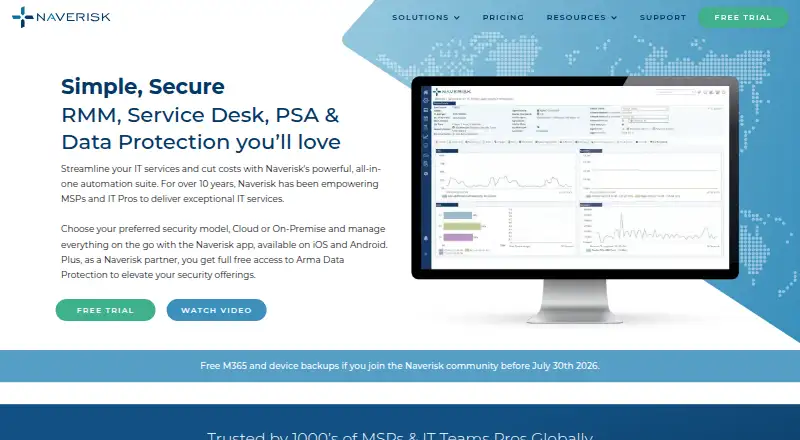
What Naverisk is
Naverisk combines remote monitoring and management, Service Desk, professional services automation, and data protection in an IT services automation suite for MSPs and IT professionals. Customers can choose cloud or on-premise hosting. Its RMM supports Windows, Linux, Mac, and SNMP devices, with tasks that can run manually, on demand, on an event, or on a schedule across devices and customers.
The Service Desk provides ticket collaboration and routing, technician scheduling, and site- and device-level knowledge base documentation. PSA covers contracts, projects, automated billing, and business intelligence reporting. Listed integrations include Xero, QuickBooks, Autotask, Zendesk, TeamViewer, Splashtop, ScreenConnect, StorageCraft, e-automate, and ScalePad. Arma Data Protection describes encryption in transit and at rest, role-based access controls, two-factor authentication, and air-gapped immutable storage. The mobile app handles tickets and alerts; iOS device-management support is listed as coming soon. Naverisk advertises 24/7 global support at no additional cost. The starting price is $110/mo; there is no free plan, though a free trial is available.
Who it suits
Naverisk is aimed at managed service providers and IT professionals managing devices, service tickets, projects, and data protection. It suits teams seeking cloud or on-premise deployment options.
What it does well
- RMM supports Windows, Linux, Mac, and SNMP devices
- Automates tasks on demand, events, or schedules
- Service Desk includes ticket routing and technician scheduling
- PSA includes contracts, projects, and automated billing
- Advertises 24/7 global support at no additional cost
What to know first
- No free plan
- Starting price is $110/mo
- iOS device-management support is coming soon
- Bare-metal recovery was not yet available
Plans
| Plan | Billed and limits | Price |
|---|---|---|
| Arma Data Protection for Naverisk partners | Data backups free for Naverisk partners · Wasabi cloud storage costs excluded | Free |
| Microsoft 365 backups | Per user · Wasabi cloud storage costs excluded | $0.50 a month |
| Naverisk | monthly subscription; pricing varies by monitored devices · RMM, PSA and Service Desk included · no feature separation stated | $110 a month |
As naverisk.com lists them, read 4 Oct 2026. The maker's own page has the final word.
Overview
Naverisk is an IT services suite for MSPs and IT professionals who want to manage devices, service requests, contracts and backups in one system. Its appeal is the breadth of that combined workflow, with cloud and on-premise hosting options; teams looking only for a focused monitoring tool may find the $110/mo starting commitment hard to justify.
Key features
RMM supports Windows, Linux, Mac and SNMP devices, with patch management, unattended remote access and script automation. Tasks can run manually or on demand, in response to events, or on a schedule across multiple devices and customers. That flexibility suits providers handling both routine maintenance and reactive work across client environments. The all-inclusive price does not come with a stated device or user limit, so buyers should establish whether it fits their fleet before committing.
The Service Desk combines ticket collaboration and routing with technician scheduling and knowledge-base documentation at the site and device level. PSA adds contract and project management, automated billing and business intelligence reporting. Keeping these service and business workflows together can suit MSPs that want fewer separate tools; it is less compelling for a team that needs only remote monitoring.
Arma Data Protection describes encryption in transit and at rest, role-based access controls, two-factor authentication and air-gapped immutable storage for ransomware protection. But bare-metal recovery was not available at the time described, limiting its appeal to buyers who require that recovery method. The mobile app handles tickets and alerts, while iOS device-management support is coming soon. Advertised 24/7 global support at no additional cost is a practical plus for teams serving clients across time zones.
Listed integrations include Xero, QuickBooks, Autotask, Zendesk, TeamViewer, Splashtop, ScreenConnect, StorageCraft, e-automate and ScalePad. That range can help connect service operations with accounting, PSA and remote-access tools a provider already uses.
Pricing
Naverisk is paid, with a starting price of $110/mo for a single all-inclusive plan. It has a free trial but no free plan. The one-price approach may appeal to teams seeking the suite’s full mix of RMM, Service Desk, PSA and data protection, but the device and user limits are unstated, making scale and total fit important questions before purchase.
Two backup offers are priced separately: Arma Data Protection for Naverisk partners is free, with Wasabi cloud storage costs excluded; Microsoft 365 backups cost $0.50 a month per user, also excluding Wasabi storage. The partner offer removes the backup charge, not the storage cost, so it is not necessarily cost-free in operation.
Platforms
Naverisk is available on Android, iOS, Linux, macOS, web, Windows and as a self-hosted deployment. Customers can choose cloud or on-premise hosting. RMM support covers Windows, Linux, Mac and SNMP devices; the mobile app’s iOS device-management support is still coming soon.
Who it's for
Naverisk is best suited to MSPs and IT professionals who want device management, service desk operations, PSA workflows and data protection in a shared suite, especially when cross-customer automation and a choice of hosting model matter. It is a weaker fit for small teams seeking a free RMM, buyers who need a clear per-device or per-user price before evaluating, or organizations that require bare-metal backup recovery now.
Pros and cons
- Pro: RMM, Service Desk, PSA and data protection are combined, which can reduce the need to spread service delivery and billing across separate systems.
- Pro: Automation can be manual, on demand, event-triggered or scheduled across multiple devices and customers, useful for varied client operations.
- Pro: Cloud and on-premise hosting options give teams a choice in deployment model.
- Pro: Advertised 24/7 global support has no additional charge.
- Con: The main plan starts at $110/mo and has no published device or user limit, which complicates cost comparisons for teams with defined fleet sizes.
- Con: Bare-metal recovery was not yet available, a meaningful gap for backup buyers who need that recovery path.
- Con: iOS device-management support is still coming soon, despite iOS being among the platforms supported by the product.
Alternatives
Choose ManageEngine RMM Central if a free tier for up to 25 devices is a better starting point; its Enterprise Edition — 50 devices is $1,195 a year.
MSP360 RMM is worth considering for an MSP that wants a no-time-limit community edition for up to 50 endpoints, or a paid option at $1.75 a month.
NetLock RMM offers a Community Edition at no cost for up to 25 devices, with unlimited tenants, users and locations and all features included; it may suit a provider prioritizing a free multi-tenant entry point.
Consider Cinch RMM if a free plan capped at five users with full platform features is a better match.
Level.io has a free tier for the first 10 devices and paid pricing at $2 a month, billed month-to-month with no annual commitment; it suits buyers who prefer a per-device option and shorter commitment.
Xcellerate RMM offers a free, self-hosted Community plan with unlimited devices and technicians, making it an alternative for teams seeking that combination.
ManageEngine Endpoint Central is another option to compare.
O&O Syspectr is another option to compare.
Browse more options in Remote Monitoring and Management Software.
Verdict
Naverisk is a strong candidate for MSPs that want RMM, service desk, PSA and data protection integrated, with flexible automation and cloud or on-premise deployment. Its main reason to choose it is that operational breadth; look elsewhere if you need a free or clearly capped entry plan, or bare-metal recovery as part of backup today.
Verdict
Naverisk brings RMM, service desk, PSA, and data protection into one suite, with cloud or on-premise hosting. It starts at $110/mo, and the backup FAQ lists bare-metal recovery as unavailable at the time described.
Facts from Naverisk's own pages
- Agent requirements
- Agents are documented for Windows, Mac OS X and Linux, with at least 20 MB disk space and 256 MB RAM on monitored clients. · kb.naverisk.com, 15 Oct 2026
- AI processing
- AI ticket summaries, sentiment and assistant features run on Microsoft Azure AI with TLS, encryption at rest, SOC 2 controls and regional residency claims. · kb.naverisk.com, 15 Oct 2026
- Audience
- The company says Naverisk is designed for MSPs and IT professionals. · naverisk.com, 4 Oct 2026
- Automation
- RMM tasks can be started manually, on demand, on an event, or on a schedule across multiple devices and customers. · naverisk.com, 4 Oct 2026
- Backup limitations
- The backup FAQ says bare-metal recovery was not yet available and described it as a roadmap item for Q4 2025. · naverisk.com, 4 Oct 2026
- Backup security
- Arma Data Protection describes encryption in transit and at rest, role-based access controls, two-factor authentication, and air-gapped immutable storage for ransomware protection. · naverisk.com, 4 Oct 2026
- Billing
- Agreements support recurring, block, term, all-you-can-eat per-device, all-you-can-eat per-user, and time-and-material billing. · kb.naverisk.com, 15 Oct 2026
- Company facts
- LinkedIn lists Naverisk as privately held, founded in 2010, headquartered in Auckland, New Zealand, with 11–50 employees. · linkedin.com, 15 Oct 2026
- Company history
- Naverisk says it has been automating IT services since 2009. · naverisk.com, 4 Oct 2026
- Company legal name
- The terms identify the provider as NAVMK1 LIMITED. · naverisk.com, 15 Oct 2026
- Compliance claim
- Naverisk states that its services comply with GDPR and that hosted offerings are regionally localized unless a partner chooses otherwise. · kb.naverisk.com, 15 Oct 2026
- ConnectWise integration
- The ConnectWise integration uses web services to synchronize tickets and device details in both directions. · kb.naverisk.com, 15 Oct 2026
- Data Hub
- Data Hub queries operational information about devices, tickets, agreements, contacts and PSA data and can export results. · kb.naverisk.com, 15 Oct 2026
- Data protection
- Naverisk partners receive free access to its Arma Data Protection service. · naverisk.com, 15 Oct 2026
- Device support
- Naverisk RMM supports Windows, Linux, Mac, and SNMP devices. · naverisk.com, 4 Oct 2026
- Documentation depth
- The public knowledge base lists quick-start, agent, billing, service-desk, integration, general-guide and release-note collections with many articles. · kb.naverisk.com, 15 Oct 2026
- Founded
- 2007 · naverisk.com, 28 Sept 2026
- Headquarters
- Auckland, New Zealand · naverisk.com, 28 Sept 2026
- Hosting
- Customers can choose a cloud or on-premise security model. · naverisk.com, 4 Oct 2026
- Integrations
- Official integrations cover Xero, QuickBooks, Autotask, TeamViewer, ConnectWise, Zendesk, security products, backup and warranty services. · naverisk.com, 15 Oct 2026
- Licence
- Naverisk software is proprietary: its terms state that Naverisk and its licensors retain intellectual-property ownership and grant a defined service licence. · naverisk.com, 15 Oct 2026
- Limit: API and releases
- Software Advice review summaries include complaints about a limited API and regressions where updates break saved views or introduce new problems. · softwareadvice.com, 15 Oct 2026
- Limit: hosted sessions
- A G2 reviewer reports sometimes needing to log out and back in before all hosted features work. · g2.com, 15 Oct 2026
- Limit: interface
- G2 reviewers repeatedly describe the interface or GUI as dated and in need of improvement. · g2.com, 15 Oct 2026