Freedom251 › Remote Monitoring and Management Software

ITarian Remote Desktop
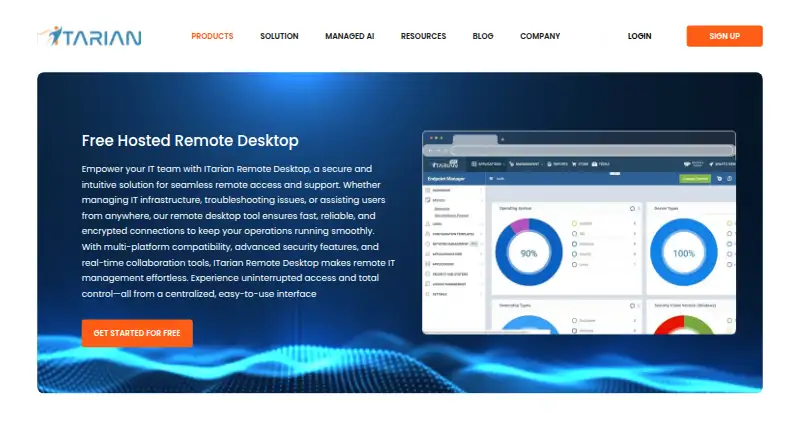
What ITarian Remote Desktop is
ITarian Remote Desktop gives technicians a centralized way to connect to customer devices, troubleshoot problems and take remote control. It supports attended connections, where a user is present to approve the request, as well as unattended access to managed endpoints. During a session, technicians can control the screen in real time, switch between monitors, transfer files, and manage remote files, processes, services and command-line operations. Sessions can be connected with ITarian service requests, tickets, troubleshooting and resolution records, linking remote work with a service workflow.
ITarian describes sessions as using confirmation, encrypted connections, authentication and session controls. Its Remote Access tool connects to managed endpoints peer to peer using the secure RTP protocol. The product supports Windows, macOS, iOS and Android, and mobile apps are available. The free plan, Free Remote Desktop, costs nothing and includes unlimited administrators and free remote access. To manage an endpoint, ITarian must also be installed on that device. For each connection, the remote user must approve the request, and the session password applies only to that session. ITarian says its platform is built for managed service providers serving multiple customers.
Who it suits
ITarian Remote Desktop suits managed service providers supporting devices across multiple customers, as well as technicians who need attended or unattended access. It is a fit for teams that want remote control and endpoint tools connected to service requests and resolution records.
What it does well
- Free plan includes unlimited administrators and remote access.
- Supports attended connections and unattended access to managed devices.
- Technicians can manage files, processes, services and command-line operations.
- Supports real-time control and switching between multiple monitors.
- Remote work can connect with service requests, tickets and resolution records.
- Supports Windows, macOS, iOS and Android.
What to know first
- ITarian must also be installed on each endpoint being managed.
- A remote user must approve each connection request.
- Each session password is valid only for that session.
Plans
| Plan | Billed and limits | Price |
|---|---|---|
| Free Remote Desktop | Unlimited administrators · free remote access | Free |
As itarian.com lists them, read 8 Oct 2026. The maker's own page has the final word.
Getting started
- Visit the ITarian Remote Desktop website.
- Choose the Free Remote Desktop plan at no cost.
- Install ITarian on each endpoint you want to manage.
- Use a supported Windows, macOS, iOS or Android device to access the service.
- Request a connection and have the remote user approve it.
ITarian Remote Desktop gives technicians remote control of customer endpoints, with tools for both screen-based support and endpoint administration. It is most compelling for managed service providers who want remote work tied to service requests and resolution records; teams seeking a standalone remote-access tool may find that workflow less useful.
Overview
Technicians can connect to customer devices from a centralized platform, troubleshoot issues and take control. Attended access supports sessions with a user present, while unattended access covers managed devices. The distinction is useful for teams handling both live support and ongoing administration.
Remote sessions can be connected to service requests, tickets, troubleshooting and resolution records. That gives support teams a way to keep remote work associated with the service workflow rather than treating each connection as a separate activity. The strongest fit is an MSP already delivering IT services across multiple customers.
Key features
Control and endpoint tools
Real-time screen control includes multiple-monitor support and display switching, while file transfer and session recording support more than a basic view-and-control session. Technicians can also manage files, processes and services, and use command-line operations on remote endpoints. This breadth suits technical support work that goes beyond guiding a user through what is visible on screen.
Access and security
ITarian supports attended and unattended connections, but each managed endpoint must also have ITarian installed. A remote user must approve a connection, and the session password lasts only for that session. Those controls shape access, but user approval can slow a support call when the person at the device is unavailable.
ITarian describes its sessions as using confirmation, encrypted connections, authentication and session controls. It also describes Remote Access as a peer-to-peer tool using secure RTP to connect to managed endpoints. Together, these measures address session access and transport, while the endpoint installation requirement remains part of deployment.
Pricing
Free Remote Desktop: free. The plan includes unlimited administrators and free remote access. It is a straightforward fit for teams that want to use ITarian’s remote-access workflow without paying for administrator seats. No endpoint quota is stated for the plan, so the practical constraint to weigh is the installation and approval process rather than a published seat cap.
Platforms
ITarian Remote Desktop supports Windows, macOS, iOS and Android, and offers mobile apps. This range covers desktop and mobile endpoints, though ITarian must be installed on each managed device.
Who it's for
Managed service providers supporting multiple customers are the clearest audience, particularly those who want remote sessions associated with service requests, tickets and resolution records. It also suits technicians who need file, process, service and command-line controls alongside screen access. It is less suitable for teams that want a connection without installing endpoint software or waiting for a remote user’s approval.
Pros and cons
- Pros: Unlimited administrators on the free plan avoid an administrator-seat limit.
- Pros: Session activity can connect to service requests and resolution records, helping keep support work within a service workflow.
- Pros: Screen control, file transfer, recording and endpoint-management tools support varied troubleshooting tasks.
- Cons: ITarian must be installed on each endpoint to be managed, adding a deployment step.
- Cons: A remote user must approve a connection, which can delay support when that person is unavailable.
Alternatives
For a broader service-management choice, iTop has a free, unlimited Community plan and runs across web, self-hosted and desktop platforms. Consider it instead when the priority is a free service-management platform rather than ITarian’s remote endpoint controls.
ITFlow is a free, open-source, self-hosted option; choose it when self-hosting is the priority and remote desktop control is not the deciding need. HESK offers a free self-hosted help desk, making it an alternative when help-desk software is the main requirement. osTicket offers a free open-source download with email integration and community support, so it is worth considering for a help-desk workflow centered on those capabilities.
CompassDocs, Scribe and Tango are also alternatives.
For category browsing, see managed service provider software, remote monitoring and management software, remote desktop software and IT knowledge base software.
Verdict
ITarian Remote Desktop is a strong fit for MSP technicians who need endpoint control connected to service work, and its free plan includes unlimited administrators. Choose it when that workflow and its broad endpoint tools matter more than frictionless access; look elsewhere if endpoint installation and user approval are obstacles for your support model.
Verdict
Choose ITarian Remote Desktop if your technicians need remote endpoint control alongside service request and resolution records. Its free plan includes unlimited administrators and remote access. Each managed endpoint needs ITarian installed, and a remote user must approve a connection.
Questions
How much does ITarian Remote Desktop cost?
The Free Remote Desktop plan costs nothing and includes unlimited administrators and free remote access.
Which platforms does it support?
It supports Windows, macOS, iOS and Android, and mobile apps are available.
Can technicians connect without someone present?
Yes. It supports unattended access to managed devices, as well as attended connections when a user is present.
Does it transfer files and support multiple monitors?
Yes. File transfer is supported, and technicians can control screens in real time and switch between multiple monitors.
How does a remote connection work?
The remote user must approve the request, and the session password is valid only for that session. ITarian describes Remote Access as a peer-to-peer tool using secure RTP.
Can remote sessions connect to service records?
The product page describes linking remote access work with ITarian service requests, tickets, troubleshooting and resolution records.
Facts from ITarian Remote Desktop's own pages
- Access mode
- both · itarian.com, 20 Sept 2026
- Access modes
- It supports attended connections when a user is present and unattended access to managed devices. · itarian.com, 8 Oct 2026
- Connection behavior
- For a connection, the remote user must approve the request, and the session password is valid only for that session. · help.itarian.com, 8 Oct 2026
- Endpoint requirement
- The remote access guide says ITarian must also be installed on each endpoint to be managed. · help.itarian.com, 8 Oct 2026
- File transfer
- Users can upload and download files between the technician’s computer and a remote endpoint during a session. · itarian.com, 8 Oct 2026
- Free plan
- Yes · itarian.com, 20 Sept 2026
- Headquarters
- Bloomfield, New Jersey, United States · itarian.com, 28 Sept 2026
- Integrations
- The product page describes linking remote access work with ITarian service requests and service records; it does not name a third-party integration there. · itarian.com, 8 Oct 2026
- Intended users
- ITarian says its platform is built for managed service providers delivering IT services across multiple customers. · itarian.com, 8 Oct 2026
- Mobile apps
- Yes · itarian.com, 20 Sept 2026
- Protocol
- ITarian describes Remote Access as a peer-to-peer tool using the secure RTP protocol to connect to managed endpoints. · help.itarian.com, 8 Oct 2026
- Purpose
- ITarian Remote Desktop lets technicians securely connect to customer devices, troubleshoot issues and take remote control from a centralized platform. · itarian.com, 8 Oct 2026
- Remote tools
- Technicians can manage files, processes, services and command-line operations on remote endpoints. · itarian.com, 8 Oct 2026
- Screen support
- The product supports real-time screen control, multiple monitors and switching between displays. · itarian.com, 8 Oct 2026
- Security
- ITarian describes remote sessions as using session confirmation, encrypted connections, authentication and session controls. · itarian.com, 8 Oct 2026
- Service workflow
- The product page describes connecting remote sessions to service requests, tickets, troubleshooting and resolution records in a service workflow. · itarian.com, 8 Oct 2026
- Session recording
- Yes · itarian.com, 20 Sept 2026
- Supported platforms
- Windows,macOS,iOS,Android · itarian.com, 20 Sept 2026
Where ITarian Remote Desktop stands on Freedom251
- Remote Monitoring and Management Software#3 of 39
- Managed Service Provider Software#3 of 29
- IT Knowledge Base Software#8 of 60
- Remote desktop software#26 of 135