Freedom251 › IT Knowledge Base Software
ITFlow
What ITFlow is
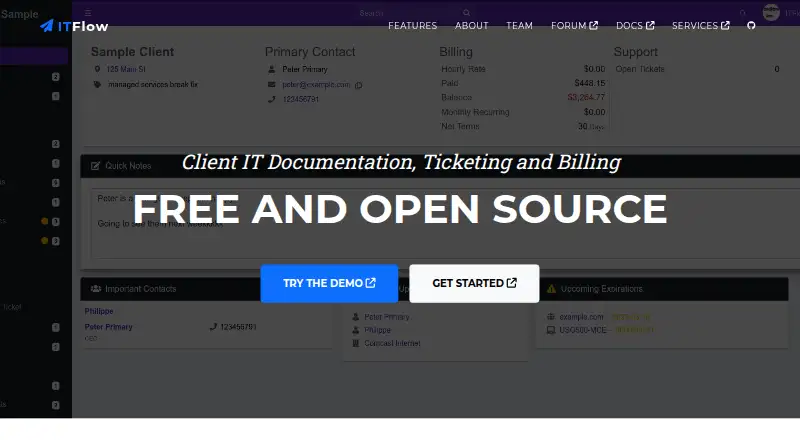
ITFlow is a free, open-source platform for small managed service providers to manage client IT documentation, support tickets, and billing. Its records can include contacts, locations, vendors, computer assets, software licenses, domains, and documents. Teams can create, prioritize, and track tickets, while billing tools cover recurring invoices, quotes, automated reminders, and client payments through Stripe. Other listed modules include accounting, bulk email, calendars, lead management, a client portal, and a password manager. Documentation lists integrations with Ollama, OpenAI, and LocalAI for ticket rewording and summaries. The version 1 API supports modules such as assets, clients, contacts, credentials, documents, invoices, and tickets, although some operations are partial or unavailable. Login passwords are encrypted at rest using AES 128-bit encryption; the documentation advises backing up the master key. ITFlow began in 2018 and moved to stable releases in January 2025. It must currently be hosted by users themselves. Debian is the recommended installation method; manual Debian, HestiaCP, and community-supported Docker options are also documented. Windows installation is unsupported.
Who it suits
ITFlow is intended for small managed service providers that want client documentation, ticketing, and billing in a self-hosted system. It suits teams able to manage their own hosting and installation.
What it does well
- Free and open source.
- Combines documentation, ticketing, and billing.
- Includes a client portal and password manager.
- Lists AI integrations for ticket rewording and summaries.
- API covers assets, clients, invoices, and tickets.
What to know first
- Users must host the software themselves.
- Windows installation is unsupported.
- Some API operations are partial or unavailable.
- Hosted service is planned but not yet available.
Limits
The self-hosted software is free, but hosting and sponsor support are paid services. A hosted ITFlow service is planned but not yet available.
Plans
| Plan | Billed and limits | Price |
|---|---|---|
| ITFlow (self-hosted) | Free and open source; self-hosted; hosting and sponsor support are paid services | Free |
As itflow.org lists them, read 3 Oct 2026. The maker's own page has the final word.
Getting started
- Open the ITFlow website at https://itflow.org/.
- Choose a self-hosted installation route; Debian is recommended.
- Use the documented manual Debian or HestiaCP installation option, or community-supported Docker.
- Arrange your own hosting for the installation.
ITFlow is an open-source IT operations platform for small managed service providers that want client documentation, support tickets, and billing in one system. Its strongest appeal is the range of MSP functions available without a license fee; its chief drawback is that users must run and maintain the software themselves.
Overview
ITFlow brings client contacts, locations, vendors, computer assets, software licenses, domains, and documents into a shared record. That breadth can help a small MSP connect client context with day-to-day support and billing rather than manage those tasks in separate tools. The project began in 2018 and moved to stable releases in January 2025.
Self-hosting is required today. A hosted service is planned but is not yet available, so teams that need a vendor-managed deployment should choose another product. The recommended installation method uses Debian; manual Debian installation and HestiaCP are also documented, while Docker is community-supported. Windows installation is unsupported.
Key features
Documentation and ticketing
Client records cover both people and infrastructure, while tickets can be created, prioritized, and tracked. Together, these functions suit MSPs that want support work tied to a broader client record. ITFlow also offers a client portal, calendars, lead management, and bulk email, extending its reach beyond documentation and ticket queues.
Billing, security, and integrations
Recurring invoices, quotes, automated reminders, and client payments through Stripe give small providers a useful billing foundation. Accounting and a password manager add further operational tools. Login passwords are encrypted at rest with AES 128-bit encryption; the documentation advises backing up the master key, making key management an important part of operating an installation.
Documented AI integrations with Ollama, OpenAI, and LocalAI support ticket rewording and summaries. The version 1 API covers modules including assets, clients, contacts, credentials, documents, invoices, and tickets, but some operations are partial or unavailable. Teams relying on automation across every workflow should check that coverage before building around it. Single sign-on is supported.
Pricing
ITFlow (self-hosted): free. The free, open-source plan includes self-hosted software. Hosting and sponsor support are paid services, so the zero license price does not remove the cost or responsibility of running the service. This plan best fits technically capable small MSPs that can manage their own deployment. The forum is the stated support channel; sponsors may access private support.
There is no hosted plan currently available. That makes the free plan a poor match for buyers who need infrastructure management or direct vendor support as part of their standard service.
Platforms
ITFlow supports API, Linux, self-hosted, and web environments. Debian is the recommended installation route, with manual Debian and HestiaCP options also documented. Docker is community-supported, and Windows installation is unsupported, which limits the choices for teams standardized on Windows servers.
Who it's for
ITFlow is best for small MSPs seeking a no-license-cost alternative for IT documentation, ticketing, and billing, especially those prepared to administer a Linux-based self-hosted service. It is less suitable for teams that lack hosting expertise, require a managed cloud deployment, depend on Windows installation, or need complete API operations across all modules.
Pros and cons
Pros
- Broad MSP scope at no license cost: documentation, tickets, invoicing, accounting, and other operational modules sit in one open-source platform.
- Useful client record coverage: contacts, locations, vendors, assets, licenses, domains, and documents can be kept together.
- Flexible AI integrations: Ollama, OpenAI, and LocalAI can assist with ticket rewording and summaries.
Cons
- Self-hosting is mandatory: users bear responsibility for operating the software, and a hosted service is not yet available.
- Installation choices are constrained: Windows is unsupported, and Docker support is community-provided.
- API coverage is uneven: partial or unavailable operations may obstruct integrations that expect complete workflows.
- Key backup matters: the master key must be protected as part of responsible password-data administration.
Alternatives
CompassDocs is a closer fit for teams focused on IT documentation that want an alternative with a free self-hosted Community plan and support for Windows and macOS as well as Linux. ITFlow is more compelling when ticketing, billing, and additional MSP modules matter alongside records.
InfraDocs is another free, open-source, self-hosted option for buyers seeking a simpler Linux and web platform. Choose ITFlow when its broader ticketing and billing scope is important.
IT Dock may suit a very small team that prefers a web product and can work within its free plan's cap of one technician, three clients, 25 AI questions per month, and five screenshot-to-documentation uses per month. ITFlow instead avoids those published usage caps but requires self-hosting.
FlowGuideAI is a web-based alternative for teams whose needs center on guided documentation; its free plan allows one user, 15 pages per month, and 2 GB of storage. Choose ITFlow for the wider MSP workflow, or FlowGuideAI when a hosted web format and those documentation limits fit.
Danbyte, Rundeck, StackStorm, and Stepwright are also alternatives to consider.
Browse IT Documentation Software, Network Documentation Software, and IT Knowledge Base Software for more options.
Verdict
Choose ITFlow if you run a small MSP, want documentation tied to ticketing and billing, and can host and maintain a Linux-based installation. Its extensive free, open-source feature set is the reason to adopt it; the lack of hosted service and uneven API coverage are the reasons to look elsewhere.
Verdict
ITFlow brings a broad set of MSP functions into free, open-source software, but users need to provide and maintain their own hosting. Check the installation options and API limitations against your needs.
Questions
Is ITFlow free?
Yes. The self-hosted plan is free and open source, priced at $0. Hosting and sponsor support are paid services.
Where can I use ITFlow?
The listed platforms are API, Linux, self-hosted, and web. Windows installation is unsupported.
Can I use ITFlow as a hosted service?
Users currently need to host it themselves. The FAQ says a hosted service is planned but not yet available.
What installation options are documented?
Debian is the recommended method. Manual Debian installation, HestiaCP, and community-supported Docker are also documented.
What does the API cover?
The version 1 API supports modules including assets, clients, contacts, credentials, documents, invoices, and tickets. Some operations are partial or unavailable.
Who is ITFlow intended for?
The official documentation describes it as a free alternative for small MSPs.
Facts from ITFlow's own pages
- AI integrations
- The documentation lists Ollama, OpenAI, and LocalAI integrations for ticket rewording and summaries. · docs.itflow.org, 3 Oct 2026
- API
- The API is version 1 and supports modules including assets, clients, contacts, credentials, documents, invoices, and tickets, with some operations marked partial or unavailable. · docs.itflow.org, 3 Oct 2026
- Audience
- The official documentation describes ITFlow as a free ITGlue or Hudu alternative for small MSPs. · docs.itflow.org, 3 Oct 2026
- Billing
- Billing features include recurring invoices, quotes, automated reminders, and client payments via Stripe. · itflow.org, 3 Oct 2026
- Company history
- The official site says ITFlow began in 2018 and moved to stable releases in January 2025. · itflow.org, 3 Oct 2026
- Documentation
- It stores client information including contacts, locations, vendors, computer assets, software licenses, domains, and documents. · itflow.org, 3 Oct 2026
- Founded
- 2018 · itflow.org, 28 Sept 2026
- Hosting
- Users must currently host ITFlow themselves; the FAQ says hosted service is planned but not yet available. · docs.itflow.org, 3 Oct 2026
- Installation
- The recommended installation method uses Debian; the documentation also lists manual Debian installation, HestiaCP, and community-supported Docker. · docs.itflow.org, 3 Oct 2026
- Other modules
- The site also lists accounting, bulk email, calendars, lead management, a client portal, and a password manager. · itflow.org, 3 Oct 2026
- Password security
- The documentation says login passwords are encrypted at rest using AES 128-bit encryption and advises backing up the master key. · docs.itflow.org, 3 Oct 2026
- Product
- ITFlow describes itself as a free, open-source platform for client IT documentation, ticketing, and billing. · itflow.org, 3 Oct 2026
- Support
- The forum is the stated place for product support, while sponsors may access private support. · docs.itflow.org, 3 Oct 2026
- Tickets
- The ticketing system supports creating, prioritizing, and tracking support tickets. · itflow.org, 3 Oct 2026
- Windows support
- The documentation says Windows installation is unsupported and that it cannot offer support for it. · docs.itflow.org, 3 Oct 2026
Where ITFlow stands on Freedom251
- IT Knowledge Base Software#10 of 60
- IT Documentation Software#4 of 20
- Network Documentation Software#6 of 27