Freedom251 › Remote Monitoring and Management Software
LogMeIn Resolve IT Asset Management
Visit LogMeIn Resolve IT Asset Management Alternatives Pricing
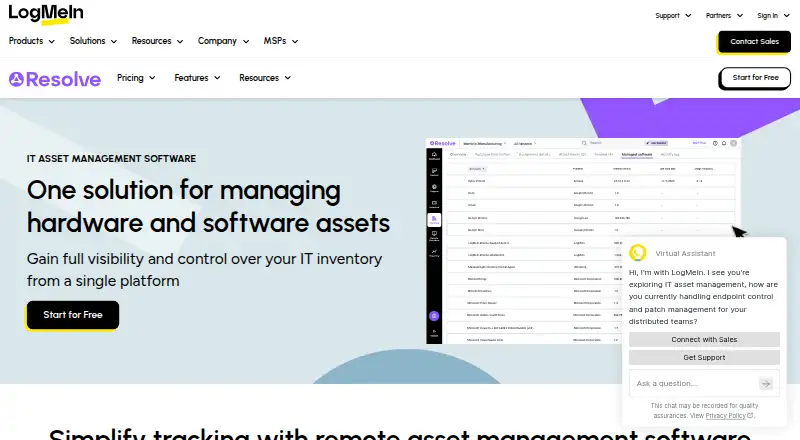
What LogMeIn Resolve IT Asset Management is
LogMeIn Resolve IT Asset Management tracks hardware and software assets from acquisition through disposal in a cloud platform for IT teams and managed service providers. Software tools cover compliance notifications, purchases, licenses, contracts, billing cycles, and assignments for onboarding or offboarding. Hardware inventory shows quality, warranty status, and technical details; teams can export hardware data for reporting and compliance, with end-of-life visibility and replacement-cost estimates. Asset management connects with conversational ticketing and secure remote access at no extra cost. Integrations include Acronis, SentinelOne, HaloPSA, and ConnectWise PSA. Resolve uses zero-trust architecture, permission-based access, 256-bit AES encryption, and SSL. Its API uses OAuth2 and provides reporting, ticketing, and knowledge-base endpoints. The product supports Windows, macOS, iOS, and Android, with desktop apps for Mac and Windows and mobile apps for iOS and Android. A free plan and 14-day trial are listed. MSP plan details include additional endpoints from $1.00/mo, $2.06/mo, $2.56/mo, or $0.44/mo, depending on plan.
Who it suits
Resolve suits managed service providers and IT teams managing customer devices and endpoints. It is also relevant to teams seeking hardware and software tracking alongside ticketing and remote access.
What it does well
- Tracks assets through acquisition, use, and disposal
- Exports hardware data for compliance and reporting
- Integrates asset management with ticketing and remote access
- Lists a free plan and a 14-day trial
What to know first
- Plans require at least 25 endpoints
- Some plans list additional endpoint charges
Limits
Paid MSP plans have endpoint minimums: Launch starts at 25, Accelerate and Dominate require at least 25, and Elevate starts at 100. Additional endpoints are listed from $1.00/mo for Launch, $2.06/mo for Accelerate, $2.56/mo for Dominate, and $0.44/mo for Elevate; the listed plans are billed annually.
Plans
| Plan | Billed and limits | Price |
|---|---|---|
| Resolve Free | up to five devices · background diagnostics · command prompt · file manager | Free |
| Starter | per month; annual discount available · cloud · minimum 25 endpoints · unlimited users | $29 a month |
| Advanced | per month; annual discount available · cloud · minimum 25 endpoints · unlimited users | $78 a month |
| Complete | per month; annual discount available · cloud · minimum 25 endpoints · unlimited users · MDM included | $94 a month |
| MSP Dominate | per month, billed annually · minimum 25 endpoints · unlimited users · additional endpoints from $2.56/mo | On request |
| MSP Elevate | per month, billed annually · starting at 100 endpoints · unlimited agents · additional endpoints from $0.44/mo | On request |
| MSP Launch | per month, billed annually · starting at 25 endpoints · unlimited agents · additional endpoints from $1.00/mo | On request |
| MSP Accelerate | per month, billed annually · minimum 25 endpoints · unlimited users · additional endpoints from $2.06/mo | On request |
As logmein.com lists them, read 15 Oct 2026. The maker's own page has the final word.
Getting started
- Visit the LogMeIn Resolve IT Asset Management website.
- Choose the free plan or begin the 14-day trial.
- Select a suitable MSP plan if you need paid service, noting its endpoint starting point.
- Use the download center to get the Resolve app for Windows or Mac, or the mobile app for iOS or Android.
- Use the API with OAuth2 for reporting, ticketing, and knowledge-base endpoints.
Verdict
Resolve combines hardware and software asset oversight with ticketing and remote access in a cloud service. Teams should review plan endpoint requirements and charges when choosing an MSP plan.
Questions
Is there a free plan or trial?
Yes. A free plan and a 14-day trial are listed.
What platforms does Resolve support?
The cloud service supports Windows, macOS, iOS, and Android. Desktop apps are listed for Mac and Windows, and mobile apps for iOS and Android.
What do the MSP plans charge for additional endpoints?
The listed monthly add-on rates, with annual billing, start at $1.00/mo for Launch, $2.06/mo for Accelerate, $2.56/mo for Dominate, and $0.44/mo for Elevate. Each plan also has an endpoint starting point or minimum.
Which integrations are listed?
Resolve integrates with Acronis, SentinelOne, HaloPSA, ConnectWise PSA, and other tools.
What does the API provide?
The API uses OAuth2 and provides reporting, ticketing, and knowledge-base endpoints.
What security and compliance details are listed?
Resolve uses zero-trust architecture, permission-based access, 256-bit AES encryption, and SSL. GoTo says SOC 2 Type II, SOC 3, and C5 controls apply to Resolve, while ISO/IEC 27001:2022 certification covers support operations.
Facts from LogMeIn Resolve IT Asset Management's own pages
- API
- The LogMeIn Resolve API uses OAuth2 and provides reporting, ticketing, and knowledge-base endpoints. · developer.goto.com, 30 Sept 2026
- API scope
- The API can export tickets, device inventory, users, actions, audit logs and asset fields, although availability depends on account level. · goto.com, 15 Oct 2026
- API updates
- The changelog records ticketing create/update/delete APIs in 2025 and incident filtering and attachment additions in 2026. · developer.goto.com, 15 Oct 2026
- Asset lifecycle
- The software tracks assets from acquisition and use through disposal. · logmein.com, 30 Sept 2026
- Asset reporting
- Hardware data can be exported for reporting and compliance, with end-of-life identification and replacement-cost estimates. · logmein.com, 15 Oct 2026
- Company founding
- LogMeIn says it was founded as 3amLabs in 2003 and later became part of GoTo. · logmein.com, 15 Oct 2026
- Company headquarters
- LogMeIn is headquartered in Boston, Massachusetts. · logmein.com, 15 Oct 2026
- Company size
- LinkedIn lists LogMeIn as a privately held software company with 1,001–5,000 employees and more than 3,500 globally. · linkedin.com, 15 Oct 2026
- Compliance
- The trust center lists SOC3, ISO 27001 certificates, security measures and subprocessor disclosures for Resolve. · goto.com, 15 Oct 2026
- Core purpose
- LogMeIn Resolve manages hardware and software assets from a single platform. · logmein.com, 30 Sept 2026
- Documentation
- The developer center links API guides, status information, changelog entries, support and interactive examples. · developer.goto.com, 15 Oct 2026
- Downloads
- Agent desktop applications are available for Windows and Mac, while agent and customer mobile applications are available for iOS and Android. · logmein.com, 15 Oct 2026
- Founded
- 2003 · logmein.com, 28 Sept 2026
- Free trial
- Resolve offers a 14-day free trial with no credit card required and lets users continue with Resolve Free afterward. · logmein.com, 30 Sept 2026
- Hardware inventory
- Hardware inventory provides live insights into quality status, warranty status, and technical characteristics. · logmein.com, 30 Sept 2026
- Hardware lifecycle
- The asset module tracks hardware from acquisition through use and disposal, including status, warranty and technical characteristics. · logmein.com, 15 Oct 2026
- Headquarters
- Boston, Massachusetts, United States · logmein.com, 28 Sept 2026
- Helpdesk
- The helpdesk offers unlimited tickets, an end-user portal, reporting and integrations with Teams, Zendesk and ServiceNow. · logmein.com, 15 Oct 2026
- Hosting model
- Resolve is delivered as a SaaS cloud service; no self-hosted deployment is documented. · trustradius.com, 15 Oct 2026
- Integrations
- LogMeIn Resolve integrates with Acronis, SentinelOne, HaloPSA, ConnectWise PSA, and other tools. · logmein.com, 30 Sept 2026
- Licence
- Resolve is proprietary commercial software; the legal page only discloses third-party open-source components used within GoTo services. · goto.com, 15 Oct 2026
- License controls
- The software asset tools track license agreements, billing cycles, renewals and over-utilization notifications. · logmein.com, 15 Oct 2026
- Limit: end-user onboarding
- Gartner reviewers say nontechnical users may struggle to download, find and open the support application before a session. · gartner.com, 15 Oct 2026
- Limit: mobile and Mac
- Reviews cite weaker Mac support, limited mobile capability and requests for more reporting and analytics. · getapp.com, 15 Oct 2026
Where LogMeIn Resolve IT Asset Management stands on Freedom251
- Remote Monitoring and Management Software#5 of 39
- Mac Management Software#5 of 24