Mockit
What Mockit is
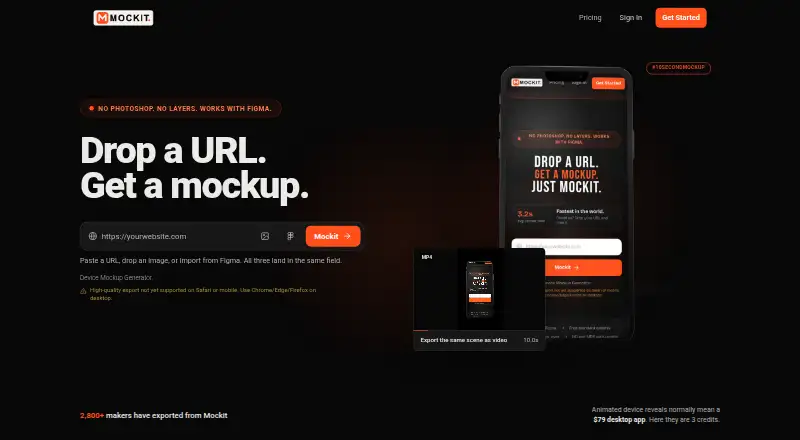
Mockit is a browser-based 3D device mockup generator for designers, developers, and makers. Users can start with a website URL, screenshot, or Figma frame, then rotate and style the device with backgrounds, shadows, and logos. Available mockups include iPhone, iPhone Duo, iPad, MacBook, desktop, monitor, kiosk, Apple Watch, and foldable phone. Exports include transparent PNGs, App Store screenshot kits, and short MP4 videos. The free Standard plan costs nothing and provides unlimited exports up to 1200px, without signup or a watermark. Guests have five Standard exports per day; a free account removes that limit. HD exports up to 3000px use one credit, while a 10-second MP4 uses three credits. One-time credit packs cost $5, paid once for Starter, $12, paid once for Creator, and $20, paid once for Pro. Credits never expire, but unused credits are non-refundable. The maker recommends desktop or laptop exporting because phone exports may not render as expected.
Who it suits
Mockit suits designers, developers, and makers who need device mockups from a website, screenshot, or Figma frame. Desktop or laptop users are a better fit for exporting, given the stated limitation with phone exports.
What it does well
- Accepts website URLs, screenshots, and Figma frames
- Offers a range of device mockups
- Free exports up to 1200px have no watermark
- Credits never expire
What to know first
- Guests are limited to five Standard exports daily
- HD exports and MP4 videos use credits
- Unused credits are non-refundable
- Phone exports may not render as expected
Limits
Standard exports are limited to 1200px. HD exports up to 3000px cost one credit each, and 10-second MP4 exports cost three credits each; guests can make five Standard exports per day.
Plans
| Plan | Billed and limits | Price |
|---|---|---|
| Standard | Unlimited exports · up to 1200px · no signup · no watermark | Free |
| Creator | $12 one-time · 75 HD credits · up to 3000px per export · credits never expire | $12, paid once |
| Pro | $20 one-time · 200 HD credits · up to 3000px per export · credits never expire | $20, paid once |
| Starter | $5 one-time · 20 HD credits · up to 3000px per export · credits never expire | $5, paid once |
As mockit.design lists them, read 7 Oct 2026. The maker's own page has the final word.
Getting started
- Open mockit.design in a modern browser.
- Start with a website URL, upload a screenshot or import a Figma frame.
- Choose a device mockup and adjust its rotation, background, shadow or logo.
- Export a Standard image, or use credits for HD or MP4 exports.
- A free account removes the guest limit of five Standard exports per day.
Overview
Mockit is a browser-based 3D mockup generator for designers, developers and makers who want to present websites or app screens in device scenes. Its strongest case is low-friction, subscription-free output: standard exports are free, while higher resolution and video are bought as credits.
Key features
Start with a website URL, a PNG or JPG upload, or a frame imported directly from Figma. That makes Mockit practical for both live-page presentations and static design work. Its device range includes iPhone, iPhone Duo, iPad, MacBook, desktop, monitor, kiosk, Apple Watch and foldable phone, covering more than the usual phone-only mockup use.
Real-time device rotation and styling controls for backgrounds, shadows and logos let users give a screen more context than a flat capture. Exports include transparent PNGs, App Store screenshot kits and short MP4 videos. The variety is useful for marketing and presentation assets, but the cost changes when output needs to be HD or animated.
Mockit runs in modern browsers, though exports from phones may not render as expected. It recommends exporting from a desktop or laptop, so it is not the right choice for a workflow that must be completed on a phone.
Pricing
Standard is free: unlimited exports up to 1200px, no signup and no watermark. Guests are capped at five Standard exports per day; a free account removes that daily cap. This is a strong option for routine, smaller exports, but it does not cover HD output or MP4s.
One-time credit packs avoid a recurring subscription. Starter costs $5, paid once and includes 20 HD credits; Creator costs $12, paid once for 75 credits; Pro costs $20, paid once for 200 credits. Each supports exports up to 3000px. An HD export costs one credit, while a 10-second MP4 costs three, so video uses credits faster than still images. Credits never expire, which suits occasional projects, but unused credits are non-refundable. Choose a pack based on expected HD and video output rather than buying for access to standard exports.
Platforms
Mockit is web-based and runs in modern browsers. Although it can be opened on a phone, its export rendering may be unreliable there; a desktop or laptop is the sensible platform for finished work.
Who it's for
Mockit suits designers, developers and makers who need polished device scenes from a website, image or Figma frame, especially when a free 1200px export is enough or paid output is needed only occasionally. It is less suitable for phone-only creators or teams that need a larger workflow than the device mockups and export formats described here.
Pros and cons
Pros
- Free standard exports without a watermark: unlimited output up to 1200px, with no signup required; free accounts also remove the guest daily limit.
- Several useful input and output routes: URL, PNG/JPG and Figma frame inputs pair with transparent PNG, screenshot-kit and short-video exports.
- One-time credits do not expire: occasional users can buy HD or video capacity without a recurring plan.
Cons
- HD and MP4 output consume credits: a 10-second video costs three credits, which can make video-heavy use deplete a pack more quickly.
- Credits are non-refundable: users should estimate their likely export needs before purchasing.
- Phone exporting is unreliable: the recommended desktop or laptop workflow rules out dependable phone-only production.
Alternatives
Browse Mockup Libraries if you want to compare a wider set of mockup tools. Choose Mediamodifier Mockup Generator instead if its free design templates, 1300+ fonts, Unsplash and GIPHY integrations, or download-and-embed options better fit the task. Mockuuups Studio is a better match for users seeking a large mockup collection across desktop platforms; its free collection is limited and requires attribution, while Professional is $12 a month.
The Mock House may suit users who prefer a monthly creator plan and can work within its free tier's three mockups per month, watermark and personal-use restriction. Angle 4 is worth considering when Figma, Sketch or XD plugins matter; its free plan offers sample mockups for personal use. Mockup Hunt is a straightforward alternative for finding free mockups that link to their source websites.
Mockups Design is a better fit if downloadable Photoshop PSD mockups and smaller-resolution free files are what you need. Polymock suits users who prioritize unlimited renders and end products under a community license and can include attribution. Presenta is an alternative for users looking for a broader studio with PNG, JPG and WebP export.
Verdict
Choose Mockit if you want browser-based device mockups from websites, images or Figma frames, and free standard exports cover your needs. Its no-subscription HD and video credits are most appealing for occasional higher-spec work. Look elsewhere if you need reliable phone exports, or if your workflow calls for a broader design studio rather than focused device mockups.
Verdict
Mockit offers browser-based device styling and PNG, screenshot-kit, and video exports. The free plan covers standard exports, while HD images and MP4s require credits; exporting from a desktop or laptop is recommended.
Questions
Is Mockit free?
Yes. Standard costs nothing and allows unlimited exports up to 1200px, with no signup or watermark.
What do the credit packs cost?
Starter costs $5, paid once for 20 credits, Creator costs $12, paid once for 75, and Pro costs $20, paid once for 200.
Do Mockit credits expire?
No. Credits never expire, but unused credits are non-refundable.
What can I use as a starting design?
You can paste a website URL, upload a screenshot or import a frame from Figma.
Which devices can I create mockups for?
Choices include iPhone, iPhone Duo, MacBook, iPad, desktop, monitor, kiosk and Apple Watch.
Can I export from a phone?
Mockit runs in modern browsers, but exports from phones may not render as expected. The maker recommends using a desktop or laptop for exporting.
Facts from Mockit's own pages
- 3D styling
- The editor supports real-time device rotation and styling backgrounds, shadows, and logos. · mockit.design, 7 Oct 2026
- Browser support
- Mockit runs in modern browsers, but exports from phones currently do not render as expected; the site recommends desktop or laptop use for exporting. · mockit.design, 7 Oct 2026
- Devices
- Mockit offers mockups for iPhone, iPhone Duo, MacBook, iPad, desktop, monitor, kiosk, and Apple Watch. · mockit.design, 7 Oct 2026
- Exports
- Users can export transparent PNGs, App Store screenshot kits, and short MP4 videos. · mockit.design, 7 Oct 2026
- Figma integration
- Mockit supports importing a frame directly from Figma. · mockit.design, 7 Oct 2026
- Free export limit
- Guests get five Standard exports per day, and a free account removes that limit. · mockit.design, 7 Oct 2026
- HD export cost
- HD exports up to 3000px cost one credit each, while 10-second MP4 exports cost three credits each. · mockit.design, 7 Oct 2026
- Inputs
- Users can paste a website URL, upload a screenshot, or import a Figma frame. · mockit.design, 7 Oct 2026
- Maker
- Mockit is a solo project designed, built, and supported by one person. · mockit.design, 7 Oct 2026
- Product
- Mockit is a free, browser-based 3D device mockup generator. · mockit.design, 7 Oct 2026
- Refunds
- Unused credits are non-refundable, but credits never expire. · mockit.design, 7 Oct 2026
- Support
- The maker says every message is read, usually within a day or two. · mockit.design, 7 Oct 2026
- Target users
- The maker describes Mockit as made for designers, developers, and makers. · mockit.design, 7 Oct 2026
Where Mockit stands on Freedom251
- Mockup Libraries#7 of 27